No Coding Required: An In-Depth Look at the n8n Automation Learning Path

n8n tops 1.8M monthly active users; a six-module course teaches beginners to run automations and respect their limits.
Based on the "AI Wrangler n8n Automation Pathway," this article examines how n8n automation skills are spreading from developers to operations and management. The course progresses through six modules: concepts, first workflow, value, business app connections, AI enhancement, and reliable operation. It prioritizes hands-on success and distinguishes conversational AI from event-driven workflows. The stability section covers testing, documentation, and monitoring, and asks learners to recognize tasks beyond their ability. The recommended format is a six-week cohort of six three-hour sessions, with an advanced pathway in 2027.
Title
No Coding Required: An In-Depth Look at the n8n Automation Learning Path
Meta Description
An in-depth look at the n8n automation learning path: a six-module course for non-technical business users, from building your first workflow to connecting business apps, adding AI, and keeping things running reliably.
Article Content
n8n is becoming one of the world's most popular automation platforms, with more than 1.8 million monthly active developers. But its value isn't limited to engineers—when a structured course like the "AI Wrangler n8n Automation Pathway" appears, it signals that automation skills are spreading from technical roles to operations, management, and beyond. Based on the official introduction to this pathway, this article breaks down how it helps people with zero background actually put n8n to work.
Why Learn n8n Now?
According to the official introduction, n8n has more than 1.8 million monthly active builders, and behind that number is a clear trend: companies are no longer just asking "what can AI do"—they're starting to ask "how can AI handle my repetitive work for me."
The scenario the course opens with is very concrete—forwarded emails, information copied and pasted between systems, lead statuses changed by hand, reminders sent one by one. None of these is hard on its own, but together they constantly drain attention and create opportunities for error.
The course's core premise is: you don't need to be a developer—you just need a practical starting point, a bit of curiosity, and the confidence to build something. This positioning shapes the entire design of the pathway—get learners through the smallest possible loop first, then talk about scaling.
What is n8n: n8n is an open-source workflow automation tool that uses "node"-based visual orchestration—each node represents an action (such as reading email, writing to a spreadsheet, or calling an API), and connections between nodes define data flow and trigger conditions. Compared with SaaS products like Zapier, n8n can be self-hosted, supports custom code nodes, and has looser limits on API calls, making it more popular with mid-to-large teams and in scenarios that involve sensitive data. Understanding this "nodes + connections" mental model is the prerequisite for making sense of every course module that follows.
Course Structure and the Pacing of Six Modules
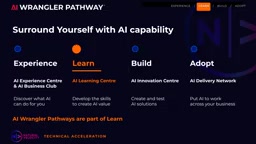
The pathway sits within an ecosystem of four layers: experience, learn, build, and adopt. The course itself belongs to the "Learn" layer, with the goal of building capability rather than directly delivering solutions.
The six modules progress as follows: understanding basic automation concepts, building your first workflow, recognizing why workflows are valuable, connecting everyday business applications, understanding how AI enhances automation, and making automation run reliably. Each module builds on the previous one, with no jargon dump and no assumed coding ability.
The goal of the first session is just one thing: get something running. Learners build a workflow by hand, run a test, and see the result. The purpose of this "first success" is to turn automation from something you've heard about into something you've done.
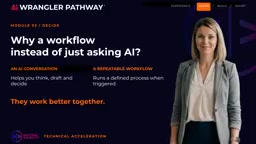
You may not have noticed that the course distinguishes between AI chat and workflows. ChatGPT, Claude, or Gemini are good for exploring ideas and generating answers; a workflow is a mechanism triggered by events that executes repeatable sequences. The course shows when the two complement each other, when chat is enough, and when a workflow delivers real value. This kind of judgment is harder to teach than tool operation, and it has more long-term value.
"Cohort learning" and the four ecosystem layers: In this context, cohort refers to a batch-based class format where learners start and finish together, completing the course within the same time window and answering each other's questions—unlike recorded courses you can watch anytime. As for the four layers of experience, learn, build, and adopt, they can be understood as a capability maturity path: the experience layer lets people perceive value at low cost, the learn layer builds systematic capability, the build layer produces runnable assets, and the adopt layer embeds automation into organizational processes. The course is positioned at the "learn" layer, which means it doesn't promise to directly deliver business solutions but rather lays the groundwork for building your own later or collaborating with professional builders—which also explains why the course treats boundary judgment as being just as important as hands-on ability.
From Your First Workflow to End-to-End Business Scenarios
The second phase strings together a complete run-through using a real business scenario. Take a new customer inquiry as an example: information is captured, a record is created, and the next action is assigned.
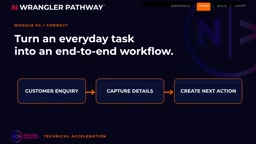
The course uses supported, commonly used applications to demonstrate end to end, then guides learners to transfer the same thinking to their own work scenarios. This step is key—many automation trainings stop at following along, but this pathway explicitly requires learners to complete the mapping from the example to their own business.
When it comes to adding AI, the course takes a pragmatic approach: first understand the pure automation form, then look at how AI-assisted steps handle more complex tasks. The demonstrations are designed so that not every learner has to buy a paid AI plan, lowering the barrier to participation.
What an "end-to-end" scenario means: End-to-end refers to the complete chain from when a triggering event occurs to when the final result lands (such as a record being saved or a notification being sent), rather than demonstrating just a single node. For a new customer inquiry, the complete chain typically includes: form or email trigger → extract key information → create a record in the CRM → assign an owner → send a follow-up reminder. The value of breaking down such chains is that learners can see clearly how data flows between systems and which step is most likely to fail, turning "copying what's shown" into "restructuring my own process the same way."
Stability and Boundaries: What Beginners Most Often Overlook
Getting an automation to run once is only the beginning. The course covers testing, documentation, and monitoring so that learners know what to check when a process changes.
This part is omitted from most introductory courses, yet it is precisely the dividing line between automation as a demo and automation in production. The original introduction repeatedly emphasizes one judgment: learners need to learn to identify which tasks are too complex, sensitive, or business-critical for a workflow built by a beginner, and when to hand things over to a professional builder. Acknowledging boundaries is itself part of the skill, and that deserves credit.
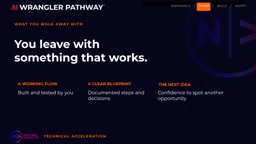
By the end of the course, learners walk away with more than slides: a workflow they built and tested by hand, a piece of documentation, and the judgment to identify the next task worth automating.
What testing, documentation, and monitoring specifically mean: Testing means using sample data to verify that each node's output matches expectations and to cover abnormal inputs; documentation means recording a workflow's trigger conditions, the app permissions it depends on, the role of each node, and who is responsible for maintenance, so others can take over or troubleshoot; monitoring means setting up failure alerts, checking execution logs, and doing periodic reviews so that interruptions are caught immediately when upstream systems change or data formats shift. Together these three form the guarantee that takes a workflow from "runs once" to "runs long-term," and they are the direct basis for judging whether an automation meets production-ready standards.
Who It's For, and How to Commit
The target audience is business owners, operations staff, managers, and anyone who wants to build practical workflow skills—no programming or automation experience required. Learners need to come with a real problem that genuinely matters to them.
The recommended format is six three-hour sessions over six weeks, with space for practice and questions in between, delivered as guided practice in an in-person or online small group. According to the official description, an advanced n8n pathway will also launch in 2027.
From a content-design perspective, the strength of this pathway is that it puts "hands-on success" first and puts "judging boundaries" last but prominently enough. For anyone evaluating whether it's worth the time, being able to independently identify and build a usable business workflow after six weeks is a more practical measure than the course outline.
One-line Summary
n8n has over 1.8 million monthly active users, and a six-module course teaches beginners to get workflows running and respect their boundaries.
Paragraph Summary
Based on the introduction to the "AI Wrangler n8n Automation Pathway," this article analyzes how n8n automation skills are spreading from developers to operations staff and managers. The course uses a progressive six-module structure: understanding concepts, building your first workflow, recognizing its value, connecting business apps, understanding AI enhancement, and ensuring reliable operation. The design puts "first hands-on success" first and clearly distinguishes when conversational AI versus event-driven workflows are appropriate. The stability section covers testing, documentation, and monitoring, and requires learners to recognize tasks beyond their current ability. The recommended format is a six-week cohort with six three-hour sessions, with an advanced pathway launching in 2027.
Related articles

WorkBuddy Tutorial: From Prompts to AI Workflow in Practice
A breakdown of the WorkBuddy tutorial: desktop AI Agent vs chatbot, WorkBuddy vs CodeX comparison, three beginner misconceptions, and the full learning path.

Multi-Agent Collaboration in Practice: A Master Agent Orchestrating Codex and Claude Code
Bilibili creator Xiaoshan's episode 11 shows a master agent orchestrating Codex and Claude Code: Codex handles deep images and research, Claude Code handles coding and UI, dispatching via adapters and SDKs with dual-channel callbacks.
Six Types of AI Agents Explained: A Guide to Deploying and Choosing Open-Source Agents
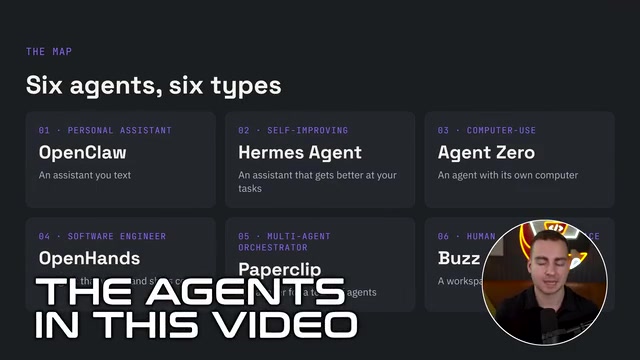
A systematic breakdown of six open-source AI agents—OpenClaw, Hermes, Agent Zero, OpenHands, Paperclip, and Buzz—covering their underlying architectures, pros and cons, plus VPS deployment and selection advice.