Notchling: A Desktop Pet That Lives in Your MacBook's Notch
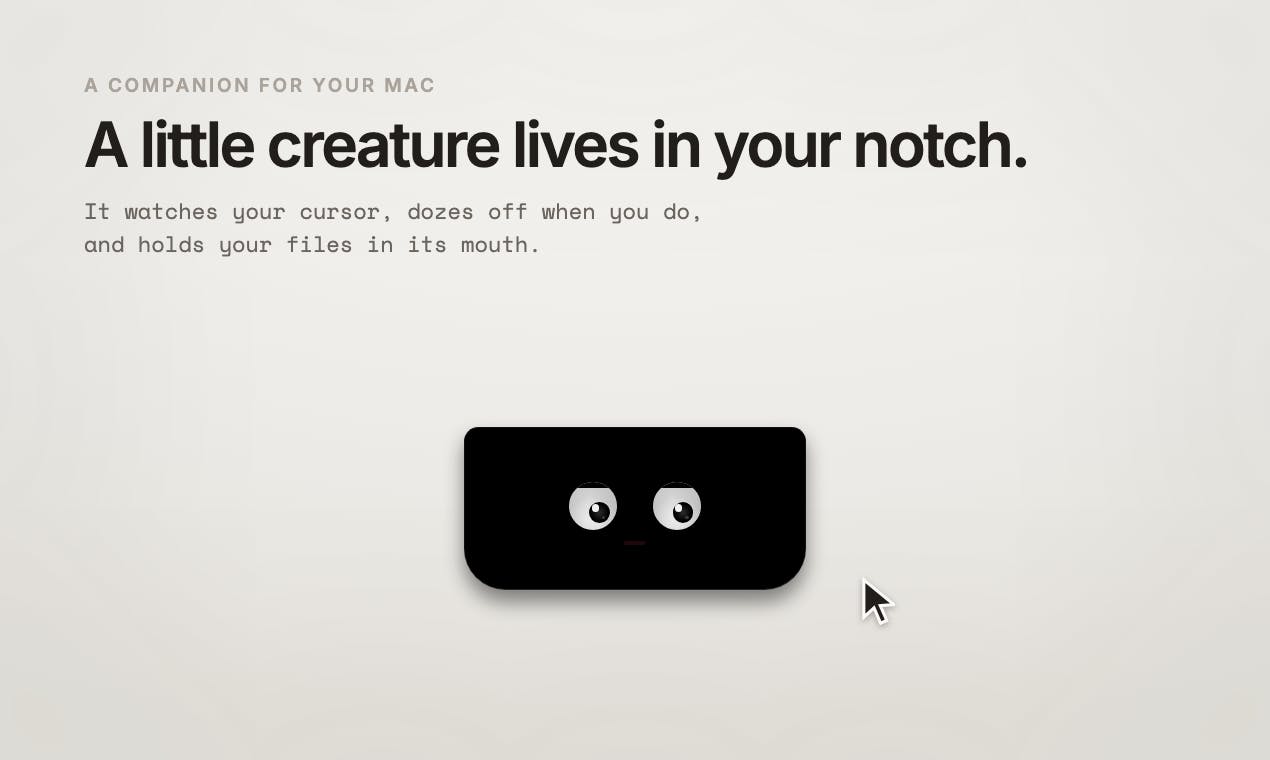
A sub-1MB desktop pet that lives in your MacBook's notch, offering playful companionship and file staging.
Notchling transforms the MacBook's notch from wasted space into home for a desktop companion. Under 1MB and completely free, this creature tracks your cursor, naps when idle, reacts to battery levels, and temporarily holds dragged files. All processing stays local for zero privacy concerns.
When the Notch Becomes More Than a Compromise
Since Apple introduced the notch design on MacBook Pro, developers have found creative ways to use this black area at the top of the screen—some display system status, others turn it into a notification center, and some use it for clipboard management. But Notchling, which recently ranked 8th on Product Hunt, takes a completely different approach: it puts a desktop pet in your MacBook's notch.
Apple first introduced the notch design in 2021 on the 14-inch and 16-inch MacBook Pro models, embedding the FaceTime HD camera into a cutout area at the top of the screen. This design borrowed from the front-facing camera solution used since iPhone X, but sparked greater controversy on Mac—because macOS's menu bar sits right at the top of the screen, and the notch blocks some menu bar icons. Apple mitigated this by making menu bar content automatically avoid the notch, but the space on either side often still feels wasted. This spawned a unique developer ecosystem: creative applications around the notch area proliferate, transforming what was originally a design compromise into a canvas for interaction innovation. Notchling is one of the most playful representatives of this ecosystem.
Created by developer Ravindra Sisodia, this app quickly garnered 85 votes and 11 comments after launch with its positioning as "under 1MB, completely free, and all data stays on your device." Its core selling point isn't some hardcore feature, but something many overlook—desktop companionship.
What Notchling Does: A Little Creature That Watches You
Core Interactive Features
According to the official description, Notchling is a little creature that "lives" in your MacBook's notch, and its behavior revolves entirely around your daily usage:
- Cursor tracking: It watches your mouse pointer move, as if curious about what you're doing
- Idle napping: When you haven't operated for a while, it gets drowsy and dozes off
- Battery awareness: It can "sense" your battery status and react accordingly
- File carrying: When you drag a file in front of it, it opens its mouth to "hold" and carry the file for you
The brilliance of these interaction designs lies in transforming cold system states (cursor position, idle time, battery level, drag operations) into a little creature's "emotions" and "actions." This is a typical anthropomorphic design approach, turning a tool from a functional carrier into an emotional object.
Anthropomorphic design has deep academic foundations in human-computer interaction (HCI). Its theoretical roots trace back to the "Media Equation" theory proposed by Reeves and Nass in 1996—people unconsciously treat computers and media like real people. Subsequent research shows that when digital interfaces exhibit human-like characteristics (such as eye tracking, emotional reactions, fatigue displays), users develop stronger emotional attachment and engagement. Notchling's design precisely applies this principle: cursor tracking simulates "eye contact," idle napping simulates "empathetic fatigue," and battery awareness creates the illusion of "shared experience"—all proven interaction paradigms that effectively enhance user emotional connection.
File Drag Staging: Hidden Practical Value
The "file carrying" feature deserves special mention. On macOS, dragging files across applications and windows has always had a pain point: you must complete the drag with both the source and target windows visible. Notchling's "staging point" design—letting you drop files with it for safekeeping, then switch to the target location to retrieve them—actually solves a real efficiency problem.
macOS's drag operation design stems from its classic direct manipulation interaction paradigm, but this design exposes obvious shortcomings in modern multi-window, multi-desktop workflows. Users must continuously hold down the mouse while dragging files, using the other hand to switch windows or desktop spaces, which demands high operational coordination. Yoink (priced around $8.99) and Dropover (priced around $4.99) are the most well-known tools in this space, providing a temporary "shelf" area to solve this problem—users can first place files on the shelf, leisurely switch to the target location, then retrieve them. Notchling naturally integrates this functionality with the notch location, using the fixed anchor point at the top center of the screen to provide a free and intuitive alternative, wrapping practical functionality in a cute little creature and lowering users' psychological barriers.
Under 1MB Minimalism: Notchling's Technical Trade-offs
Development Philosophy Behind Extreme Small Size
In today's app ecosystem where applications routinely run hundreds of megabytes, "under 1MB" is itself a bold technical statement. This indicates Notchling uses extremely restrained native development, most likely written in pure Swift/SwiftUI, without relying on bloated cross-platform frameworks (like Electron).
To understand the fundamental reason for this size difference, you need to understand how Electron works. Electron is a cross-platform desktop application framework developed by GitHub that essentially bundles a complete Chromium browser and Node.js runtime into every application. This means even a simple Electron app typically has an installer over 100MB—Slack's desktop client is about 300MB, VS Code about 350MB, Discord about 300MB. In contrast, Apple's native Swift/SwiftUI framework directly calls UI components and APIs already present in macOS, requiring no additional bundled runtime environment. Notchling's sub-1MB size strongly suggests it uses a pure native tech stack, and likely uses entirely vector animations rather than bitmap assets to achieve the pet's visual presentation, which is also a key technical means of maintaining extremely small size.
The benefits of this trade-off are obvious:
- Extremely low memory and CPU usage, virtually no impact on system performance
- Instant launch, no lengthy loading process
- Battery-friendly, and for a small tool that permanently resides in the menu bar, being lightweight directly relates to battery life
For a desktop pet application positioned as "companionship," being lightweight isn't just a bonus—it's a necessity. No one wants their "pet" to become a burden that slows down their computer.
Privacy First: All Data Stays on Your Mac
The official emphasis on "nothing leaves your Mac" is particularly precious today when AI applications generally require internet connectivity and data collection has become the norm.
All of Notchling's behavioral logic—cursor tracking, idle detection, battery reading—are essentially local system calls that require no cloud participation. Specifically, cursor position can be obtained in real-time through NSEvent's mouseLocation property; user idle time can be queried through the IOKit framework's HIDIdleTime; and battery status is read through the IOPowerSources API. These calls are completed entirely locally without any network requests. Notably, since macOS Mojave, Apple has significantly tightened the system permission model, requiring explicit user authorization for applications to access sensitive capabilities like camera, microphone, screen recording, and accessibility features. The APIs Notchling uses are mostly low-sensitivity level and don't require additional permission requests, allowing it to achieve a frictionless "install and use" experience.
This both demonstrates privacy protection and indirectly confirms its minimalist technical architecture. For the privacy-conscious Mac user community, this is key to building trust.
Why Notchling-Type Desktop Pets Resonate
Return of Emotional Design
Notchling's popularity reflects a noteworthy trend in software design: in an era when productivity tools are highly homogenized, emotional and playful design has become the breakthrough point for differentiation.
The history of desktop pets traces back to the virtual pet craze of the 1990s. Bandai's Tamagotchi launched in 1996, though a handheld device, pioneered the conceptual paradigm of "virtual companion creatures." On PC, the most representative early desktop pets include Microsoft's "Office Assistant" Clippy (the paperclip assistant) built into Windows XP, Shimeji created by Japanese developers (a type of little person that climbs screen edges), and various desktop animals based on the eSheep (electronic sheep) engine. These applications gradually declined in the mid-2000s with the rise of "efficiency-first" software design philosophy. However, in recent years, with the proliferation of remote work and growing attention to digital loneliness, desktop pets have returned in new forms—desktop pet applications on Steam continue to see growing sales, and discussions about "cozy computing" on social media are increasingly active.
Notchling is the latest case in this cultural revival wave. From desktop pet ancestors to today's custom creatures for MacBook notches, these products never win by "improving productivity by X percent," but rather by creating small moments of delight, improving the relationship between people and devices. When a little creature dozes off because you haven't operated for a long time, a subtle "connection" forms between you and your computer.
Current Limitations and Future Potential
As a minimalist application, Notchling's functional boundaries are clear. Its current core value lies in "companionship + lightweight file staging," not yet involving more complex productivity scenarios. This is both its advantage (focused, not bloated) and possibly its future growth ceiling.
Imaginable evolution directions include: richer creature animations and emotion systems, integration with calendar or Pomodoro time management tools, personalized feedback based on different work states, etc. But how to add features while maintaining the original vision of "under 1MB" and "purely local" will be the real test for the developer.
Conclusion: A Free MacBook Notch Tool Worth Trying
Notchling isn't a revolutionary tool that will change how you work, but it precisely captures the "wasted space" of the MacBook notch and fills it with a lightweight, cute, privacy-respecting little creature. In a software world dominated by functionalism, this return to emotion and fun is itself a product philosophy worth appreciating.
For users who pursue minimalism, value privacy, and want their Mac to have a bit more warmth, there's almost no reason to refuse a free download under 1MB.
Related articles

LLM Application Development: A High-Paying Career Guide for Ordinary People
LLM application development offers fresh graduates up to 35K/month, with SP offers reaching 600K. This article explains the core skills, how to break in, and how ordinary people can seize AI opportunities through learning by doing.

Say Goodbye to AI Influencer Faces: A Complete Guide to Creating Visual Assets for AI Comic Dramas from Scratch
Bilibili creator shares a full workflow for zero-basics AI comic drama visual assets: use Doubao Work skills with script-first, visual references, and real-person texture to escape AI influencer faces, then lock character and scene consistency with asset sheet layouts, weapon detail images, scene nine-grids, and cinematic color palettes.

The AI Production Pipeline Behind Great Videos: From Research to Agent Validation
AI video production isn't just a model race. This article breaks down a transferable four-step pipeline: researching professional workflows, organizing a skill checklist, configuring agents, and experimental validation—and explains how general-purpose LLMs like DeepSeek can replace paid tools to run the entire process.