NVIDIA Free API Hands-On Test: Only 4 of 38 Models Can Write Code, Kimi K3 Has Been Discontinued

NVIDIA free API test: only 4 of 38 free models are good for coding, rate limit ~40/min, production use prohibited.
Based on a Bilibili creator's hands-on test cross-checked with NVIDIA's official pages, this article maps out what's actually usable in NVIDIA's free LLM API. Of 97 catalog models, 38 are marked free, but only GLM5.3, DeepSeek 4.1 Flash, Nemotron 3 Ultra, and Poolside Laguna are truly suited to coding, with the first three offering 1M context. Kimi K3's free endpoint was discontinued on Oct 15, and MiniMax M2.7 and DeepSeek V4 Pro are also deprecated, so old tutorial configs will fail. No official rate limit is published; forum users measure about 40 requests per minute, and multi-step agent requests easily trigger 429. Trial terms prohibit production use, log inputs and outputs, allow endpoints to be discontinued anytime, and don't disclose free quota numbers. Connecting coding tools only needs the OpenAI-compatible endpoint integrate.api.nvidia.com/v1, with keys starting with NVAPI.
NVIDIA puts large models in its own data centers and gives you a key to call them — context windows up to 1 million tokens, 97 models in the catalog, 38 of them marked as free. But not every book on the free shelf is good for writing code, and the lending rules are stricter than you'd expect. This article, based on a hands-on test by a Bilibili creator cross-checked against the official pages, explains clearly what works, what doesn't, and how to connect them to coding tools.
Only 4 models in the free catalog can actually write code
NVIDIA's official catalog has 97 models in total, with 38 marked as free endpoints. Among those 38 are speech, translation, drug research, and video generation models that have nothing to do with coding tools. After going through every page, the creator singled out 4 that are useful for writing code:
- GLM5.3: The page lists 753 billion parameters, with reasoning and tool-calling abilities, and a 1M context window. Note that the page URL says GLM-5-3 while the model name in code is GLM-5.3 with a dot in the middle — copying directly from the page's code example is the easiest way to avoid mistakes.
- DeepSeekAd 4.1 Flash: 552 billion total parameters, using only 8 billion per request, with the page emphasizing efficiency, and also a 1M context window. A 1M context is roughly the amount of code in a whole medium-sized project.
- Nemotron 3 Ultra: NVIDIA's own model, 1M context, positioned on the page as strong at reasoning, coding, planning, and tool calling.
- Poolside Laguna XS 2.1: 33 billion parameters, 260K context, described as for long-running coding tasks and terminal operations.
How to choose? For big projects with many files, pick one of the 1M-context options; if you want fast responses, the page says Nemotron 3.5 Lightning is the fastest in the 30-billion-parameter tier; for very long terminal tasks, go with Laguna. The same page also shows GLM5.3 Flash, Nemotron 3.5 Lightning, and GPT-AUS 20B marked as free, which the creator didn't cover in this episode.
Context window refers to the maximum number of tokens a model can process in a single request, including both the input prompt and the generated output. 1 million tokens is roughly equivalent to hundreds of thousands of Chinese characters or the core set of files in a medium-sized code repository, but not all models maintain the same reasoning quality at that length, and the practically usable length is often limited by the service and model implementation. For coding scenarios, a longer context means more related files can be loaded at once, reducing back-and-forth retrieval; but an overly long context also increases the latency and cost of each request (if it's a paid tier). So when choosing, weigh project size against response speed rather than blindly chasing the maximum.
Kimi K3 has been discontinued — stop filling in these models
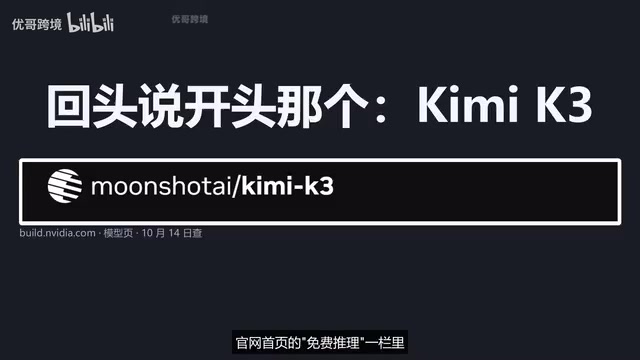
On the day the creator checked, Kimi K3 was still first in the free inference section on the homepage, but the top of the model page had a red banner saying it would be deprecated on October 14 and no longer supported after October 15. Yet further down, the "Model Availability" section's free endpoint still said available — the two didn't match, and the creator went with the banner. Kimi K3 is now discontinued; anyone whose config file still lists this model will get an error on every call.
Two other names common in online tutorials: MiniMax M2.7 and DeepSeek V4 Pro. Their model pages' free endpoint sections now say "deprecated," leaving only partner paid endpoints. Following old tutorials will most likely fail. This is everyday life under Article 8 of NVIDIA's terms: the company may change, suspend, or deprecate any part of the API at any time.
40 requests per minute isn't an official announcement, but 429 is real
The official pages don't give a fixed rate limit number. There's a pinned post on the NVIDIA developer forum where a moderator states clearly: the free tier is rate-limited, the specifics depend on the model, use case, and overall usage at the time, and there's no official way to raise it. A string of users posted saying they get 40 requests per minute and wanted to apply for 200, and the official replies were all that it can't be raised. So "40 per minute" is a measured reading from many people, not an official announcement — try it on your own account to see what yours is; hitting status code 429 means you've hit the ceiling.
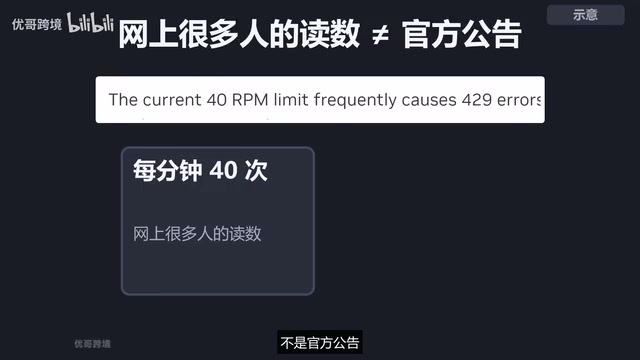
Coding agents hit the limit especially easily. You say one sentence, and behind it is reading files, editing files, running tests, reading files again — every step is a request, and dozens per task is normal. If you can only borrow 40 books a minute and 60 requests come at once, the rest naturally get turned away at the door. Some forum users ran into this repeatedly on Cursor and OpenCode. There are three safe practices: run only one task at a time and don't start subtasks in parallel; turn on the auto-retry and interval-retry options if your tool has them; and keep a backup model in your config so you can swap in another one when one gets rate-limited or pulled.
One widely circulated claim also needs clearing up: online tutorials say "200+ models free for 6 months, use as you like." The creator went through the official pages, and the catalog has 97 models in total, with no mention of how many months it's free for. The trial terms say verbatim that the service may be used in limited quantities and for a limited time, and that NVIDIA may adjust or discontinue it at any time. There's no source on the official pages for "6 months."
429 Too Many Requests is the HTTP status code indicating a request rate limit has been exceeded, belonging to the 4xx client error category. When a client sends more requests per unit of time than the server's configured quota, the server returns 429 and may include a Retry-After field in the response headers telling the client how long to wait before retrying. Many OpenAI-compatible clients recognize this as a rate-limit error and trigger built-in backoff retry logic (such as exponential backoff). Understanding this helps with troubleshooting: if a coding tool repeatedly reports 429, it's a pacing problem with your calls, not an invalid key or a misspelled model name — adjust concurrency or enable retry intervals.
Three rules of the library card: no production, gets logged, can be pulled anytime
The terms for this key are called the NVIDIA API Trial Service Terms, and a few hard rules are worth reading one by one.
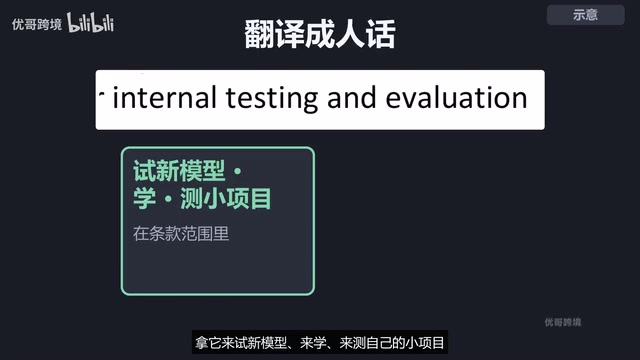
Limited trial only, not for formal production use. Article 1 states that the API or generated content may not be used in formal production; for formal use you need to separately order NVIDIA or partner services. Trying new models, learning, and testing your own small projects are within the terms; putting it into a launched product or a process delivered to customers goes beyond them.
Inputs and outputs are logged. Clicking into any model page first pops up a notice stating that inputs and outputs will be recorded, both to provide the trial experience and to improve NVIDIA's products and models, and asking you not to upload confidential information or personal data. Company code, config files with keys, and customer data should stay in your own hands.
When the trial quota runs out, you need to order separately. The official FAQ says you get free trial credits after registering, that chatting on the website doesn't consume them, and that only remote calls from your own programs do. Article 1.4 of the terms also says that once the quota is used up, continued use requires a separate order. The specific quota number isn't stated on the official pages right now — what you see in your own account after registering is what counts.
There's also output responsibility: the page states that third-party model answers may be inaccurate or biased, that NVIDIA doesn't endorse them, and that users bear the risk themselves. Run any code it writes yourself before using it.

Connecting coding tools: OpenAI-compatible format is the key
NVIDIA's API uses an OpenAI-compatible format, so any tool with a "custom OpenAI-compatible endpoint" option can connect. The endpoint is integrate.api.nvidia.com/v1, and you fill in the key and model name.
To get a key: open build.nvidia.com, click any model, click Get API Key, register an NVIDIA account with your email, and copy the key after creating it. There's a phone number verification step in the middle, which some forum users got stuck on, so keep that in mind before registering. OpenCode's official docs already list NVIDIA as an option: type slash-connect, search for NVIDIA, and enter your key, then use slash-models to select a model — the docs use Nemotron 3 Super. Keys start with NVAPI and are only stored locally.
OpenAI-compatible API means the server implements endpoints such as /v1/chat/completions following OpenAI API request and response formats, so clients, SDKs, and coding tools originally written for OpenAI can be used directly by just swapping base_url, api_key, and the model name. This is currently the lowest-cost way for third-party model services to connect to IDE plugins, command-line agents, and local clients. NVIDIA's integrate.api.nvidia.com/v1 plays this role, so any tool offering a "custom OpenAI-compatible endpoint" option can connect without dedicated adaptation. Note that compatible format only guarantees protocol consistency; the parameters each model supports (such as tool calling and streaming output) may still differ.
Who is this library card for
If you want to try new models for free and write some personal small projects, it's a great fit. The usable options on the shelf are GLM5.3, DeepSeek 4.1 Flash, and Nemotron 3 Ultra; about 40 requests per minute is what many people are seeing, and agents hit the limit most easily; the rules are that trials get logged and can be pulled at any time. Treat this as a library card rather than production infrastructure, and you won't easily stumble into pitfalls.
Related articles

Amphibious Transforming Drone: Beyond 100x Power Savings, What Are the Real Needs?
Is the amphibious transforming drone just a gimmick? Starting from the 100x power difference of the M4 Morphobot, explore real application scenarios and thesis topic ideas, analyzing boundary conditions where pure drones and pure ground robots both fail.

Warhound Raises $200 Million: Genetically Engineered "War Dogs" Paired with Anduril Gear
Warhound raises $200M, backed by Ben Lamm and Palmer Luckey, to genetically engineer dogs for military and law enforcement use and equip them with Anduril gear. This article analyzes its technology direction, funding logic, and ethical controversy.

Claude API Comes to Google Cloud: IAM Integration and SDK Access Guide
Anthropic hosts the full Claude API on Google Cloud with IAM-controlled permissions and unified billing. This guide covers the Vertex AI and Anthropic-hosted entry points, IAM role configuration, and SDK access.