NVIDIA OpenShell Tutorial: Free Sandbox Isolation for AI Agents, Protecting API Keys
NVIDIA's open-source sandbox OpenShell isolates AI Agents with an out-of-sandbox supervisor, keeping keys and permissions out of reach of a compromised Agent.
Based on a hands-on tutorial, this article systematically introduces NVIDIA's free, open-source Agent sandbox OpenShell. Its core positioning is a runtime rather than an Agent: the user's own Agent is packed into a container, and a supervisor located outside the sandbox checks every file access, system call, and network connection according to policy; even a fully compromised Agent cannot tamper with the inspection logic. The architecture has three layers—gateway, supervisor, and sandbox—and the API key is kept in a credential store outside the sandbox, injected only into requests to approved hosts, so the Agent process itself never sees the key. Policy checks are fine-grained down to the HTTP method, rules hot-reload in real time, and there is an "advisor drafts, human approves" interaction. The article also provides an eight-step setup process, hard installation prerequisites (Linux kernel 6.2+, Docker 28+), and several common pitfalls, and argues for the rationality of "putting the guardrails outside the Agent" from the security concept of the reference monitor.
NVIDIA OpenShell Tutorial: Free Sandbox Isolation for AI Agents, Protecting API Keys
Your AI Agent can read files, run commands, and use your API keys. If it gets manipulated by malicious instructions, or simply goes off the rails, who bears the loss? NVIDIA's answer is: put it in a box, and you decide exactly what it can touch. That's OpenShell—a free, open-source Agent sandbox that racked up nearly a thousand stars on GitHub on its launch day and has since accumulated over 10,000 stars.
This article is based on a hands-on tutorial from a Bilibili creator, with every step from scratch verified on a real machine, plus additional architectural analysis to help you understand why this approach is worth paying attention to.
What OpenShell Is: A Runtime, Not an Agent
The positioning of OpenShell needs to be clear from the start: it is a runtime, not an Agent. You bring your own Agent—OpenCode, Claude Code, or your own script—package it into a container image, and OpenShell runs it in a sandbox, enforcing policies on every file it opens, every system call it makes, and every network connection it attempts.
The project is written in Rust, currently at version 1.2 (released two days ago), and is described as a "patchy 2.0 release." It pairs with NVIDIA's concurrently launched "Open Agent Security Platform": OpenShell is the software half, and the other half is a hardware watchdog for NVIDIA's own networking chips. The sandbox part is free for everyone, which is what this tutorial installs.
Architecturally, the system has three layers:
- Gateway: the control plane, responsible for policy distribution and state management
- Supervisor: located outside the sandbox, checks every connection against your policies
- The sandbox itself: where the Agent lives; the Agent never communicates directly with the internet
The key to this layered design is that "the supervisor is outside the sandbox." Even if the Agent is fully compromised, it cannot tamper with the component that inspects its behavior.
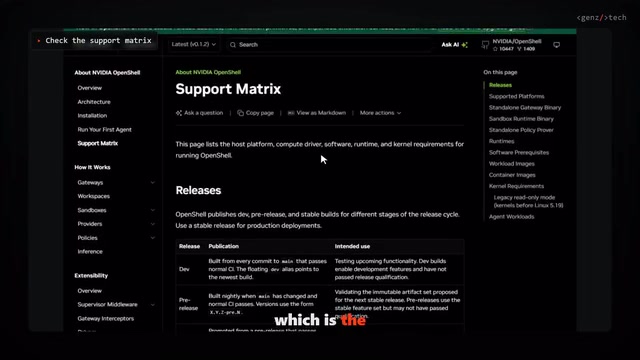
Must-Read Before Installing: Support Matrix and Hard Prerequisites
OpenShell has clear requirements for the runtime environment, and it does not silently degrade—if the kernel isn't supported, it simply refuses to start the sandbox.
- Operating system: Linux, or a Mac with Apple Silicon, or Windows via WSL2 (Windows is marked as experimental support)
- Docker 28 or later
- Linux kernel 6.2 or later, because the sandbox relies on a kernel feature called Landlock
The installation script is distributed per platform: Ubuntu/Debian gets a Debian package with checksum verification, Fedora uses an RPM package, and Mac installs via Homebrew with the gateway run as a Homebrew service. Releases are published on the Releases page, including packages, standalone binaries, and checksums. In terms of size, the static command-line tool on Linux is about 10 MB, and the full Debian package is about 74 MB.
On Windows, the creator's approach was to download the static binary directly into WSL2, extract it, and run it. But this "binary-only" approach causes the command line to show the gateway as unconfigured—because only the full package installer registers the gateway for you. This is the first pitfall that beginners tend to hit.
Landlock is an unprivileged sandboxing mechanism first introduced in Linux kernel 5.13, which only gained full network and filesystem access control capabilities in 6.2—the direct reason OpenShell sets its kernel floor there. It allows a process to proactively declare at runtime, "from now on I will only access these paths and only connect to these ports," and the kernel enforces this self-imposed constraint—even if the process is later fully controlled, it cannot break out of the boundaries it has declared. Unlike the namespaces and cgroups that Docker relies on by default, Landlock does not require root privileges and does not depend on a container orchestration layer, so it can add another layer of defense in depth inside a container. Understanding this explains why OpenShell chooses to refuse to start rather than degrade when it detects an unsupported kernel: the absence of Landlock means the kernel-level defense line beyond the supervisor does not exist, and silent degradation would give a false sense of security.
Building from Scratch: Eight Steps to Your First Sandboxed Agent
Step 1: Check Versions
Confirm the kernel version, Docker version, and curl availability. The creator's laptop had a kernel version in WSL2 well above 6.2, so this passed without issue.
Step 2: Run the Installation Script
Run the installation script from the official repository; it fetches the package for your platform, verifies the checksum, completes the installation, and starts the gateway as a user service.
Step 3: Confirm the CLI-to-Gateway Connection
Run the status check command; the Doctor command checks each prerequisite item by item. Here the creator encountered a Docker check failure—because Docker Desktop on Windows needs to be shared with the WSL distribution. After enabling WSL integration for the Ubuntu distribution in Docker Desktop settings, the check passed. This is the most common pitfall on Windows, so it's best to handle it before you start.
On Linux, the gateway runs as a System user service on port 176070, and the documentation provides commands for restarting and viewing logs; if you want it to keep running after logout, you need to enable Linger.
Step 4: Create Your First Sandbox
Run openshell sandbox create and name it demo; you'll enter a shell in a minimal Ubuntu image with no Agent installed. This is a safe place to explore—by default, nothing leaks out.
Step 5: Prepare an OpenRouter Key
The official tutorial uses OpenCode with a free model on OpenRouter. Just register an OpenRouter account and create an API key; free models require no credits.
Step 6: Import the Provider Configuration
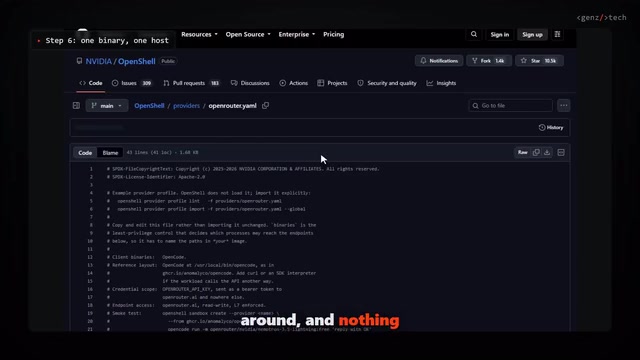
This step is worth examining closely for what the configuration file actually says: it allows only one program (the OpenCode binary) to communicate with one host (the OpenRouter API). OpenShell stores the key in its own credential store, and the Agent cannot see it at all—the key is only added to requests sent to that approved host.
This is one of the most valuable details of the whole design. The traditional approach injects the key into the Agent process as an environment variable; once the Agent is tricked into executing arbitrary code, the key is exposed. OpenShell instead moves key custody up to the supervision layer outside the sandbox, and what the Agent gets is merely a channel that is "allowed to send requests."
The credential store is the most fundamental point of divergence between OpenShell and "environment variable injection." In the traditional model, the API key exists as a process environment variable; any Agent that can read /proc/self/environ, print environment variables, or execute arbitrary code can take it, and once taken it is valid forever. OpenShell's approach is to entrust the key to a store on the supervisor side, so the value does not exist within the Agent process at all; when the Agent initiates a request, the supervisor first determines according to policy whether "this binary has the right to access this host," and only after passing does it attach the key to the request header at the moment of forwarding. This yields two results: first, the key never enters the sandbox's addressable memory, so prompt injection cannot directly steal it; second, the use of the key is bound to a specific host and a specific program, so even if leaked, its scope of effect is already constrained by policy.
Step 7: Launch the Agent
Create a sandbox named my-agent, pull the OpenCode image, mount the provider, and then launch OpenCode on NVIDIA's free model. At this point you have a coding Agent genuinely running inside a sandbox.
Step 8: Handle Pending Rules
New rules do not take effect automatically; you need to list pending rules and approve the ones you actually want.
Policy in Practice: From Deny-All to Fine-Grained Allow
The official five-minute policy tutorial demonstrates the complete allowance flow. A brand-new sandbox can access nothing, and a simple request to the GitHub API returns 403. Every denial is logged, including the attempted action and the target host.
Then add a rule allowing curl to read the GitHub API—read-only. The same request now passes. But POST requests (such as creating an issue) are still blocked, because the supervisor checks the HTTP method, not just the hostname.
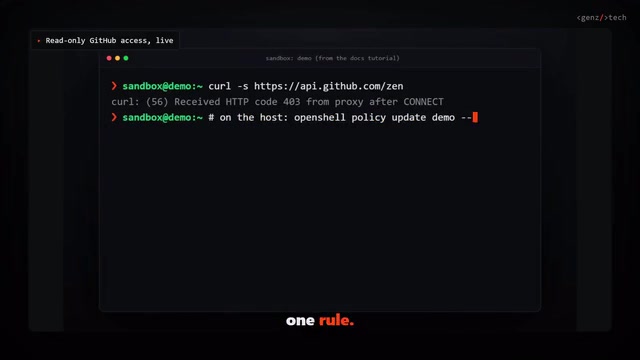
Rules take effect without a restart and are reloaded in real time. The creator's favorite feature is that when the Agent is blocked, the policy advisor drafts a fine-grained rule for it, which you then approve—or first inspect what that rule newly allows, such as whether it would send credentials to a new host—before deciding whether to let it through. This "AI proposes, human approves" interaction lowers the barrier to policy configuration to a level acceptable to ordinary users.
A Few Pitfalls You Must Know
- The default image is empty: the real work is building an image with your Agent inside
- The provider configuration hardcodes the binary path: copy and edit it; don't import it blindly
- The gateway sends anonymous usage statistics by default: a single environment variable turns it off
- The project iterates quickly: three versions in four days, so pin version numbers in any automation
Why "Putting the Guardrails Outside the Agent" Is the Right Design
The creator's judgment is worth expanding on: this is better than trusting the Agent's own permission prompts. The reason is not complicated—the Agent's permission prompts run inside the Agent process, and an Agent compromised by prompt injection can bypass its own prompts; whereas OpenShell's supervisor is outside the sandbox, beyond the Agent's reach. This is a modern re-creation of the "reference monitor" idea from operating system security: all access must pass through an unbypassable checkpoint.
From an ecosystem perspective, NVIDIA opening the sandbox for free while keeping the hardware watchdog for its own chips is a smart strategy: use the open-source software layer to establish a de facto standard for Agent security, then monetize at the hardware layer. For users, this means a rigorously designed isolation solution is available for free right now.
If you use Linux, you can try the OpenRouter example this week; on Windows it runs in WSL2 but is still experimental support, so don't use it in production yet.
The "reference monitor" is a classic concept in operating system security, proposed by Anderson in a 1972 technical report to describe the abstract checkpoint in a system that "all access by subjects to objects must pass through, and which itself cannot be bypassed." It must simultaneously satisfy three properties: it must be invoked (no access can skip it), it must be small enough to be verifiable (the attack surface is small enough to be rigorously audited), and it must be effective as a mediator (its decision logic is protected and subjects cannot tamper with it). OpenShell placing the supervisor outside the sandbox process is precisely the engineering means by which all three properties hold at once—no matter how complex or tainted the Agent's code is, it runs on the side being inspected, while the inspection logic itself is outside its writable range. This is also the fundamental divide between it and an Agent's built-in permission prompts: the latter is essentially "the regulated enforcing regulation on itself," and offers no enforceability against prompt injection.
One-line Summary
NVIDIA's open-source sandbox OpenShell isolates AI Agents with an out-of-sandbox supervisor, keeping keys and permissions out of reach of a compromised Agent.
Paragraph Summary
Based on a hands-on tutorial, this article systematically introduces NVIDIA's free, open-source Agent sandbox OpenShell. Its core positioning is a runtime rather than an Agent: the user's own Agent is packed into a container, and a supervisor located outside the sandbox checks every file access, system call, and network connection according to policy; even a fully compromised Agent cannot tamper with the inspection logic. The architecture has three layers—gateway, supervisor, and sandbox—and the API key is kept in a credential store outside the sandbox, injected only into requests to approved hosts, so the Agent process itself never sees the key. Policy checks are fine-grained down to the HTTP method, rules hot-reload in real time, and there is an "advisor drafts, human approves" interaction. The article also provides an eight-step setup process, hard installation prerequisites (Linux kernel 6.2+, Docker 28+), and several common pitfalls, and argues for the rationality of "putting the guardrails outside the Agent" from the security concept of the reference monitor.
Related articles

Asana AI Product Lead Shares AI Agent Best Practices
Asana's AI product lead shares AI Agent best practices, covering responsibility boundaries, human-in-the-loop design, data model anchoring, and evaluation iteration methods for product teams deploying Agents.

Japanese Internet Giant GMO Hit by Hacker Leak: Cloud Service Vulnerability Exposes Customer Data
GMO Internet confirms cloud service hack, customer data possibly exposed. The company is verifying the leaked data, highlighting cloud security and supply chain attack risks.
Apple Adds AI Assistant to Pages, Keynote, Numbers
Apple introduces an AI assistant to Keynote, Pages, and Numbers, powered by Apple and OpenAI models, capable of understanding document context, designing animated slides in Keynote, and drafting and restructuring documents in Pages, escalating AI competition in productivity suites.