Oduflow Lets Codex Agent Run on Your ChatGPT Subscription

Oduflow lets the Codex agent connect to the Odoo dev environment using ChatGPT subscription authentication—no API keys required.
Oduflow demonstrates a new way to connect the Codex coding agent to the Odoo development environment: no additional API keys are needed—the agent runs directly on an existing ChatGPT subscription. Its architecture assigns a dedicated container to each team, with login credentials persisted on the agent volume so no re-authentication is required after container rebuilds. The setup involves enabling Coding Agent in team settings, setting Codex as the default agent, and restarting the server, followed by device code login. In an Agent Chat test, the agent autonomously invoked tools like environment info, module list, and Odoo shell to correctly answer that it was running Odoo 20 with no third-party modules. The core value lies in folding AI agent costs into an existing subscription and lowering the barrier to use, though performance on complex tasks and resource consumption under multi-team concurrency remain to be validated.
From Subscription to Agent: Oduflow Connects Codex with the Odoo Environment
According to a demo video released on a YouTube channel, Oduflow showcases a new way to connect the Codex coding agent to the Odoo development environment—no additional API keys required, since the agent can run directly on an existing ChatGPT subscription. The video captures the entire process from team configuration to agent login to real-world Q&A, offering a low-barrier path for developers looking to bring an AI coding assistant into their workflows.
Rather than simply calling the OpenAI API, Oduflow runs the Codex agent in a dedicated container—one container per team. This architecture ensures environment isolation while also preserving the agent's login credentials (stored on the agent volume) across container rebuilds, eliminating the hassle of repeated authentication.
Codex is a coding agent introduced by OpenAI that can understand natural language instructions and autonomously invoke tools to complete code-related tasks such as querying the environment, modifying files, and running commands. Unlike traditional code completion tools, Codex operates as an "agent" with multi-step reasoning and tool orchestration capabilities. Users can authenticate and invoke it through a ChatGPT subscription account (rather than a separate API key), making it a viable option for teams seeking a low-cost way to adopt an AI coding assistant.
Odoo is an open-source enterprise resource planning (ERP) and business application suite written in Python, featuring a modular architecture and an active community ecosystem. Developers frequently build on and customize Odoo, with environment configuration, module management, and version queries being routine high-frequency operations. Connecting a coding agent to the Odoo development environment means the agent needs to understand Odoo's versioning, module structure, and shell interaction—placing specific demands on tool integration.
Configuration Workflow: Team Setup and Agent Enablement
The entry point for enabling the agent is in team settings. The video demonstrates the specific steps: go to the Teams panel, edit the target team, turn on the Coding Agent toggle, and set Codex as the default agent. After saving the changes, the server must be restarted for them to take effect.

After the restart, Oduflow automatically creates the agent container at startup. Back on the dashboard, a new Agent Chat button appears in the environment interface—a clear signal that the agent is ready. The entire configuration process involves no complex API key management; all permissions are handled through the ChatGPT subscription account.
Device Code Login: Getting Codex to Recognize Your ChatGPT Account
Once the agent container is ready, the next step is to sign in to Codex. Oduflow includes an Agent CLI—the Codex terminal—in the environment menu, which can be operated directly in the browser. After selecting "sign in with device code," Codex generates a link and a one-time verification code.
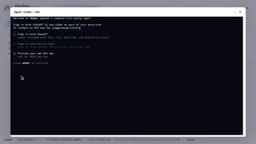
Users simply open the link in a browser already signed in to ChatGPT, enter the verification code, and confirm to complete authentication.

You may not have noticed, but the login state is stored on the agent volume, meaning the agent doesn't need to sign in again even if the container is rebuilt. For development teams that frequently adjust their environments, this design reduces repetitive work and makes agent lifecycle management more worry-free.
Device Code Flow is an OAuth 2.0 authorization mode designed specifically for devices that cannot directly enter passwords or open a browser (such as CLI tools, smart TVs, and container environments). The flow works as follows: the device requests a one-time verification code and verification link from the authorization server; the user opens the link in another browser that is already signed in, enters the verification code, and confirms authorization; the device then polls for an access token. This approach avoids directly handling user credentials in restricted environments, balancing security and convenience, and is a common method for CLI tools to connect to OpenAI accounts.
Agent Chat in Action: Autonomously Invoking Tools to Answer Environment Questions
After signing in, users can interact with Codex through Agent Chat in a familiar chat interface. In the video, the operator asks the agent: which version of Odoo is running in the current environment? Which non-standard modules are installed?
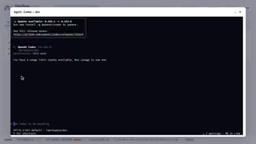
Rather than asking the user for additional information, the agent autonomously invoked the tools provided by Oduflow: Environment info, module list, and Odoo shell. The final answer: Odoo 20, with no non-standard modules installed.
This process demonstrates the agent's tool-calling capability—it doesn't rely on preset scripts but autonomously decides which tools to use based on the question and integrates the results. The video emphasizes that the entire run is based solely on the user's ChatGPT subscription, with no separate API key used.
Subscription as Compute: What It Means for Development Workflows
The core value of Oduflow's integration lies in folding the cost of invoking an AI agent into an existing ChatGPT subscription. For organizations that have already purchased ChatGPT subscriptions for their teams, this means Codex agents can participate in daily development tasks without purchasing additional API quota or configuring keys.
From a technical standpoint, the per-team container design balances isolation and maintainability, while the agent volume's persistent login state reduces operational overhead. However, the scenarios demonstrated in the video remain relatively basic—only involving environment information queries. The agent's performance on more complex tasks (such as code modification, debugging, and multi-turn collaboration), as well as resource consumption under concurrent multi-team usage, still awaits further practical validation.
For teams developing with Odoo that already have ChatGPT subscriptions, Oduflow offers an integration path worth watching. Its value lies not in inventing new capabilities, but in embedding existing capabilities in the right place within the workflow.
Related articles

Zero-Cost Local Jarvis: Open-Source Voice Cloning and Task Automation in Practice
AI Workshop shows how to build a zero-cost local Jarvis with Ollama and Voice Studio: local model switching, open-source voice cloning, file retrieval, and tool-calling tests, with setup steps and hardware trade-offs.

Mistral Large 4 Released: 1T-Parameter MoE Tops Western Open-Source Leaderboard
Mistral releases its flagship Mistral Large 4: a 1T-parameter MoE architecture activating only 49B parameters at inference, trained from scratch on 3,800 Grace Blackwell GPUs, topping the Western open-weight leaderboard with third-party endorsements in law, finance, and cybersecurity.

Mistral Large 4 Review: Can Europe's Strongest Open-Source Model Challenge the US and China?
Mistral Large 4 (L-Charm) review: trillion-parameter MoE, standout cybersecurity benchmarks but behind Kimi K3 in software engineering, 3,800 GPUs, a key step for European sovereign AI.