Ollama v0.40.5 Released: llama.cpp Upgraded to b11669

Ollama v0.40.5 released, with the only substantive change being the upgrade of inference engine llama.cpp to b11669.
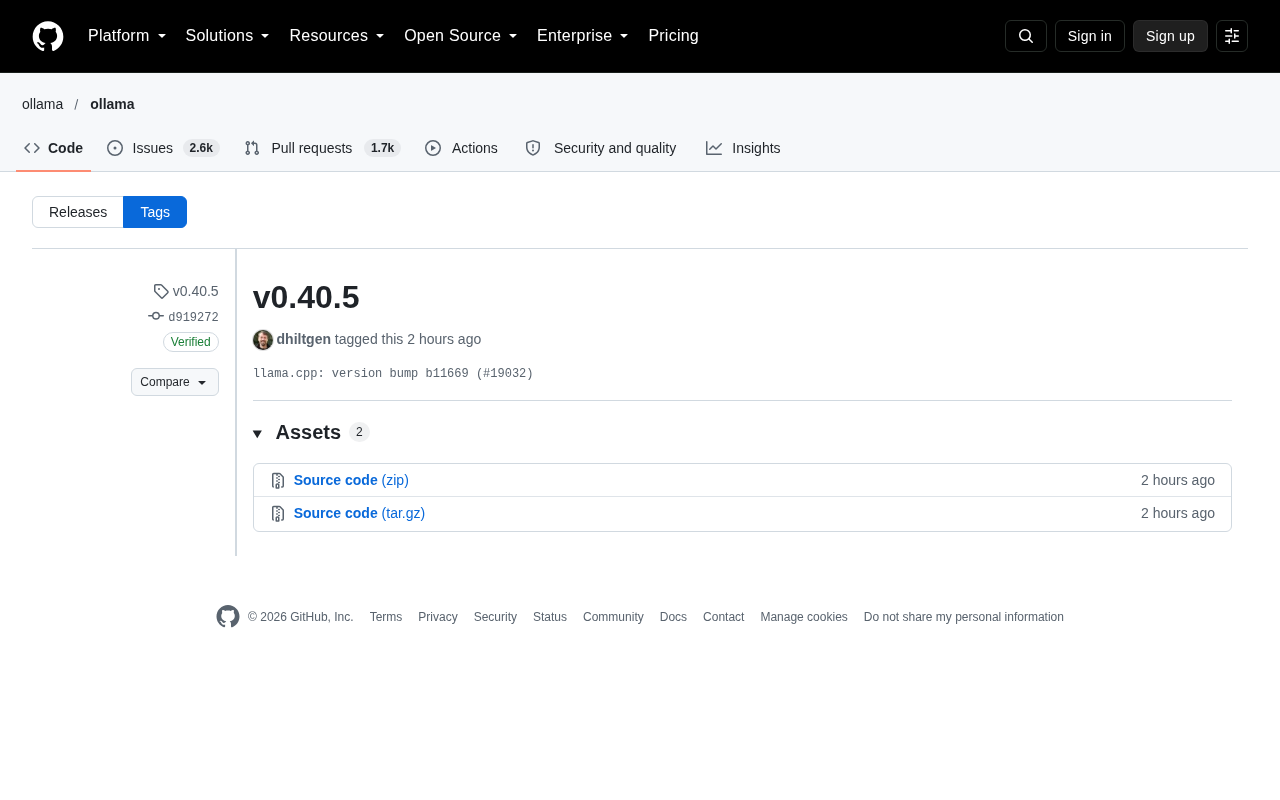
Ollama released v0.40.5, a maintenance minor version update whose core content is syncing the bundled inference engine llama.cpp from an older version to b11669, corresponding to commit d919272 and PR #19032, tagged by maintainer dhiltgen on October 15. The article explains that Ollama does not implement inference itself but relies on llama.cpp for underlying capabilities, so it periodically follows upstream builds to gain performance fixes, new model support, and inference behavior improvements. Such upgrades typically do not affect API interfaces, but may change inference speed, VRAM usage, quantization support, model compatibility, and sampling output stability, so validation is recommended before upgrading in production. The acquisition method is the same as before: the Release page provides two platform installation packages, and macOS/Windows, Linux, and Docker users can all upgrade via the usual paths.
Ollama has released v0.40.5, a minor version iteration whose core change is syncing the upstream inference engine llama.cpp version.
The Update Logic Behind the Version Number
According to GitHub commit records, v0.40.5 corresponds to commit d919272, tagged by maintainer dhiltgen on October 15 at 16:11. The commit message is just one line: llama.cpp: version bump b11669 (#19032).
This means the only substantive change in this release is upgrading the bundled llama.cpp from an older version to b11669. Ollama does not implement model inference itself; instead, it uses llama.cpp as its underlying engine and periodically follows upstream commits to gain performance fixes, new model support, and improvements in inference behavior.
Semantic Versioning (SemVer) typically follows a "major.minor.patch" structure, corresponding to incompatible changes, backward-compatible new features, and backward-compatible bug fixes respectively. Ollama's version numbers roughly follow this convention, but its "patch" increments are often not fixes to its own code—rather, they package cumulative changes from upstream llama.cpp. As a result, version bumps indicate sync cadence more than functional semantics. This approach is common in projects that depend on fast-evolving upstreams: the benefit is that users can roughly gauge how new or old a version is based on a simple version number, but the trade-off is that the version number alone cannot tell you whether inference behavior changes affecting your specific use case have been introduced.
Why the llama.cpp Version Sync Matters
llama.cpp is one of the most active projects in the local large model inference ecosystem, with a very fast update cadence. Ollama chooses to package these upstream changes through version number increments, allowing users to get the latest inference capabilities with a single ollama pull or upgrade installation package.
For users, such version jumps typically do not bring breaking interface-level changes, but they may affect the following areas:
- Inference speed and VRAM usage: llama.cpp's operator optimizations and quantization format support adjust as versions evolve
- Model compatibility: New versions often add support for new architectures (such as new MoE or attention variants)
- Output stability: Subtle corrections to sampling logic may change generated results for the same prompt
If you rely on fixed output behavior in production, it's advisable to validate key prompts in a test environment before upgrading.
llama.cpp was originally initiated by Georgi Gerganov in March 2023, with the goal of implementing efficient inference for Meta LLaMA models in pure C/C++, leveraging the ggml tensor library to run large models on consumer-grade hardware (CPU, Apple Silicon, regular GPUs). Its most well-known contribution is the GGUF model format and its accompanying quantization schemes (such as Q4_K_M, Q5_K_M, Q8_0, etc.), which compress models that would otherwise require tens of GB of VRAM down to sizes runnable on a single machine while maintaining output quality as much as possible. Due to the large number of community contributors and frequent merges, llama.cpp may produce multiple build numbers per day—for example, b11669 mentioned in this article is a version identifier ordered by build number. Because iterations are so dense, downstream projects that want to continuously gain support for new model architectures and new hardware optimizations must regularly follow these upstream builds, rather than syncing only at major releases.
How to Get This Version
The GitHub Release page provides 2 assets (installation packages for different platforms), which is Ollama's consistent release structure. The upgrade method is the same as usual:
- macOS / Windows users can download the installation package and overwrite-install
- Linux users can update via the official installation script or package manager
- Docker users can pull the image corresponding to the tag
A small detail: the "Compare" and tag filter areas on the page showed a loading error message. This is a common phenomenon when GitHub's frontend renders a large number of tags and does not affect actual downloads.
Docker users can refer to the official ollama/ollama image maintained on Docker Hub, which provides both latest and versioned tags (such as 0.40.5). For production environments, it's recommended to pin version tags to avoid behavior changes caused by automatic upgrades. When using docker run, you typically need to mount a model storage volume (such as -v ollama:/root/.ollama), otherwise pulled models will be lost after container restart. If the container needs to access the host GPU, you also need to use --gpus=all and install the NVIDIA Container Toolkit. For Kubernetes or other orchestration environments, the community also has corresponding Helm Charts and Operators for reference, but they are all built on the same image.
Summary
v0.40.5 is a typical maintenance update: no new feature announcements, no API changes, with all value coming from cumulative improvements in upstream llama.cpp. For users focused on local inference performance, following Ollama's minor version upgrades is a low-cost way to keep the engine up to date; for deployment scenarios pursuing stability, you can wait for community feedback before deciding whether to follow up.
Related articles

Chain of Thought Isn't Just for AI: How Humans Can Use CoT to Improve Thinking Quality
Chain of Thought isn't just a prompt trick for large models. Starting from a Hacker News discussion, this article analyzes why CoT works for human thinking too, breaks down actionable ways to transfer it, and highlights the key differences between human CoT and machine CoT.
Cloudflare Teams Up with OpenAI: Closi…
Cloudflare Teams Up with OpenAI: Closing the Loop from Vulnerability Discovery to Defense with AI
Cloudflare uses OpenAI Daybreak to investigate security vulnerabilities and generate reviewable remediation plans, while developers use Codex to boost coding efficiency and quality.

Orca Multi-Agent Orchestration in Practice: A Guide to Parallel Collaboration with Claude and Codex
Orca is Stable AI's free open-source agent workbench supporting 34 agents like Claude Code and Codex in parallel. Learn its Git worktree isolation, multi-model orchestration, and mobile management.