omerta: Using Real Environment Variable Values to Stop .env Secret Leaks
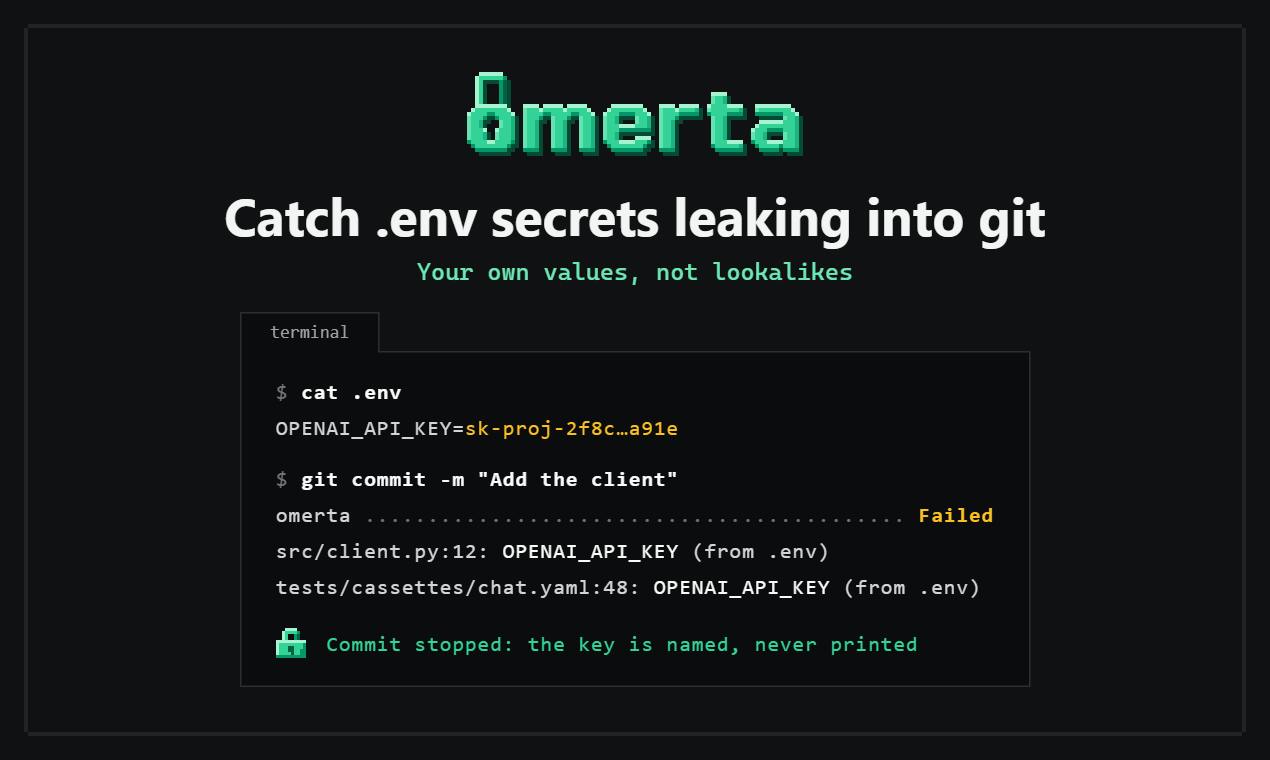
omerta reduces false negatives and false positives in secret scanning by comparing real environment variable values instead of regex patterns.
This article introduces omerta, a new secret scanning tool on Product Hunt that compares real environment variable values instead of relying on regex matching like git-secrets. It analyzes the limitations of traditional scanners, explains omerta's pre-commit hook and CLI tool, and notes its use cases and caveats—suitable for custom secret formats or investigating historical leaks, but unable to detect hardcoded secrets never present in the local .env file. It also compares omerta with existing tools and stresses that protecting the .env file remains the first line of defense.
During development, .env files leaking secrets into Git repositories is a common security risk. Traditional secret scanning tools typically rely on regex matching of secret formats, but this approach is prone to both false negatives and false positives. omerta, newly launched on Product Hunt, proposes a different approach: directly comparing real environment variable values instead of relying on pattern matching.
Limitations of Traditional Scanning Tools
Most secret detection tools (such as git-secrets, truffleHog, etc.) identify sensitive information through preset secret format rules (e.g., the fixed prefix of AWS Keys). The drawbacks of this method are:
- Developers may use custom secret naming or formats that rules cannot cover
- Some secrets have no obvious characteristics and are hard to describe with regex
- Easy to generate a large number of false positives, interfering with normal development workflows
omerta's creator Sergii Shcherbak clearly noticed this problem. The product's core logic is: detect using the real values from your environment files, not patterns. This means that regardless of what the secret looks like, as long as it appears in Git's staging area, tracked files, or history, it will be caught.
git-secrets is an open-source tool developed by AWS Labs, designed to prevent passwords, keys, and other sensitive information from being committed to Git repositories. It installs Git hooks (such as pre-commit, commit-msg) to scan commit content and matches based on regex patterns (such as AWS access key formats). git-secrets allows users to customize prohibited patterns and supports a whitelist mechanism, but its core detection logic still relies on predefined or user-configured pattern rules.
truffleHog is another popular open-source secret scanning tool, focused on finding high-entropy strings and known secret formats in Git repositories. It identifies possible secrets by calculating the entropy (randomness) of strings, and supports validating the validity of certain secrets (such as AWS, Slack, etc.). truffleHog can scan the entire Git history, including branches and commits, but its detection is likewise based on patterns or entropy values, which may produce false positives or false negatives, especially for secrets with custom formats.
How omerta Works
According to the product description, omerta offers two usage methods:
- pre-commit hook: automatically checks staged files before committing, and blocks the commit if any real value of an environment variable is found to be included
- CLI tool: can be run manually to scan tracked files or the entire Git history
The advantage of this design is precision. Because it compares specific values, it won't miss secrets due to non-standard formats, nor will it produce false positives just because a string resembling a secret happens to appear in the code.
pre-commit hook is a client-side hook provided by Git that is automatically triggered when a developer executes the git commit command. It allows scripts to run before the commit message is edited, for purposes such as checking code style, running tests, or performing security scans. If the hook script exits with a non-zero status, the commit process is aborted. Developers can place an executable script in .git/hooks/pre-commit, or use the pre-commit framework to manage hooks, thereby automatically intercepting potential issues (such as secret leaks) before committing.
Git staging area (also called the index) is a temporary area used to store file changes about to be committed. Developers use the git add command to add modifications from the working directory to the staging area, and then git commit commits the contents of the staging area to the repository. The staging area allows developers to carefully select the changes to commit and review them before committing. omerta's pre-commit hook checks the contents of files in the staging area to ensure that no real values of environment variables are accidentally included.
Use Cases and Considerations
omerta is particularly suitable for the following situations:
- Teams use custom environment variable naming without a unified secret format
- Sensitive values may have already been mixed into the project history and require a comprehensive check
- Want reliable pre-commit protection without adding complex configuration
However, this detection based on real values also has its prerequisite: you need to let the tool know which values are sensitive. This means omerta needs to read your .env file as a reference. Therefore, protecting the .env file itself from being committed remains the first line of defense.
.gitignore is a text file used to specify patterns for files and directories that Git should ignore. Adding the .env file to .gitignore prevents it from being accidentally committed to the repository, which is the first line of defense for protecting sensitive information. However, if the .env file has already been tracked or committed to history, simply adding .gitignore is not enough to remove it; you need to use git rm --cached to stop tracking it, and may also need to use tools like git filter-branch or BFG Repo-Cleaner to clean up history. As a supplementary tool, omerta can check the staging area before committing, but the prerequisite is that the .env file itself has not been committed.
Comparison with Existing Tools
Compared with common pattern-matching tools, omerta's approach is closer to "whitelist comparison." It doesn't care what the secret looks like, only whether it comes from your environment file. This compensates to some extent for the shortcomings of rule libraries, but it also means it cannot detect leaked secrets that never appeared in the local .env file (for example, secrets hardcoded from other sources).
According to the Product Hunt page, omerta received 72 votes and 5 comments, ranking 16th among products of the day. As an open-source developer tool, it targets a specific and real pain point in the Git workflow.
Conclusion
omerta offers a pragmatic security protection approach: using real values instead of pattern matching to reduce false negatives and false positives. For developers who frequently work with .env files, it is a pre-commit hook tool worth trying. Of course, no tool can replace good security habits—ensuring that .env files are properly added to .gitignore and regularly rotating secrets remain necessary measures.
One-line Summary
omerta reduces false negatives and false positives in secret scanning by comparing real environment variable values instead of regex patterns.
Paragraph Summary
This article introduces omerta, a new secret scanning tool released on Product Hunt, which takes a different approach from traditional tools like git-secrets: directly comparing real environment variable values instead of relying on regex matching. The article analyzes the limitations of traditional scanning tools, explains in detail omerta's two usage methods (pre-commit hook and CLI tool), and points out its applicable scenarios and considerations—for example, it is suitable for custom secret formats or investigating historical leaks, but cannot detect hardcoded secrets that never appeared in the local .env file. Finally, the article compares omerta with existing tools, emphasizes the advantages of its "whitelist comparison" approach, and reminds users that protecting the .env file itself remains the first line of defense.
Related articles
Three New Metapunk Skills: Building a Closed Loop for AI Software Development
Metapunk's new version adds Implement Spec, PR, and Retro skills to complete the AI software development loop. This article analyzes each skill's features and workflow to help improve AI Agent development efficiency and code quality.

6 Dark Tales of Terror: TED-Ed Uses Animation to Illustrate Fables of Human Nature
TED-Ed's six horror stories collection includes The Monkey's Paw, the Japanese tale of Oiwa, Death's Godfather, Beowulf, Poe's The Masque of the Red Death, and Hoichi the Earless. This article analyzes how these animated shorts use cross-cultural fables to explore desire, betrayal, and the price of death—and why they suit classroom discussion.
A Practical Guide to Calling Lightweight Ollama Models from Python
A complete hands-on guide to installing Ollama, pulling a 0.8B lightweight model, and calling it from Python—covering service startup, model name matching, first-load delays, and other pitfalls, with a measured 0.23s per call.