Omi X 2.0 Review: Point-and-Click Editing, AI Deploys Directly to Your Own Cloud
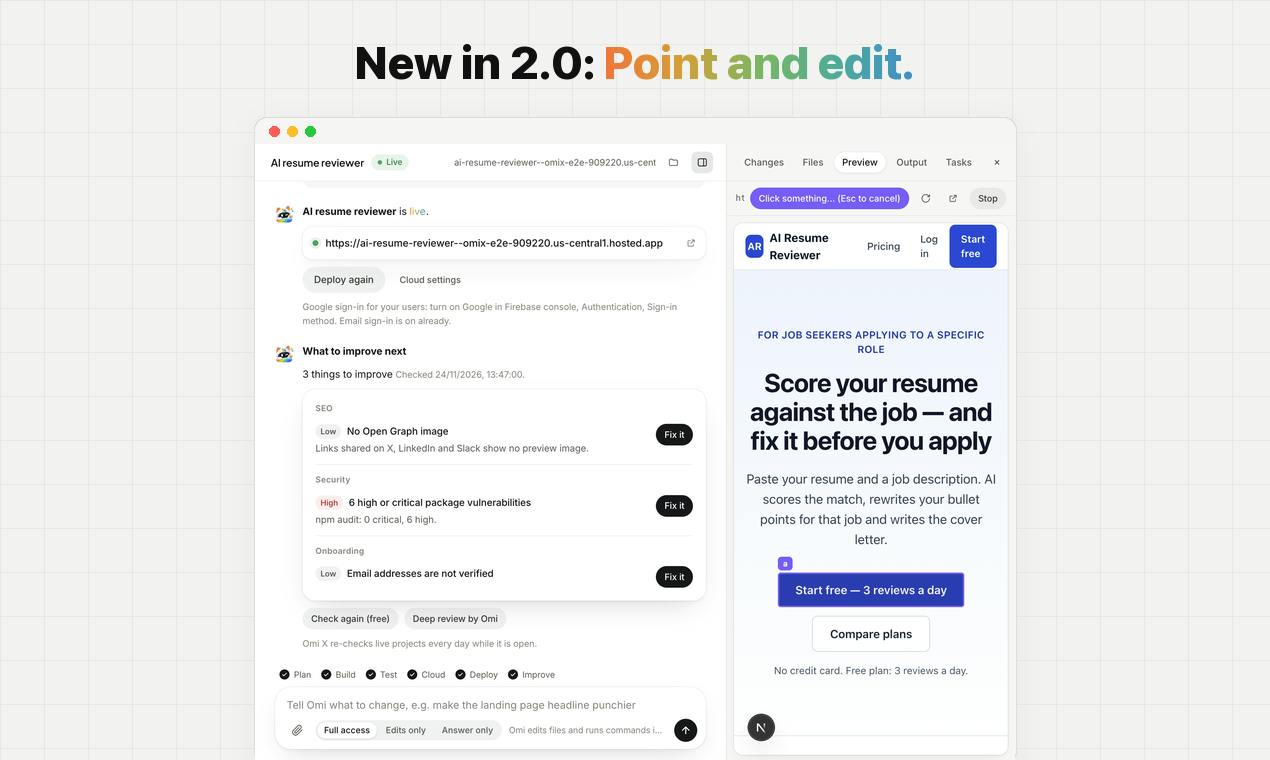
Omi X 2.0 uses point-and-click editing and bring-your-own-cloud deployment to make AI website building deliverable.
Omi X 2.0 is a Mac and Windows desktop app that upgrades from generating code snippets to directly delivering production-ready AI SaaS. Its three core changes: Point and edit lets you click any element of the running app to instruct AI changes; Open an existing project supports importing existing Next.js apps; and new projects start from a tested starter template. Unlike most platform-hosted AI website builders, Omi deploys to the user's own Google Cloud and Firebase — clear asset ownership but self-managed ops costs. Free plan, no credit card, build features from $29/month, targeting independent developers and small teams.
AI coding tools are evolving from "help you write code" toward "help you get your product running." Omi X 2.0, launched on Product Hunt, is a noteworthy product in this trend: it combines "point-and-click editing" and "deployment to your own Google Cloud and Firebase" into one package.
From Generating Code to Owning the Delivery Pipeline
Omi's positioning is straightforward — "Omi can build anything." According to the official description, Omi X 2.0 is a Mac and Windows desktop app whose goal is not to hand you a code snippet, but to build a production-ready AI SaaS directly under your own Google Cloud and Firebase accounts.
This choice sidesteps a common pitfall of most AI website builders: the generated output runs in the platform's own sandbox, making it hard to export and migrate. Omi keeps the infrastructure in the user's hands, so when the product is retired or you switch tools, the cloud assets still belong to you. For those serious about building products, this is more valuable than a few extra templates.
Firebase is a mobile and web application development platform provided by Google. Its core capabilities include real-time databases (Firestore/Realtime Database), authentication, Cloud Functions, static hosting, and Cloud Messaging. In Omi's scenario, Firebase primarily handles frontend hosting, user management, and backend logic (Cloud Functions), while Google Cloud provides underlying resources such as virtual machines, storage, networking, and IAM permission management. Deploying the app to the user's own Firebase project means data, authenticated users, and Cloud Functions all reside under the user-controlled GCP project, with billing going directly through the user's own billing account. The benefit of this model is clear asset ownership, easy migration, and auditability; the cost is that users must configure projects, enable APIs, and manage service account keys and security rules themselves.
Three Key Changes in 2.0
Point and Edit: Turning "Describe the Requirement" into "Show the AI"
The most core new feature in 2.0 is Point and edit. You can click any part of the running app and then tell Omi what to change. Compared to the traditional approach of "describing in natural language where you want changes," point-and-click eliminates the most laborious step — getting the AI to accurately understand which element you mean.
This interaction looks simple but is actually a compression of the AI coding workflow. Locating the problem has always been the efficiency bottleneck for these tools; point-and-click directly binds visual location to modification intent, reducing back-and-forth questioning and editing the wrong spot.
Import Existing Projects
Open an existing project lets you import your own Next.js application, with Omi handling testing, building, and deployment. This means Omi isn't just a toy for "starting from scratch" — it can also take over projects that have been in development for a long time and integrate with existing engineering CI pipelines.
Next.js is a full-stack framework based on React, offering file-based routing, server-side rendering (SSR), static generation (SSG), API routes, and incremental static regeneration, commonly used for building SaaS products with both frontend and backend. Omi's support for importing existing Next.js applications effectively means taking over a standard Node.js build pipeline: installing dependencies, running the build, producing deployable artifacts, and pushing them to target environments like Firebase Hosting or Cloud Run. This means Omi needs to be compatible with different projects' package managers, environment variables, and build scripts, with certain requirements on project structure. For users, whether import succeeds depends on whether the project uses build configurations Omi supports and whether environment variables and secrets have been correctly migrated.
New Projects Start from a Tested Starter Template
New projects are based on a tested starter rather than a blank canvas. For developers unfamiliar with full-stack scaffolding, this saves a lot of configuration time; for experienced developers, it's better suited as a usable baseline to layer their own work on top of.
A starter (starter template/scaffold) is a pre-configured project skeleton, typically including directory structure, dependency manifest, build scripts, base pages, and deployment configuration. Compared to a blank canvas, a tested starter ensures the initial state is buildable and runnable, reducing first-time failure rates caused by missing configuration. In AI website builders, starters have an additional significance: they define the technical stack boundaries for AI-generated code, so subsequent point-and-click edits and automated deployments run under a known framework and configuration, reducing uncertainty. For developers, choosing a starter essentially means choosing a set of default conventions; afterward, you can replace dependencies, adjust directories, or integrate your own CI on top of it.
Target Users and Practical Constraints
Judging from pricing and form factor, Omi X 2.0 targets independent developers and small teams. Plans are free with no credit card required, with build features starting at $29 per month. The combination of a desktop app plus bring-your-own-cloud accounts means it's better suited for people with some technical background who are willing to manage their own cloud resources, rather than complete beginners.
It's worth noting that deploying apps to your own Google Cloud and Firebase also means bills, permissions, and security configuration all fall on you. The tool simplifies build and deployment actions but doesn't eliminate the operational cost of cloud resources — this is something to think through before adopting it.
Bring Your Own Cloud (BYOC) is a model where users run services in their own cloud accounts, as opposed to SaaS platform hosting. Its advantages include data sovereignty, cost transparency, and avoiding vendor lock-in; the challenge is that users must handle IAM permissions, service accounts, API quotas, network security rules, and cost monitoring themselves. For independent developers, GCP's pay-as-you-go billing and free tiers need to be understood in advance to avoid unexpected bills. Omi simplifies build and deployment actions, but permission boundaries, key rotation, and anomaly alerts for cloud resources remain the user's responsibility — an operational burden that must be assessed before adopting a BYOC model.
Position in the Competitive Landscape
In the AI coding space, one category of products provides in-IDE assistance, another offers browser-based generative website building, and Omi takes a third path: desktop client + own cloud infrastructure + point-and-click interaction. It targets both "fast generation" and "deliverability" needs, but judging from the feedback on Product Hunt — 83 upvotes and 4 comments — the product is still early-stage, and its actual experience and stability need more user validation.
What's worth watching is whether interactions like Point and edit become standard in AI coding tools. If proven effective, it's likely to be followed by more similar products.
FAQ
What platforms does Omi X 2.0 support? Officially stated as Mac and Windows desktop apps.
Can I migrate an existing project into it? Yes, Open an existing project supports importing your own Next.js application, with Omi handling testing, building, and deployment.
Where are apps deployed? They are deployed under the user's own Google Cloud and Firebase accounts, not Omi's hosting environment.
How is it priced? Plans are free with no credit card required, and build features start at $29 per month.
One-line Summary
Omi X 2.0 pushes AI website building toward deliverability with point-and-click editing and bring-your-own-cloud deployment.
Paragraph Summary
Omi X 2.0 is a Mac and Windows desktop app that upgrades from generating code snippets to directly delivering production-ready AI SaaS. It has three core changes: Point and edit lets you click any element of the running app to tell the AI what to change, saving the hassle of describing locations in natural language; Open an existing project supports importing existing Next.js applications, with Omi handling testing, building, and deployment; and new projects start from a tested starter template. Unlike most platform-hosted AI website builders, Omi deploys apps under the user's own Google Cloud and Firebase accounts — clear asset ownership but self-managed operational costs. The free plan requires no credit card, build features start at $29 per month, and the target users are independent developers and small teams with some technical background.
Related articles

A 19-Year-Old's Rental Horror Story: Ceiling Collapse, Bug Infestation, and the Lessons It Taught Me
At 19, my first off-campus rental brought bug infestations, no heat, a collapsed ceiling, and a ruined laptop with no renter's insurance. Here are the hard-won lessons for first-time student renters.

Veda Nurse's Cranial Nerve Exam: Why ASMR Role-Play Is Going Viral
Bilibili creator Veda's cranial nerve exam ASMR video goes viral, blending humor and sensory triggers through nurse role-play. This article analyzes its unique appeal and the audience psychology behind ASMR role-play.

LG Cinebeam AI Review: 120-Inch Giant Screen + 3000 Lumens, a New Choice for the Living Room Theater
LG Cinebeam AI projector review: 3000 ANSI lumens, 4K, 100 inches from about 8 cm and 120 inches from about 18 cm. Built-in webOS, AI Concierge voice recommendations, AI Sound Pro 11.1.2 virtual surround, and Game Optimizer—positioned for fixed living room installation, complementing the portable Cinebeam S.