One-Click De-AI: Open-Source Cloud Skill Instantly Makes Website UIs Look Professional

A free open-source Cloud Skill cleans up AI-generated UI visual redundancies with one command, freeing websites from the "plastic feel."
The article introduces a free open-source Cloud Skill that claims to remove common purple gradients, glowing borders, and excess emojis from AI-generated websites with just one command, making interfaces clean and professional. Through before-and-after screenshots, the creator demonstrates the tool's "subtraction" effect: rather than regenerating pages, it cleans and normalizes existing styles, helping indie developers complete visual "denoising" while keeping AI generation speed. To get it, leave a comment saying "skill" on the creator's page for the installation guide. The article notes the information comes from a single short-video demo, so compatibility and long-term maintenance remain to be verified.
AI-generated websites always have that "plastic feel"—purple gradients, glowing borders, and unnecessary emojis all over the screen. A developer recently shared a free open-source Cloud Skill that can transform AI-generated UIs with just one command.
From "Obviously AI" to Professional UI
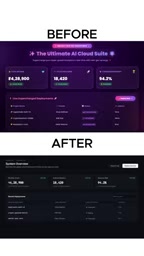
According to a YouTube creator's demo, he obtained a free open-source Cloud Skill while building a project and tried applying it to a website he had built. The before-and-after comparison is striking: before use, the site was filled with purple gradients, glowing boxes, and excessive emojis, making it obvious at a glance that it was AI-generated; after running the Skill, the interface became clean and professional, with the AI traces almost entirely gone.
The core value of this tool lies in "subtraction." It doesn't regenerate the page; instead, it cleans up and normalizes the visual redundancies commonly found in AI-generated code, so developers don't have to manually adjust styles line by line.
Cloud Skill is not a standalone application but a reusable instruction or script unit that encapsulates specific processing logic, typically available as a cloud-callable resource. In the context of AI-assisted development, a Skill is similar to a "plugin" or "skill pack" installed for AI coding assistants (such as Cursor or Copilot). After the AI generates code, the Skill can be invoked on demand to post-process the output. The Skill in this example specifically targets UI styles for cleanup; "open-source" means the code can be reviewed and modified, while "free" lowers the barrier to entry. Developers simply run one command in the project directory to trigger the Skill to scan and normalize existing style files, without needing to regenerate the entire page.
Before and After: Details Define Professionalism
The creator showed before-and-after screenshots of the same website with the Skill applied. You can see that the originally piled-on gradient backgrounds and glow effects were replaced with more restrained colors and borders, unnecessary emojis were removed, and the overall layout is closer to the design language of a mature product.

This change is especially meaningful for indie developers. During rapid prototyping, AI-generated UIs often get functionality working but are hard to ship directly; manual optimization, meanwhile, is time-consuming and laborious. This Skill offers a middle path: retain the speed advantage of AI generation while completing visual "denoising" with a single command.
The "visual redundancy" commonly seen in AI-generated UIs usually stems from pattern preferences in training data: large models tend to reproduce "modern" design elements that appear frequently in their training sets, such as purple-to-blue linear gradients, box-shadow glow effects, rounded corners combined with borders, and lots of decorative emojis. These elements aren't jarring on their own, but stacked together they create a strong "template feel" and "plastic feel." Professional UI design emphasizes restraint and consistency: limiting the number of colors, using neutral tones as a base, guiding visual focus through whitespace and hierarchy rather than glow, and removing decorations unrelated to function. The Skill's cleanup logic is based on these design principles, identifying and replacing these redundant styles through rules or heuristic matching to restore a clean interface.
How to Get This Open-Source Skill
The creator says the Skill can be used no matter what type of project you're building. To get it, leave a comment saying "skill" on the page, and he'll send the link and installation guide via direct message.
Based on the demo, the Skill has a very low barrier to installation and use, making it suitable for developers who want to quickly improve the quality of AI-generated websites. However, since the information currently comes only from a single short-video demo, its actual compatibility and long-term maintenance remain to be verified by more users.
Implications for AI Website-Building Workflows
This Cloud Skill reflects a broader trend: AI website-building tools are moving from "can generate" to "can deliver." Early users were satisfied with AI quickly producing pages, but as AI-generated content proliferates, "obviously AI" UIs have become a mark against professionalism.

For developers using AI coding tools like Cursor, this type of post-processing Skill can be embedded into existing workflows, automatically performing style cleanup after the AI generates code. It doesn't replace generation tools; rather, it fills in the last gap between prototype and shippable product.
It's worth noting that the original demo did not elaborate on the Skill's specific implementation details, the range of frameworks it supports, or whether it is open-source and auditable. Interested developers can obtain the installation guide through the creator's channel and evaluate it themselves.
Cursor is a code editor with an integrated AI coding assistant that supports generating, modifying, and refactoring code through natural language instructions, and has become popular among indie developers and the frontend community in recent years. In a typical AI website-building workflow, after developers use tools like Cursor to generate page structure and styles, they often need to manually adjust visual details to reach a shippable standard. The post-processing Skill intervenes precisely between "generation" and "publishing": it doesn't change functional code, only normalizes the style layer, so it can be seamlessly embedded into existing workflows. This layered approach of "generation + post-processing" also applies to code formatting, accessibility checks, performance optimization, and more—signaling that the AI website-building toolchain is evolving toward modularity and composability.
One-line Summary
A free open-source Cloud Skill cleans up visual redundancies in AI-generated UIs with one command, freeing websites from the "plastic feel."
Paragraph Summary
The article introduces a free open-source Cloud Skill that claims to remove common purple gradients, glowing borders, and excessive emojis from AI-generated websites with just one command, making interfaces clean and professional. Through before-and-after screenshots, the creator demonstrates the tool's "subtraction" effect: rather than regenerating pages, it cleans and normalizes existing styles, helping indie developers complete visual "denoising" while keeping AI generation speed. To get it, leave a comment saying "skill" on the creator's page and receive the installation guide via direct message. The article also notes that the information currently comes only from a single short-video demo, and its compatibility, implementation details, and long-term maintenance remain to be verified.
Related articles
VP ≠ VNP: A Major Breakthrough in Computational Complexity Theory
A study claiming to prove VP ≠ VNP over every field sparks heated discussion on Hacker News. This article analyzes the algebraic complexity background of VP and VNP, the proof approach, community controversy, and its potential impact on computational complexity theory.

Developer Naming Woes: The Technical Names That Drive Us Crazy
Why is technical naming so maddening? From Nginx and Vite to Qt and Sudo, a YouTube creator rants about the chaos of developer naming and pronunciation, revealing the tug-of-war between creators' intentions and community habits, and the cultural roots behind spelling traps like PyPI and GNOME.

Figma Workplace Scandal: Employee Sues CEO for Forcing Confrontation with Harasser
Figma and its CEO are sued by a current employee alleging sexual harassment and discrimination, and forcing the victim to confront her harasser. This article outlines the background, potential impact, and industry reflection.