One Line of Code Lets an AI Agent Learn to Watch YouTube

YouTube Transcripts MCP tool lets AI agents retrieve structured video transcript JSON in a single call.
This article introduces YouTube Transcripts, an MCP tool that lets AI agents like Claude, Cursor, and ChatGPT convert any YouTube video, Shorts, or channel subtitles into clean structured JSON via one tool call. Output includes full text, timestamped snippets, language, and metadata in a consistent format. It supports batch processing and integrates with Python, Curl, N8n, Make, and Zapier, has run nearly 500k times, and offers a free trial. The article covers its significance, use cases, and open questions.
Giving AI agents the eyes to "watch videos" is becoming a reality. An MCP tool called YouTube Transcripts claims that with just one call, it can turn the subtitles of any YouTube video, Shorts, or an entire channel into clean, tidy JSON data. From Claude to Cursor to ChatGPT, you only need to give the agent a video link, and the transcript will be returned to the conversation as the result of a tool call, ready to be summarized. This "plug-and-play" experience is changing how we build video data processing workflows.
Core Idea: Turning Transcript Retrieval Into a Single Tool Call
The core value of this tool lies in encapsulating the complex video transcript scraping process into a standardized MCP interface. MCP (Model Context Protocol) is becoming an important protocol for connecting AI agents with external tools, and this tool is conceived based on this protocol.
Its working method is very intuitive: when you ask Claude, Cursor, or ChatGPT to "summarize this video for me" and attach a link, the agent will proactively call the YouTube Transcripts tool. What is returned is not raw text that needs secondary parsing, but a line of structured JSON data. This line of JSON contains the complete transcript text, timestamped snippets, language information, and video metadata.
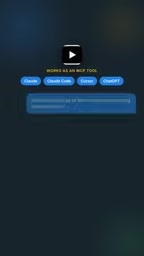
This means developers no longer need to worry about inconsistent transcript formats. Whether it's long videos, short videos, or the content of an entire channel, the output format is consistent. For AI agents that need to process large amounts of video content, this consistency is key to simplifying development workflows.
MCP (Model Context Protocol) is an open protocol proposed by Anthropic at the end of 2024, aimed at providing AI applications with a standardized way to connect to external data sources and tools. It adopts a client-server architecture: AI applications (such as Claude Desktop and Cursor) act as clients and call servers that implement the MCP protocol through a unified JSON-RPC interface, thereby accessing resources such as file systems, databases, and APIs. The core value of MCP lies in decoupling: developers do not need to write separate integration code for each AI platform; they only need to implement an MCP server once, and it can be used by all clients that support the protocol. Compared with traditional plugin or function-calling mechanisms, this greatly reduces the fragmentation of the tool ecosystem and is gradually becoming one of the de facto standards for AI agent tool integration.
Data Structure: Clean, Complete, Traceable
The tool's output design emphasizes that "each video is one clean line of JSON data." This sounds simple, but it is crucial for downstream data processing.
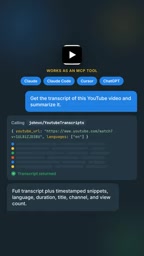
One line of JSON contains the complete transcript text, timestamped snippets, language, and video metadata. This structured design makes downstream tasks simple. For example, when you need to search for specific content by time period, timestamped snippets come in handy; when you need to distinguish multilingual videos, the language field can be used directly for filtering. Metadata helps the agent understand information such as the video's source and title, providing context for more complex reasoning.
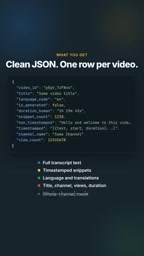
Behind this design philosophy is a deep understanding of "training data" and "video search" scenarios. For training data preparation, structured transcripts can be directly used as corpus input; for video search, the correspondence between timestamps and text is the foundation for building indexes. The tool developer has internalized these requirements directly into the output format.
Timestamped snippets usually refer to subtitles being split into several short sentences or phrases, with each snippet accompanied by start and end times (such as "start": 12.5, "end": 15.2, "text": "..."). This structure is crucial for video content retrieval: when a user searches for a keyword, the system can quickly locate the specific time point in the video where the word appears and generate a clickable jump link. In addition, timestamped snippets also facilitate extracting content by time window (such as "summarize the content from the 5th to the 10th minute"), or aligning with video frames for multimodal analysis. In training data preparation, timestamp information can help build more fine-grained supervision signals, for example by associating text snippets with corresponding visual scenes.
Batch Processing and Multi-Platform Integration
In addition to single calls, this tool also supports batch processing. You can send the agent a list of URLs or a channel handle and have it transcribe multiple videos at once. More importantly, it explicitly lists integration methods such as Python, Curl, N8n, Make, and Zapier.
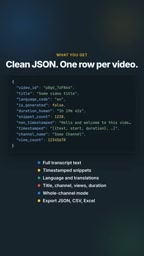
This multi-platform coverage shows that the tool's designers want it to be seamlessly embedded in various automation workflows. Whether it's code-driven Python scripts, the command-line tool Curl, or low-code automation platforms N8n, Make, and Zapier, all can serve as entry points for triggering transcription. For scenarios such as content reuse and video search that require large-scale video processing, batch capability is essential.
The material mentions that the tool has been run nearly half a million times. Although this number cannot be independently verified, it suggests a certain level of reliability in actual use. The tool also provides a free trial entry at apify.com/johnvc/youtubetranscripts.
Low-code automation platforms (such as N8n, Make, and Zapier) allow users to connect various applications and services by dragging and dropping through visual workflow editors. They usually provide nodes such as Webhook, scheduled trigger, and conditional branch, and MCP tools can be called as an "action" node within them. Taking N8n as an example, users can set up an HTTP Request node in a workflow pointing to the MCP server endpoint, or encapsulate the MCP tool as a custom node, thereby realizing an automated process such as "automatically transcribe new videos and store them in the database when a channel updates." This integration method significantly lowers the barrier for non-developers to use AI capabilities and also allows video transcript data to flow seamlessly into existing content management systems, data analysis pipelines, or marketing automation tools.
Significance for the AI Agent Ecosystem
The emergence of this tool reflects a trend in the AI agent ecosystem: encapsulating specific capabilities into standardized interfaces so that agents can combine complex functions through tool calls. Transcript retrieval may seem like a small feature, but it solves the first step for agents to "understand video content."
For developers building "video-watching agents," this means they no longer need to handle YouTube page parsing, anti-scraping strategies, and format conversion from scratch. The clean data returned by tool calls can directly enter subsequent summarization, question-answering, or retrieval processes. From the perspective of content reuse, one-click access to structured transcripts also greatly lowers the barrier for applications such as video-to-article and video-to-notes.
Of course, this approach of relying on third-party tools also has its boundaries. The tool's stability, its adaptability to changes in the YouTube platform, and the cost of large-scale use are all factors developers need to evaluate. But at least based on the current information, it provides a starting point worth trying.
Getting Started Suggestions and Use Cases
If you are building an AI agent that needs to process video content, you can evaluate this tool according to the following approach:
- Quick validation: Use the free trial quota to test the accuracy and format of single-video transcription in Claude or Cursor to see if they meet expectations.
- Workflow integration: If you already have an N8n or Make automation workflow, try integrating channel transcription for content monitoring or material collection.
- Data preparation: For teams that need to build video search or training datasets, batch transcription can significantly reduce the workload of data cleaning.
It is worth noting that the material does not provide details such as transcription accuracy, supported language range, and the ability to handle private videos or region-restricted videos. These are key pieces of information that need further confirmation before actual adoption.
One-line Summary
YouTube Transcripts MCP tool lets AI agents retrieve structured video transcript JSON in a single call.
Paragraph Summary
This article introduces an MCP tool called YouTube Transcripts, which through a standardized protocol allows AI agents such as Claude, Cursor, and ChatGPT to convert the subtitles of any YouTube video, Shorts, or entire channel into clean structured JSON data with just one tool call. The output includes full text, timestamped snippets, language information, and video metadata in a consistent format, making downstream processing easy. The tool supports batch processing of URL lists or channel handles and integrates with platforms such as Python, Curl, N8n, Make, and Zapier. It has been run nearly half a million times and offers a free trial. The article analyzes the tool's significance for the AI agent ecosystem, provides getting-started suggestions and use cases, and notes that details such as transcription accuracy and language support range still need confirmation.
Related articles

Gemini 4 Neon Leak: A Potential Strong Contender Against Opus 5.5
A Hacker News thread suggests Gemini 4 Neon looks like an Opus 5.5 competitor. This article unpacks the product positioning behind this community signal, shifts in the top-model competitive landscape, and what it means for developers' model selection strategy.

Claude Fable 5.2's Self-Authored Short Film 'Fable' Sparks Discussion
A short film 'Fable,' credited to Claude Fable 5.2 for script, visuals, and directing, appears on Hacker News. This article analyzes the significance of full-pipeline AI creation, community reactions, and what it means for content creators.

Anthropic IPO Pricing: A Signal of AI Giants Going Public
Anthropic's IPO pricing draws attention. This article analyzes its potential impact on AI industry valuation, commercialization paths, and the competitive landscape, and highlights public-market expectations and challenges for AI companies.