One Prompt to Cinematic Blender Scene: A Complete AI Director Workflow Breakdown

A four-tool AI pipeline turns one natural-language prompt into photorealistic cinematic 3D footage.
Bilibili creator Jax demonstrates an AI 3D production pipeline chaining GPT-6 Astra, Blender, Higgs Field, and Seedance 2.5. A natural-language concept is enough for Astra to generate a complete 3D scene with environments, characters, vehicles, and multi-angle camera plans. Blender exports a flat-shaded PlayBlast as a motion reference, which Seedance 2.5 then uses as a structural guide to produce photorealistic cinematic footage — yielding far greater controllability than text-to-video alone. The pipeline's core value lies in shifting creators from operating tools to expressing intent.
From One Sentence to a Cinematic Shot: AI Is Reshaping 3D Production
In traditional 3D filmmaking, a single train-chase shot can take a 3D artist hours of modeling, asset creation, scene layout, and animation work. The workflow that Bilibili creator Jax demonstrates in his video compresses all of that down to roughly a single prompt — just describe your idea in plain language, and the modeling, scene arrangement, and camera choreography are handled by AI.
The core logic of this pipeline is a complete decoupling of creative intent from technical execution. Creators no longer need to specify canyon wall textures, the color of a train, or exact camera coordinates. Instead, they hand a complete narrative concept to AI and let it figure out how to stage the scene in three-dimensional space. That shift — from "operating tools" to "expressing intent" — is the most important thing to notice about this video.
Workflow Breakdown: How Four Tools Work Together
The entire pipeline is a chain of four components, each with a distinct role:
- GPT-6 Astra: Interprets the creative concept and generates a 3D base scene, including environments, characters, vehicles, and even multiple pre-set camera positions.
- Blender: Serves as the hub for viewing and exporting the 3D scene, communicating bidirectionally with Higgs Field via a plugin.
- Higgs Field: The platform that handles scene transfer and the video-generation workflow.
- Seedance 2.5 (also referred to in the video as "C-Dance 2.5"): Converts the 3D motion reference into photorealistic, cinematic footage.
It's worth noting that Jax's verbal references to the last tool fluctuate between "Cedence 2.5," "Seedance 2.5," and "C-Dance 2.5" throughout the video — context makes clear these all refer to the same video generation model, Seedance 2.5.
Step One: Connecting Blender to Higgs Field
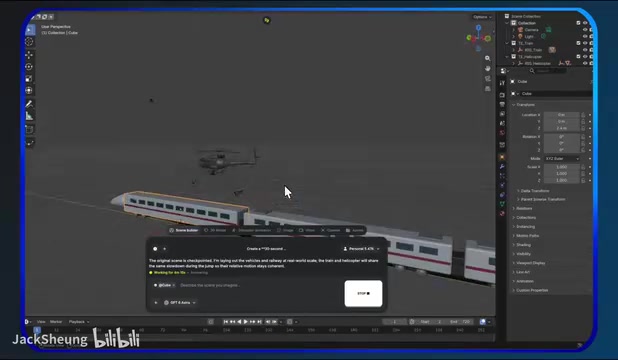
This step only needs to be done once. In the Higgs Field dashboard, find the Blender option in the plugin section at the top, download the plugin file, and drag it directly into Blender's add-on installation area to confirm. Blender will then prompt you to log in to Higgs Field and authorize the connection; once complete, the Higgs Field toolbar embeds directly inside the Blender window. This link is what allows scenes to be sent back and forth between the two tools.
How AI Turns an "Idea" Into a "Scene"
After selecting GPT-6 Astra as the model in Higgs Field, Jax describes the scene using only the concept itself — no technical parameters, no measurements, no camera coordinates. After clicking generate, Astra's processing happens in two stages.
First, it breaks down the idea: the action, the environment, and the spatial relationships between characters, the train, and the helicopter. Then it builds the actual scene — the train lands on its tracks, canyon terrain rises on both sides, rock formations, rail structures, and surrounding landscape all fall into place, with the character already positioned on the roof ready to run. This is precisely the phase that consumes the most time in traditional production, and AI delivers the fully assembled result directly into the creator's hands.
Astra doesn't stop at a static scene. It also plans multiple camera angles, developing the concept into a genuine shot sequence: the character sprinting along the train roof, a helicopter closing in from behind, and the moment of a leap toward it. In other words, the complete visual logic of the action is already laid out in rough 3D form before a single frame of photorealistic footage has been generated.
The Critical Intermediate Output: The PlayBlast Motion Reference
Export settings require some care once the scene is built. Jax sets the resolution to 1920×1080, frame rate to 24fps, media type to video, and the container to MPEG-4. He specifically emphasizes keeping these settings "clean and standard," avoiding unusual parameters that could confuse the downstream video model.
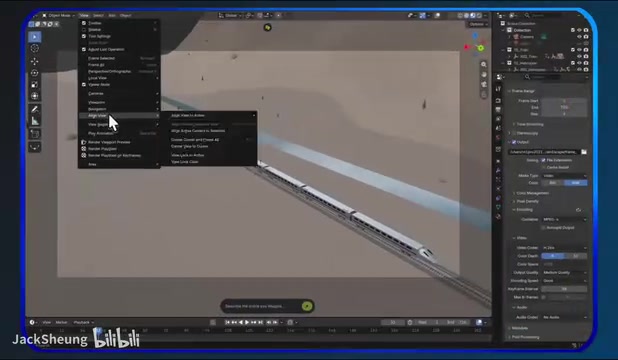
From the Render menu, he selects PlayBlast, which renders the full 3D motion using flat shading — no lighting, no textures — and saves it as a video file. This rough, low-poly video is the "motion reference." It precisely records the position of every element and how each one moves frame by frame. This step is the technical linchpin of the entire pipeline: it converts abstract motion intent into a concrete visual baseline that the video model can follow.
PlayBlast is a professional term from 3D animation, originating as a named feature in Autodesk Maya and later adopted by Blender and other software. It is essentially a "fast preview render": it skips global illumination, texture maps, and shadow calculations, recording the 3D geometry visible in the viewport as a video using flat shading. The resulting footage has flat colors and hard edges — it looks like colored building blocks in motion — but that is exactly its value. With all visual noise removed, motion paths, spatial relationships, and timing are preserved without ambiguity. In traditional animation and VFX pipelines, animators produce a PlayBlast for the director to review before committing to expensive final renders, confirming that the motion timing is right. In this AI workflow, PlayBlast plays the same role: it is a motion specification that the AI video model can "read," rather than the final image intended for an audience.
From Grey Model to Photorealism: Teaching the Reference to "Perform"
After importing the PlayBlast back into Higgs Field and opening the video generation workflow, Jax does something with a personal touch: he uploads a photo of himself, so the character sprinting along the train in the final shot is genuinely him rather than a generic AI-generated face.
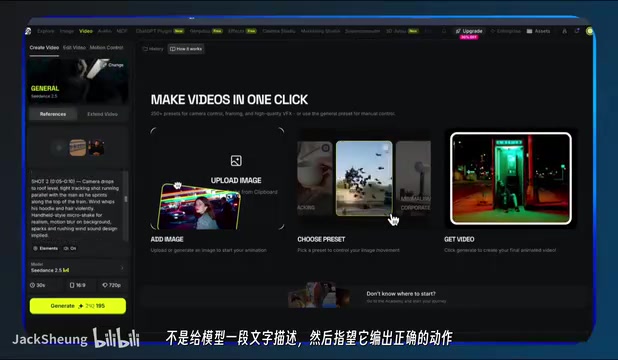
This reveals a fundamental difference from pure text-to-video generation. In the past, giving a model a text description meant "hoping it would invent the right motion." Seedance 2.5, by contrast, holds a real visual reference. It uses the motion reference to understand timing, camera paths, and how the character and helicopter should move relative to each other. This constraint dramatically improves the controllability of the output.
In the final footage, the rough grey previs models become a photorealistic canyon; the placeholder geometry becomes a real train racing along the tracks, kicking up clouds of dust; the character runs across the roof, the helicopter enters frame exactly on cue and in exactly the position Astra planned, with the jump timed precisely.
Seedance 2.5 falls into the video-to-video (Video-to-Video) application of video generation models, which differs from text-to-video (Text-to-Video) at a fundamental level. Text-to-video models must infer spatial layout, motion speed, and camera paths from language descriptions alone, with results constrained by the model's interpretation of text and stochastic sampling — controllability is limited. When a 3D motion video is used as a conditioning input, the model's task becomes "stylizing the image while preserving the motion structure" — translating low-poly geometric motion into photorealistic imagery. This is known in the industry as "structure-guided generation" or "motion transfer." Uploading a face photo adds an identity constraint, anchoring the model's generation of character appearance to that photo and reducing random facial drift — an approach that shares conceptual lineage with recent techniques such as IP-Adapter and ControlNet.
Versatility and Limitations: Beyond the Chase Scene
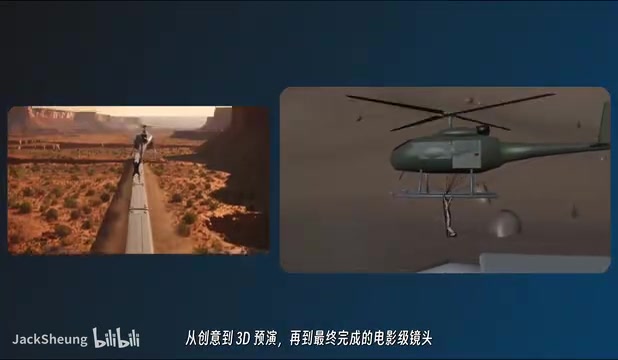
Jax specifically notes that this workflow isn't limited to train-and-helicopter chase sequences — it applies to essentially any shot where "3D matters more than text descriptions." When a scene involves complex spatial relationships and motion choreography, repeatedly trying to describe it in words is often far less efficient than simply building a 3D motion reference.
Looking at the big picture, this workflow delivers value in three ways: Astra turns an idea into a usable 3D scene, Blender handles viewing and export, and Seedance 2.5 converts the staged scene into a final cinematic result — no stunt crew, no manual keyframing, no repeated attempts to guess the right motion from text alone.
That said, as a demo video with an obvious promotional angle, the results shown have likely been curated. Questions around real-world stability, the model's limits when handling complex scenes, and the cost of generation are not addressed in depth. For creators who want to experiment, the underlying approach — 3D previs combined with video generation — may be more transferable than the specific tools used to implement it.
Related articles

Amphibious Transforming Drone: Beyond 100x Power Savings, What Are the Real Needs?
Is the amphibious transforming drone just a gimmick? Starting from the 100x power difference of the M4 Morphobot, explore real application scenarios and thesis topic ideas, analyzing boundary conditions where pure drones and pure ground robots both fail.

Warhound Raises $200 Million: Genetically Engineered "War Dogs" Paired with Anduril Gear
Warhound raises $200M, backed by Ben Lamm and Palmer Luckey, to genetically engineer dogs for military and law enforcement use and equip them with Anduril gear. This article analyzes its technology direction, funding logic, and ethical controversy.

Claude API Comes to Google Cloud: IAM Integration and SDK Access Guide
Anthropic hosts the full Claude API on Google Cloud with IAM-controlled permissions and unified billing. This guide covers the Vertex AI and Anthropic-hosted entry points, IAM role configuration, and SDK access.