Open-Source Coding Tool Pi 1.0 Hands-On: Connecting Chinese AI Models for Pennies

Pi 1.0 now works with Chinese AI models like DeepSeek — full tasks for under one US cent.
After upgrading to version 1.0, the open-source coding tool Pi lets developers in China skip overseas subscriptions entirely. One npm command installs it (note the new package name and Node 22.19+ requirement), and a single environment variable connects Chinese model APIs like DeepSeek, Kimi, or Qwen. Three config settings — interface mode, default model, and thinking level — should be tuned first. A real FizzBuzz test using DeepSeek's pay-as-you-go API completed in 9 seconds and cost less than $0.01, with prompt caching making costs drop further as tasks progress.
Want AI to help you write code, but stuck because you can't pay for overseas subscriptions — while sitting on an API key from a Chinese AI platform with nowhere to use it? That's the reality for many developers. Since the open-source coding tool Pi upgraded to version 1.0, connecting it to Chinese models like DeepSeek to run full tasks is completely viable, and the cost is just a few cents. Based on a hands-on test by a Bilibili creator, this article walks through the entire process: upgrading, configuring, and connecting Chinese AI models.
One Command to Upgrade — But Watch Out for the Package Name Change
Upgrading Pi itself only requires typing a single npm install command in your terminal — it's done in about two minutes. npm is the package manager used to install command-line tools like this, and the package name follows the install command.
Two things to watch out for. First, your Node version — Node is the underlying runtime that allows these tools to run, and you need at least version 22.19. The test machine used 24.11 and worked fine. Second, the package name is a trap: the old package was under the author's personal account and has been officially marked as deprecated. The new package name uses the company name as its prefix. If you search for the wrong one, you'll likely end up installing the old version.
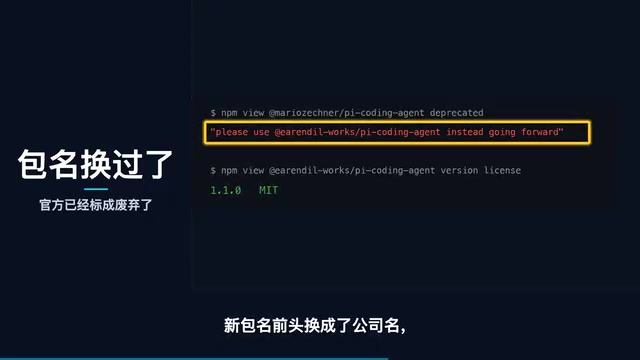
After installation, check the version number. If it went from 0.85 to 1.1, the upgrade was successful.
Note on npm: npm (Node Package Manager) is the most popular package manager in the JavaScript ecosystem and is installed alongside Node.js. Developers use it to install, update, and manage command-line tools and libraries. The
-gflag innpm install -g <package>means a global install — the tool becomes available from any directory on your system. Without-g, it only applies to the current project directory. Package name prefixes typically start with@orgname/, for example migrating from a personal account'spito a company account's@company/pi— a common pattern for organizational migrations on npm. When searching on the npm website, the old package page will show a prominent "deprecated" warning, with a link to the recommended new package.
Three Settings to Adjust on Day One
Pi 1.0 changed a few default behaviors. Getting these three settings right after installation will make the experience much smoother.
Interface Mode
Starting with 1.0, the default is a fullscreen interface. Fullscreen mode takes over the terminal's scroll history, meaning you can't scroll back to previous output. The author responded in a community post saying this was to fix some issues with Windows terminals, but the old mode isn't going away. If you prefer the classic feel, change the interface mode from fullscreen to regular in the config file, and the scrollbar comes back.
Default Model
The same config file has two key lines: one specifies which platform to use by default, and one specifies which model. To switch temporarily, add a parameter when launching Pi; you can also switch via keyboard shortcut once inside the interface.
Default Thinking Level
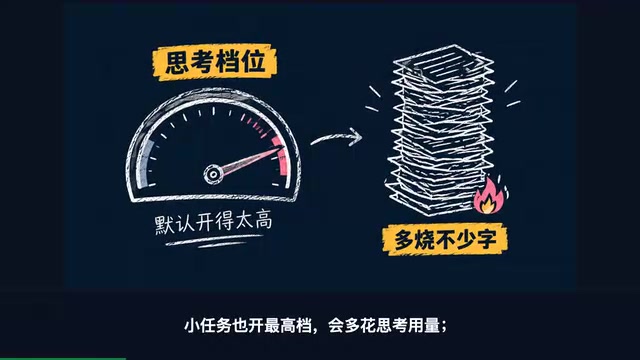
The status bar shows the current thinking level. If it defaults to the highest setting, even small tasks will trigger maximum reasoning — wasting time for no reason. It's worth turning this down to a lower level that your model supports. Most everyday tasks don't need deep thinking.
Connecting DeepSeek and Other Chinese Models: One Environment Variable
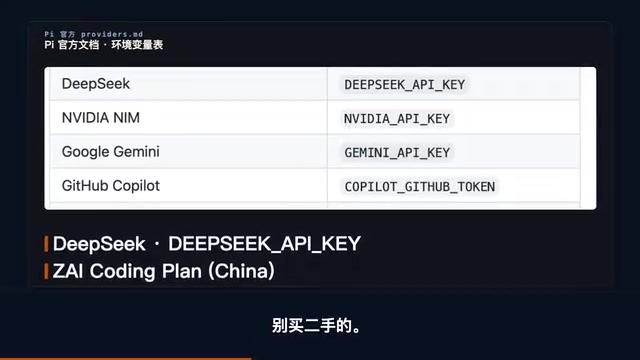
Connecting a Chinese model API key requires one extra step. The official documentation includes a table of environment variable names — one variable per platform. To use a given platform, simply export that platform's key in your terminal.
Beyond the international providers, the table lists a full row of Chinese platforms where you can register and top up directly, with DeepSeekAd (深度求索) at the top — just one variable name to set. Further down are monthly subscription services, Kimi, MiniMax, Alibaba's Qwen, Xiaomi's model, and more. Essentially all the major Chinese channels are covered.
Note on
export:exportis the Unix/macOS terminal (Bash/Zsh) command for setting environment variables, formatted asexport VARIABLE_NAME=value. Environment variables are OS-level key-value pairs readable by any program running in the same terminal session — that's how Pi picks up your API key and forwards it to the corresponding platform. Note that usingexportdirectly in the terminal only lasts for the current session; it disappears when you close the terminal window. For a permanent setting, append the command to your~/.zshrcor~/.bashrcshell config file so it loads automatically. On Windows, the equivalent is adding it via System Properties → Environment Variables, or using$env:VARIABLE_NAME='value'in PowerShell.
Running a Real Task: Done in 30 Seconds, Costs Pennies
Seeing the list of supported platforms is one thing — the creator tested it for real. On a Mac, they created a fresh empty directory and asked Pi to write a FizzBuzz program, then write tests and run them. FizzBuzz is a classic coding interview problem: print Fizz for multiples of 3, Buzz for multiples of 5.
Two channels were tested back to back:
- Subscription plan with DeepSeek model: Completed in 30 seconds. Pi read the directory, understood the task, wrote two files, and ran the tests — all on its own. The task consumed approximately 16,000 tokens (tokens are the unit models use to measure text input and output), counted against the subscription quota with no extra charge.
- DeepSeek official pay-as-you-go key: Same task completed in 9 seconds, tests passed. The actual bill: $0.0064 USD — less than five Chinese fen (under one US cent).
The official pay-as-you-go channel also includes prompt caching — caching lets the model remember content it just processed, so subsequent steps aren't billed again, making each task progressively cheaper as it goes. All costs and usage are displayed in the status bar at all times.
Note on Tokens and Prompt Caching: A token is the basic unit large language models use to process text — think of it as a "word fragment." One English word typically equals 1–2 tokens; one Chinese character is roughly 1–2 tokens as well. Models charge separately for input and output tokens, with input usually cheaper. Prompt Caching is a cost-reduction feature now offered by most major platforms: when a model repeatedly processes similar prefix content within a session (such as system prompts or existing code files), the platform caches those computation results. Subsequent requests that hit the cache are charged at a much lower rate, or even free. For coding tools like Pi that repeatedly read project files, cache hit rates tend to be high, meaning real bills are often far lower than estimates based on raw token counts.
Caveats and Limitations
A fair assessment requires clear boundaries. This FizzBuzz test proves that Pi can connect to Chinese models, run successfully, and do so cheaply. It does not prove that Chinese models are as capable as the most expensive flagship models — complex, large-scale tasks will still cost more, and model selection matters.
A few other details worth keeping in mind:
- For official pay-as-you-go API keys, register and top up through official channels. Don't buy secondhand keys.
- Whether Chinese npm mirror registries have synced the new package name was not verified, but a direct connection to the official registry works fine.
- Pi's slash commands aren't all-powerful. The creator tried a slash command to check usage stats, and Pi treated it as a natural language query and went looking through the docs — though it did end up finding the usage info anyway.
Quick-Start Checklist
Here's the complete step-by-step you can follow:
- Run a single
npm installcommand to upgrade — make sure to use the new package name; - Open the config file and adjust these three settings: interface mode, default model, and default thinking level;
exportone Chinese platform's API key into your terminal;- Throw a real task at it to verify everything works.
For developers locked out by overseas subscription barriers, the combination of Pi 1.0 and a Chinese model API key offers a low-cost, fully viable path forward.
Related articles

WebMCP: Every Website as Its Own MCP Server, So AI Agents No Longer Rely on Screenshots
WebMCP lets websites expose tools via the document.modelcontext API, becoming directly callable MCP servers. This article explains its architecture, the Claude Code remote-debugging demo, Chrome's current support stage, and its impact on the agent ecosystem.
MCP Protocol-Driven AI Testing Agent: …
MCP Protocol-Driven AI Testing Agent: Automated Execution, Diagnosis, and Reporting
Introduces an MCP protocol-based AI testing Agent: using FastMCP to expose PyTest execution tools, running Llama 3.2 3B locally with Ollama for failure diagnosis, automatically generating timestamped reports and comparing them with historical results to create a closed loop of test execution, root cause analysis, and fix tracking.

AI Agent Draws an Architectural Elevation in 15 Seconds — Open-Source Drawing Software Rewritten by AI
An AI Agent controls open-source drawing tool VectorCraft via MCP Server, executing 1,077 commands with zero errors to draw an architectural elevation in 15 seconds and export editable SVG/PDF.