Open-Source Skill Tested: One Sentence Lets AI Auto-Dub and Animate a Video

An open-source Skill rule set from a Bilibili creator that lets AI handle scriptwriting, dubbing, animation, and final cut in one command.
The Ali Animation Machine is a Skill rule set open-sourced by Bilibili creator Ali. With a Skill-capable AI Agent, it automates video production from topic to final cut. Animations are built with React and Remotion, keeping source code and assets local for editing rather than a locked-down MP4. Installation only requires giving the Agent the repo link to set up the environment; the only manual step is entering the Doubao TTS 2.0 API Key and voice ID, and model 2.0 must be activated or the key fails. Two manual confirmations (script and low-res preview) reduce wasted rendering. The author admits quality depends heavily on the model: Opus 5.5 performs best, some models are stiff or ignore instructions, and it's still short of fully automatic premium output.
AI video generation has become fiercely competitive, yet most solutions still stop at "generating a clip." But a complete video needs a script, voiceover, animation, subtitles, sound effects, and final rendering—all stitched together manually. The "Ali Animation Machine" Skill, open-sourced by Bilibili creator Ali, aims to connect the entire pipeline with a single command: you give a topic, and the AI writes the script, dubs it, writes animation code, and exports a finished video.
This tool doesn't depend on any specific platform—as long as your AI Agent supports the Skill mechanism, it can run. Based on the author's configuration tutorial, this article breaks down its operating logic, configuration essentials, and actual performance boundaries.
What Is the Ali Animation Machine: Packaging the Video Production Workflow as a Skill
The Ali Animation Machine is essentially a "production rule set" used with AI Agents that support Skills. Mainstream Agent tools can all integrate it; it tells the AI: how to organize explanatory content, which TTS service to use for dubbing, which framework to use for animation code, and where to put exported files.
The animation part is built on React and Remotion, with all source code and assets kept locally for later modification. This is fundamentally different from platforms that generate videos in one shot—what you get is an editable project file, not a locked-down MP4.
The author gives an intuitive demo in the video: given only a topic, the AI completes everything from scriptwriting to final cut. This "one sentence to a finished video" experience is the most direct selling point of the Skill-style packaging.
The Skill mechanism is a way in the AI Agent field to encapsulate a model's ability to execute complex tasks according to preset rules. Simply put, a Skill is a set of structured instructions and tool-calling conventions that tell the Agent what steps to follow, which external tools to call, and what format to produce in a given scenario. It differs from ordinary prompt templates: a Skill usually packages workflow specifications, file-operation conventions, and error-handling logic, enabling the Agent to reliably complete multi-step tasks. Currently, mainstream Agent tools like Claude and Cursor all support some form of Skill or custom-instruction mechanism, which is the prerequisite for the Ali Animation Machine to run cross-platform—it isn't tied to a specific model, as long as the Agent can read and follow this rule set.
Remotion is an open-source framework for writing videos with React. Traditional video production relies on editing software, whereas Remotion renders each frame as a React component; developers can control animation, timelines, and composition logic with JavaScript/TypeScript, and ultimately render frame by frame through a browser rendering engine and encode into MP4. Its core advantage is "video as code": animation parameters, duration, and transitions can all be precisely controlled programmatically, and it's easy to version and reuse. The cost is dependence on a Node environment and a headless browser, with rendering speed affected by machine performance. React is the most popular UI framework in the front-end world, known for componentization and declarative rendering—Remotion is precisely a video layer built on top of it.
Installation: Let the Agent Handle the Environment Itself
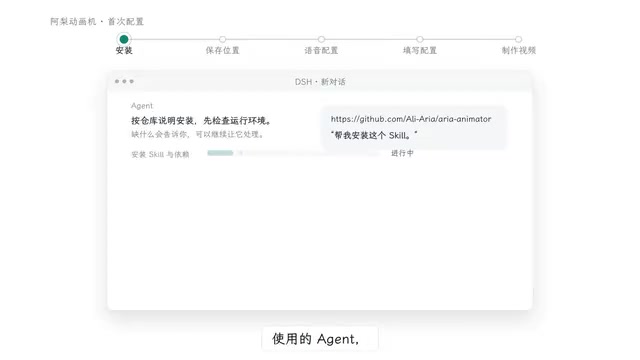
The first configuration step is almost counterintuitively simple—throw the GitHub repository link to the Agent, say "help me install this Skill," and leave the rest to it. The Agent will complete the installation according to the repository instructions and check the runtime environment; if any tool is missing, let the AI handle it.
During installation, you'll be guided to choose where to save videos. The author recommends creating a dedicated video folder, where a shared library (Shared) holds dubbing configuration, fonts, and cache, and each video has its own folder storing script, assets, source code, and final cut separately. The benefit of this structure is convenient asset reuse, and individual video projects won't pollute each other.
The environment check deserves extra attention. Remotion depends on the Node environment and browser rendering capability, and TTS needs network access and keys—any missing link will stall at the compositing stage. Letting the Agent self-check is easier than manual troubleshooting, but the premise is that the Agent itself has permission to execute local commands.
Dubbing Configuration: The Only Mandatory Manual Step
Throughout the entire workflow, the only thing the user needs to fill in by hand is the dubbing configuration. The open-source version connects to Doubao Speech Synthesis 2.0 by default, requiring two things: the speech service's API Key and a corresponding system voice ID.
The author also leaves room for substitution—you can switch to other platforms or deploy a local TTS model. He previously used a local combination of FasterWhisper plus CosyVoice 1.7B, but synthesis was rather slow, so he largely moved to third-party platforms. In testing, Doubao TTS performed best overall for his use cases.
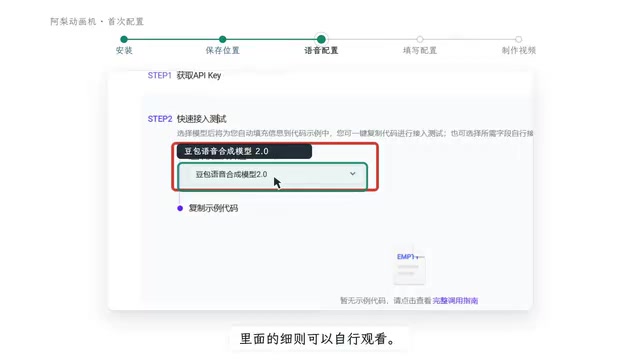
The configuration path isn't complicated: go from the link provided in the repository to the speech console, log in and complete real-name verification, enter the speech synthesis page—new users get a gift quota of 20,000 characters, enough for daily use for a while. Next, activate the speech synthesis model 2.0, get the key from the API call page; then preview and pick a voice from the system voice list, and copy the voice ID.
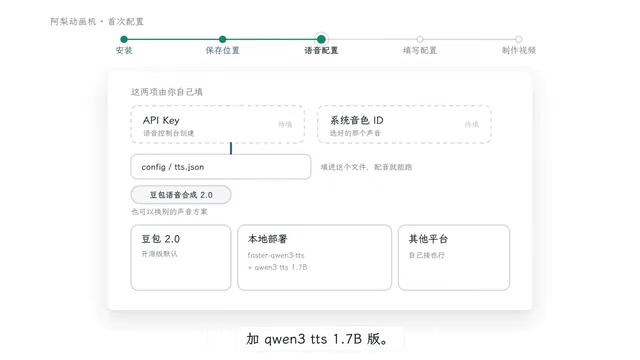
Back in the Agent tool, have the AI open the local speech configuration file and paste in the Voice ID and API Key. The author specifically reminds: the speech synthesis model 2.0 must be activated, otherwise the key won't work. This is the pitfall newbies most easily fall into.
Doubao Speech Synthesis 2.0 is a TTS service provided by ByteDance's Volcano Engine, a cloud-based speech synthesis solution. Users authenticate and call via API Key, billed by character count, with new users usually getting a free quota. TTS (Text-to-Speech) converts a spoken script automatically into audio, a key step in automated video workflows that replaces human voiceover. The advantage of third-party cloud TTS is stable audio quality, low latency, and no local compute needed; by contrast, locally deployed TTS models like CosyVoice are free and keep data local, but require a GPU and synthesize slowly—suitable for privacy-sensitive or batch-processing scenarios. Choosing between them is essentially a trade-off among cost, speed, audio quality, and privacy.
Actual Generation: Two Confirmations, Preview in Low-Res First
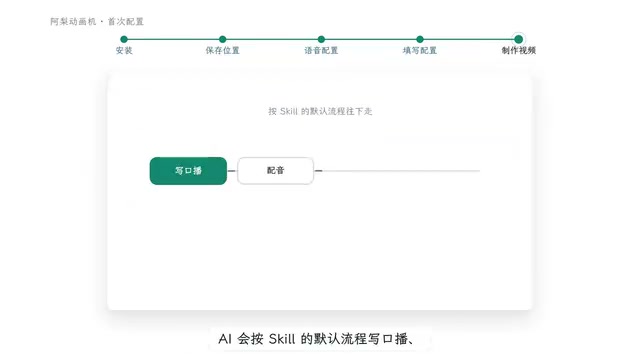
After configuration, open a new chat window to make a video. Taking DeepSeekAd as an example, reference the Skill, provide a topic or text/image materials, and say "help me make a video"; the AI will follow the Skill's default workflow to write the voiceover script, use the configured dubbing and fonts, and arrange visuals and sound effects.
Two manual confirmations are set in the workflow. The first checks the voiceover script; after confirmation, it begins synthesizing the dubbing and producing the video; the second checks the complete low-res preview, and only after confirmation renders the final version. The low-res preview includes the complete timeline, dubbing, enabled subtitles, and sound effects, at a default 16:9, 960x540 resolution.
This design is pragmatic—video generation has high waiting costs, and viewing the low-res version first avoids wasting rendering time in the wrong direction. The two confirmation points also happen to sit at the two key nodes of "content" and "final cut."
Performance Boundaries: Model Capability Determines the Ceiling
The author candidly notes that results vary noticeably across models and Agents. His personal best experience was with Opus 5.5; while GPT-Soul 6.1 delivered fast, its motion effects were rather stiff. In other words, the Skill provides workflow specifications and a code framework; the final visual quality still depends on the underlying model's code generation and content organization capabilities.
Another real case is "That Damn Big Fat Fish"—the AI didn't follow the Skill instructions, and the final result deviated from expectations. This shows the rule set is not a hard constraint; the model's adherence to instructions directly affects output stability.
For those who want to try it, a reasonable expectation is: this tool can significantly compress the mechanical workload of video production, letting you focus on topic selection and review, but it's still some distance from "fully automatic premium output." Its value lies in handing repetitive labor to AI while leaving judgment calls to humans.
One-line Summary
An open-source Skill rule set from a Bilibili creator that lets AI handle the entire pipeline from script and dubbing to animation and final cut with a single command.
Paragraph Summary
The Ali Animation Machine is a Skill rule set open-sourced by Bilibili creator Ali. Used with an AI Agent that supports the Skill mechanism, it enables automated video production from topic to final cut. It writes animations based on React and Remotion, keeping source code and assets local for further modification rather than a locked-down MP4. Installation just requires tossing the repository link to the Agent for it to configure the environment itself; the only manual input is the Doubao Speech Synthesis 2.0 API Key and voice ID, and model 2.0 must be activated or the key is invalid. The workflow sets two manual confirmations—voiceover script and low-res preview—to reduce rendering costs in the wrong direction. The author admits final quality highly depends on the underlying model's capability: Opus 5.5 performs best, while some models produce stiff motion or even fail to follow instructions, leaving a gap before fully automatic premium output.
Related articles

Workbuddy for Absolute Beginners: How a Desktop AI Agent Fits Into Real Workflows
A beginner's guide to the Workbuddy desktop AI agent: installation, claiming credits, file management, and building automated workflows—compared with CodeX for fit and cost, helping professionals shift from AI question-askers to AI managers.

OpenAI's New Agent Stack: Computer Use, Decisions API, and Ultra-Fast Workflows
OpenAI Dev Day unveiled a new agent stack: Computer Use outperforms humans, Decisions API delivers ultra-low-latency classification via Luna, Agents API opens the same Computer Use capabilities, and GPT-6.1 Sol costs only one-seventh of Astra. Core updates, benchmark data, and developer insights.

Liang Wenfeng Open-Sources DeepInfo Inference Framework, Takes On U.S. Ban
DeepSeek open-sources its DeepInfo inference framework after its models, featuring GPU/CPU cross-pipelining, small-model prediction with large-model verification, and full Huawei Ascend and NVIDIA chip support—facing the U.S. federal ban head-on. This article analyzes its significance for AI deployment and open-source strategy.