Open WebUI in Practice: Building a Custom Programming Agent from Scratch
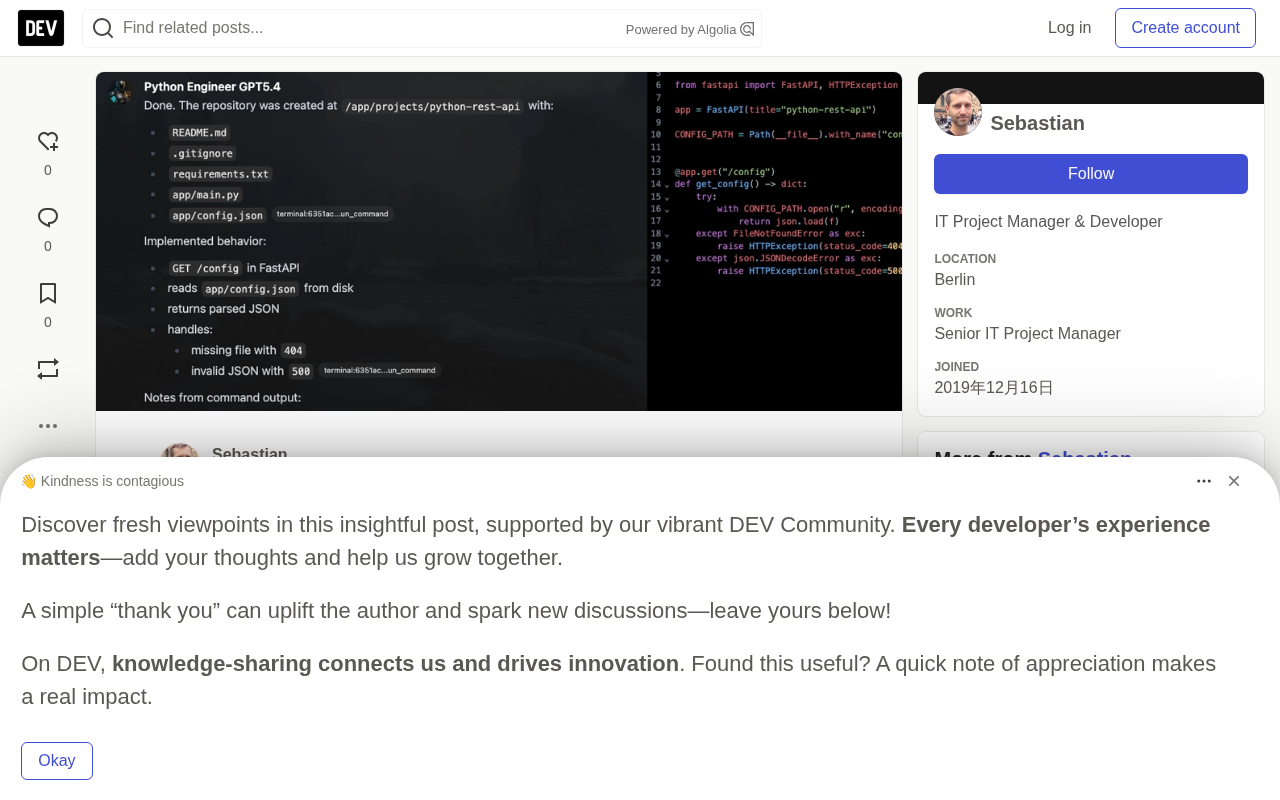
Build a Python coding Agent in Open WebUI, with experiments showing model capability — not framework config — determines Agent success.
Using Open WebUI v0.9.6, this article demonstrates how to build a Python programming Agent that can make real codebase changes, covering base model selection, structured system prompts, memory activation, capability configuration, and open-terminal Docker integration. The core insight comes from a head-to-head experiment: with gpt-5.4-nano, the Agent had a complete toolchain but repeatedly failed to actually execute commands, only describing them; with gpt-5.5, the same framework completed project creation, service startup, and curl testing in one shot — proving that Agent reliability hinges on the underlying model's tool-calling and instruction-following capabilities, not the framework itself.
Open WebUI has evolved far beyond its origins as an Ollama chat interface — it's now a full-featured Agent platform that connects to any OpenAI-compatible API endpoint. Its capability matrix spans RAG knowledge base retrieval, image and text context, persistent memory, and the newly added Terminal feature, which connects to Docker containers to execute arbitrary code. Together, these capabilities give Open WebUI genuine end-to-end Agent functionality.
This article is based on Open WebUI v0.9.6. It walks through the complete process of building a Python programming Agent capable of making real changes to a codebase, and uses two comparative experiments to reveal a critical fact that many people overlook: an Agent's execution power depends largely on the underlying model itself.
Defining Agent Requirements and Choosing a Model
The first step in building an Agent isn't writing configuration — it's defining the scope of requirements. The goals for this programming Agent are deliberately modest:
- Base model: A reasonably recent model with solid coding capabilities
- Custom prompt: Play the role of a senior Python full-stack engineer with a disciplined, structured working methodology
- Tools: No special tools
- Knowledge base: No local proprietary knowledge needed
- Memory: Sessions should persist — for example, remembering tech stack decisions
In Open WebUI's GUI, custom models are created via Workspace → Models. For the base model, the author chose the cost-conservative gpt-5.4-nano — a choice that seemed frugal at the time but turned out to be the key variable influencing the results.
For the system prompt, the author used another LLM to generate a richly detailed one, breaking down the traits of a senior engineer into four dimensions: the clarity of a systems thinker, the discipline of a mechanic, the memory of an archivist, and the rigor of an empiricist. The prompt explicitly instructs the model to write idiomatic, strongly-typed, maintainable Python code; to prefer pragmatic solutions over trendy complexity; and to state assumptions before designing anything non-trivial. This kind of structured prompt is far more effective than a vague "you are a senior engineer."
Memory and Capability Configuration
Open WebUI has memory disabled by default. To enable it, click your avatar → Settings → Personalization and toggle the switch. Once active, interactions can store persistent facts, which you can list and edit at any time.
Capabilities define which tool calls are permitted. When enabled, they expand the system prompt or append conversation metadata. Open WebUI's Docker image already includes most of the libraries required for built-in tools, and the container can directly run code interpretation and access tasks, notes, and memory. However, web search and Terminal access still require additional configuration — and Terminal is by far the most complex to set up.
Open WebUI's "memory" feature is implemented as External Long-term Memory, distinct from the parametric memory baked into model weights. After each conversation, the system extracts facts deemed worth retaining (such as the user's preferred tech stack or project conventions) and writes them to persistent storage. When a new session starts, these memory fragments are injected into the system prompt, allowing the model to "know" cross-session context. The limitation: memory quality depends on the model's judgment about what's worth recording. Weaker models may store irrelevant information or miss critical details. As memory entries accumulate, they also consume valuable context window space. For a programming Agent, typical memory use cases include locking in framework choices (e.g., "always use FastAPI, not Flask"), coding style conventions, and cross-session project state summaries.
Open WebUI Terminal: Giving the Agent Real Code Execution
The open-terminal project provides a Python package that exposes a REST API for filesystem interaction and command execution. It acts as the Agent's "terminal," providing raw filesystem access.
The project offers four image variants to cover different scenarios:
latest: A 4GB heavyweight image with a full C++, Python, Node.js, and data science library stack; the default user can install additional packages viasudoslim: A production image with onlygitadded on topalpine: An Alpine-based minimal image, compressed down to 230MBopenshift: An image constrained by Security Context Constraints (SCC) with further minimized access
Building a Custom Image
Since the author was already running Open WebUI via docker-compose.yml, the natural choice was to extend it with an open-terminal service and customize the image to include the required libraries.
Clone the repository:
git clone --depth=1 https://github.com/open-webui/open-terminal.git
For a Python engineering scenario, pip is essential. Add it to the custom packages section of the Dockerfile:
RUN apt-get update && apt-get install -y --no-install-recommends \
        python3-pip \
        tini \
        ...
Build and tag with a custom label:
docker build -f Dockerfile.slim -t open-terminal-custom-python:20260628 .
Integrating with Docker Compose and Open WebUI
Add the terminal service to the compose file, mount volumes, configure the environment variable file open-terminal.env, and populate it with a self-generated OPEN_TERMINAL_API_KEY. Once started, the container logs will print an ASCII art logo and indicate the service is running at http://0.0.0.0:8000. The logs will also warn that CORS is set to * (allowing all origins) — this should be restricted in production.
Finally, establish the connection in Open WebUI: click your avatar → Admin Panel → Integrations → click + next to Open Terminal, enter the Docker internal address http://open-webui-terminal:8000 along with the API Key, test the connection, and save. A successful connection will produce a GET /api/config HTTP/1.1 200 OK entry in the terminal container logs.
Understanding how open-terminal works from a security perspective is essential for evaluating the risks of introducing it. open-terminal is essentially a command execution agent running inside an isolated container: the LLM generates shell commands via Open WebUI, which sends them as HTTP requests to the open-terminal container's REST API; the container executes them within its own filesystem and returns stdout/stderr. The critical security boundary here is Docker container isolation — commands executed by the LLM are confined to the container and cannot directly access the host filesystem unless a host directory has been explicitly mounted. This is precisely why volume mounting requires extra caution: if you mount a host code directory into the container, the Agent gains the genuine ability to modify files on the host. This is both the prerequisite for "letting the Agent modify a codebase" and a potential source of risk. In production, consider pairing this with read-only mounts, network isolation, and strict CORS policies to tighten the attack surface.
Two Experiments: Model Capability Determines Agent Success or Failure
The most valuable part of this article is the author's comparative experiment — same configuration, different base models. The results are illuminating.
Run 1: gpt-5.4-nano Struggles
The first test asked the Agent to create a Python REST API project using Poetry for dependency management. Problems appeared immediately — the model didn't actually execute commands. Instead, it described which files should be created. When asked whether the commands had actually run, the model admitted:
"No — I was describing what to create, but I haven't actually run a terminal or generated a repository on your filesystem."
This led the author to discover an easy-to-miss detail: the terminal is disabled by default and must be manually enabled by clicking a small cloud icon in the chat window. Even after enabling it, the model repeatedly claimed it couldn't read the stdout/stderr from commands and asked the user to "paste the output" so it could diagnose the issue. Getting it to actually run a curl request against the started application took multiple attempts.
This friction raises a key question: is this a limitation of the Open WebUI toolchain, or a problem with the model itself?
This "describe instead of execute" behavior pattern has a name in the Agent world: Tool Call Hallucination. It refers to a model generating descriptive text when it should be making an actual tool call — the output looks like execution, but is really just simulating the result at the language level. Smaller models (especially those with limited parameters or training data) tend to be unreliable with tool calls: they may fail to consistently recognize when the current context requires a terminal tool call, or they may format the tool call incorrectly in a way the framework can't parse. This is why the capability ceiling of an Agent framework is ultimately set by the model's ability to follow tool-calling specifications (such as OpenAI's Function Calling format) — the framework itself cannot compensate for a model's deficiencies in instruction following.
Run 2: gpt-5.5 Executes Flawlessly
For the second run, the author changed only three things: upgraded the base model to gpt-5.5, and disabled web search and image generation to eliminate interference.
The difference was stark. A single prompt was enough for the model to complete the entire workflow: create the repository, generate the README, .gitignore, requirements.txt, app/main.py, and app/config.json; implement a GET /config route in FastAPI that reads the config file; and handle edge cases for missing files (404) and invalid JSON (500). The model also honestly reported the real command output — that pip was unavailable in the environment (No module named pip) but compileall compilation succeeded.
A follow-up instruction to "start the service and run a curl test" also executed smoothly, returning a full HTTP 200 response, JSON config content, and a 307 redirect for /config/ with a trailing slash — all command output faithfully captured and displayed.
The contrast between the two runs is striking: identical Agent framework, identical tool configuration. Simply upgrading the base model from nano to standard turned the Agent from "repeatedly stalling, unable to execute" into "completing everything accurately on the first try."
Conclusion: Beyond the Framework, the Model Is the Foundation
This article walked through the complete process of building a programming Agent in Open WebUI: selecting a base model, injecting a structured system prompt, activating memory, defining capabilities and tools, building a custom Terminal container, and integrating it into the compose stack.
But the deepest insight comes from the gap between the two experiments. A less capable small model (gpt-5.4-nano), even with a complete toolchain, repeatedly failed on something as basic as "did you actually execute that command." A sufficiently capable model (gpt-5.5), under the same framework, completed file creation, service startup, and endpoint testing in a single pass.
This validates a core principle: a capable Agent requires a capable model paired with a capable execution framework — neither alone is sufficient. For developers looking to build their own private Agents, Open WebUI provides mature and flexible orchestration capabilities. But when it comes to model selection, never sacrifice execution reliability to save on cost.
Related articles

Anthropic IPO Countdown: The Compute Cost Ledger Behind a $2 Trillion Valuation
Anthropic's IPO targets up to $2 trillion — double its Series H valuation. We break down the timeline, compute cost logic, and the key question investor day must answer.

Anthropic IPO Prospectus Revealed: Behind 12x Revenue Growth, the Twin Tests of Compute Costs and Customer Concentration
Anthropic filed its IPO prospectus: 2025 revenue up 12x to $4.6B, net loss $42B including $34B non-cash. Breaking down compute costs, $2T valuation logic, customer concentration risks, and founder control.

Xteink X4 Pro Review: A Mini E-Reader That Fits in Your Pocket, Now More Affordable
Xteink X4 Pro is a 4.26-inch mini e-reader, smaller and thinner than a 6-inch Kindle, magnetically attachable to phones, and cheaper than ever. We analyze its screen, design, use cases, and value.