OpenAI Agents SDK vs LangGraph: How to Choose a Python Agent Framework

Frameworks just package the agent loop and tooling you'd write by hand; choosing depends on scale and mental model.
The article notes that agent frameworks conjure no magic—they encapsulate what anyone who has hand-written multi-turn loops already understands: the agent loop, auto-generated tool schemas, multi-agent collaboration, plus tracing, session memory, and guardrails. OpenAI Agents SDK is agent-first, defining agents with name, instructions, and tools, using as_tool to turn agents into tools and handoff to let specialists take over, and it can point at non-OpenAI models; LangGraph is workflow-first, with typed-dictionary state, nodes returning only changes, and loops drawn into the graph via conditional edges, enabling checkpoints and human pause/resume. For selection: small agents are shorter and easier to debug in plain Python; bring in a framework when you need teams, tracing, or long workflows, matching whether your mental model is "roles calling roles" or "a flowchart." Because libraries iterate fast, pin dependency versions.
What Does a Framework Actually Encapsulate?
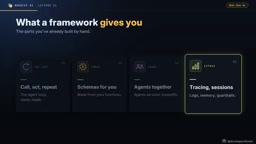
If you've already hand-written multi-turn agent loops—defining tools, maintaining memory, coordinating multiple roles—then the framework doesn't conjure any magic. It just packages the parts you already understand into a reusable bundle. The original course makes this point right at the start of the lecture: the framework encapsulates the agent loop, tool schemas auto-generated from functions, multi-agent collaboration (teams), and add-on capabilities like tracing, session memory, and guardrails.
Understanding this premise matters. Many people treat frameworks as black boxes, and when behavior doesn't match expectations, they have no idea how to debug. In reality, that single line runner.run_sync in the OpenAI Agents SDK replaces the entire loop you used to hand-write. Knowing what the loop looks like tells you where to look when things go wrong.
The agent loop refers to the process where an agent repeatedly executes "call the model → parse the output → if the model requests a tool, execute it and feed the result back → call the model again" until the model stops requesting tools and produces a final answer. When hand-writing this loop, you have to handle message history assembly, tool-call argument parsing and error catching, max-turn limits, and other details yourself. The framework solidifies this while loop into a runner—you just provide the agent definition and input.
A tool schema is a structured declaration describing a tool's name, purpose, and parameter structure; the model relies on it to decide when to call the tool and how to pass arguments. Hand-writing usually means writing it field by field in JSON Schema format; decorators like function_tool automatically derive the schema from the Python function's signature, type annotations, and docstring—saving manual maintenance and preventing mismatches between function and declaration.
OpenAI Agents SDK: Agent-First
This SDK's design philosophy is agent-first. An agent is defined by three things: name, instructions, and tools. Use function_tool to turn an ordinary Python function into a tool, then run it with the runner. The course demonstrates a very simple example—asking "do I need a jacket for the trip to Runqi," and the agent calls a weather tool to answer based on the actual temperature.
You might not have noticed that it isn't limited to OpenAI models: pointing the client at another provider's endpoint (the course demos Grok) works just as well. That's a real benefit for teams that don't want to be locked into a single vendor.
Building a Team with as_tool and handoff
The course brings back the earlier "service desk" example. Any agent can become a tool of another agent via as_tool, so each business desk is an agent with its own knowledge base, and the main service desk decides which one to ask. Another pattern is handoff—where a specialist takes over the conversation directly, e.g., the service desk routes remote-run-related requests to the billing desk, which then replies.
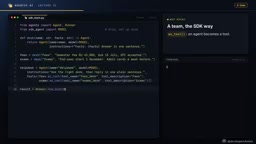
According to the course, a three-agent team can be built in about twenty lines of code. The cost is control granularity: you give up explicit control over the flow in exchange for extremely low boilerplate.
The difference between as_tool and handoff lies in who holds control. With as_tool, the wrapped agent remains a "called tool": the main agent initiates the call, gets the result, and then decides what to say next—the main agent owns the conversation context and the final reply. handoff transfers control entirely—the receiving agent faces the user directly, the main agent exits this turn and no longer participates in subsequent back-and-forth. The former suits scenarios where "the main agent needs to aggregate conclusions from multiple specialists"; the latter suits scenarios where "the specialist understands the problem better than the main agent and should answer directly." The two can be mixed, but note that after a handoff the original agent doesn't automatically regain control—you need an explicit return-path design.
LangGraph: Draw Your Workflow as a Graph
LangGraph takes a different path—workflow-first. State is a typed dictionary that runs through the entire graph, each node is an ordinary Python function, and a node returns only the portion of state it modifies. The course example is a writer plus critic: start points to the writer, the writer points to the critic, and a conditional edge decides whether to "go another round" or "end."
The key difference is that this loop is drawn into the graph rather than hidden inside a while loop. Once running, each round goes through the same two nodes until the draft passes or the four-draft limit is reached.
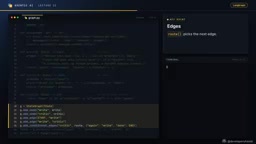
This explicit structure brings controllability: loops, branches, checkpoints, and the ability to pause mid-execution for human intervention and then resume. For long processes that need auditing and human review nodes, this is LangGraph's core value.
A conditional edge is a function in LangGraph that decides where to go next: it receives the current state and returns the name of the next node (or a set of candidates), and the graph jumps accordingly. The edge after writer → critic is essentially a routing function that judges "did the draft pass, has the turn limit been reached" and returns "back to writer" or "go to end." This is what draws the loop into the graph structure instead of hiding it in a code-level while.
A checkpoint is LangGraph's mechanism for persisting the entire graph state step by step. State is saved after each round of node execution, so you can interrupt, inspect, and resume from any checkpoint. Human intervention is built on top of this: the flow pauses at a node, waits for a human to review and modify state, then resumes from that point without rerunning from scratch.
How to Choose: Three Dimensions
The course's advice is quite direct and can be summarized in three points:
For small scale, plain Python is enough. A single small agent written in native Python is shorter and easier to debug. The framework adds dependencies here, not capability.
Reach for a framework when you need teams, tracing, or long workflows. Multi-agent collaboration, tracing observability, long multi-step workflows—these are costly and error-prone to implement by hand, and that's exactly where frameworks pay off.
Match your mental model. If you think in terms of "what roles exist, who calls whom," the Agents SDK is more natural; if your problem is essentially a flowchart with branches and loops, LangGraph expresses it more naturally.
Version Pinning Is Not a Minor Detail
The course mentions a concrete lesson: the MCP library renamed its main class in version 2. Such breaking changes are not rare in the fast-evolving agent ecosystem. So the advice is clear—pin your versions.
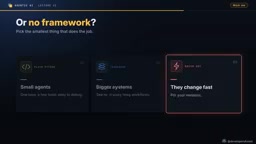
Behind this advice is a more general reality: these libraries change fast, and tutorials and docs often lag behind the code. Locking dependency versions at least ensures today's code still runs tomorrow.
MCP (Model Context Protocol) is an open protocol that lets models access external tools and data sources in a unified way; many libraries in the agent ecosystem are built around it. It updates frequently, and breaking changes like renaming the main class in v2 will directly break old import statements. "Pinning versions" means writing exact version numbers in dependency declarations (e.g., mcp==1.2.3) rather than range constraints, and using a lock file to fix the entire dependency tree so the environment is reproducible. When upgrading, explicitly change the version number and run tests, keeping the impact of breaking changes within a single well-prepared migration.
A Hands-On Exercise You Can Start Right Away
The course assignment is to rewrite the earlier researcher-plus-writer team using the Agents SDK: turn both into SDK agents, have an orchestrator call them via as_tool, then compare it with your original pure-Python version.
This comparison is more valuable than any conclusion—you'll directly see which dozens of lines the framework saves you and what abstraction cost you pay for it. Frameworks are not a free lunch, but when what you need is exactly what they encapsulate, they're genuinely worth it.
Related articles

MiniMax H3 Open-Source Workflow: Breathing-Skin Results Even on Low VRAM
This article introduces a MiniMax H3 dual-sampling workflow shared by a Bilibili creator, using fused models, a line-breaking LoRA, and low-VRAM nodes to fix greasy AI character faces and run on 12GB VRAM devices. Includes model pairing, dual-sampling logic, and parameter details.

On-Device LLM + ESP32: Build a DIY Calorie Reminder
A Bilibili creator open-sourced a calorie intake reminder: a phone app uses the open-source miniCPM model to locally recognize food photos and estimate calories, while an ESP32 mini screen syncs data and shows intake status with green/yellow/red rings — magnetically attachable to the fridge door for constant reminders.

Running 125B MoE on a 12GB GPU? Inside Strata's Three-Tier Cooperative Engine
Open-source C++ engine Strata runs 125B MoE models locally on 12-16GB consumer GPUs at 40-95 tokens/s. Here's how its VRAM/memory/SSD three-tier pipeline works.