OpenAI Codex CLI Commands Explained and Session Recovery Tips

A detailed look at Codex CLI's command system and permission modes, plus a demo of restoring past sessions with codex resume.
Following the previous section's code modification and merge workflow, the article systematically reviews Codex CLI's built-in slash command system. The author notes that its interaction logic closely resembles Claude Code's, lowering cross-tool migration costs. It highlights startup commands like /init, /status, /approvals, and /model, along with the full command set including /new, /compact, /diff, /mention, /mcp, and /logout. /compact compresses chat history to avoid context bloat degrading editing judgment in long sessions, while /mention overlaps with typing @, reflecting a tool that hasn't fully converged. The hands-on section details /status session info, /model model and reasoning effort switching, and the auto, read only, and full access permission tiers of /approvals. Finally, it demonstrates using codex resume to list and search past sessions, noting that deleting sessions wasn't supported at recording time and that the tool is still iterating rapidly.
Slash Commands: A Lineage Shared with Claude Code
If you've used Claude Code, the interaction logic of Codex CLI will feel very familiar: all built-in commands start with a forward slash /, and typing / reveals the full command list. This design lowers the learning curve when migrating between tools, and it also shows that AI coding assistants in the terminal are converging on a set of established interaction conventions.
To exit the current session, just press Ctrl + C. After returning to the regular terminal, run codex again to start a fresh session. On startup, Codex proactively surfaces a few high-frequency commands: /init (create an agents.md file), /status (view session info), /approvals (set the auto-approval policy), and /model (select a model). According to the video demo, the default model at the time of recording was GPT-5 Codex.
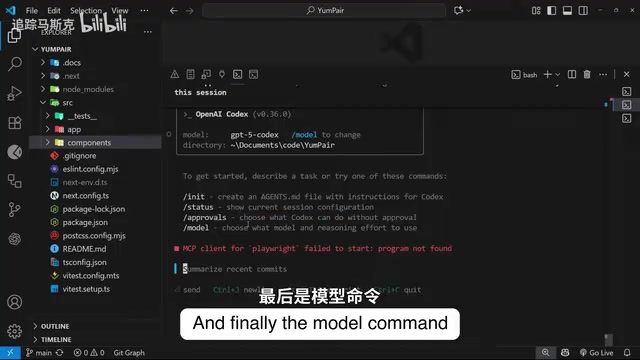
A Quick Tour of All Commands
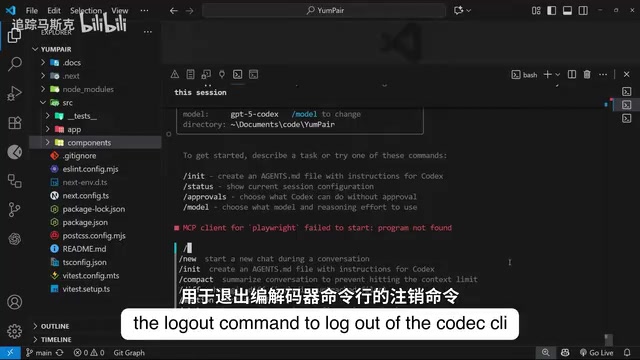
Type / and scroll down to see more commands: /new to start a new session, /compact to compress chat history, /diff to display the git diff directly in the terminal, /mention to add a file as context to the prompt, /mcp to list the MCP servers configured for the project, plus /logout to sign out and /quit to exit.
/compact deserves special attention. As a session grows longer, context keeps accumulating, which degrades the AI's judgment when making code edits and can even hit the model's context limit. /compact compresses the chat history into a summary, effectively controlling context bloat—ideal for long sessions.
By contrast, /mention fully overlaps with simply typing @ to add file context. The video's author openly admits he's "not quite sure why this command was added," unless there are undisclosed extra uses. This is a side reflection that Codex CLI is still iterating rapidly, with its feature set not yet fully converged.
Claude Code is a terminal-based AI coding assistant from Anthropic, positioned similarly to Codex CLI: both drive code reading/writing and command execution from natural language in the command line. Both use a slash-command system (e.g., /init, /model) and display high-frequency command hints on startup, so users can migrate between them almost seamlessly. Codex CLI is developed by OpenAI, was released as open source early on, and relies on the GPT-5 family on the model side, emphasizing a workflow of "editing code and committing directly in the terminal"; Claude Code relies on the Claude model family. The two converge in their approaches to permission approval, context management, session recovery, and other features, reflecting that terminal AI coding tools have formed a relatively stable product paradigm.
MCP (Model Context Protocol) is an open protocol proposed and open-sourced by Anthropic, designed to let AI applications connect to external tools and data sources in a standardized way. An MCP server can encapsulate capabilities such as database queries, file retrieval, and third-party APIs. AI clients discover and invoke these tools through the protocol without writing separate integration code for each tool. In Codex CLI, the /mcp command lists the MCP servers configured for the current project, making it easy to confirm the scope of external capabilities available to the AI. Understanding MCP helps assess the practical capability boundaries of Codex within a project: beyond built-in file and command operations, what it can do depends heavily on whether the corresponding MCP services are connected.
Hands-on with Three High-Frequency Commands
/status is the best entry point for understanding the current session state. Running it displays workspace information (including the working directory, approval mode, and sandbox permissions—for example, write access limited to the current workspace), account information, the current model and additional parameters, the client version, and token usage at the bottom (for input prompts and AI output, respectively). The information is organized clearly, letting you quickly assess the permission boundaries and resource consumption of the current session.
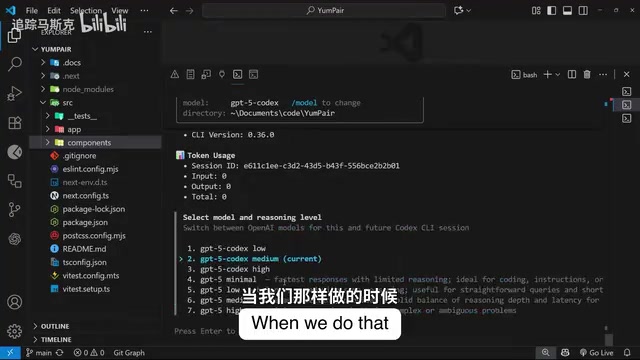
/model is used to switch models and reasoning effort. In the demo, the current selection is GPT-5 Codex with medium reasoning level; at the time of recording, all selectable models were variants of the GPT-5 family. Higher reasoning effort generally yields better performance on complex tasks, but response speed and cost change accordingly.
/approvals determines Codex's degree of autonomy and directly relates to security boundaries:
- auto (automatic): Can automatically read files, modify code, and execute commands within the current workspace—suitable for routine development with a high level of trust.
- read only: Can only read files and answer questions; any write operation requires manual approval—suitable for code review or exploring unfamiliar projects.
- full access: Grants Codex full autonomy and automatically enables network access—the highest risk, to be used with caution.
Understanding the differences among these three permission tiers is more important than memorizing the commands themselves—it determines how far the AI can "act."
Sandbox is an operating-system-level isolation mechanism that restricts the files, network, and system resources a process can access. When executing AI-generated commands locally, Codex CLI by default constrains operations within a sandbox so that write permissions cover only the current workspace directory, reducing the risk of accidentally deleting files or accessing system paths beyond authorization. Working in tandem is the approval mode: the sandbox defines "what can be touched," while the approval mode defines "whether manual confirmation is needed before acting." When switching to full access, sandbox restrictions are relaxed and network access is automatically enabled—which is why this mode carries the highest risk. Understanding this relationship helps you make reasonable trade-offs between security and efficiency.
Restoring Past Sessions: The Underrated Efficiency Tool
In real projects, a more sensible approach is to start a session for each independent feature. As a result, restoring old sessions becomes a frequent need.
The process is simple: type codex resume in the terminal and press Enter. Codex lists all historical sessions under the current project; use the up/down arrow keys to select one and press Enter to return to that session. The list also supports search filtering—for example, typing "summary" quickly locates the earlier session where you worked on a summarization task.
The video's author mentions that at the time of recording, Codex CLI did not yet support deleting old sessions, but expects later versions to add it. Combined with the redundant /mention design and the overall level of completion, he admits the CLI tool "feels a bit unfinished." However, he also notes that vendors are all racing to bring tools to market within a time window, and this early roughness is an industry-wide phenomenon rather than unique to Codex.
Summary and Next Steps
This section covered Codex CLI's command system, permission modes, and historical session recovery. Although the number of commands is smaller than Claude Code's, /status, /model, /approvals, and codex resume already cover the core needs of daily development. The next section will focus on the agents.md file—the product of the /init command and the key mechanism that lets Codex understand project conventions.
Related articles

T3 Code: The Open-Source AI Coding Assistant's Comeback Story
T3 Code is an open-source AI coding assistant that unifies subscriptions like Codex and Claude, with powerful remote control and parallel task management.

Never Elected, Yet Ruled New York for 30 Years: The Ultimate Case Study in the Mechanics of Power
Robert Caro's biographies reveal how unelected Robert Moses ruled New York for 30 years through legal drafting and public authorities, and how Lyndon Johnson built leverage as a "powerless" Senate Majority Leader. Unpacking the underlying logic of accumulating and sustaining power.

The CPython 3.10 Recursion Trap and Synthetic Recovery in TokenGuard, an LLM Circuit Breaker
TokenGuard's author recounts a recursion crash caused by OrderedDict.pop in CPython 3.10 and introduces v0.3.0's Loop Nudge synthetic recovery, inline DLP scanning, and other new LLM agent circuit-breaker capabilities.