OpenAI Launches GPT-6: Intelligent UI Transforms Answers from Text into Interactive Interfaces

GPT-6 brings Intelligent UI to all ChatGPT users, turning AI answers into dynamic, interactive interfaces.
OpenAI has released GPT-6 to all ChatGPT users (1.2B+ weekly), with Intelligent UI as the headline feature: responses can now include graphics, buttons, forms, and interactive charts — with the model choosing the right format automatically. Three use cases stand out: more intuitive everyday answers (illustrated guides, auto-scaling shopping lists), hands-on exploration of complex topics (dynamic CLT sampling demos), and instant one-sentence tool generation. The system relies on a streamable component library and real-time compiler. Web search response time drops 32% on average. Paid tiers run GPT-6 Soul; Free and Go tiers run GPT-6 Luna.
OpenAI announced on October 7th via its official blog and X account that GPT-6 is now available to all ChatGPT users. For the previous month, the model had only been accessible to paying subscribers — this release is built for the more than 1.2 billion people who use ChatGPT every week. More than any benchmark or parameter count, the most notable change in this update is a new capability called Intelligent UI — it means AI responses are no longer limited to walls of text, but can become interfaces you can click, explore, and interact with directly.
From Text Answers to Interactive Interfaces
OpenAI released a short film alongside the launch, showing a series of everyday scenes: someone struggling with a paint swatch card full of text descriptions, someone unfolding a word-heavy San Francisco travel guide on a street corner, someone straining to assemble a bicycle from a purely text-based manual. The film's core message is straightforward — sometimes text alone isn't enough.
With GPT-6, assembling a bike comes with illustrated step-by-step guidance, exploring San Francisco gets you an actual map, and choosing a wall color lets you preview the result before you paint. The underlying logic is this: GPT-6 is trained to structure its responses using text, images, and interactive elements, with the model itself deciding how to combine them. Responses can include graphics, clickable buttons, forms, charts, and interactive content you can manipulate directly within the conversation — the exact form depends on the question.
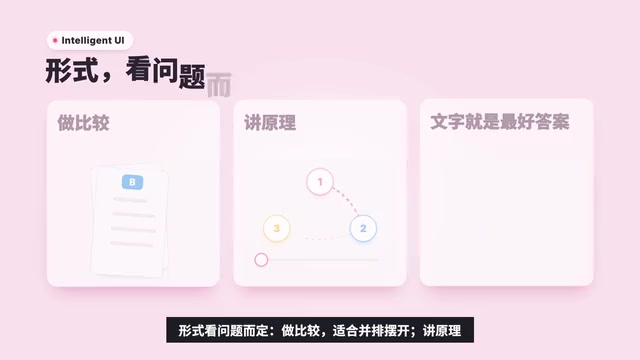
When comparing options, placing them side by side is clearer. When explaining a concept, an interactive diagram is more intuitive. And when a paragraph of text is simply the best answer, the model delivers exactly that. A telling example is breaking down the design of a seven-speed bicycle — GPT-6 produces a clickable diagram with five major systems (frame, wheels, drivetrain, brakes, handlebars), where clicking any one explains it in detail.
Three Core Use Cases
OpenAI organizes Intelligent UI's applications into three categories, spanning everyday and professional needs alike.
Making Everyday Answers More Intuitive
The contrast between old and new is immediately apparent. Take a question like "I'm hosting friends for roasted lamb on Sunday, headcount still TBD" — the previous GPT-5.6 would produce a lengthy text response with a table, while GPT-6 delivers dish photos, a shopping list that auto-scales by guest count, and a timeline running from the day before to the moment dinner is served. Plan a road trip and the stops along the route appear directly on a map, with notes on which detours are worth taking.
Making Complex Knowledge Easier to Learn
The second category emphasizes a "tweak the inputs and watch the output change" learning experience. Ask GPT-6 about the Central Limit Theorem and it draws a skewed distribution, then runs repeated samples so you watch the distribution of sample means converge into a bell curve before your eyes. Other examples from the official announcement include breaking down GDP into its components, analyzing the drone photography market, and a hands-on interactive version of the Monty Hall Problem.

The Central Limit Theorem (CLT) is one of the foundational theorems in probability theory and statistics. Its core conclusion is this: regardless of the shape of the original population's distribution — whether uniform, skewed, or otherwise — if you repeatedly draw independent samples of sufficient size and calculate the mean of each, the distribution of those sample means will converge toward a normal distribution (a bell curve). The theorem matters because real-world data distributions are often unknown and irregular, yet CLT guarantees that statistical inferences based on sample means — such as confidence intervals and hypothesis tests — remain valid under large-sample conditions. Demonstrating this concept through dynamic sampling is deliberate: the intuition runs counter to common sense. The idea that "the means of any distribution converge to a normal distribution" is difficult to accept from static text alone, but watching a distribution visibly reshape into a bell curve makes the understanding land naturally.
Generating Tools in a Single Sentence
The third category is closer to "generative apps." A single sentence can produce a group dinner bill splitter, a retirement calculator for visualizing savings growth, or even a retro mini-game you can play directly within the conversation. This means AI isn't just answering questions — it's instantly generating a functional, ready-to-use tool.
The Technology Behind It: Component Library + Compiler
Intelligent UI is underpinned by two things. A natively streamable component library that provides a consistent, familiar design foundation for each response, with the model deciding how to assemble the pieces. And a compiler that processes the interface as the model generates it, so the interface appears incrementally — users don't have to wait for the full response to finish before they can see or interact with anything.
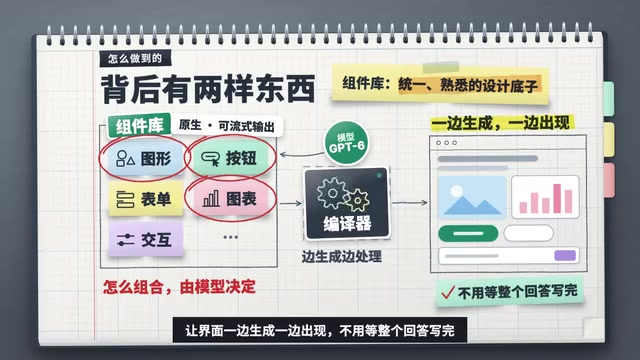
On the training side, OpenAI expanded its evaluation methods to assess whether the interfaces the model produces are clear, useful, and complete — and to teach the model when to use interactive elements versus when plain text suffices. The company is candid that the model still has room to improve in "design judgment," which is an honest acknowledgment that the current experience won't always produce the optimal interface format.
Streaming Output is the key concept for understanding this architecture. Traditional AI responses require the model to fully generate all content internally before presenting it to the user at once. Streaming output allows content to be delivered incrementally — users see results appearing word by word, or block by block. Extending this to UI components is significantly harder: not just text needs to stream, but structured components like buttons, charts, and interactive elements must begin rendering before their final form is fully determined. OpenAI's compiler acts as a real-time interpreter: it continuously monitors the model's output stream, identifies interface description instructions within it, and assembles visible components locally in real time — allowing users to start interacting with the interface before the full response has finished generating. This shares conceptual ground with the incremental rendering approaches of frontend frameworks like React, but the challenge is that the input comes from a probabilistic language model rather than deterministic code.
Faster Responses and Better Search Quality
Beyond the interface capabilities, GPT-6 delivers a meaningful speed improvement. It can begin responding while still reasoning. For questions that require a web search, GPT-6 Instant starts responding an average of 32% faster than GPT-5.6 Instant. In internal evaluations covering high-value everyday agentic tasks, GPT-6 Extra High matched GPT-5.6 Medium on time-to-first-token while outscoring GPT-5.6 Extra High on overall quality — speed and capability, not traded off against each other.
Web search itself is also more reliable: the model is better at judging when to look something up, and better at finding information that actually supports its answers.
Safety and Rollout

On the safety front, GPT-6 carries over several advances from Extra — it is more resistant to attempts to bypass safety training, particularly multi-turn attacks that incrementally push the conversation in a harmful direction. Protections against high-risk misuse such as cyberattacks, biological threats, and violence have been reinforced. At the same time, the model works to avoid unnecessary refusals of harmless requests, uses conversational context to identify risks that a single message might not reveal, and is more articulate about what it can and cannot do.
On rollout: Plus, Pro, Business, and Enterprise users are being enabled globally starting today, accessible via the Chat tab; Free and Go users follow tomorrow. The paid tiers are powered by GPT-6 Soul, while Free and Go tiers run on GPT-6 Luna — both fine-tuned for everyday conversation. The models behind Work and Codex are unchanged in this release.
A Larger Direction
OpenAI describes Intelligent UI as "a first step" toward a ChatGPT that generates interfaces around what users are trying to accomplish. The company offers a notably ambitious framing: for decades, people have had to learn how to use software — in the future, software will adapt to people instead.
If this direction holds, the paradigm for AI interaction may evolve from "text in a chat box" to "dynamically generated interfaces on demand." The model's remaining gaps in design judgment and the reliability of generated interfaces are still key things to watch. But at least starting with GPT-6, what a "response" actually looks like is being redefined.
This framing resonates with a long-running debate in human-computer interaction (HCI): the design logic of existing software interfaces was fundamentally shaped to match how computers process information, not how humans think. Menu hierarchies, keyboard shortcuts, modal windows — all of these are forms of "machine language" that users had to learn. The concept of a Natural Language Interface has resurfaced repeatedly since the 1990s, but understanding limitations kept it from going mainstream. What sets GPT-6 Intelligent UI apart is its attempt to merge "understanding intent" and "generating an interface" into a single step — bypassing the traditional NLI middle layer of translating natural language into fixed commands. Whether this direction can truly take hold depends on whether the model's design judgment becomes reliably consistent, and whether users are willing to accept a dynamic interface that may look different every time — because consistency is a fundamental user experience expectation, and it sits in inherent tension with "generated on demand."
Related articles

Rysh Forge in Action: One OpenAPI Spec, Automatically Turned into Claude-Callable Agent Tools
Rysh Forge converts an OpenAPI spec into Claude-callable Agent tools, an MCP server, a Python SDK, and docs with one command — with built-in write confirmation and full audit logging.

OpenAI Agents SDK in Practice: Implementing Human-in-the-Loop Approval
A complete guide to implementing Human-in-the-Loop approval with OpenAI Agents SDK: pause tool calls with needs_approval, capture interruptions, handle approve/reject decisions, and serialize RunState for async workflows.

NeurIPS SAC Ticket Transfer Policy Sparks Debate: What's Behind the Change
NeurIPS SAC ticket transfer policy sparks debate in the Reddit ML community. We break down the controversy, likely reasons behind the change, and practical advice for researchers navigating top conference ticketing.