OpenMausBot + Domestic DeepSeek Hands-On Test: Run an AI Bot Team with Zero Foreign Accounts
OpenMausBot orchestrates local AI command-line tools and connects to the domestic DeepSeek to do hands-on work at low cost.
OpenMausBot is a beta project with nearly 8,000 stars on GitHub. It doesn't carry a model; it runs a local service, orchestrates logged-in command-line tools like Claude Code, and lets multiple bots divide work in a chat UI, storing data locally and asking for confirmation before acting. This article, based on a Linux hands-on test, walks through installing, pairing, and connecting the domestic DeepSeek by editing .claude-settings.json—running on a ten-yuan top-up with actual cost under a dime—and covers four community pitfalls: port/data directory conflicts, Windows SmartScreen blocking, the built-in browser stuck on connecting, and phone QR codes not working with 127.0.0.1.
A project on GitHub has been growing rapidly lately—OpenMausBot, which has accumulated nearly 8,000 stars so far. Its idea isn't complicated: stuff a bunch of AI bots into a chat app, and each bot can actually do hands-on work instead of just chatting with you.
A Bilibili creator did a from-scratch hands-on test on a brand-new Linux machine, choosing the domestic DeepSeekAd as the model, with no foreign accounts needed throughout the process, and it can run with just ten yuan topped up. This article combines that hands-on test to lay out the installation process and the four pitfalls the community has run into, all in one place.
What It Actually Is: No Model Included, Just Orchestration
First, let's clear up a common misunderstanding: OpenMausBot itself doesn't carry any model. What each bot calls behind the scenes is a command-line tool you've already installed on your computer—Claude Code, Codex, or Grog—using your own account.
It runs a small service on local 127.0.0.1. Chat logs, keys, and other data are all saved in the .OpenMausBot folder on your computer, not uploaded to the cloud. Before a bot executes a command or modifies a file, it pops up a confirmation card, and it only acts after you click agree. This "ask before acting" design is the key difference from ordinary chatbots.
The target audience is clear: people who want multiple AIs to divide the work and help them get things done. If foreign models aren't usable, that's fine—we'll test connecting to the domestic DeepSeek later.
What is Claude Code? Claude Code is a command-line AI programming assistant launched by Anthropic. Users can use natural language in the terminal to have it read and write files, execute commands, and debug code. It is itself a "shell"—what actually does the work is the model called behind it. By default it connects to Claude's official models, but through configuration files you can point the Base URL and Auth Token to any service compatible with the Anthropic interface, which is exactly the principle that lets this article connect it to DeepSeek. Understanding this is important: OpenMausBot orchestrates the execution framework that is Claude Code, while the model is replaceable.
Two Thresholds Before Installation
On the system side, Mac, Windows x64, and Ubuntu 24.04 Linux are supported, and it's still in beta. If you install via command line, Node.js needs to be version 24 or above—the test machine was 24.22.1, which meets the requirement.
The real threshold is just one: at least have one AI command-line tool installed and logged in. If you can't get past this, nothing else matters.
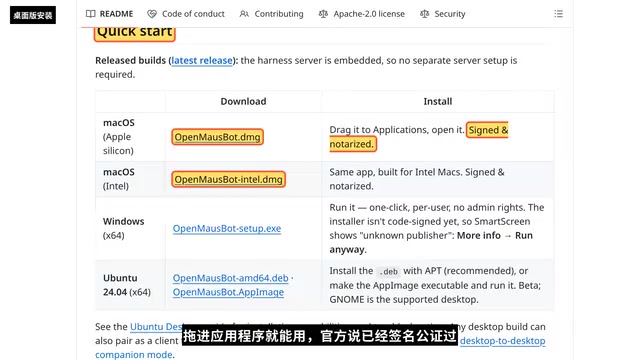
There are two installation paths. Beginners can directly download the desktop version; the link is right in the README's Quickstart: for Mac there are two packages, Apple silicon and Intel, just drag into Applications, and the official docs say it's signed and notarized; for Windows download setup.exe, no admin rights needed; for Ubuntu the deb package is recommended, using sudo apt install plus the package path.
Windows users will hit SmartScreen blocking the first time they run it, with the message "Windows protected your PC." Don't panic—this is because the official installer hasn't been code-signed yet, and the README even says so itself. Click "More info" and then "Run anyway," provided you confirm you downloaded it from the official GitHub.
The command-line method is more recommended, and it also works on Linux servers: first install globally with npm, then start the service. Running it directly the first time enters the setup wizard; in the test we ran OpenMausBot serve to get the service up first, and seeing the service listening on 127.0.0.1:8799 means it succeeded. To stop the service, press Ctrl+C in the terminal, and saved content won't be lost.
Connect DeepSeek: Run It for Ten Yuan
Open the service address in a browser. The first time you need to pair: open another terminal and run OpenMausBot pair, enter the pairing code to get in. The button on the welcome page says Install Cloud—don't be scared by the name—Claude Code here is just a command-line shell that does the work, and the model behind it will be swapped to DeepSeek in a moment, with no Claude account needed.
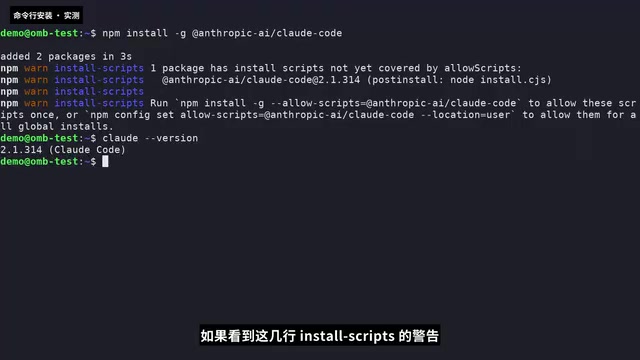
Open a new terminal and install Claude Code with npm; if the version number prints normally, it's installed. Next, go to the DeepSeek open platform, log in with your phone number, create a new Key in API Keys on the left, and copy and save it immediately—it's only shown this once, and never send it to anyone else.
On pricing, DeepSeek Flash is one yuan per million input tokens and four yuan for output, with prices doubling during weekday daytime peak hours. Your account must have a balance to use it, and you need to complete real-name verification before topping up. In the test we topped up ten yuan, and all the demos across the whole episode cost less than a dime.
The key to configuration is this: the official docs teach exporting environment variables, but OpenMausBot reads the .claude-settings.json file, so writing it into the file is more reliable. For Base URL, fill in DeepSeek's Anthropic interface address; for Auth Token, fill in your Key; for the model name, fill in DeepSeek Flash for both; then in .claude.json set hasCompletedOnboarding to true to skip Claude's own login guide. Test by sending a sentence with the Claude command line—seeing a Chinese reply means DeepSeek is connected, and the "doesn't recognize the model" prompt can be ignored.
After changing the config, go back to the first terminal, press Ctrl+C to stop it, then run OpenMausBot serve again so it reads the new config. Back in the browser, click the plus in the top left to create a new bot, click show all in the model menu in the top right, and select DeepSeek Flash under local models.
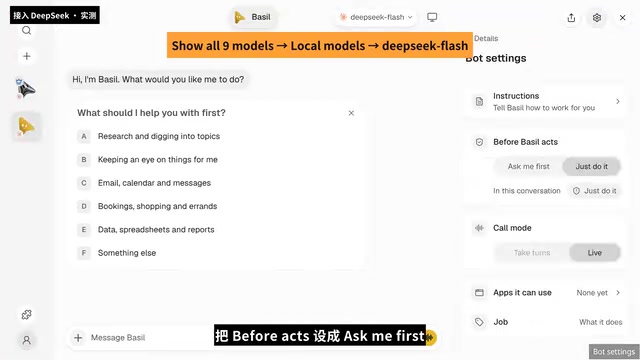
Open the bot settings and set the before option to ask me first, meaning it must ask you before acting. Give it a small task, such as creating hello.txt in the demo folder and writing "Hello DeepSeek." You'll see that every time it wants to run a command or write a file, it pops up a card first, and only continues after you click allow once. In the end it replies that the file has been created and the content is correct—the whole process is the domestic model doing the work, verified as usable.
Tokens and Billing A token is the basic unit of text processing for large models; one Chinese character roughly corresponds to 1–2 tokens, and an English word is about 1 token. DeepSeek prices by "per million tokens," where input refers to what you send to the model and output refers to the reply the model generates. Because an AI programming assistant resends the context to the model at every step, input token consumption is often far greater than output. In this article's test, a ten-yuan top-up ran all the demos in the whole episode for less than a dime, showing that costs are extremely low for lightweight tasks, but you still need to watch your balance in complex, long-conversation scenarios.
Four Pitfalls: Detours the Community Has Taken
Pitfall 1: Port and Data Directory Conflicts
With the service still running in the first terminal, starting it again in a second terminal reports that port 8799 is already in use. Try a different port, 8899—then it reports data dir is error—the data directory is also occupied, because both instances still use the same data directory. The solution is simple: shut down the old instance first; if you really want two running at once, change both the port and the data directory. One more detail: after changing the port, the pair command still looks for 8799 by default, so you need to use OMB_PORT to tell it the new port so it can connect to 8899.
Pitfall 2: Windows Built-in Browser Stuck on Connecting
After using it once or twice, it stays stuck on connecting, and the official team hasn't fixed it yet. Someone in the community provided a PowerShell command that can clear leftover Chrome processes; the command can be found in the original video description.
Pitfall 3: Phone QR Code Can't Connect
The address scanned by the phone is 127.0.0.1, which points to the phone itself, so of course it can't connect. The official docs state it clearly: the phone needs to go through an https address—either the official hosted address, Tailscale, or your own reverse proxy, pick one of the three.
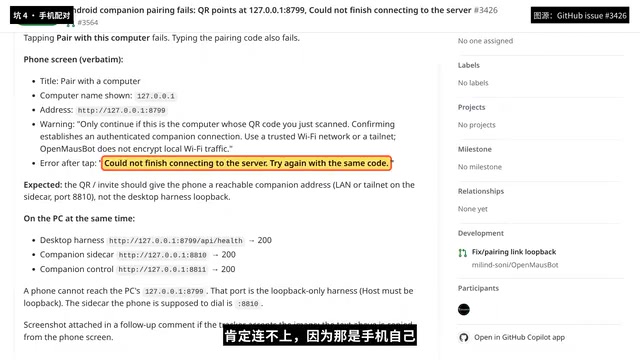
The Necessity of 127.0.0.1 and https 127.0.0.1 is the "loopback address," which always points to the device itself, so when the phone scans this address it only connects to the phone itself. To let the phone access a service on the computer, you must use the computer's real IP on the local network, or a publicly reachable address. In addition, modern mobile browsers have strict restrictions on calling capabilities like the camera and clipboard on non-https pages, which is why the official docs require mobile to go through https. Tailscale is a networking tool that puts your multiple devices into the same virtual LAN and automatically provides https certificates, making it a relatively hassle-free option; a reverse proxy, on the other hand, uses tools like Nginx to map an intranet service to a public domain with a certificate.
Pitfall 4: Three Reminders for Domestic Users
On models, besides DeepSeek, the official docs also list domestic models like Tongyi Qianwen and Kimi. Each provider's service has terms and restrictions, so first confirm you can use them compliantly. In addition, the setup wizard has an API direct-connection method, and the official docs state it currently only supports chat and won't run commands or modify files by itself like Claude Code—if you want the bot to actually act, use the Claude Code plus DeepSeek approach described above. If npm downloads are slow, switch to a domestic mirror; one command does it, and after switching use npm config get registry to confirm. The Chinese interface is only about half translated; mixed Chinese and English is normal.
Is This Combination Worth Trying?
The value of OpenMausBot isn't yet another chat entry point, but that it turns "AI can act" into a controllable process: local storage, confirmation before acting, and division of labor among multiple bots. Combined with the low cost and compliance convenience of the domestic DeepSeek, it offers a realistic path for users who can't use foreign models. Of course, beta means there will still be pitfalls—details like ports, signing, and mobile access all need to be handled yourself—but following the order above should save you a lot of time.
One-line Summary
OpenMausBot orchestrates local AI command-line tools and connects to the domestic DeepSeek to do hands-on work at low cost.
Paragraph Summary
OpenMausBot is a beta project with nearly 8,000 stars on GitHub. It doesn't carry a model itself; instead it starts a local service, orchestrates logged-in command-line tools like Claude Code and Codex, and lets multiple bots divide tasks in a chat interface. Data is stored locally, and user confirmation is required before acting. Based on a Bilibili creator's Linux hands-on test, this article lays out the full process from installation and pairing to connecting the domestic DeepSeek: by modifying .claude-settings.json to point to DeepSeek's Anthropic interface, a ten-yuan top-up is enough to run it, with actual cost under a dime. The article also summarizes four pitfalls the community has hit—port and data directory conflicts, Windows SmartScreen blocking, the built-in browser stuck on connecting, and phone QR codes not working with 127.0.0.1—and reminds that the API direct-connection method currently only supports chat and cannot execute commands.
Related articles
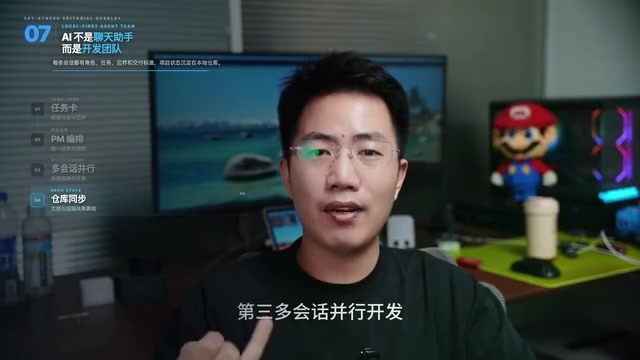
Multi-Agent Collaborative Development: Task Card-Driven Practices for Medium-to-Large AI Projects
A Bilibili creator shares a task card-driven, PM-orchestrated multi-Agent collaboration model with local-first repository state, so any Agent tool can take over a project anytime.
Cursor vs Copilot vs Claude Code: How Laravel Developers Should Choose
Compare Cursor, GitHub Copilot, and Claude Code for Laravel development: an AI-first editor, a plugin for existing editors, and a terminal agent for multi-file tasks and testing — plus workflow-based recommendations.
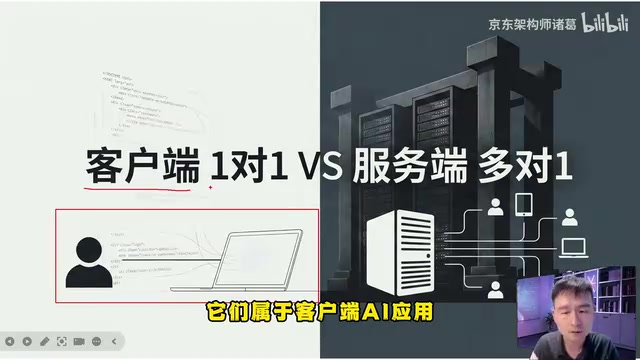
AgentScope Java Edition: A Practical Guide to Enterprise-Level Agent Frameworks
An in-depth analysis of Alibaba's AgentScope Java enterprise agent framework: contrasting client-side AI and server-side AI, explaining Java's natural advantages in high concurrency and distributed state management, and outlining a complete learning path from core principles to multi-agent collaboration.