OpenPencil MCP in Practice: Let AI Agents Read and Edit Design Files Directly

OpenPencil lets AI Agents read and edit local design files via MCP — no more AI that can't see your canvas.
OpenPencil is an MIT-licensed open-source local design tool that exposes 100+ design interfaces via MCP, enabling AI clients like Claude Code, Cursor, and Windsurf to directly read and modify local design files — breaking past the read-only, cloud-locked limitations of mainstream tools. Setup takes one npm command, Figma files are supported, and both stdio and HTTP channels are available. The recommended five-step workflow covers listing documents, opening or creating files, locating nodes, making edits, and delivering output — with explicit document and page IDs required for stability. The key efficiency lever is the `render` tool combined with JSX, letting the model generate complete component trees in a single call. Three built-in security layers cover per-tool toggles, token auth, and directory restrictions.
Why OpenPencil?
Anyone who's tried using AI to help with design work has probably run into this frustration: you ask it to update a login page, it responds with a wall of text and a screenshot that doesn't match your canvas. You point at the screen and say "change this, move that" — and the AI has no idea what you're talking about, because it literally cannot see your design file.
This is the core pain point highlighted by Bilibili creator 大叔大 in his tutorial: AI can't see your design file, and can't touch a single element on your canvas. Making it worse, most mainstream design tools' MCP integrations are read-only, and your design files are locked on someone else's cloud server.
OpenPencil was built to fill exactly this gap. It's an MIT-licensed open-source design tool that connects to MCP with a single command, exposing over 100 design tool interfaces so that an Agent can directly read and modify local design files. Your files live on your own machine, and every operation is accessible to the Agent.
Its core philosophy can be summed up in one line: design files are just data. Anything you can do by clicking in the UI — drawing shapes, changing colors, setting layouts, exporting assets — an AI Agent can do too. That's because the editor UI and the automation interface run on the same engine.
Set Up in Two Minutes
The entire installation process involves exactly two things.
First, install the MCP server. Open your terminal and run:
npm install -g open-pencil-mcp
One global install, and you're done.
Second, open the OpenPencil desktop app and load a design file. A few things worth noting here: it supports opening Figma-format files directly, with two-way compatibility and copy-paste support; the desktop app is about 7MB, requires no account, and doesn't force you online; once the app is running, MCP will automatically discover it — no manual configuration needed.
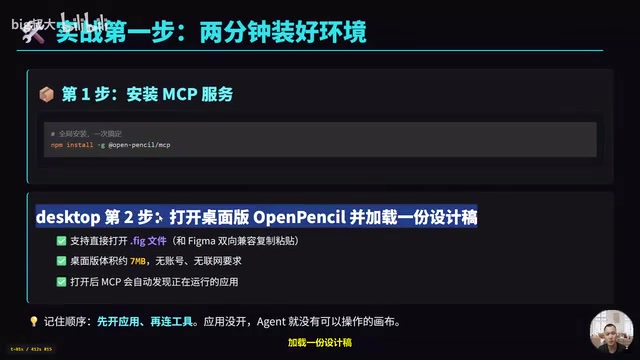
One rule to remember on ordering: open the app before connecting your tools. If the app isn't running, the Agent has no canvas to work with.
Connecting to AI Coding Tools
Claude Code
Registration takes two commands. The first uses claude mcp add to register the server — set the scope to user, name it open-pencil, and set the launch command to open-pencil-mcp. Using --scope user means it's registered at the user level and works across all your projects. The second command, claude mcp list, verifies the connection.
If you get a permissions prompt, you'll need to add an allowlist to your config file. In settings.json under the Claude directory in your home folder, add a rule to allow only open-pencil's own tools — this is safer than disabling permissions globally.
Cursor and Windsurf
These tools use a standard MCP config template. Create an mcp.json file in your project's Cursor directory, add a key called open-pencil under mcpServers, and set the command to open-pencil-mcp. Windsurf uses the exact same format.
There are two connection channels: the standard input/output channel (stdio), used by local clients like Claude Code and Cursor; and an HTTP channel, launched with the open-pencil-mcp-http command, intended for browser extensions, scripts, and CI pipelines — it defaults to port 7600 and includes token-based authentication.
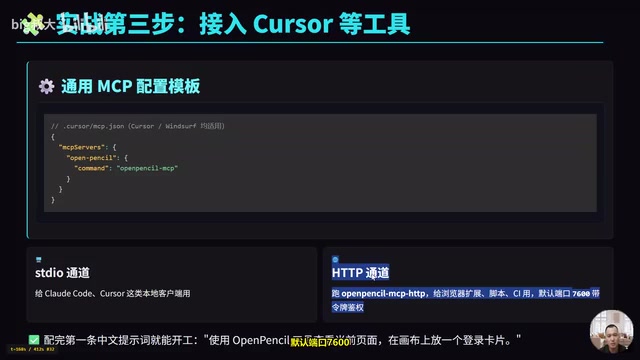
Once both sides are configured, a single prompt in plain language is enough to get started — for example: "Use the OpenPencil tool to view the current page and place a login card on the canvas."
MCP (Model Context Protocol) is an open protocol released by Anthropic in late 2024, designed to standardize how AI models communicate with external tools and data sources. The core idea is that AI clients (such as Claude Code and Cursor) can discover and invoke tools through a unified interface, without needing a custom integration layer for each application. An MCP server exposes a set of "tool" definitions; the client can call them on demand during inference, and results are returned to the model to continue generation. OpenPencil wraps over 100 design operations as MCP tools, enabling any MCP-compatible AI client to drive the design software directly — no extra plugins or bridges required.
The Core Method: A Five-Step Workflow
Once the tools are connected, 大叔大 distills common Agent operations into a five-step workflow:
- List documents: Use
list-documentsto get document IDs and page IDs; - Open or create: Use
open-fileto open a Figma file, ornew-documentto start with a blank canvas; - Locate nodes: Use
get-page-treeto read the page structure, thenfind-nodesto target specific nodes; - Make edits: Use
renderto generate an entire component tree in one call, or use tools likeset-fillto make individual changes; - Wrap up and deliver: Use
save-fileto write back to Figma, orexport-svgto hand off to developers.
One extra rule: if you have multiple documents and pages open at the same time, always pass the document ID and page ID explicitly to each tool call — don't rely on the currently active tab. This is the key to keeping Agent operations stable.
Frequently Used Tools by Category
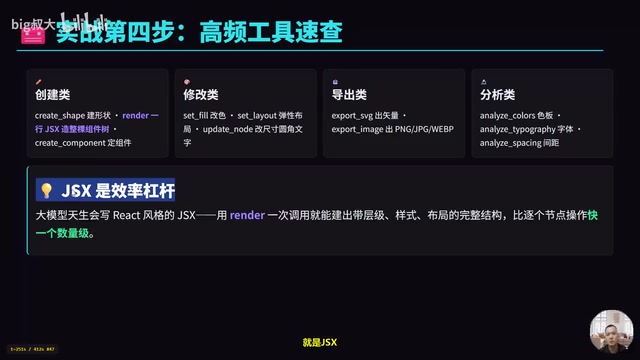
Creating: create-shape for drawing shapes, render for building an entire component tree from a single JSX expression, create-component for making components; Editing: set-fill for colors, set-layout for flexbox layout, update-node for resizing, rounding corners, and updating text; Exporting: export-svg for vector output, export-image for PNG/JPG/WebP; Analyzing: analyze-colors to audit your color palette, analyze-typography to inspect font usage, analyze-spacing to check spacing.
The key efficiency multiplier here is JSX. Large language models naturally write React-style JSX, and the render tool lets you build a complete structure — with hierarchy, styles, and layout — in a single call. That's an order of magnitude faster than operating on nodes one by one.
JSX (JavaScript XML) was originally a syntactic sugar introduced by the React framework to describe UI structure — it lets you declare component trees and their properties using HTML-like tags inside JavaScript, for example <Button color="#22d3ee" borderRadius={12}>Login</Button>. Large language models encountered massive amounts of React code during pretraining, which means their ability to generate valid JSX far exceeds their ability to make sequential API calls. The render tool takes advantage of this: it accepts a JSX string, parses it internally into a complete node tree, and writes it to the canvas in a single operation — essentially translating a "declarative UI description" directly into a design file. This saves a significant number of round-trips compared to having the model call create-shape, set-fill, set-layout, and other individual interfaces one by one, and also reduces the chance of errors accumulating across intermediate steps.
Two Real-World Examples
Generate a Login Page from a Single Prompt
Just speak to Claude Code in plain language: "Use OpenPencil to create a new document, then build a mobile login screen on the canvas. Put a large heading at the top that says 'Welcome Back', add two input fields below it, and a primary button that says 'Login' with 12px border radius and a main color of hex 22d3ee."
Upon receiving this instruction, the Agent internally executes the steps in sequence: first new-document to create a blank canvas, then render to draw the heading, input fields, and button all at once, followed by set-fill to apply the primary color, set-layout for vertical auto-layout, and finally save-file to write the file. You said one sentence — the Agent completed all five steps on its own.
Reviewing and Delivering a Design
An even more practical use case is having the Agent act as a product manager doing a design review. Write the prompt like this: "Open login.pen in the design directory, analyze the color and font size usage across the full page, flag any spacing under 8 pixels, and produce a report."
The Agent will call analyze-colors, analyze-typography, and analyze-spacing on its own and generate a list of issues. The audit is just the first half — in the second half, it can also directly edit the file: for example, normalizing the login button styles, exporting SVGs, and even attaching a direct deep-link URL that starts with the OpenPencil protocol. A developer clicks the link and lands directly on the relevant layer.
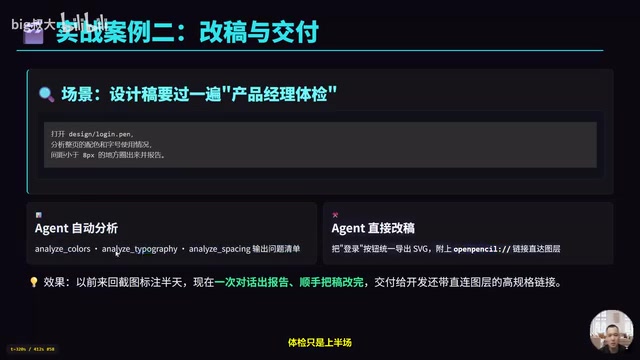
What used to take ages of back-and-forth with annotated screenshots now happens in a single conversation: a report is generated, edits are made, and the handoff comes with a direct link.
Permissions and Security
Before handing your canvas over to an Agent, OpenPencil ships with three layers of protection configured by default:
First, in Settings you can toggle each tool on or off individually, or enable/disable them in two groups: "read-only" and "side-effects"; Second, the HTTP server only listens on localhost by default, comes with generated token authentication, and has eval disabled by default; Third, file operations are restricted to authorized directories — any attempt to go outside is rejected.
The two channels have different security tradeoffs: stdio is a local private channel that prefers system sockets and is highly stable; HTTP uses localhost plus a token, designed for scripts and CI. Note that changes to settings require a service restart to take effect.
stdio (standard input/output) is the most fundamental inter-process communication mechanism in Unix systems — data is written through a process's standard input stream and read from its standard output stream. In an MCP context, the AI client launches the MCP server as a child process, and the two sides exchange JSON messages over stdin/stdout. The entire communication channel is contained within local processes and never touches a network port, which inherently eliminates the external network attack surface. By contrast, the HTTP channel exposes the service on a TCP port — and while it defaults to listening only on 127.0.0.1 (the loopback address), it still requires token authentication to prevent unauthorized access from other processes on the same machine. Choosing between the two channels is fundamentally a tradeoff between ease of use and isolation strength.
Conclusion
Two-minute setup, a five-step workflow, and over a hundred tools at the Agent's disposal — this approach definitively solves the age-old problem of "AI can't see the design file." Three things to remember: one npm install -g open-pencil-mcp command to connect; always call list-documents before each operation and pass document and page IDs explicitly; use render with JSX for large-scale creation in one shot, and use set-fill-style tools for fine-grained tweaks.
For designers and developers looking to build an AI product-manager workflow, locally readable and editable open-source tools like OpenPencil offer concrete, practical value over read-only cloud-based MCP integrations.
Related articles

Chain of Thought Isn't Just for AI: How Humans Can Use CoT to Improve Thinking Quality
Chain of Thought isn't just a prompt trick for large models. Starting from a Hacker News discussion, this article analyzes why CoT works for human thinking too, breaks down actionable ways to transfer it, and highlights the key differences between human CoT and machine CoT.
Cloudflare Teams Up with OpenAI: Closi…
Cloudflare Teams Up with OpenAI: Closing the Loop from Vulnerability Discovery to Defense with AI
Cloudflare uses OpenAI Daybreak to investigate security vulnerabilities and generate reviewable remediation plans, while developers use Codex to boost coding efficiency and quality.

Orca Multi-Agent Orchestration in Practice: A Guide to Parallel Collaboration with Claude and Codex
Orca is Stable AI's free open-source agent workbench supporting 34 agents like Claude Code and Codex in parallel. Learn its Git worktree isolation, multi-model orchestration, and mobile management.