Parrot: The Smart Meeting Assistant on Mac That Finds Answers for You in Real Time During Calls

Parrot is a free, open-source Mac meeting recorder featuring real-time answer prompts during calls and local transcription.
Parrot is a free, open-source Mac meeting recording tool. Unlike similar products focused on post-meeting summaries, it emphasizes real-time information support during calls. It requires no bot to join, directly records Mac microphone audio, and transcribes on-device; when the conversation touches on preloaded document content, relevant answers automatically surface with source files indicated. Technically, it supports cloud models like Claude, Ollama local models, or self-hosted servers, balancing privacy and cost flexibility. It also generates post-meeting reports on commitments and missed questions, and supports conversations with historical meeting records. Currently Mac-only, its real-time assistance depends on document quality, and it's in an early stage with limited community feedback.
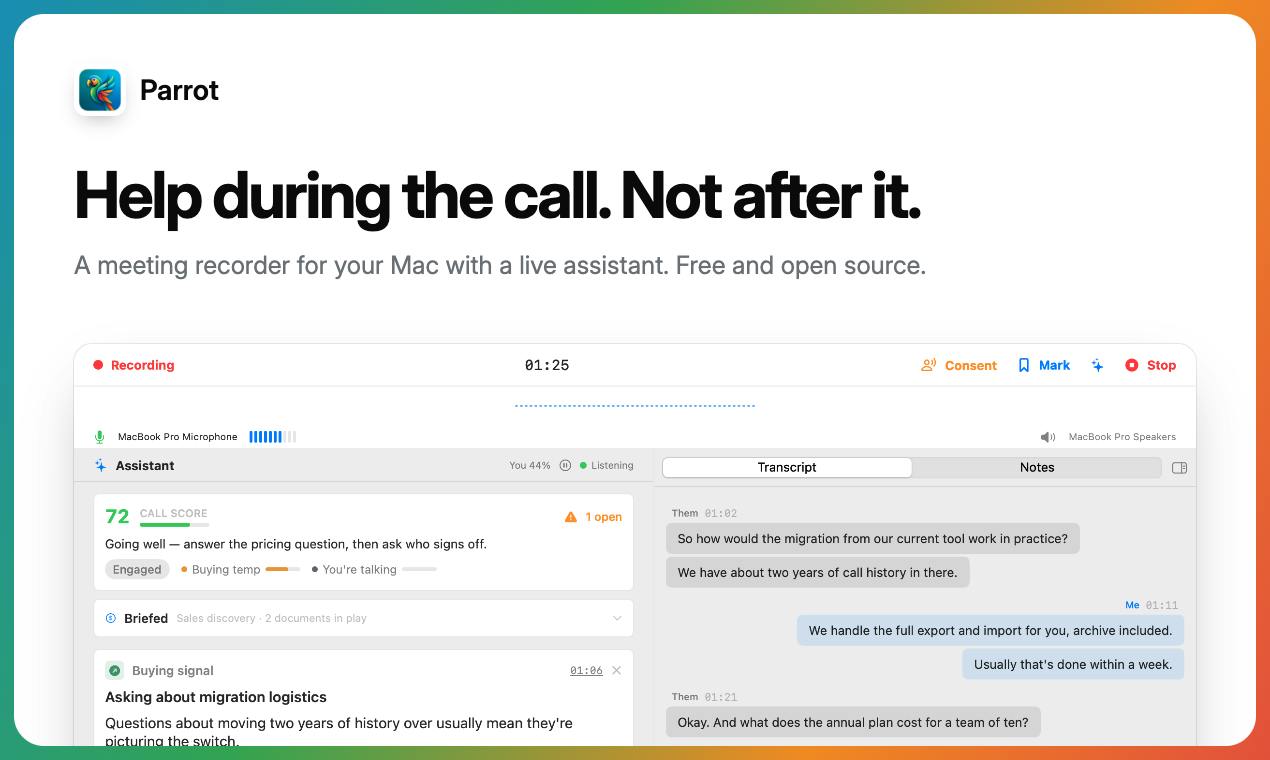
Most meeting transcription tools on the market focus on "post-meeting summaries," but what really makes participants anxious is often the moment during a call—when a client suddenly asks about a detail you can't quite remember, or when you need to dig up a number from some file. Parrot tries to solve exactly this pain point. It's a free, open-source Mac meeting recorder that focuses on "helping you during the call" rather than afterward. According to its Product Hunt page, Parrot doesn't require a bot to join the meeting; instead, it directly records what the Mac microphone hears and performs transcription on-device. When a client asks about something already covered in your quote sheet or FAQ document, the answer automatically surfaces along with the source file. After the call ends, you also get a report on commitments made and questions missed, and you can have conversations with all your meeting records.
Core Feature: Real-Time Assistance During Calls
Parrot's differentiation lies in "real-time." Traditional meeting assistants typically generate minutes after the call ends, whereas Parrot continuously listens and transcribes during the call itself. It claims that when the conversation touches on content from documents you've preloaded, relevant answers are displayed directly, with the source file indicated. This means in sales, consulting, or customer support scenarios, you don't need to frantically search for materials during the call.
Another notable design choice is "no bot joining the meeting." Many meeting transcription tools require adding a virtual participant, which can sometimes make clients uncomfortable. Parrot relies entirely on the Mac's local audio input and doesn't inject any bot into the meeting, making it more discreet and natural for both parties on the call.
Retrieval-Augmented Generation (RAG): Parrot's ability to "automatically surface answers with sources" during calls is essentially a retrieval-augmented generation pattern. Its workflow is: first, the user's preloaded documents are split into chunks, vectorized, and stored in an index; when a relevant query appears in the transcribed text, the system retrieves the best-matching document chunks, then passes them to a large model to generate a concise answer with source attribution. The advantage of this mechanism is that answers are verifiable and traceable, but its effectiveness depends heavily on document chunking strategy, embedding model quality, and retrieval recall. If document structure is messy or wording differs significantly from spoken language, retrieval may fail, leading to inaccurate or missed answers.
Technical Architecture: Local Transcription and Flexible LLM Choices
Parrot emphasizes privacy and local processing. Transcription is done on-device, and audio doesn't need to be uploaded to the cloud. For model selection, it offers three options: using cloud models like Claude, running free local models via Ollama, or connecting to your own server. This flexibility means users can make trade-offs based on their privacy and cost requirements.
Being free and open-source is another card Parrot plays. There's no account system, no subscription fees, and the code is publicly available for review. For teams that prioritize data sovereignty, this is an attractive option. However, it's worth noting that the transcription and inference quality of local models depends on hardware performance, and the experience may be degraded on older Macs.
Edge Transcription and Speech Recognition Models: Local transcription typically relies on lightweight speech recognition models (such as smaller versions of the Whisper series). These models perform inference on-device via CPU or neural engines without uploading audio streams to the cloud. Their advantages are privacy and low latency, but the cost is certain hardware compute requirements, and model accuracy is limited by parameter size. On Mac, Apple's Core ML framework can accelerate inference for such models, but performance differences between chips (M series vs. Intel) directly affect transcription real-time performance and accuracy. Understanding this helps evaluate the actual experience differences of Parrot across different Mac devices.
Ollama: Ollama is an open-source local LLM runtime framework that supports conveniently downloading, running, and switching between various open-source models (such as Llama, Mistral, etc.) on personal computers. It simplifies local inference deployment through a unified command-line interface and API, enabling non-expert users to call large models locally. For Parrot, integrating with Ollama means users can complete answer matching and report generation entirely offline using local models, but model choice and quantization level significantly affect response speed and output quality.
Post-Meeting Reports and Meeting Conversations
After the call ends, Parrot generates a report highlighting "what was committed" and "what questions were missed." This perspective is more action-oriented than a simple full transcript—it tries to help you review what you promised during the call and which client questions weren't adequately answered. Additionally, users can have conversations with historical meeting records, similar to running a Q&A assistant over meeting data.
Use Cases and Limitations
Parrot is suitable for individuals and small teams that frequently handle customer calls, sales communications, or consulting meetings—especially those already accustomed to working on Mac and sensitive to data privacy. Its free and open-source nature also lowers the barrier to trying it.
However, there are some aspects of this product that need to be observed. First, it currently only supports Mac; Windows and mobile users cannot use it. Second, the accuracy of real-time answers depends on the quality of the documents you provide in advance; if the documents themselves are incomplete or outdated, the assistance effectiveness will be compromised. Third, local models typically have lower transcription accuracy than cloud solutions, and scenarios with multiple languages or heavy accents may require additional testing. Finally, the Product Hunt page shows 66 votes and 2 comments, ranking 17th, indicating it's still in an early stage with limited community feedback.
Conclusion
Parrot targets a neglected link: information support during the call itself. Through local transcription, no bot joining the meeting, and flexible LLM backends, it finds a balance between privacy and practicality. For Mac users, this is a free, open-source tool worth watching, especially for those tired of manually organizing minutes after meetings and hoping to get prompts in the moment during calls. However, whether its actual performance can deliver on the promise of "real-time answer finding" still needs validation from more users.
One-line Summary
Parrot is a free, open-source Mac meeting recorder focused on real-time answer prompts during calls and local transcription.
Paragraph Summary
Parrot is a free, open-source Mac meeting recording tool. Unlike similar products that focus on post-meeting summaries, it emphasizes providing real-time information support during calls. It requires no bot to join the meeting, directly records Mac microphone audio, and performs transcription on-device; when the conversation touches on content from documents you've preloaded, relevant answers automatically surface with source files indicated. Technically, it supports cloud models like Claude, local models via Ollama, or your own server, balancing privacy and cost flexibility. After the meeting, it also generates a report of commitments and missed questions, and supports conversations with historical meeting records. Currently it only supports Mac, real-time assistance effectiveness depends on document quality, and the product is in an early stage with limited community feedback.
Related articles
AI Engineering in Practice: The Complete Workflow of Claude Code and Agent Skill Development
A Bilibili hands-on course analyzes AI engineering: using Claude Code, Codex, and WorkBuddy to develop enterprise-grade Agent Skills, covering WeChat article drafts, quantitative analysis, and automated Xiaohongshu posting, while explaining the paradigm shift of Skill-driven development and tool selection.
LangChain for Beginners: A Practical Guide to Structured Output and Agents
Starting from zero with LangChain: clarify the difference between low-code platforms and large model application development, covering structured output, tool calling, Agent practice, and multi-tenant RAG enterprise deployment—ideal for engineers with development experience looking to transition into AI application development.

MCP Protocol Explained: How a Single Email Can Hijack Your AI Agent
A deep dive into MCP: from the M×N to M+N integration mental model, the 2026 stateless spec and Python code practices, to a full prompt injection attack reproduction and five defenses to help you design and harden your AI Agent's tool layer.