Pawse: An Open-Source Mac Tool That Uses a 3D Desktop Pet to Remind You to Drink Water and Take Breaks

Pawse replaces cold pop-up reminders with a cute 3D desktop pet to help Mac users build healthier habits.
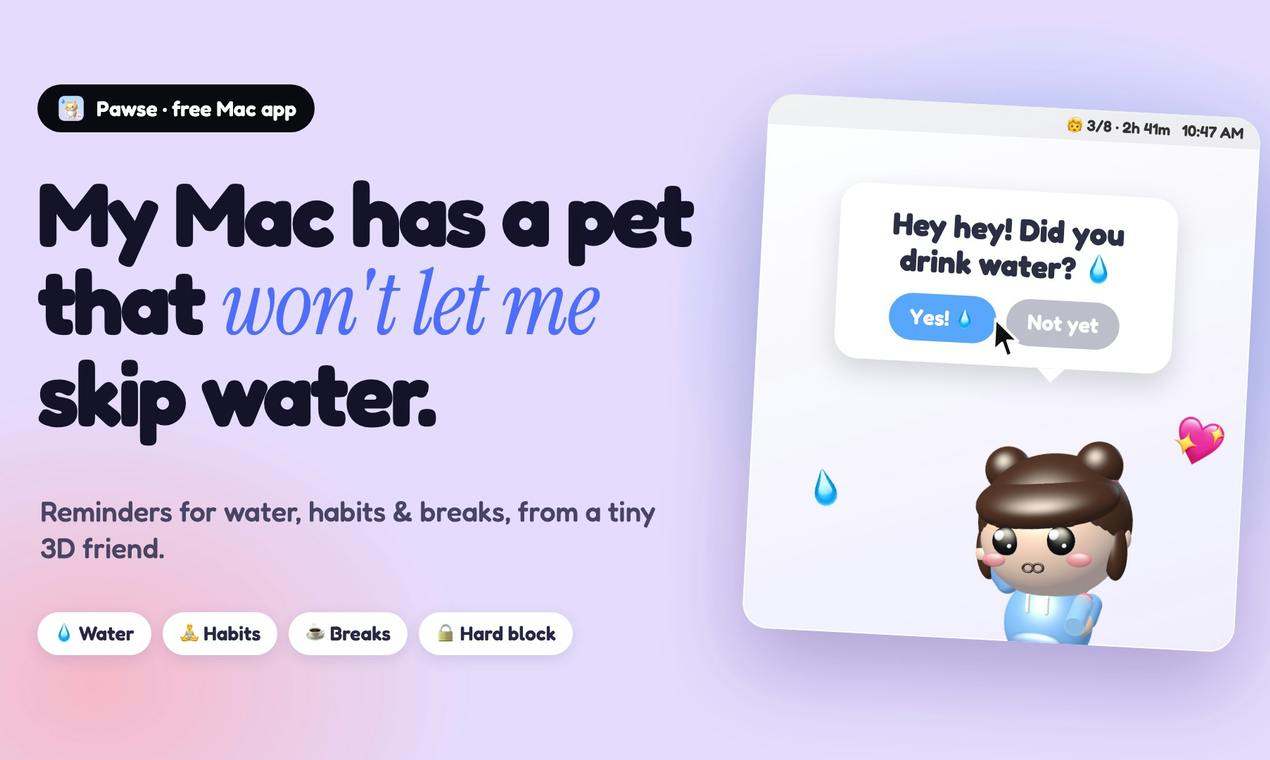
Pawse is a menu bar health reminder app for Mac users who sit for long stretches. Its core idea is using an adorable 3D pet that walks onto your screen — instead of a boring pop-up — to remind you to drink water, stretch, and take breaks. It supports 30-minute habit reminders and offers an optional hard block feature that forces you away from your screen. Pawse is completely free and open source on GitHub, debuted at #10 on Product Hunt, and offers a lightweight, emotionally engaging solution to the sedentary health challenges of modern digital work.
A 3D Little Pet That Walks Onto Your Screen
When you spend long hours staring at a screen, it's easy to forget to drink water or get up and move around — habits that, over time, can take a real toll on your health. Pawse is a macOS menu bar app designed exactly for this problem. Instead of the cold, impersonal pop-ups you'd find in traditional reminder tools, it uses an adorable 3D desktop pet to nudge you toward healthier habits in a way that feels warmer and more companionable.
The app recently launched on Product Hunt, earning 69 upvotes and landing at #10 for the day, listed under the Health & Fitness and GitHub categories. It was built by developer Swalahu Cv. What sets it apart from similar reminder tools is that it's completely free and open source — something that's genuinely uncommon in this space.
Core Features: More Than Just a Water Reminder
Pawse is built around the everyday health habits of people who sit for long stretches, offering several practical reminder mechanisms:
Water Reminders
At set intervals, the 3D pet walks onto your screen to remind you to drink water. Compared to plain text notifications, this personified approach is harder to ignore — and much less likely to be dismissed with a reflexive click.
Habit Building
Pawse can remind you every 30 minutes to do stretches or other healthy activities. For developers, designers, and others who spend long periods locked in the same posture, regular stretching can meaningfully reduce neck and back strain.
Screen Breaks and Hard Blocking
Beyond standard break reminders, Pawse also offers an optional hard block feature. When it's time to rest, the app can forcibly interrupt what you're doing and make you step away from the screen for a moment. This is especially useful for people who lack self-discipline and always tell themselves they'll just finish "one more thing."
The hard block is a fairly aggressive design choice for a health reminder tool. Most comparable apps — like Stretchly or Time Out — use "soft reminders," showing a pop-up that users can still skip or dismiss. A hard block is different: it covers the screen with an interface that can't be easily closed, forcing the user to wait until the timer runs out. This approach is somewhat controversial from a UX standpoint. Users with weaker self-control can genuinely benefit from it, but for professionals at a critical point in their work, a sudden forced interruption can cause anxiety or even risk data loss. By making this an opt-in feature, Pawse strikes a reasonable balance between coercion and autonomy.
Why the Menu Bar + Desktop Pet Combination Works
As a menu bar app, Pawse lives quietly in the macOS status bar at the top of your screen. It doesn't take up Dock space or disrupt your workflow. When you need to adjust reminder settings, just click the menu bar icon — the whole experience stays lightweight.
The 3D pet adds a layer of gamification and emotional engagement to what would otherwise be a dry health management task. This design philosophy is part of a broader trend of "desktop companion" apps — the idea being that emotional connection increases the likelihood that users will actually stick with the habit. Everyone knows they should drink water and take breaks; the hard part is actually doing it. A little pet that walks onto your screen fills in that missing piece: motivation.
Desktop companion apps have become quite popular in the indie developer community in recent years. Notable examples include Shimeji on Windows (which lets anime characters crawl along the edges of desktop windows) and various desktop cat apps. The psychological foundation for this kind of design comes from the anthropomorphism effect — humans are naturally inclined to form emotional responses to things that exhibit lifelike characteristics, even when we know they're virtual. Pairing this mechanism with health reminders is essentially using emotional engagement as a substitute for purely rational nudges, thereby improving behavioral adherence. In behavioral science, this type of design is a variant of the nudge strategy — influencing user decisions by changing how a reminder is presented, rather than adding hard constraints.
The Value of Being Open Source and Free
Pawse is open source on GitHub, and that matters on several levels:
- Transparency and trust: An app that runs in the background and publishes its source code lets users verify that there are no privacy or security concerns — a definite plus for security-conscious Mac users.
- Customizability and contribution: Developers can modify the reminder logic or tweak the pet's appearance to suit their own needs, and the community can help improve the app over time.
- Zero cost: Being free lowers the barrier to entry — anyone who wants to build healthier habits while sitting at a desk can just download and start using it.
Given that most comparable commercial health reminder tools rely on subscriptions, Pawse's free and open-source approach is a genuinely compelling alternative.
Who Is It For?
Pawse has a very clear target audience: macOS users who spend long hours in front of a screen and need an external push to maintain healthy habits. Whether you're a developer, a writer, or a student — if you frequently forget to drink water or get up and move, this little tool is worth trying.
Of course, as a product that just launched on Product Hunt, its feature set is still relatively basic, focused primarily on the core "reminders + companionship" use case. But with its charming presentation, the practical value of hard blocking, and its free open-source positioning, Pawse already offers a lightweight and delightful solution to the sedentary health challenges of the digital age.
Related articles

5 Practical Ways Real Estate Agents Can Use AI to Boost Efficiency (2026 Edition)
How can real estate agents use AI to boost efficiency? Based on a YouTube walkthrough, this breaks down five methods — ChatGPT for listing descriptions, Canva for marketing materials, forms for open house leads, Zapier for automated follow-up, and seller meeting prep — and flags risk boundaries like fair housing laws, photo authenticity, and price verification.

Grok Bot vs ChatGPT Agent: Which AI Agent Is More Powerful?
How does Grok Bot differ from ChatGPT Agent? This comparison examines how they work: Grok Bot has a cloud computer and runs persistently inside tools to execute multi-step tasks automatically; ChatGPT Agent operates web pages in a browser and is more mature at general tasks. Includes selection advice.

Walmart Agent Gateway: AI Shops for You Automatically—Why Is Amazon Going the Opposite Way?
Walmart's Agent Gateway lets ChatGPT, Gemini and other AI assistants access its product catalog to search, compare and add to cart, with spending limits and per-purchase approval. Amazon blocks external AI agents—two retail giants, opposite paths. Currently US-only, India may follow.