Pebble Time 2 In-Depth Review: Is This Minimalist Smartwatch with 30-Day Battery Life Worth It?

Pebble Time 2 review: a minimalist smartwatch with weeks-long battery life and distraction-free notifications.
The Pebble Time 2 offers an always-on 64-color e-ink display, real-world battery life of nearly three weeks, and a minimalist notification system that syncs phone alerts without clearing them. While it lacks the feature richness of Apple Watch or Samsung watches, its open-source ecosystem, extreme battery longevity, and distraction-free design make it ideal for users who value focus and simplicity over flashy specs.
A Smartwatch That's "Good Enough"
Smartwatches have been around for nearly 15 years, yet most products try to augment or even replace the phone in your pocket — making calls, navigating, ordering pizza, getting voice assistants to tell jokes. But for tech YouTuber Jeff (Craft Computing channel), his requirements for a smartwatch are crystal clear: it needs to be a watch first, and second, a notification filter that doesn't intrude on his life.
He laid out a few hard criteria for his ideal watch: being able to see the time whenever he raises his wrist (preferably with an always-on display or raise-to-wake), exceptional battery life (no nightly charging, no extra charger to pack when traveling), and a "just enough" notification system — unless something needs his attention, the phone can stay in his pocket.
These requirements sound simple, yet they hit a nerve with many heavy information workers.
From the Original Pebble to Time 2: A Twelve-Year Wait
Twelve years ago, Jeff was the CTO of an organization, handling hundreds of emails every day. The vast majority were purely informational — ticket statuses, project notes, internal department communications — and very few actually required immediate action. But every time his phone buzzed, he had to pull it out, unlock it, scan the notification, decide whether it needed attention, then put it back — a process taking roughly 20 to 30 seconds each time.
In 2014, he bought a Pebble Steel. From then on, every time his phone buzzed, a quick glance at his wrist gave him the same information. If you save 100 of those moments per day at 20 seconds each, that's half an hour saved. He wore it continuously for over three years, until Pebble was acquired by Fitbit in 2017, and two weeks later his Pebble Steel's screen died completely — he'd been searching for the same functionality ever since.

The turning point came in January 2025. Pebble's original founder Eric Migicovsky announced on YouTube that Google had agreed to open-source the original Pebble OS (which Google had inherited through its 2021 acquisition of Fitbit), and that Pebble would return with brand-new hardware. The mission remained the same — to create a wearable that adds basic functionality to your smartphone rather than trying to replace it entirely.
Pebble is one of the most iconic crowdfunded projects in smartwatch history. In 2012, Eric Migicovsky launched a Kickstarter campaign for the original Pebble with a goal of $100,000, ultimately raising over $10.26 million — making it the highest-funded project in Kickstarter history at the time. Pebble's success directly catalyzed the explosion of the entire smartwatch category, prompting giants like Apple and Samsung to accelerate the release of their own smartwatch products. However, Pebble consistently struggled with funding pressure and was acquired by Fitbit in late 2016 for approximately $23 million — far below its peak valuation. Fitbit primarily acquired Pebble's software assets and engineering team rather than its hardware product line, resulting in the immediate discontinuation of all Pebble hardware. In 2021, Google acquired Fitbit for $2.1 billion, and Pebble's intellectual property transferred to Google along with it. It was this winding chain of acquisitions that ultimately led to the 2025 story of the founder negotiating open-source rights with Google.
Pebble Time 2 Hardware Specs Breakdown
Jeff went with the Pebble Time 2, which features the following specs:
- 1.5-inch 64-color e-ink display with always-on functionality
- Four physical buttons paired with a touchscreen (though navigation primarily relies on buttons — gesture controls haven't been added to the UI yet)
- Heart rate monitoring sensor
- Officially claimed 30-day battery life
- Standard 22mm pogo pin watch band connector, freely swappable with any compatible band
The e-paper/e-ink display used in the Time 2 is a bistable display technology based on the electrophoretic effect. Inside the screen are millions of microcapsules, each containing positively charged white particles and negatively charged black particles. By applying electric fields of different polarities, the position of these particles is controlled to form images. Unlike LCD or OLED, e-ink displays consume virtually no power when showing a static image — energy is only used when the screen refreshes — and this is the core technology behind Pebble's multi-week battery life. The Time 2's 64-color e-ink display represents an early implementation of color e-paper, achieved by adding color filter layers on top of the black-and-white electrophoretic layer. While color saturation and refresh rates fall far short of OLED screens, readability in bright light is actually superior, since it relies on reflecting ambient light rather than self-emitting.
Regarding the charging interface, pogo pins are spring-loaded metal probes that create electrical connections and are widely used in smartwatches, earphone charging cases, and other devices that require water resistance. Compared to traditional USB ports, pogo pins offer the advantage of a completely flat, sealed surface with no openings, significantly improving a device's water and dust resistance rating. The Pebble Time 2 uses standard 22mm-spaced pogo pins, which greatly improves third-party charging accessory compatibility and reduces the risk of users being locked into proprietary accessories.
Unlike the original Pebble, which used a proprietary band connector, the Time 2 supports standard 22mm watch bands. Jeff openly declared his "deep hatred" for silicone bands — he didn't even look at the included silicone strap and instead spent $17 on Amazon for a stainless steel band, which he's worn comfortably for nearly three months.
Real-World Battery Performance
Battery life is one of the Pebble Time 2's most outstanding selling points. Jeff went on two separate week-long trips without bringing a charger, and came home with 60% battery remaining both times. He fully charged the watch the day before leaving for San Francisco for an AMD event on July 20, and by August 7 (19 days later) it still had 26% battery left. This kind of endurance is simply unattainable for Apple Watch or Samsung Galaxy Watch — for comparison, the Apple Watch Ultra 2 lasts approximately 36 hours under official test conditions, and even in low-power mode only reaches about 72 hours, an order-of-magnitude gap compared to the Pebble Time 2's multi-week stamina. The fundamental reason for this difference lies in the display technology: OLED screens require continuous power to keep pixels lit, while e-ink displays only consume energy when the content changes.
Core Value: The Minimalist Notification Experience

Although the Time 2 also offers health tracking features, what Jeff values most is its most fundamental capability: when my phone gets a notification, tell me what it is — that's it.
Phone notifications automatically sync to the watch, displaying texts, emails, calls, and app notifications — just like the phone's lock screen. The technical implementation behind smartwatch notification delivery primarily relies on Bluetooth Low Energy (BLE) protocol. On Android, the companion app uses NotificationListenerService permissions to monitor system-level notifications, then transmits notification content via BLE to the watch for rendering; on iOS, it relies on Apple Notification Center Service (ANCS) protocol to accomplish similar notification forwarding.
The crucial point is that viewing a notification on the watch doesn't clear it from the phone, so if you don't want to deal with it right away, you'll still be reminded when you pick up your phone later. This "read but not dismissed" design is essential for work scenarios requiring deferred action. This stands in stark contrast to Apple Watch's default behavior — Apple Watch automatically removes notifications from the iPhone's Notification Center once the user views them on the watch. For knowledge workers who need to defer processing emails and messages, Pebble's approach avoids the risk of "glancing at something on the watch and forgetting to follow up."
If you need to reply immediately, the Time 2 supports that too. The original Pebble could only send one- or two-word simple replies, but the Time 2 has a built-in microphone that enables more complex replies via voice-to-text.
Jeff specifically noted that notifications on the watch are arranged chronologically, which is far more efficient than sifting through app-grouped notifications on a phone — a two-second glance is all it takes to decide whether action is needed.
Pebble Time 2 vs. Apple Watch and Samsung Watches
Many people ask: can't Apple Watch and Samsung watches do all of this too? Jeff's answer is — yes, but they come "pre-loaded with a bunch of stuff I absolutely don't need."
His reasoning is clear:
- Focus: He wants to simply read notifications without being distracted by as many apps on the watch as there are on the phone.
- Battery gap: Mainstream smartwatches last two days at most, meaning yet another device to charge, another charger to carry, and another potential point of failure.
- Distraction-free experience: He doesn't need a "nanny" telling him to take a walk while he's writing, or reminding him to stand up and stretch during a long drive — especially when these prompts are often based on inaccurate motion sensors.
He openly shared that he's tried watches from Fitbit, Garmin, and Samsung in recent years, but Pebble's minimalism is precisely its charm. This design philosophy aligns perfectly with the "Digital Minimalism" movement that has gained traction in the tech industry in recent years. Georgetown University computer science professor Cal Newport argued in his book of the same name that people should intentionally choose a small number of truly valuable digital tools rather than being overwhelmed by endless features and notifications. In many ways, Pebble is the hardware embodiment of this philosophy — it deliberately limits functionality to protect the user's attention.
Health Monitoring: Adequate and Accurate
The Time 2's health features perform respectably:
- Heart rate monitoring: Samples once every 10 minutes by default to conserve battery, and automatically switches to real-time monitoring when a workout begins or a fitness app is opened. Compared against a finger-clip pulse oximeter, readings were accurate.
- Step tracking: Absolute accuracy can't be verified, but the data is at least internally consistent — days with more activity clearly show higher step counts.
- Sleep tracking: One of Jeff's favorite features, it automatically records when you fall asleep, wake up, and periods of deep sleep. As someone who struggles with severe insomnia, he says Pebble can quite accurately capture the moment he actually falls asleep, rather than just logging when he lies down.
The Time 2's heart rate monitoring uses photoplethysmography (PPG), which works by shining LED light from the back of the watch onto the skin while a photoelectric sensor detects changes in reflected light intensity caused by blood flow, thereby inferring heart rate. This differs from medical-grade electrocardiogram (ECG) monitoring — PPG sensors can lose accuracy during intense exercise due to watch movement, sweating, and other factors — but for daily resting heart rate and low-to-moderate intensity exercise monitoring, it's reliable enough. The Time 2's choice to default to sampling every 10 minutes rather than continuous monitoring is a pragmatic trade-off between data granularity and battery life.
Shortcomings: Limitations of the Pebble Time 2
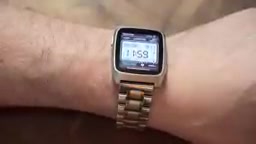
Jeff was equally honest about Pebble's limitations:
This is fundamentally a basic device. The e-ink display is always-on and supports 64 colors, but it won't dazzle you with vibrancy or readability — it's perfectly fine for displaying text and simple graphics, but don't expect to scroll through Instagram on it.
More subtly, the Time 2 "feels like a time capsule." It has indeed evolved from the 2014 original, but it's essentially the product Pebble had planned to release in 2018 before being acquired by Fitbit. The app integrations that were popular 12 years ago (like ordering pizza from your watch) died along with Pebble's demise in 2017, and Jeff hasn't seen developers returning en masse yet. For him, though, that's actually not a drawback — the simplicity is exactly what he likes.
Fully Open Source: Future-Proofing the Pebble Ecosystem

Beyond open-sourcing Pebble OS, Eric also announced that virtually everything needed to run Pebble has been fully open-sourced, including:
- The Pebble operating system itself that runs on the watch
- The companion apps for iOS and Android
- The Pebble app store and its backend
This decision is exceptionally rare in consumer electronics. Most smartwatch manufacturers (including Apple's watchOS and Samsung's Wear OS) operate closed ecosystems, treating their software platforms as core competitive moats. Pebble's open-source strategy is essentially an "antifragile" design — given that Pebble's entire ecosystem nearly perished when the company went under (after servers were shut down in 2017, community developers barely kept older Pebble watches functional by building alternative servers through the Rebble project), full open-sourcing means that even if Pebble faces commercial difficulties again, the community can independently maintain and iterate on the entire tech stack. Open-source licenses grant anyone the right to view, modify, and distribute the code, enabling Pebble's SDK and app store to be maintained by the community indefinitely.
In fact, Pebble's most active ecosystem is its watch face community — Jeff has installed more watch faces than apps, ranging from traditional analog faces and digital faces to fan creations inspired by Star Trek, Fallout, Portal, and more. Since the SDK is open source, users can even create and upload their own watch faces.
His regularly used apps are equally restrained: a hotkey-bound timer called Timer Plus, a real-time heart rate monitoring app, and a dice-rolling app called Pebbles and Dragons for D&D players. There are also fun community-made novelties like Duck Hunt (using the touchscreen, complete with original NES sound effects) and a Tamagotchi simulator.
Verdict: Who Is the Pebble Time 2For?
Jeff's summary is straightforward: in an era where "tech enthusiasts collect specs like Pokémon," the Pebble Time 2 won't be for everyone. But for those who want a minimalist device that doesn't add chaos, genuinely makes life easier, and helps you stay focused, he's been "very happy" with the Time 2 over the past few months. He strongly recommends it to anyone looking for a smartwatch that "doesn't add clutter to your digital life."
Pebble's ecosystem of apps and features will never compete with Apple or Samsung — but those devices will never match Pebble's battery life. And for Jeff, that's exactly the trade-off that matters.
Key Takeaways
Related articles

Meta vs. Publishers: The AI Data Battle Over Terms of Service Changes and the Future of the Internet
Meta changed its business account terms to allow AI training on linked website data, sparking backlash from publishers and creators. Industry groups demanded negotiations, forcing Meta to remove 'training' wording and delay the effective date. The dispute reveals the deeper battle over data authorization and the future of the internet in the AI era.
When Outside Xbox Meets Blood on the Clocktower: A Legion Match in Minecraft
Outside Xbox guests Ellen and Mike play Minecraft Blood on the Clocktower in a Legion game. How can three good players fight an evil majority amid information noise? This article breaks down Legion mechanics, information-role mind games, and the endgame reversal.

Kimi K3.1 Hands-On Test: Open-Source Model Nears Opus, Video Generation Steals the Show
Kimi K3.1 completed motion graphics, 3D rendering, mini-games, and video generation in a live test. Analysis of its 2.8T MoE architecture, gap vs Opus/GPT, and hidden video generation.