PilotDeck Open-Source Agent Platform: Deployment Tutorial & Four Practical Use Cases Explained

Deploy PilotDeck and explore four real-world Agent use cases from reports to website generation.
This article provides a comprehensive guide to PilotDeck, an open-source Agent platform from OpenBNB. It covers installation, LLM configuration, cost-saving Main/Sub-Agent routing, and MCP service setup. Four practical use cases are demonstrated: automated research report writing, one-sentence website generation, professional data analysis with visualization, and Feishu IM bot integration — showcasing how zero-code Agent workflows can dramatically boost productivity.
Introduction
Agent platforms are moving from concept to practical application. PilotDeck, an open-source project from OpenBNB, aims to solve a core problem: how to enable everyday users to complete complex tasks with zero code — from data analysis to website building, from report writing to IM bot integration.
Based on a comprehensive tutorial from a Bilibili creator, this article systematically walks through PilotDeck's deployment process and four real-world use cases to help you quickly get started with this open-source Agent platform.
Deployment & Configuration: From Zero to Ready
Installation & Startup
PilotDeck's installation process is remarkably simple. On Mac, for example, you just need to run a single install command in the terminal. Once installation is complete, the website opens automatically. If it doesn't pop up, you can manually visit the address displayed in the terminal.
LLM Configuration
After entering the interface, the first step is configuring your large language model. Select from the provider list as needed. If you choose a custom template, you'll need to fill in the following:
- Provider ID: Model provider identifier
- Base URL: API address (usually requires appending
/v1) - API Key: Your secret key
- Model ID: Specific model identifier
After filling in the details, click "Test Connection" — a green indicator means the connection is successful. Send a quick "Hello" to verify the response works properly, and your basic configuration is done.
Cost-Saving Routing: Main Agent & Sub-Agent Layered Architecture
This is PilotDeck's core design for reducing API call costs. The architectural concept is:
- Main Agent: Handles direct user interaction — receiving requests, breaking down tasks, and orchestrating execution
- Sub-Agents: Execute specific tasks and return results to the Main Agent for aggregation
The configuration path is: Settings → Model Pool → Add models for both the Main Agent and Sub-Agents → Bind Sub-Agent models in Advanced Settings.
The benefits of this layered architecture are obvious: you can use cheaper models for simple subtasks and only invoke premium models when complex reasoning is needed, significantly reducing overall API costs.
MCP Services & Search Tool Configuration
MCP (Model Context Protocol) enables LLMs to call external tools, which is key to giving Agents real execution capabilities. Configuration involves adding a template, naming it, and filling in parameters and environment variables (such as API Keys).
If you need web search functionality, you'll also need to configure a search service provider separately. Using Tavily as an example: register and log in on their website, create an API Key, then copy and paste it into PilotDeck. Tavily supports multiple login methods including Google and GitHub.
Use Case 1: Automated Research Report Writing
Research reports are a commonly used format for information reference. The traditional workflow requires dedicated personnel spending significant time collecting, organizing, analyzing, and formatting information.
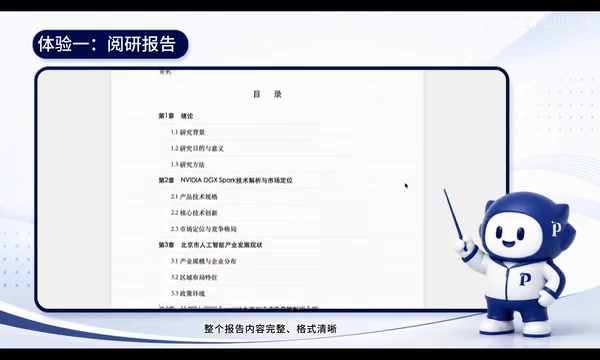
In the demo, the user entered a single instruction: Research chip release information, assess its impact on Beijing's IT industry layout, and output HTML and Word files in a specified format.
The Agent's execution process was impressive:
- Automatically invoked web search tools, searching across multiple keywords
- Generated a complete web-based report — not just a simple information dump, but including in-depth content like industry layout analysis and policy recommendations
- Output a formal Word document with proper formatting and complete, authentic references
- Supported follow-up modifications, with changes applied directly to the local document
This point deserves emphasis — PilotDeck understands the standards and requirements of research reports, outputting formal work documents rather than code snippets or plain text. Compared to terminal-based tools, this combination of visual interaction and document delivery is much closer to real-world work scenarios.
Use Case 2: One-Sentence Website Generation
The highlight of this experience isn't about "whether it can build a website," but rather how autonomous the Agent is throughout the entire workflow.
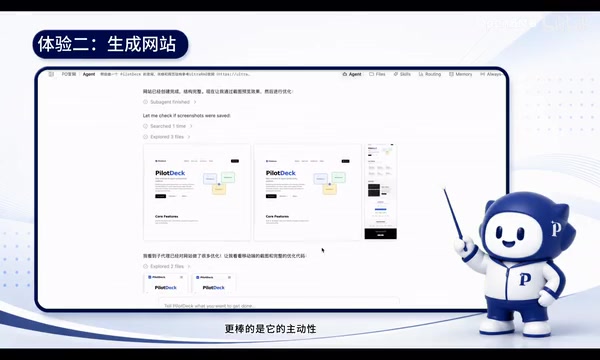
The user's input was remarkably simple: Build me an official website, reference AutoRAG's website for style, use this GitHub link for content, and take screenshots to preview and optimize on your own.
The Agent's execution flow demonstrated a high degree of autonomy:
- Analyzed the reference website: Thoroughly studied AutoRAG's visual style via screenshots, generating a detailed analysis report (page structure, color theme, fonts, layout, animations, etc.)
- Built the framework and coded: Automatically scaffolded the website based on the analysis report, wrote the code, and rendered it
- Self-inspection and optimization: This was the most impressive part — the Agent automatically took screenshot previews and continued improving when it found issues. It didn't just preview the desktop version but also proactively captured mobile views for responsive design checks
- Detail polishing: After noticing the GitHub icon wasn't sharp enough, it proactively replaced it with an SVG format to improve visual quality
The final delivered website had complete content, with descriptions and tutorials consistent with the GitHub information, and a design style highly aligned with AutoRAG. Throughout this process, the Agent behaved more like a UI designer — it was "looking at" the website and making design decisions, not just reading code.
Use Case 3: Data Analysis & Visualization
User input: Collect global AI chip market size data from the past five years, compare market share changes among three chip manufacturers, and generate broker-grade visualization charts and a data report.
The Agent's workflow demonstrated professional-level data analysis capabilities:
Data Collection & Cross-Validation
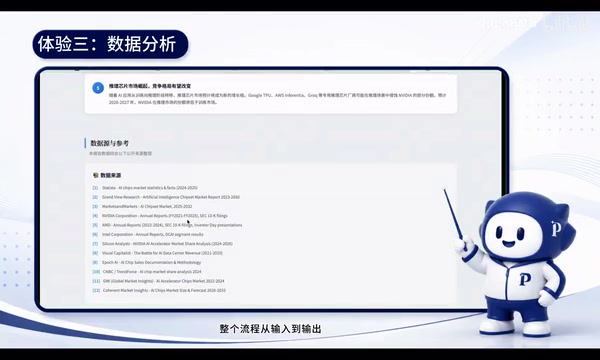
The Agent searched multiple authoritative data sources and performed cross-validation — a crucial step. Rather than grabbing data from a single source, it compared multiple sources to ensure data reliability.
Interactive Visualization Output
Four sets of interactive charts were generated:
- Market size trend chart: Bar chart paired with a growth rate line chart
- Big Three revenue comparison: Stacked bar chart
- Market share evolution: Stacked area chart plus pie chart
- Revenue growth rate comparison: Multi-line chart
Accompanying Data Report
- Three complete data summary tables (usable for verifying data authenticity)
- Five core insights
- 12 authoritative data sources
From input to output, it truly achieved "one-sentence data analysis report generation." Using traditional methods, an analyst might need three to five days to complete this work — now a first draft can be done in minutes. Of course, final conclusions still require human review and verification.
Use Case 4: IM Integration — Command Your Agent Anytime, Anywhere
You don't need to keep a browser open to chat with the Agent. PilotDeck supports integration with instant messaging tools like Feishu (Lark), WeChat, QQ, and more, making the Agent readily accessible.
Using Feishu as an example, the configuration steps are:
- Create a custom app on the Feishu Open Platform and obtain the App ID and App Secret
- Add message send/receive permissions in the permission settings
- Select long connection mode in event subscriptions
- Paste the credentials in PilotDeck's configuration
- When the startup log shows "Stream Mode Connected," the channel is live
Once configured, you can chat with the Bot directly in Feishu. In the demo, the user asked it to find the fastest-rising AI open-source projects on GitHub recently. The Agent returned project names, categories, star counts, and a trend summary.
This means you can invoke the Agent's capabilities anytime, anywhere from your phone, dramatically lowering the barrier to use.
Summary & Reflections
PilotDeck's four practical use cases cover the core value chain of Agent applications:
| Scenario | Core Capabilities | Traditional Time | Agent Time |
|---|---|---|---|
| Research Report | Search → Analyze → Write → Format | Hours to days | Minutes |
| Website Generation | Design analysis → Code → Self-check → Optimize | Days | ~15 minutes |
| Data Analysis | Data collection → Cross-validation → Visualization | 3-5 days | Minutes |
| IM Integration | Invoke Agent anytime, anywhere | — | One-time setup |
Several design highlights worth noting:
- The Main/Sub-Agent layered routing architecture effectively controls API costs
- MCP protocol support gives Agents the ability to call external tools
- IM integration solves the last-mile problem for usage scenarios
Of course, AI-generated content still requires human review and verification, especially for data analysis and report scenarios. But as a "first draft generator" and "efficiency multiplier," PilotDeck demonstrates the practical potential of open-source Agent platforms. Interested readers can find the project on GitHub and try it out for themselves.
Related articles
What Is Vibe Coding? The AI Programming Skill Every Developer Needs
What is Vibe Coding? Learn how AI programming is reshaping dev teams, why traditional programmers face displacement, and why Cursor & Claude Code matter.
Making Rocks Think: A Philosophical Exploration of Generative AI and Information Compression
From a viral Reddit post to deep AI theory: why compression equals understanding, the Library of Babel thought experiment, semantic compression, and the Hutter Prize.
Irregular Warns: Four AI Lab Security Breaches Traced to the Same Root Cause
Irregular reveals four AI lab security breaches share a single root cause, exposing systemic risks from technology stack homogeneity across the AI industry.