PP-OCRv6 Deployment Deep Dive: Invoice Recognition Results and the Font-Missing Pitfall Explained

PP-OCRv6 deployment guide: invoice OCR testing and solving the hidden font-missing pitfall in Docker.
PP-OCRv6 is PaddlePaddle's latest SOTA-level OCR model excelling in invoice and document recognition. This article walks through Docker deployment (CPU version), real-world invoice recognition results, and a critical pitfall where missing fonts in Docker containers cause entire text regions to silently disappear. It also demonstrates building an automated OCR workflow with N8n for end-to-end invoice processing.
Introduction: PP-OCRv6 — The New Ceiling for Open-Source OCR?
In the field of intelligent document processing, OCR (Optical Character Recognition) has always been a fundamental necessity. Whether it's invoice recognition for expense reimbursement, handwritten text transcription for archive digitization, or data entry points for various automation workflows, OCR accuracy directly determines the usability of the entire system.
OCR technology has over 60 years of development history, evolving from early rule-based template matching systems to today's deep learning-powered end-to-end neural network solutions. Modern OCR systems typically consist of three core modules: Text Detection, Direction Classification, and Text Recognition. These three work in concert to determine the final recognition quality.
It's worth diving deeper into the technical evolution of each module: The text detection module is responsible for locating text regions within images. Mainstream approaches have progressed from early Connected Component Analysis to deep learning-based DB (Differentiable Binarization) algorithms. The latter significantly improves detection accuracy for curved text and dense characters through differentiable binarization operations — its core innovation lies in making the binarization threshold itself a learnable parameter, enabling end-to-end optimization of detection boundaries during training rather than relying on fixed post-processing steps. Traditional binarization methods (such as Otsu's algorithm) use global or local fixed thresholds with limited robustness to uneven lighting and blurred text in real-world scenarios. The differentiable design of the DB algorithm allows the threshold map and probability map to be learned simultaneously, achieving state-of-the-art performance on standard detection benchmarks like ICDAR while being several times faster at inference than methods of comparable accuracy — a characteristic particularly critical for real-time OCR scenarios.
The text direction classification module handles non-standard layouts such as rotated or inverted text, which is especially important in scanned document scenarios. It's typically implemented as a lightweight classification network with minimal impact on overall inference latency. The text recognition module usually employs CRNN (Convolutional Recurrent Neural Network) or Transformer-based sequence modeling architectures to convert image sequences within detection boxes into string outputs — CRNN uses CNN to extract local visual features and BiLSTM to model contextual dependencies between characters, while Transformer approaches replace recurrent structures with self-attention mechanisms, offering stronger global modeling capabilities for long sequences and complex layouts.
CTC (Connectionist Temporal Classification) or attention mechanisms are used to solve character alignment issues. CTC allows the model to output prediction sequences of equal length to the character sequence without pre-aligned annotations, while attention mechanisms implicitly complete alignment by dynamically focusing on image regions. Notably, CTC and attention mechanisms each have their trade-offs: CTC offers advantages in training stability and inference speed, while attention mechanisms often perform better in complex scenarios such as vertical Chinese text and mixed multilingual content. From an engineering selection perspective, CTC's "blank token" design allows the model to output uncertainty signals when character boundaries are ambiguous, which is extremely friendly for printed text recognition scenarios like invoices. Meanwhile, the dynamic alignment properties of attention mechanisms demonstrate stronger robustness in handwriting recognition. PP-OCRv6 makes differentiated choices across different sub-modules based on specific task characteristics. PP-OCRv6 has made targeted optimizations across all three modules, achieving synergistic improvement in overall performance.
Recently, the PaddlePaddle team's release of PP-OCRv6 has attracted widespread attention. As the latest generation of the PaddleOCR series, PP-OCRv6 employs a more lightweight backbone network and knowledge distillation training strategy, dramatically compressing model size while maintaining high accuracy.
Knowledge Distillation is a model compression technique proposed by Hinton et al. in 2015. Its core idea is to use the soft label outputs of a large pre-trained "teacher model" (containing probability distribution information across classes, rather than hard 0/1 labels) to guide the training of a smaller "student model." The value of soft labels lies in the implicit information they carry about inter-class similarities — for example, when a teacher model outputs "probability of '己' = 0.7, '已' = 0.2, '巳' = 0.1" for a handwritten character, this distribution contains far richer semantic relationships than a simple yes/no label, effectively mitigating overfitting of small models in data-sparse scenarios. Compared to training small models directly on limited data, this approach allows the student model to learn the implicit knowledge encoded by the teacher — such as fine-grained judgment like "this character looks more like '己' than '已'." From an information theory perspective, soft labels encode the teacher model's "Dark Knowledge" into the training signal: hard labels have extremely low entropy (either 0 or 1), while the high-entropy outputs of soft labels provide richer gradient information for the student model. This is why knowledge distillation is particularly effective in tasks like Chinese OCR where the character set scales to tens of thousands — the morphological similarities between characters (such as confusable character groups like "土/士" and "己/已/巳") are naturally encoded in the teacher model's probability distributions.
PP-OCRv6 employs a DML (Deep Mutual Learning) mutual distillation strategy, where multiple student models learn from each other during training, avoiding dependence on a single fixed teacher model. The key advantage of DML is that participating models can be trained in parallel, with each model serving as both "student" and "teacher" to the others, mutually calibrating by minimizing the KL divergence (Kullback-Leibler Divergence) of their prediction distributions — KL divergence measures the degree of difference between two probability distributions, with lower KL values indicating closer prediction distributions between models. The goal of mutual distillation is to have all participating models gradually converge toward a consensus-based high-quality prediction space. This dynamic, adversarial-style knowledge transfer often converges more stably than one-way distillation and better adapts to the long-tail character distribution in Chinese OCR (where common characters are high-frequency and rare characters are low-frequency). At the same time, it compresses model parameters to a scale suitable for edge deployment while maintaining high recognition accuracy — this is the technical foundation for its excellent CPU-version performance.
According to hands-on testing shared by Bilibili creator Linghu AI Lab, this version has been officially positioned as a SOTA (State-of-the-Art) level model — a term in academia referring to achieving the current best performance on specific benchmark datasets. PP-OCRv6's performance on Chinese scene text recognition benchmarks has earned it this distinction — particularly excelling in invoice recognition and handwritten text recognition. This article draws on their deployment and testing experience to outline PP-OCRv6's deployment methods, real-world recognition performance, and a critical pitfall that's extremely easy to overlook.
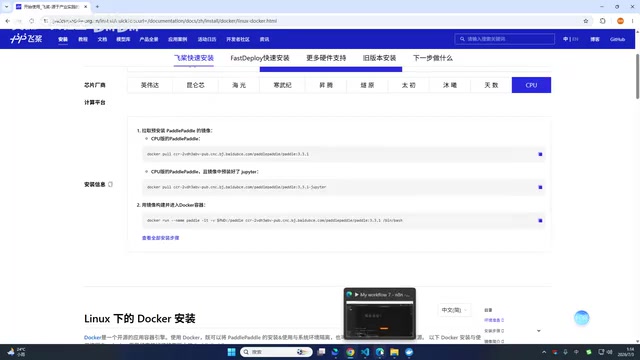
Docker Deployment: The Optimal Cross-Platform Solution
Why Docker Is the Go-To for Deploying PP-OCRv6
PP-OCRv6 supports all three major operating systems: Windows, Linux, and macOS. However, from a practical deployment experience standpoint, Docker deployment is the most hassle-free approach.
Docker is an open-source containerization platform that evolved from Linux Container (LXC) technology. Its core concept is to package an application along with all its dependencies (runtime, libraries, configuration files) into a standardized, portable container image. Unlike traditional virtual machines, Docker containers share the host machine's operating system kernel directly, resulting in faster startup times and lower resource consumption — traditional VMs need to emulate a complete hardware layer and run an independent OS for each instance, with startup times typically in the minutes, while Docker containers are essentially just a process group on the host machine isolated through namespaces and resource-limited by cgroups, with startup times compressible to seconds or even milliseconds.
Linux Namespace technology is the cornerstone of Docker's process isolation: PID namespaces isolate process trees, NET namespaces isolate network stacks, MNT namespaces isolate filesystem mount points, and the overlay of multiple namespaces makes processes inside a container "believe" they're running on an independent system while actually sharing the host kernel. Cgroups (Control Groups) handle resource quota management, limiting the CPU cores, memory ceiling, and disk I/O bandwidth available to a container, preventing any single container from exhausting host resources. While this mechanism brings lightweight advantages, it also means that system resources like fonts and language packs are isolated between the container and host by default — this is precisely the root technical cause of the font-missing issue discussed later. For deep learning applications like PP-OCRv6 that depend on specific Python versions and numerous third-party libraries, Docker effectively solves the classic engineering dilemma of "it works on my machine." docker-compose is Docker's orchestration tool, allowing users to define multi-container application services, networks, and storage volumes through YAML configuration files, further simplifying the deployment management of complex applications — users only need a single docker-compose up command to spin up the complete application stack including the OCR service and dependent middleware.
Compared to the tedious work of manually configuring Python environments and aligning dependency library versions, Docker solves environment isolation and dependency packaging in one go, dramatically reducing the probability of errors. The specific operation is very simple: just copy the corresponding deployment command from PaddlePaddle's official website, open PowerShell (for Windows users), paste and press Enter, and the system will automatically complete the deployment. Model files are also downloaded automatically on first run, requiring virtually no manual intervention.
Version Selection: CPU Version Is Impressively Fast Too
In hands-on testing, the creator deployed version 3.3.1 CPU edition, without using the GPU version that requires a dedicated graphics card. As a notable detail, even in a pure CPU environment, PP-OCRv6's recognition speed remains quite fast — more than sufficient for small to medium-scale invoice and document recognition scenarios. This means users without dedicated GPUs can still enjoy a smooth experience, significantly lowering the deployment barrier. This is precisely thanks to the knowledge distillation compression technique — by transferring the inference capability of large models to lightweight networks, PP-OCRv6's floating-point operations (FLOPs) on CPU have dropped dramatically compared to earlier versions, allowing vector instruction sets on x86/ARM processors (such as AVX-512, NEON) to meet real-time inference requirements without relying on the CUDA ecosystem for GPU acceleration.
It's worth adding that the PaddlePaddle framework specifically integrates Intel oneDNN (formerly MKL-DNN) acceleration library for CPU inference. On x86 platforms, it further squeezes CPU performance through Operator Fusion and memory layout optimization — Operator Fusion merges multiple consecutive neural network operators (such as Convolution + Batch Normalization + ReLU) into a single computation kernel call, reducing memory read/write overhead for intermediate results. This is particularly effective in CPU inference scenarios where memory bandwidth rather than raw compute power is the bottleneck. ARM platforms achieve similar optimizations through the Arm Compute Library. This means the CPU version of PP-OCRv6 is not simply a "downgraded" GPU version but an independently delivered version with targeted inference optimizations, offering practical value even on edge computing devices (such as Raspberry Pi and industrial PCs).
Additionally, official version iterations are quite rapid — the creator initially deployed version 3.2.0, while the current official version has been updated to 3.3.1. It's recommended to deploy directly with the latest version commands for the best model performance and compatibility.
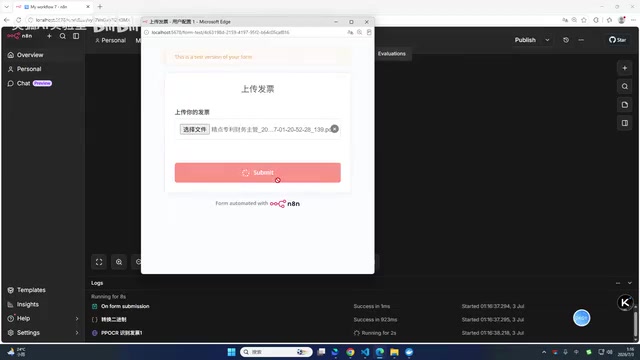
Real-World Results: Near-Perfect Invoice Recognition
From "Partial Missing" to "Complete Recognition"
In actual testing, the creator built an automated invoice recognition workflow using N8n to process multiple PDF-format invoices. Test results showed that PP-OCRv6 could completely and accurately recognize everything from invoice amounts to detailed line items like "Living Services - Travel - Tolls."
However, the process also exposed a clear issue: during the initial deployment, the "Item Name/Model Specifications" column on invoices was completely unrecognizable — not misrecognized, but the entire area was simply skipped. This phenomenon initially raised doubts about the model's capabilities, but investigation revealed that the problem had nothing to do with the model itself.
The Critical Pitfall: Missing Fonts Causing Entire Regions to Be Skipped
Pinpointing the Root Cause
After troubleshooting (with assistance from a coding AI assistant), the creator ultimately traced the problem to its true cause — missing font files in the deployment environment.
Understanding this issue requires knowledge of OCR's internal mechanism for processing PDF files: PDF (Portable Document Format) is fundamentally a vector description format based on the PostScript language, where text content is stored as character encodings and font references rather than pixel bitmaps. The PDF specification defines two approaches: Font Embedding and Font Reference — the former writes the font's glyph data entirely into the PDF file itself, while the latter only records the font name and relies on the rendering environment to provide the corresponding glyphs. The two approaches involve significant trade-offs between file size and cross-platform compatibility.
VAT (Value-Added Tax) electronic invoices issued by China's tax system typically use font references rather than font embedding. This is because the tax platform's PDF generation system assumes the rendering environment already has standard Chinese fonts installed, saving the extra file size from font embedding. However, this assumption often doesn't hold in Docker minimal image environments, creating a classic "inconsistent environment assumption" trap. When PaddleOCR processes PDF-format documents, it doesn't directly recognize PDF vector data. Instead, it first calls a rendering engine (such as poppler or MuPDF) to rasterize the PDF into pixel images, which are then processed by the neural network.
This process is essentially "simulating printing": the rendering engine looks up the fonts referenced by the PDF file — if fonts are embedded in the PDF, they're used directly; if not, substitute fonts must be found from the system's font library. When a Docker minimal image lacks the corresponding fonts, the rendering engine can't find any usable glyph data and can only render blank areas — this entire process is completely transparent to the user with no error messages, producing the bizarre appearance of "text disappearing." This has absolutely nothing to do with the model's recognition capability and is a classic "upstream data pipeline" issue.
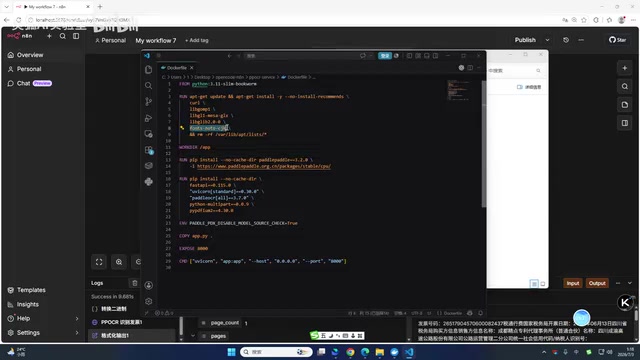
Docker minimal images (typically based on Alpine Linux or Debian Slim) often strip out large font packages to save space. Alpine's base image is only about 5MB, while Chinese font packages (such as WenQuanYi Micro Hei) alone exceed 20MB, making font dependencies extremely easy to overlook in containerized scenarios. It's worth noting that different PDF rendering engines exhibit different fallback behaviors when fonts are missing: poppler defaults to using Latin fonts like Helvetica as substitutes, silently rendering blank spaces when encountering CJK characters with no corresponding glyphs rather than throwing exceptions; MuPDF, on the other hand, provides font substitution logs accessible via the -v parameter for diagnostic output. Therefore, when troubleshooting such issues, directly examining the rendering engine's detailed logs is often more efficient than analyzing OCR output. In Linux containers, installing Chinese font packages like fonts-noto-cjk or fonts-wqy-zenhei fundamentally resolves this category of issues.
It was precisely the absence of these fonts that prevented specific areas of the invoice from being properly parsed, creating the illusion of "entire regions being skipped." After adding the missing fonts, the previously unrecognizable "Item Name" column immediately achieved perfect recognition.
This is an extremely hidden yet highly impactful pitfall, manifesting in three specific ways:
- Deceptive symptoms: The skipped regions look like model capability deficiencies, easily leading to misjudgment of model quality;
- Docker environments require manual font dependency verification: In custom docker-compose and Dockerfile configurations, "edge dependencies" like fonts are extremely easy to overlook;
- Extremely low fix cost: Once the root cause is identified, adding font files resolves the issue — no model retraining or replacement needed.
Therefore, when deploying PP-OCRv6, always check the font configuration inside the container — this is a critical prerequisite for ensuring recognition completeness.
Building an Automated OCR Workflow with N8n
Workflow Architecture Breakdown
The true value of PP-OCRv6 lies in embedding it into automated workflows. N8n is an open-source workflow automation platform developed with Node.js, using a "Fair-code" licensing model that allows users to self-host with full data sovereignty.
"Fair-code" is not a traditional OSI-certified open-source license but rather a hybrid licensing model between open-source and commercial: users can self-host for free and freely modify the source code, but cannot sell N8n itself as a commercial service. The rise of this model stems from ongoing discussions in the open-source community about "Cloud Vendor Free-riding" — cloud platforms like AWS, GCP, etc. can package open-source projects as managed services and profit from them without contributing code or funding back to the original projects. Notable projects like MongoDB, Redis, and Elasticsearch have all subsequently modified their licenses for this reason. N8n's Fair-code authorization (based on the Sustainable Use License) is a typical product of this trend, maintaining code visibility while using commercial use restrictions to sustain the project's development.
For individual developers and small to medium businesses, N8n's self-hosted version is completely free, and data never leaves the local environment. In OCR scenarios involving sensitive documents like invoices and contracts, this offers significant compliance advantages — compared to uploading files to third-party SaaS platforms, local deployment effectively avoids data breach risks and compliance pressure from privacy regulations like GDPR. N8n's visual node editor is built on Vue.js and supports real-time viewing of input/output data at each node. This feature is particularly practical when debugging JSON structures from OCR recognition results: developers can directly observe the raw JSON returned by HTTP nodes on the canvas and validate field extraction logic in adjacent Code nodes in real-time, dramatically shortening the debug cycle.
Unlike commercial SaaS platforms such as Zapier and Make, N8n's node-based orchestration supports embedding custom JavaScript code (via Code nodes), providing extremely high flexibility when handling non-standard data formats and complex business logic.
The creator demonstrated how to build an automated invoice recognition workflow using N8n, with core nodes including:
- Trigger Node: Upload PDF-format invoices via a form with corresponding field configurations;
- Code Node: Due to N8n framework limitations, binary data cannot be directly passed to retrieve needed content, requiring a Code node to process binary data and extract usable data;
- HTTP Node: Send the processed data to the PP-OCRv6 recognition API endpoint, which returns structured results in JSON format;
- Data Integration Node: Organize JSON data into readable text through custom code, completing the full recognition loop.
In integration scenarios with PP-OCRv6, N8n calls the OCR service's REST API via HTTP Request nodes, then routes the returned JSON structured data to downstream nodes for database writes, email notifications, or ERP system integration, forming a complete unattended automation chain. PP-OCRv6's REST API follows the standard multipart/form-data transfer protocol, and the returned JSON structure includes bounding box coordinates, recognized text, and confidence scores for each text box. Downstream nodes can perform quality filtering based on confidence thresholds, routing low-confidence results to a manual review queue to achieve an "AI + Human" hybrid processing model.
From an engineering practice perspective, confidence threshold settings need to be tuned for specific business scenarios: invoice amount fields should use higher thresholds (e.g., 0.95 or above) to ensure financial data accuracy, while non-critical fields like remarks and summaries can be relaxed to around 0.8 to improve automation coverage. This differentiated quality control strategy achieves an optimal balance between accuracy and manual intervention costs. It's worth adding that PP-OCRv6's returned bounding box coordinates also carry business value — by analyzing the relative positional relationships of text boxes (such as Y-axis coordinate sorting to reconstruct row structures and X-axis coordinate clustering to reconstruct column structures), you can reconstruct the table semantics of invoices from unstructured recognition results without relying on complex layout analysis models. This is particularly effective for highly standardized VAT invoices. For users unfamiliar with writing Code node logic, it's recommended to use coding AI assistants to generate the code directly, lowering the barrier to entry. This combination of "open-source AI model + open-source low-code platform" is becoming the mainstream paradigm for individuals and small teams to rapidly build practical AI applications.

Conclusion: Deployment Details Determine Recognition Success
As a SOTA-level open-source OCR model, PP-OCRv6 demonstrates excellent accuracy and speed in invoice recognition scenarios. The CPU version alone can satisfy most use cases, and the deployment barrier is quite approachable.
However, this hands-on test also reminds us: the "last mile" of open-source models often hides in environmental details. Issues as seemingly trivial as missing fonts — rooted in the conflict between Docker minimal image trimming strategies and the OCR document rendering pipeline's implicit font dependencies — can directly cause entire recognition regions to be lost. During deployment, beyond just getting the basic flow running, you need to carefully verify the completeness of fonts, dependencies, and other configurations.
A practical verification method is: after completing deployment, use a test invoice containing multiple Chinese fonts (Song, Hei, FangSong) for full-region recognition verification. Only after confirming there are no blank or missed regions should you put it into production use. Going further, you can explicitly declare font installation steps in your Dockerfile (such as RUN apt-get install -y fonts-noto-cjk fonts-wqy-zenhei), bringing font dependencies under Infrastructure as Code management to fundamentally eliminate inconsistencies caused by Environment Drift, rather than relying on post-deployment manual verification. In advanced practice, you can also integrate font verification into Docker HEALTHCHECK: write a lightweight script that renders a test PDF containing standard Chinese characters at container startup. If blank areas appear in the output image, the health check fails, intercepting font-missing issues during the CI/CD pipeline stage and eliminating potential production failures at the build phase.
Due to testing environment limitations, this test didn't cover handwritten text recognition — one of PP-OCRv6's key selling points that deserves further validation. As the integration of OCR models with automation platforms like N8n continues to mature, practical workflows spanning from invoice reimbursement to archive digitization are becoming increasingly accessible.
Key Takeaways
Related articles
What Is Vibe Coding? The AI Programming Skill Every Developer Needs
What is Vibe Coding? Learn how AI programming is reshaping dev teams, why traditional programmers face displacement, and why Cursor & Claude Code matter.
Making Rocks Think: A Philosophical Exploration of Generative AI and Information Compression
From a viral Reddit post to deep AI theory: why compression equals understanding, the Library of Babel thought experiment, semantic compression, and the Hutter Prize.
Irregular Warns: Four AI Lab Security Breaches Traced to the Same Root Cause
Irregular reveals four AI lab security breaches share a single root cause, exposing systemic risks from technology stack homogeneity across the AI industry.