Practical Guide to Configuring Bioinformatics Analysis Environments with Claude Code

Using Claude Code with DeepSeek v4 Flash to configure bioinformatics environments through three practical cases.
This guide demonstrates configuring bioinformatics analysis environments using Claude Code in bypass mode with DeepSeek v4 Flash. Through three cases—RNA-seq pipeline setup, GATK reference data downloading, and SRA batch data retrieval—it shows that effective AI-assisted programming depends more on prompt quality and human guidance than on choosing the most expensive tools, while highlighting the cost-effectiveness of this combination.
Introduction: No Need to Chase the Most Powerful Agent
In the field of AI-assisted programming, many people obsess over whether they're using the most advanced Agent or the most powerful LLM. In reality, whether it's OpenAI's Codex, Claude Code, or Agentic CLI, any of them can efficiently complete tasks when paired with appropriate prompts and human guidance. This article demonstrates how to use Claude Code with the domestic model DeepSeekAd v4 Flash to configure analysis environments through three bioinformatics use cases.
Environment Preparation and Configuration
Basic Setup
The tool combination used:
- Agent: Claude Code v2.1.179
- LLM: DeepSeek v4 Flash
- Running Mode: Bypass mode
Bypass mode refers to bypassing Claude Code's default binding to the Anthropic API and instead connecting to third-party LLM services. Claude Code itself is an excellent Agent framework with capabilities like file read/write, command execution, and context management, but its underlying LLM can be swapped out. By configuring the API endpoint and key, users can connect DeepSeek, OpenAI, or other models into Claude Code's Agent loop, retaining the Agent toolchain capabilities while significantly reducing costs. This decoupled design reflects the separation of "planning layer" and "execution layer" in Agent architecture.
The biggest advantage of this combination is extremely low cost. DeepSeek v4 Flash is a lightweight high-speed inference model from DeepSeek, positioned to maintain strong code generation and reasoning capabilities while offering very low API call costs and fast response speeds. Compared to flagship models like GPT-4o or Claude 3.5 Sonnet, the Flash series achieves near-flagship performance on programming tasks through model distillation and architecture optimization, but at token prices one-tenth or even lower. This makes it particularly suitable for scenarios requiring extensive Agent interaction loops—every tool call, environment check, and code generation consumes tokens, and low-cost models have clear advantages in such high-frequency call scenarios. If usage is light, you don't even need a monthly subscription—50 RMB can last a long time.
Memory File Configuration
In Claude Code, the memory file is called claude.md (corresponding to agent.md in Codex). Note that if you modify the configuration file after launching Claude Code, you need to restart for changes to take effect.
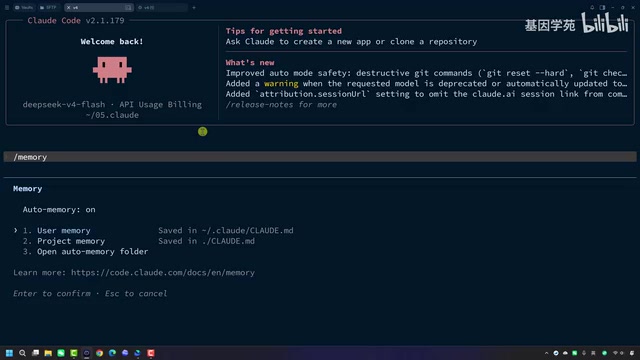
In this test, the core instruction in the memory file was to have the Agent "only generate code," avoiding redundant explanations to improve efficiency. The memory file is essentially a system-level prompt persistence mechanism that eliminates the need to repeat preferences and constraints in every conversation—the Agent automatically loads these preset instructions as part of its behavioral guidelines on startup.
Case 1: Configuring an RNA-seq Analysis Environment
Background
RNA-seq (RNA sequencing) is a method for comprehensive transcriptome analysis using high-throughput sequencing technology, widely used in gene expression quantification, differential expression analysis, alternative splicing detection, and other research. The standard analysis pipeline includes: quality control (FastQC for raw data quality inspection, FastP for adapter removal and low-quality base trimming, MultiQC for aggregating multi-sample QC reports), sequence alignment (e.g., HISAT2 or STAR for aligning reads to a reference genome), and expression quantification (e.g., featureCounts or HTSeq for counting gene expression levels). Configuring this environment involves numerous software dependencies and version compatibility issues, making it a common pain point for bioinformatics beginners.
Execution Process
Using the exact same prompt as in the Codex test, Claude Code was asked to help configure an RNA-seq analysis environment. The Agent first detects currently installed software, then asks about the configuration approach (minimal or full configuration).

After selecting minimal configuration, the Agent:
- Creates a virtual environment
- Installs common QC tools like FastQC, FastP, and MultiQC
- Installs alignment and quantification software
Evaluation
Generation speed was very fast, and the final result was essentially identical to Codex—all common RNA-seq analysis software was correctly installed. This validates an important point: different Agents can achieve the same results with identical prompts. This also suggests that as LLM capabilities converge toward homogeneity, the choice of Agent framework is more about user experience and cost differences rather than fundamental capability gaps.
Case 2: Downloading GATK Reference Data
Task Description
GATK (Genome Analysis Toolkit) is a genome variant detection toolkit developed by the Broad Institute and is the industry standard for human genome variant analysis. It depends on a series of reference data: the human genome reference sequence (e.g., GRCh38/hg38) and its BWA/Bowtie2 index files; the dbSNP database containing known single nucleotide polymorphism sites for variant annotation and Base Quality Score Recalibration (BQSR); and gold-standard genome datasets (e.g., HapMap, 1000 Genomes, Mills indels) for Variant Quality Score Recalibration (VQSR). These data typically total over 100GB, and downloading and organizing them is a time-consuming task in itself.
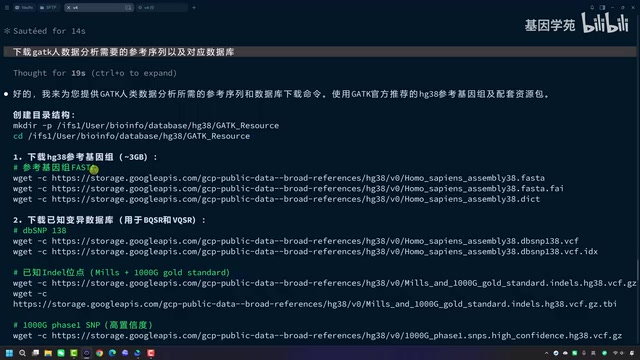
The Agent was asked to generate a script for downloading GATK reference data, including:
- Human genome reference sequence and indices
- dbSNP database
- Gold-standard genome datasets
Results
The Agent quickly generated a complete download script including directory creation, file downloading, and integrity verification steps. It also helpfully suggested using multi-threaded download tools if speeds are slow. Code quality was completely consistent with Codex-generated results.
Case 3: Batch Downloading SRA Sequencing Data
Handling Complex Requirements
This was a more complex task: obtaining all sequencing data from a specific SRA project, requiring classification by sample name, downloading data from the same sample into the same directory, and naming by sequencing platform.
SRA (Sequence Read Archive) is the world's largest public sequencing data repository maintained by NCBI, storing over 50PB of sequencing data as of 2024. Downloading data from SRA faces multiple challenges: the traditional prefetch+fasterq-dump approach relies on NCBI servers with highly unstable access speeds from China; data needs to be decompressed from SRA format to FASTQ format, which is computationally expensive. Alternatives include downloading pre-converted FASTQ files directly from AWS Open Data or Google Cloud mirrors.
The task involved 20 bacterial samples across three sequencing platforms, requiring the Agent to parse NCBI website metadata.
Iterative Optimization
The initial script used fasterq-dump for direct downloading, but the user wanted to switch to AWS downloads for better speed.
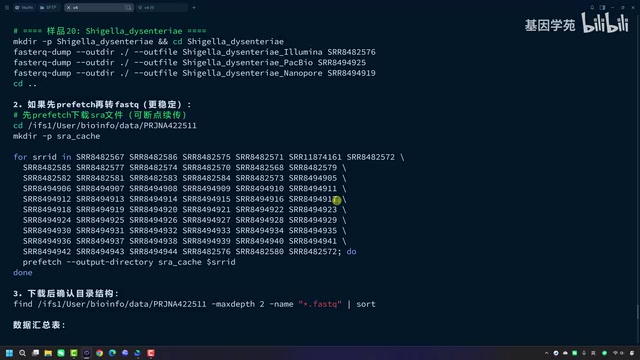
The Agent demonstrated strong comprehension and adaptability, switching directly to Kingfisher and providing three download approaches:
- Kingfisher + AWS (most recommended): Built-in AWS download support, most convenient to use
- Direct AWS CLI download: Requires separate AWS credential configuration
- HTTPS protocol download: Fetches directly from AWS via HTTPS, no additional tools needed
Kingfisher is an intelligent download tool that automatically detects the fastest data source (ENA, AWS, GCP, etc.), supports resume and parallel downloads, significantly improving efficiency for large-scale sequencing data acquisition. The Agent not only provided multiple approaches but also bold-highlighted the most recommended option, demonstrating good interaction design awareness.
Core Conclusions and Recommendations
Three Factors That Determine Results
From this test, we can conclude that the effectiveness of AI-assisted programming depends on three factors:
- LLM capability: Determines the upper limit of understanding and generation
- Agent tools: Claude Code, Codex, and Agentic CLI each have their strengths
- Prompt quality: Human guidance plays a critical role
The relationship between these three can be analogized as: the LLM is the engine, the Agent is the chassis, and the prompt is the steering wheel. The engine determines the power ceiling, the chassis affects the driving experience, but where you ultimately go and whether you arrive safely depends on how the driver operates the steering wheel.
Practical Recommendations
- No need to pursue the most expensive solution: The DeepSeek v4 Flash + Claude Code combination offers excellent cost-effectiveness
- Leverage memory files: Use
claude.mdto preset behavioral guidelines and reduce repetitive communication - Iterate and optimize: Let the Agent generate a basic version first, then refine through conversation
- Clear context: When concerned about context interference, clear and restart promptly
The ultimate core takeaway is: humans still play a decisive role in AI-assisted programming. Choosing the right tools matters, but what matters more is mastering the methodology of collaborating with AI—clear requirement descriptions, reasonable task decomposition, and effective iterative feedback are what truly determine output quality. In specialized fields like bioinformatics, researchers' domain knowledge (knowing what to do and whether results are reasonable) complements AI's code generation capabilities. This human-AI collaboration model is redefining how computational biology works.
Related articles
DeepSeek Open-Sources DeepInfer: What Is an Inference Framework Actually For?
DeepSeek open-sources its inference framework DeepInfer under Apache 2.0, supporting DeepSeek V4.1 Flash offline inference. This article explains its request scheduling, FlashMLA/DeepGEMM compute optimization, DSPark speculative verification acceleration, and what it means for developers and ordinary users.
Open-Source AI Learning Agent: A Full Workflow Experience from Topology Graphs to Exam Generation
Explore an open-source AI learning agent: built on DeepSeek API, it constructs knowledge systems via topology graphs, with automatic document generation, notes, super documents, and exams. Learn about its Agent workflow and design highlights.

DeepSeek Whale Girl Open-Source MV Meme: AI Industry Coded Slang About Pivoting to Closed Source
Bilibili's DeepSeek Whale Girl rap MV uses fictional memes to tease the AI open-source vs. closed-source debate, with lyrics full of industry slang. This article explains the meme culture, the Whale Girl symbol, and the open/closed tension.