Pydantic AI + MCP in Practice: Building Type-Safe Agents

Connect Pydantic AI to MCP servers for type-safe tool discovery, invocation, and validated agent output.
This article walks through integrating a Pydantic AI agent with an MCP server, using a weather tool as a concrete example. MCP handles runtime tool discovery and invocation, while Pydantic's `output_type` provides an independent validation boundary after the agent returns — the two schemas serve distinct roles and neither can replace the other. The article also covers local stdio subprocess mechanics, three error-handling strategies (retry/expose/propagate), security considerations for remote streamable HTTP connections, and best practices for scoping tool permissions via filtering and prefixes.
Why Connect Pydantic AI to MCP
Once you've built a Pydantic AI agent with well-defined data types, you'll often need to give it access to external capabilities — weather lookups, database queries, or third-party service calls. The traditional approach is to copy that logic into your app or rewrite the agent's run loop, but that breaks boundaries and makes maintenance harder.
Model Context Protocol (MCP) offers a better path. With MCP, Pydantic AI can discover tools exposed by external servers, let the model select and call one of them, and then process the response — all without pulling tool definitions into the client code. This article is based on Lesson 10 of Stage 22 from Emmanuel Koral's Agentic AI course. It walks through how to build a type-safe client application using a course-provided weather server that exposes a get_forecast tool.
The core idea is simple: MCP supplies the capabilities; Pydantic guarantees the reliability of application-layer objects.
Model Context Protocol (MCP) is a standardized protocol open-sourced by Anthropic in late 2024 to address the fragmented integration between AI agents and external tools or data sources. Before MCP, every agent framework had its own tool-calling convention, meaning the same weather API might need separate adapter layers for LangChain, AutoGen, and Pydantic AI. MCP draws inspiration from LSP (Language Server Protocol): it defines a universal client/server message format so that any compliant server can be discovered and called by any compatible client. The protocol supports three transport modes — local stdio (subprocess communication), streamable HTTP, and legacy HTTP+SSE — covering local tools, remote services, and legacy systems respectively. This standardization lets a single MCP server be reused by different hosts like Claude Desktop, Cursor, and Pydantic AI, with tool logic maintained in just one place.
Environment Setup and Protocol Contract
In an existing Python 3.12 project, run uv add pydantic-ai — the full package includes MCP integration out of the box. If you're using the slim distribution, you'll need to install the MCP extra separately. Pydantic AI requires Python 3.10 or later, which this environment satisfies.
Before connecting, inspect the contract the server exposes. This server advertises get_forecast with a clear description: it requires a city string and accepts an optional number of days. This contract belongs to the unmodified server — our job is to build a typed client that uses it, not to change the server.
For local stdio transport, the client launches the Python server as a subprocess and exchanges protocol messages over stdin/stdout. It uses tools/list to discover tools and tools/call to invoke the selected one. One critical detail: server logs must go to stderr, because any stray stdout output can corrupt the protocol stream.
Stdio transport is the most intuitive way to understand how MCP works. When the client launches the server as a subprocess, both sides exchange JSON-RPC 2.0 messages over stdin/stdout. During the handshake, the client sends an initialize request; the server responds with its protocol version and capability declaration. The client then sends tools/list to retrieve the tool manifest — each tool includes a name, description, and JSON Schema-compliant input definition. This schema serves dual purposes: it's a semantic hint for the model (the description field explains what the tool does), and a runtime parameter validation constraint (types and required fields are enforced by the schema). Because discovery happens at runtime rather than compile time, the client code doesn't need to know the server's tool list in advance. This is also why "don't import the server file" is the correct posture for an MCP client — the moment you import it directly, the isolation benefit disappears.
Defining the Client and Output Validation Model
Open client.py and import the necessary modules: asyncio for lifecycle management, os to configure the model from environment variables, BaseModel to define the final result, Agent to run the agent, and MCPToolset to directly control MCP transport. This toolset connects the agent to capabilities exposed by the external server.
Next, define a ForecastSummary model with fields for city, temperature_c, conditions, and source. This model describes the shape of data the application must receive after the agent completes its run.
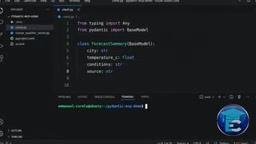
Here's a detail that's easy to overlook: a successful MCP tool call does not guarantee that the final output matches the expected shape. The model might still generate free-form text after the tool returns. That's why the final agent output needs its own separate validation boundary — and that's exactly what a Pydantic output model provides.
Setting Up the Connection and Running the Agent
Create an MCPToolset with the Python command and course_weather_server.py as arguments — this defines a local stdio server. When the connection opens, Pydantic AI will launch that process and communicate with it. Note that our application does not import the server file; capabilities remain behind a separate protocol boundary.
Then create the agent: use the course-configured model, provide focused instructions, attach the weather tool via the toolset parameter, and set output_type to ForecastSummary. This integration is provider-agnostic — the environment selects a model that supports the required tool interactions.
In main, use async with agent, which opens the registered MCP connection and starts the local subprocess before the run begins. Call agent.run with the user request and read result.output. Because output_type is set, this value is a validated ForecastSummary — not an unstructured text guess. Finish with asyncio.run(main()) — the context stays open for the entire run (including discovery and tool calls), then closes cleanly.
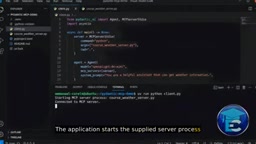
While Pydantic AI can also manage toolsets automatically during a run, an explicit context helps learners see the full lifecycle: process startup, connection duration, and shutdown.
Discovery, Invocation, and Typed Results
Run the client with uv run python client.py. The application starts the server process and opens an MCP session. The first significant event is discovery: the client requests available tools, the server returns get_forecast along with its description and input schema, and Pydantic AI converts this contract into a capability the model can choose from. We didn't copy the tool definition into client.py — we're simply using what MCP provides.
Seeing the discovered capability, the model selects get_forecast with Nairobi and two days as parameters. The application sends the call to the server (not a local Python function). At this external boundary, the server's schema determines what parameters are acceptable. The server returns the tool content — in the course fixture, this includes the requested city, forecast values, conditions, and a source label. Pydantic AI passes the result back to the model to inform the final application response.

The model ultimately produces the agent result, and Pydantic validates it against ForecastSummary. Downstream code can use result.output.city or result.output.temperature_c as typed values directly — no need to parse prose text or rely on consistent labels and formatting.
It's important to keep the two schemas separate: the MCP input schema protects calls going into the external capability; the MCP output schema (if provided) describes what the capability returns; and our Pydantic output type protects the final agent result entering the application. Each boundary has its own job and none can substitute for the others.
Handling Failures: Retry, Expose, and Propagate
To test the connection boundary, introduce a controlled failure. Temporarily request 0 days of forecast — the server contract only allows 1 to 7, making this an invalid tool parameter. This is safer and more informative than randomly breaking the implementation, because we know exactly which rule should reject the call.
The server rejects days=0 and returns a tool error. By default, the model receives this failure as guidance and can retry, rather than receiving fabricated weather data. Trace logs will show the rejected parameters and validation message, surfacing the problem rather than hiding it. The model then retries with days=1, the server succeeds, and ForecastSummary completes final validation.
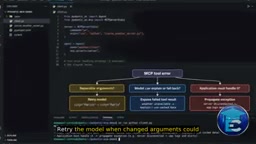
That said, limit retry attempts — repeated invalid calls waste time and model usage. "Server unavailable" is a different situation entirely: the command might be missing, the script path wrong, or the remote endpoint unreachable. In that case, the model has no tool result to work with. This should be treated as an application integration failure: log which server is unavailable and provide a clear recovery prompt, rather than making up an answer.
MCPToolset offers three error-handling approaches:
- Retry the model — when changing parameters might make the call succeed;
- Expose the failed tool result — when the model should explain the error or switch to another available capability;
- Propagate the server exception — when application code must manage logging, fallback, or user messaging itself.
Which approach to use depends on the severity of the operation's consequences.
Pydantic AI's retry mechanism is tightly coupled to the underlying model's tool-calling loop. When a tool returns an error, the framework appends the error content as a new "tool result message" to the conversation context. The model can read this failure in its next reasoning pass and decide whether to correct the parameters and retry. This closely mirrors how a human debugs a command-line tool — see the error, understand the cause, adjust the parameters, try again. The max_retries parameter (typically defaulting to 1) caps this loop to prevent the model from getting stuck in an endless cycle of invalid retries. It's worth noting that retries only make sense when "parameters are correctable": if the error stems from server unavailability or a network timeout, the model has no parameters to fix, and you should skip retries and go straight to propagation — otherwise you're just burning through token quota and waiting time.
Remote Connections and Security Boundaries
To connect to a remote service, provide a streamable HTTP endpoint instead of a local command, store the endpoint and credentials in environment-variable-based configuration, and mount it through the same toolset parameter. For new integrations, use streamable HTTP rather than the deprecated legacy HTTP+SSE transport.
Remote connections expand the trust boundary, meaning more systems need to be protected. Apply authentication where appropriate, validate request origins on the server side, and bind local-only services to localhost. Never put credentials in prompts or tool parameters unless the tool contract explicitly requires it.
Connecting to a server grants the agent capabilities, and network access is just as important as tool permissions. The principle is to only expose the tools the task requires: Pydantic AI's toolset supports dynamic filtering, and prefixes can distinguish tools with identical names coming from different servers. Filtering removes irrelevant options and limits permissions; prefixes prevent naming collisions and make each capability's origin clear. Giving the model a concise, well-scoped, appropriately permissioned set of tools is a fundamental security practice.
Reviewing the Full Path
The complete flow is now clear: MCPToolset connects to the supplying server → the toolset exposes the discovered contract to the agent → the async context manages the connection → the server executes the selected capability → output_type validates the result before application code receives it.
You can now use MCP server capabilities from a typed Pydantic AI application, with tool contracts and final output validation kept completely separate. The next lesson in the course (Stage 22 Lesson 11) compares the architectural differences between Strands and Pydantic AI.
Related articles

Felix Rieseberg Personal Homepage
Felix Rieseberg's personal homepage sparks attention on Hacker News. This article covers the Slack engineer's technical background, the rise and fall of nativefier, and the value of a developer homepage as a tech calling card.

@ai-sdk/vue 3.0.306 Patch Release Syncs with [email protected] Update
@ai-sdk/vue 3.0.306 released, synced with [email protected]. A routine patch release for the Vercel AI SDK ecosystem with no public API changes; the Vue adapter layer stays version-aligned with the core package.

Gemini 4 Argon API Launches: The Era of Million-Token Output Begins
Google launches Gemini 4 Argon with sparse MoE architecture, up to 1M output tokens, and a 68.90% Vals Index score, available across API, AI Studio, and the Gemini app.