Python + AI from Scratch: Environment Setup and Core Concepts Guide
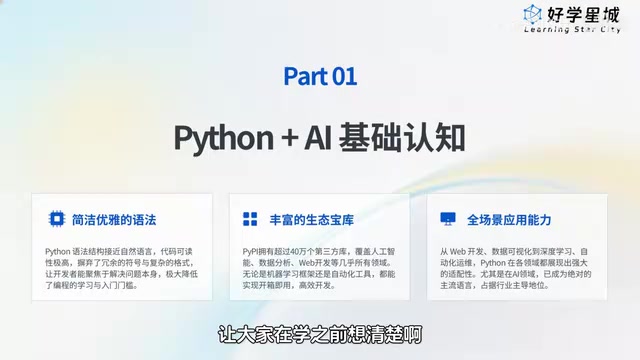
Python is the top choice for beginners entering AI thanks to its rich ecosystem and clean syntax; the course starts with environment setup.
The article introduces the design approach of a Python and AI course for absolute beginners. Over 90% of AI projects are built on Python, with TensorFlow, PyTorch, NumPy, Pandas, and OpenCV all natively supporting it. The first lesson focuses on building a versatile local environment reusable for AI development, data analysis, scraping, and office automation, plus mastering PyCharm basics. It also outlines Python's five application scenarios, cites McKinsey's estimate of a 4 million AI talent gap by 2030, and offers four learning suggestions.
Why Python Is the Go-To Entry Point in the AI Era
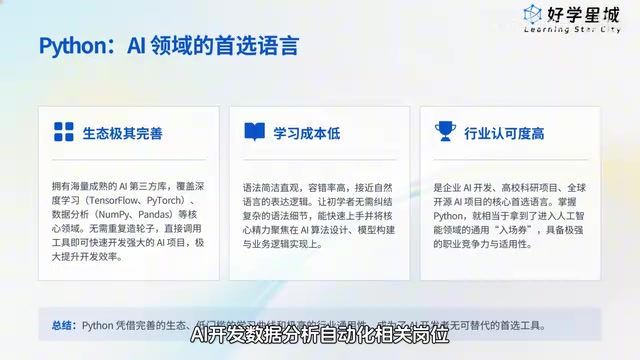
Many beginners entering the AI field share the same first question: with so many programming languages out there, why Python? In the opening episode of the Python and AI from Scratch series on Bilibili, creator Bingbing offers a straightforward answer—over 90% of AI-related projects on the market today are built on Python under the hood. This isn't a coincidence; it's determined by Python's ecosystem. From deep learning frameworks like TensorFlow and PyTorch, to data processing tools like NumPy and Pandas, to the image recognition library OpenCV, nearly every key tool in the AI development chain natively supports Python. For beginners, this means you don't need to reinvent the wheel—you can call mature tools directly and get a project running quickly.
Beyond its rich ecosystem, Python's syntax closely mirrors natural language, and implementing the same business functionality requires noticeably less code than C or Java. The creator repeatedly emphasizes one point in the course: a low learning curve is key to helping beginners stick with it. When newcomers aren't scared off by complex syntax, they can focus their energy on AI algorithms and business logic rather than grinding through rule details.
TensorFlow and PyTorch are the two dominant frameworks in deep learning today, with slightly different positioning. TensorFlow, introduced by Google, has a mature industrial deployment ecosystem—its companion toolchain including TensorFlow Lite and TensorFlow Serving is well suited to deploying models to servers and mobile devices. PyTorch, led by Meta (formerly Facebook), uses dynamic computation graphs, and its code style is closer to ordinary Python logic with intuitive debugging, making it more popular in academic research and rapid prototyping; it accounts for a high share of papers published in recent years. For beginners, both can be installed with a single pip command, with no need to implement backpropagation, convolution operations, or other low-level mechanisms yourself—a direct example of how the Python ecosystem lowers the barrier to AI.
NumPy and Pandas form the foundation of Python data processing. NumPy provides multi-dimensional array objects and vectorized operations, letting numerical operations that would otherwise require element-by-element loops run in a single batch, far faster than pure Python lists. Pandas builds on NumPy with a table-like DataFrame structure, supporting column filtering, group aggregation, missing-value handling, and more. Nearly all subsequent AI frameworks' tensor operations and data loading are built on NumPy's array interface; understanding this relationship helps beginners make sense of the data type descriptions in framework documentation.
Building a Versatile Development Environment
The first lesson of this course doesn't rush into writing code—instead, it focuses on environment setup. Creator Bingbing establishes a principle: the environment you build today isn't limited to a single learning scenario; later, whether you're doing AI development, data analysis, web scraping, or office automation, you can reuse it directly. Truly build once, use everywhere.
Two Clear Learning Objectives
The course opening sets two verifiable goals. First, build from scratch a professional, stable local runtime environment ready for Python and AI project development. Second, master the basics of the PyCharm editor so that by the end you can independently write and run your first line of Python code. This design approach is commendable—many beginner tutorials skip environment configuration and jump straight into syntax, leaving learners stuck at the first step by various error messages. Get the environment solid first, and writing code and running projects afterward will go smoothly, avoiding the vast majority of compatibility and exception issues.
Why Environment Setup Is the Gateway
The creator calls environment setup "the gateway to all Python learning and AI development." That framing is accurate. In practice, many beginners' problems aren't about understanding logic but about basic issues like improperly configured environment variables, package version conflicts, or the wrong editor interpreter selected. Clear this hurdle, and everything that follows becomes twice as effective.
Environment variables are the list of paths an operating system uses to find executable programs. If you don't check "Add Python to PATH" during installation, typing python at the command line will yield "not recognized as an internal or external command"—the most common first error beginners encounter. The principle: the system only searches directories listed in PATH for a program of that name; if Python's install directory isn't among them, it naturally can't be found. Once you understand this, you can troubleshoot similar errors yourself instead of blindly reinstalling.
Package version conflicts stem from Python's dependency management mechanism. Different libraries may depend on different versions of the same underlying library; when installed globally, later installations overwrite earlier ones, causing code that previously ran fine to suddenly error. The industry-standard practice is to create a separate virtual environment (such as venv or conda) for each project, isolating dependencies from one another. The course's emphasis on building a "professional, stable, reusable" environment points precisely to this habit—configure your virtual environment and interpreter correctly once, and switching between projects later won't cause interference.
Python's Five Core Application Scenarios
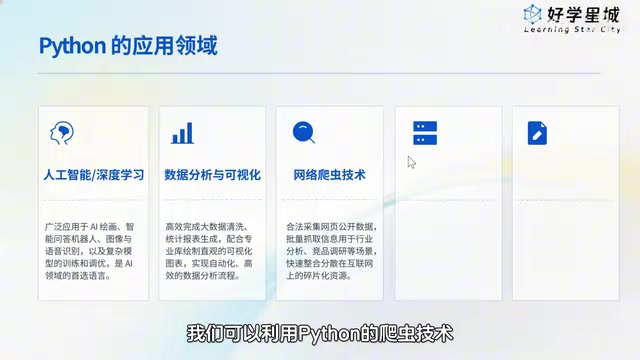
Understanding what a language can do matters more than rushing to write code. The course outlines Python's five main application directions, covering the mainstream needs of today's internet and workplace.
Artificial Intelligence and Deep Learning
This is Python's most core and hottest field. The AI art generation, intelligent Q&A bots, image recognition, and speech recognition we encounter daily—along with the training, optimization, and deployment of various AI models—all rely on Python as the underlying core development language. The vast majority of AI applications you see on the market are built on Python technology.
The TIOBE Index is a common reference for measuring programming language popularity, based on the number of search results related to a language across major global search engines, updated monthly. Python has ranked near the top for the past decade, largely driven by the wave of AI and data science. Note that TIOBE reflects "discussion and search popularity," not directly the number of jobs or salary levels—but it serves as useful evidence of a language's ecosystem activity and community resources. Popular languages typically have more complete tutorials, Q&A, and third-party libraries, which directly helps self-learners.
Data Analysis and Visualization
In the big data era, every company generates massive amounts of sales, operations, and user data daily. Manual processing is slow and error-prone. With Python, you can quickly complete data cleaning and statistical analysis, and automatically generate visualization charts and reports that intuitively reveal data patterns, supporting business decisions and reviews. The creator notes that Python can efficiently handle the massive processing that's difficult to do manually.
Web Scraping
Within legal and compliant boundaries, Python scrapers can batch-collect publicly available web data—industry news, e-commerce product data, public survey information. A few lines of code can replace the inefficiency of manual copy-paste, useful for learning and research, industry analysis, or organizing work data.
Backend Development
Python has mature web development frameworks that can quickly build corporate websites, functional websites, mini-program backends, and various system API services. Development is fast, stability is strong, and iteration is convenient—widely used in internet projects.
Office Automation
This is the scenario closest to everyday office workers. Batch-processing Excel spreadsheets, organizing files in bulk, automatically sending mass emails, repeatedly entering data—all can be automated with a single Python command, saving substantial time and saying goodbye to pointless overtime.
AI Talent Demand Through the Lens of a McKinsey Report
The course cites estimates from a McKinsey industry report: by 2030, the domestic shortage of AI professionals will reach 4 million. Based on this, the creator concludes that practitioners who master practical AI skills and can independently deliver projects will clearly surpass ordinary roles in job opportunities, salary, and career growth. This judgment aligns with current industry observations—what companies lack isn't people who can call APIs, but people who understand the business and can bring AI capabilities into real projects. As the recognized preferred development language in AI, Python has long ranked near the top of the TIOBE Index—for absolute beginners, it's genuinely a viable path into the AI field.
A Few Suggestions for Absolute Beginners
Drawing from the course's opening design, here are a few ideas worth considering for newcomers.
First, understand before you act. Before writing your first line of code, spend time clarifying what Python is, what you can do with it, and why it's worth learning. The answers to these questions will determine your persistence going forward.
Second, environment before syntax. Getting your development environment solid matters more than rushing to memorize syntax rules. A highly versatile environment can carry you from AI development all the way to office automation.
Third, choose the right toolchain. PyCharm, the editor designated by the course, is a mainstream choice for Python development; mastering its basics can significantly boost your coding efficiency later.
Fourth, let scenarios drive learning. The course's everyday examples—image recognition for photo album classification, sales data visualization reports, e-commerce price monitoring—demonstrate Python's practicality. Learning with specific problems in mind is easier to sustain than memorizing syntax in isolation.
This course targets absolute beginners, with a slower pace and detailed steps, from environment setup to running your first line of code. It's a suitable starting point for those with no prior programming experience who want to systematically enter the Python and AI field.
One-line Summary
Python is the top choice for beginners entering AI thanks to its rich ecosystem and clean syntax; the course starts with environment setup.
Paragraph Summary
The article introduces the design approach of a Python and AI course for absolute beginners. It opens by noting that over 90% of AI projects are built on Python, with key tools like TensorFlow, PyTorch, NumPy, Pandas, and OpenCV all natively supporting it; combined with syntax close to natural language and less code than C or Java, the learning curve is low enough that newcomers aren't scared off. The first lesson doesn't rush into code but focuses on building a versatile local environment reusable for AI development, data analysis, scraping, and office automation, plus mastering PyCharm basics, emphasizing that the environment is the gateway to learning and development. The article also outlines Python's five application scenarios, cites McKinsey's estimate of a 4 million AI talent gap by 2030, and closes with four suggestions: understand before acting, environment before syntax, choose the right toolchain, and let scenarios drive learning.
Related articles
Together.ai Reportedly Exposes Prompt Leakage Vulnerability: Request Handling Mechanism Raises Concerns
Together.ai is reportedly exposed on Hacker News for request prompt leakage. This article analyzes the incident background, the isolation challenges of multi-tenant inference platforms, and the security implications for developers and the AI infrastructure industry.
Codex for Beginners: 13 Hands-On Projects from Installation to Building Websites and Blender Modeling
Complete Bilibili Codex beginner tutorial: from registration and installation, permissions and model selection, to 13 hands-on scenarios including environment setup, GPT image generation for personal websites, Skill packaging, MCP connection to Blender modeling, CapCut control, scheduled tasks, and mobile control.
OpenAI Codex Complete Guide: From Installation to Hands-On Practice, a Full Breakdown of the AI Coding Agent
OpenAI Codex complete guide: the essential difference between Codex as an AI coding agent and ChatGPT, its four usage forms—CLI, web, plugin, and APP—and their scenarios, plus why developers should learn Codex in the AI era.