Python Calling Ollama Local LLMs in Practice: An Agent Development Guide

Learn how to call Ollama local models with the OpenAI SDK at zero cost and integrate them into an agent with tool calling.
Based on a Bilibili creator's hands-on demo, this article explains how to call Ollama local LLMs with the OpenAI SDK. The key takeaway is that Ollama is compatible with the OpenAI API, so migration only requires pointing base_url to local port 11434 and entering the correct model name, with no other call code changes. The article emphasizes that all Ollama models share the same endpoint, and model selection is entirely determined by the model field in the request—switching models requires changing only one string. The second part of the demo connects the local model to an agent prototype with tool calling and uses the LLM to make the code changes; in testing, the agent can initiate tool calls, but reliability on real-time tasks is limited by model scale and network conditions. The author summarizes practical experience such as acceptable response after hot-loading and slower first load, and assigns two hands-on exercises.
Local large language models are becoming an important option for developers building AI applications, and Ollama, as a lightweight local model runtime, pairs especially conveniently with Python. Based on a Bilibili creator's hands-on demo, this article walks through how to call Ollama local models with the OpenAI SDK and integrate them into an agent with tool calling.
Connecting to Ollama with the OpenAI SDK: Minimal Changes
The core idea of the demo is that Ollama is compatible with the OpenAI API format, so you can directly reuse the OpenAI Python SDK. Compared with calling a cloud API, the only change needed is base_url—point it to the local Ollama service address (such as http://localhost:11434/v1) instead of OpenAI's official endpoint.
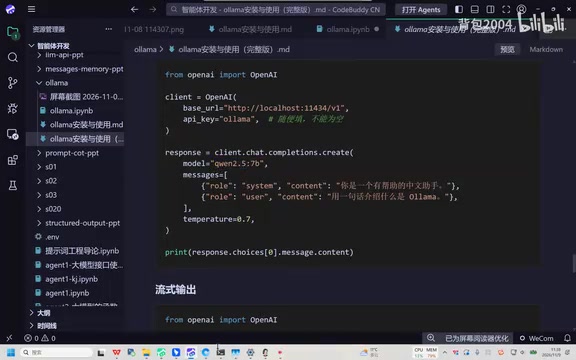
Filling in the model name also matters. The creator emphasizes that the model name in the code should match the model name actually pulled in Ollama, and you can get the exact name by listing the current models from the command line. The demo does not use a 7B model but rather a "Qwen 8B" (referring to a Qwen-series 8B-parameter model), with a reminder to be careful not to mistype the model name.
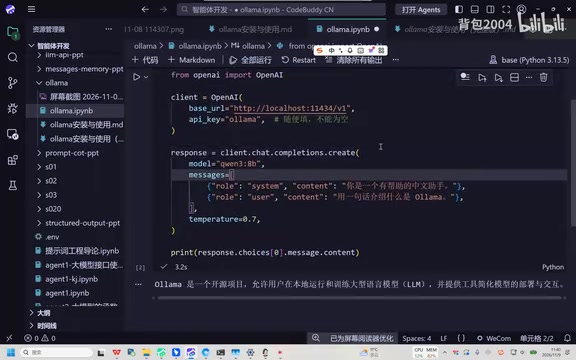
Once the connection is established, the way you ask questions and call the model is completely consistent with standard OpenAI usage. The creator runs the code live; the first attempt is a bit slow because the model was shut down and needs to reload; after the second load completes, a result comes back in about three seconds. This shows that local inference latency is acceptable once the model is hot-loaded.
Ollama is a lightweight tool designed specifically for running large language models locally, akin to a local "model package manager": it downloads quantized model weights, manages the model lifecycle, and starts an HTTP service on the local machine. The service listens on port 11434 by default and, in addition to its own REST API, is compatible with OpenAI's /v1/chat/completions and other interface formats, while also supporting native endpoints such as /api/generate. Because of this, any client written to the OpenAI specification—including the official Python SDK—can seamlessly call local models as long as base_url points to http://localhost:11434/v1, with no changes to request construction or parsing logic. This "protocol compatibility" strategy greatly lowers the cost of migrating from the cloud to local, and is one of the key reasons the Ollama ecosystem has expanded rapidly.
Key Detail: All Ollama Models Share the Same Endpoint
The creator specifically points out an easily overlooked detail: for Ollama, all local models use the same link (i.e., the same base_url), and the link itself does not change from model to model. Model selection is entirely determined by the model field in the request. This means developers do not need to maintain different connection configurations for each model—switching models only requires changing one string.

This feature simplifies the workflow of experimenting with multiple models and also explains why the model name in the code "can be written casually" and still work—as long as that name corresponds to a model that has already been pulled.
In the context of quantization and local inference, "7B" and "8B" refer to models with roughly 7 billion or 8 billion parameters. Parameter count directly determines VRAM usage and per-inference speed: on the same machine, an 8B model is usually slower than a 3B model, but it often understands complex instructions better and adheres more reliably to tool-calling formats. Models distributed by Ollama are mostly in 4-bit quantized GGUF format; an 8B model typically needs about 5–6 GB of VRAM or memory, a 7B model is similar, and a 3B model needs only about 2–3 GB. The behavior in the article where a small model "takes a detour to visit a website" during tool calling is a typical sign of limited model scale and insufficient planning ability. Therefore, when choosing a model, you need to balance response speed, hardware requirements, and task complexity rather than simply pursuing a larger parameter count.
Putting Ollama into an Agent: Let the LLM Help You Modify Code
The second part of the demo integrates the local model into an existing agent prototype. The creator previously had a simple agent prototype with tool calling, and this time the goal is to replace the model with an Ollama local model.
Interestingly, the creator did not manually modify the code line by line but instead handed the requirement directly to the LLM and let it complete the code changes. The changes are based on a file distributed earlier, and the result is that the agent can call the local model for inference. After running it, you can see that the agent successfully uses "Qwen 3B" to respond.
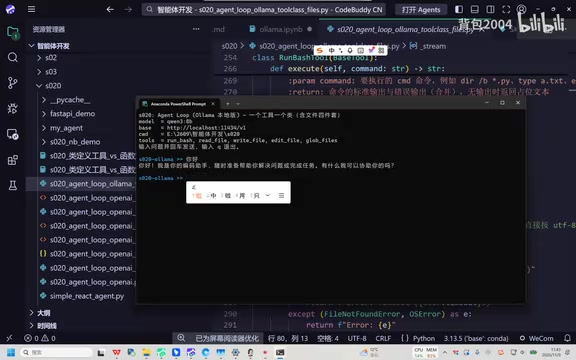
Next, the creator tested tool-calling capability by having the agent query recent news. Since the prototype has no built-in search engine tool, the model instead tries to use a terminal tool to access sites such as Sina to obtain information. In the demo, the network connection is poor and the access fails, but the creator notes that the model did indeed initiate a tool call, showing that small models can also complete a small number of agent tasks.
Tool Calling / Function Calling means the model does not directly give the final answer but instead outputs a structured call request, for example "call search_news with parameters {query: 'recent news'}", which an external program actually executes before passing the result back to the model, forming a multi-turn loop. In engineering terms, this usually requires two things: first, declaring to the model the names, descriptions, and parameter schemas of available tools; second, parsing the tool_calls field returned by the model and routing it to the corresponding function. Different models differ noticeably in their ability to follow this format, and small-parameter models often exhibit problems such as missing parameters, format errors, or "pretending to call". In the demo, the model instead chooses a terminal tool to scrape web pages, indicating that it has understood the layer of "needing external capability", but the reasonableness of tool selection and the success rate of execution still depend on model capability and the design of available tools.
Practical Advice and Limitations
Several lessons can be drawn from the demo. First, the barrier to calling Ollama local models is very low; OpenAI SDK users can migrate at almost zero cost by changing only base_url and the model name. Second, inference speed after model hot-loading is acceptable in the demo scenario, but the first load involves waiting. Third, local small models have basic capability in agent tool calling, but limited by model scale and the external network environment, reliability on complex tasks (such as real-time news scraping) is limited.
The creator assigned two practice tasks: first, connect the local model in the existing agent code; second, implement the calling program from the courseware. For developers who want hands-on practice, it is recommended to start with the simplest single-turn Q&A and then gradually add tool-calling logic.
Related articles

RePlan-VLA: Progress-Aware Replanning Breakthrough for Long-Horizon Robotic Manipulation
The RePlan-VLA framework converts VLA models' short-horizon capabilities into reliable long-horizon execution through progress-aware adaptive replanning, improving success rates by 21.9% and 10.4% on RoboCasa365 and CALVIN, and validating real-world deployment on a Franka Research 3 robot.

Geometric Bridge Flow Matching: A New Breakthrough in Blind Rigid Motion Correction
Geometric bridge flow matching enables blind rigid motion correction in head CBCT, achieving 37.1 dB PSNR and 0.27 mm RPE on simulated data in ~9.1 minutes, outperforming existing methods.

Google Releases Gemini 4 Hydrogen: 2.5x Faster Without Sacrificing Intelligence
Google releases the lightweight Gemini 4 Hydrogen: 2.5x faster task completion, AA Intelligence Index of 54 beating its flagship sibling, 7.3s single-step on Agent Arena faster than Claude and GPT rivals, four thinking levels with pay-as-you-need pricing, now available across AI Studio and more.