Qwen Image 2.1 Local Testing: Can Open-Source Image Editing Challenge Closed-Source?

Qwen Image 2.1 tops open-source image editing but still trails GPT on storyboards and complex scenes.
Alibaba's open-source Qwen Image 2.1 is a multimodal model focused on image editing that delivers a major leap over its predecessor. It excels at character consistency, text rendering, and clothing transfer, but falls noticeably short of closed-source products like GPT on comic panel logic and cinematic storyboards. Local deployment requires 8GB+ VRAM, though multi-reference-image scenes are demanding even on an RTX 5090D. INT8 quantization is recommended for most users. The model is highly prompt-dependent, and its current license restricts use to non-commercial research only.
Alibaba's Qwen Image 2.1 has officially gone open-source — an image model built primarily around editing capabilities while also supporting text-to-image generation. Bilibili creator Lihua (梨花) quickly set up a workflow and ran seven real-world test cases. The core question is straightforward: can an open-source image editing model actually replace closed-source products like GPT or Nano Banana?
Why This Open-Source Release Matters
The gap between open-source and closed-source in image generation has never been that wide. In video generation, the gap was more pronounced — but it's been gradually closing with models like MiniMax Hailuo going open-source. The real weak point has been image editing. Qwen Image 2.1 is aimed squarely at filling that gap.
Based on Lihua's hands-on assessment, compared to the previous generation (2511), this release represents a "leap forward" — calling it "the strongest in open-source" is not an exaggeration. That said, he's candid: claiming it can beat closed-source products like GPT or Nano Banana is still a stretch — there are still plenty of detail issues, and the model is highly prompt-dependent.
Model Components and Local Deployment Requirements
Alibaba released a fairly complete set of resources this time: two base models (BF16 and INT8 quantized versions), three text models (BF16, INT8, FP8), one BF16 VAE, and two PE models supporting image editing and text-to-image respectively.
The PE models are essentially standalone Qwen3 9B prompt-expansion modules — think of them as an official prompt rewriting tool. They expand your short instructions into longer, more detailed prompts.
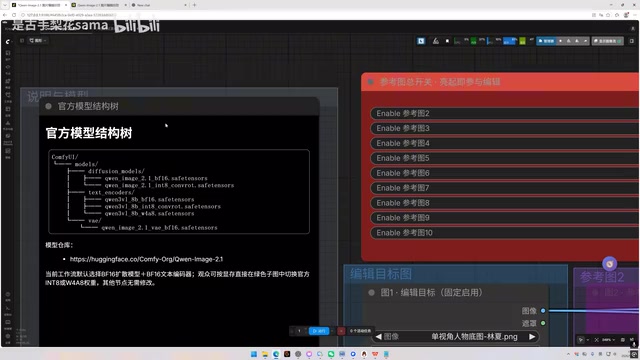
Lihua chose not to integrate the PE into his workflow, for practical reasons: the local 9B model has limited language ability. It handles simple instructions fine, but struggles with complex multi-image edits and character relationships. More critically, it's not a required component for image generation — yet it loads nearly 10GB of additional model weights, consuming VRAM, system RAM, and adding to generation time. For lower-end setups, that tradeoff isn't worth it.
Fortunately, Alibaba also provides a prompt expansion template, so users can feed it to any LLM to generate long prompts — which is actually more convenient.
The Reality of VRAM and Speed
For local deployment, 8GB of VRAM is enough to run it, but resolution and the number of reference images will be limited — and reference image count has the biggest impact on VRAM usage. Lihua ran the full BF16 model on a 5090D: a single-image edit at 50 steps in 2K resolution took about a minute and a half, but with three reference images that shot up to eight minutes. The difference is dramatic. Users with less powerful hardware are advised to use the INT8 quantized model and strictly limit the number of reference images, or VRAM overflow is almost inevitable.
For users who can't run it locally, Lihua has also uploaded the workflow to the RunningHub cloud platform for those who want to try it out.
BF16, INT8, and FP8 are different numerical precision formats for model weights. BF16 (Brain Float 16) is the full-precision version — best inference quality but highest VRAM consumption. INT8 is 8-bit integer quantization, using roughly half the VRAM of BF16 with typically minimal quality loss. FP8 is a more aggressive compression suited for severely VRAM-constrained setups. A VAE (Variational Autoencoder) is a key component in image generation pipelines, responsible for converting images between pixel space and latent space — diffusion models sample in a lower-dimensional latent space, and the VAE decodes the result back into a visible image. Its precision directly affects image sharpness and color accuracy.
The 5090D refers to the NVIDIA RTX 5090D — the "D" variant is a China-market version with reduced interconnect bandwidth compared to the international RTX 5090, but retains the same 32GB GDDR7 VRAM, making it one of the highest-end consumer GPUs currently available. Even on this setup, running the full BF16 model takes several minutes. For typical users with 8GB or 12GB VRAM (30/40 series cards), VRAM overflow in multi-reference-image scenarios is nearly unavoidable. INT8 quantization combined with limiting reference image count is the most practical approach right now.
Three Key Settings for the Workflow
A few important points to keep in mind when setting up the workflow:
- Core update: The ComfyUI core must be updated to the latest development version, or you'll run into errors.
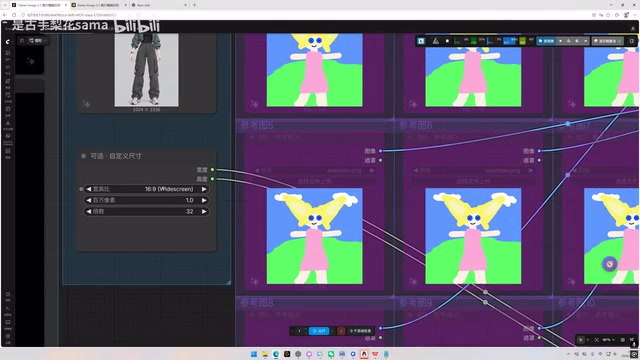
- Resolution mode: One option is to generate based on the original image's aspect ratio — in this case, disable the custom size node, and setting parameters to 0 will inherit the original resolution. If the source image is 4K or 8K, manually set it to something like 1024 so the model keeps the aspect ratio while compressing total pixel count to around 1024×1024, preventing VRAM overflow. The other option is to enable custom size and specify a ratio (e.g., 3:4 or 16:9) — a value of 1 corresponds to roughly 1024×1024 total pixels, while 2K requires setting it to 4 (approximately 2048×2048).
- Sampling steps: The official recommendation is 40–50 steps. 25 steps can produce usable output, but 40+ steps show noticeably better detail and texture. It depends on your speed vs. quality tradeoff.
Seven Test Cases: Where It Shines and Where It Falls Short
Single-Image Editing: Strong Consistency and Text Rendering
The four-view character test maintained solid overall consistency — chains, watches, and shoulder insignia directions were mostly correct. The more complex character profile card was a scenario that 2511 completely failed at — text and patterns would fall apart. Qwen Image 2.1 produced a clean layout with legible small text, with only a few character errors. For an open-source model, that's impressive.
However, once information density increases further (more cells and text), the image breaks down. It's definitely not on par with GPT here — but as Lihua points out, closed-source models often won't generate certain content at all due to content moderation. That's an irreplaceable value for open-source.
The anime-to-realistic conversion test produced aesthetically acceptable results without any LoRA, and the model natively maintains good consistency. In character pose and expression modification tests, both facial details and clothing consistency were well preserved.
Multi-Image Editing: Solid Clothing Transfer
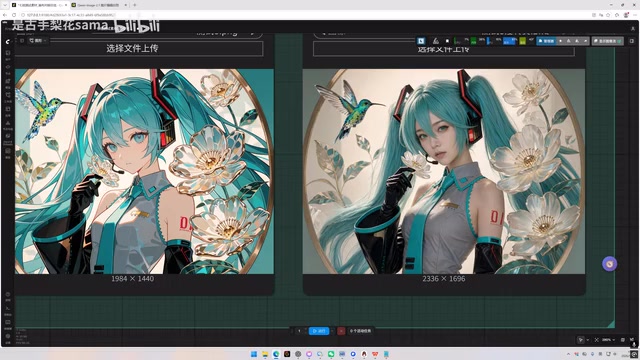
Clothing transfer is a common use case. With 2511, you had to manually cut out the clothing first — recognizing clothes worn by a character in an image was poor. This test directly transferred clothing as worn on a character, and the results showed good consistency, texture, and detail, with minimal distortion of the original image.
Comics and Storyboards: Weaknesses Exposed
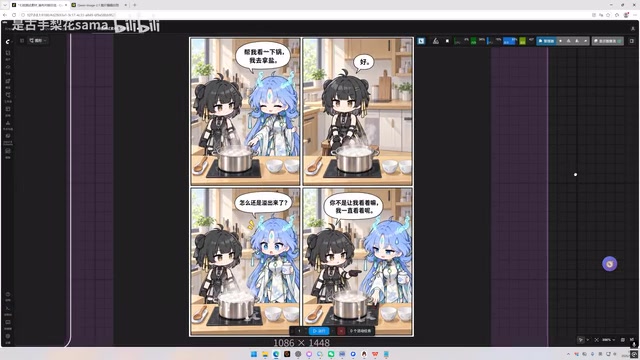
Using a character reference to generate a four-panel comic, the model produced a usable comic effect with clean visual quality — but plenty of detail issues: soup overflowing from a pot, props disappearing, speech bubble misattribution, and underwhelming expressions. Comparing side-by-side with GPT using the same prompt, GPT's output has color blotchiness, but it significantly outperforms on panel logic, dialogue attribution, and facial expressions. GPT wins overall.
The three-reference cinematic storyboard test was "kind of rough" — panel cells and character details were blurry. Lihua's conclusion: for serious film/TV storyboarding where efficiency and quality matter, you still need closed-source. Open-source can produce results, but it requires repeated generation runs and prompt adjustments — the efficiency just doesn't hold up.
"Pulling cards" (抽卡) is a term commonly used in the AI image generation community, referring to running the same prompt multiple times to cherry-pick the best result — analogous to pulling a gacha/loot box, since each generation has randomness. This is especially pronounced in storyboarding scenarios with precise requirements around composition, character count, and dialogue attribution, where each generation attempt costs significant time and compute. This makes overall workflow efficiency far less reliable than consistently high-quality output from closed-source products.
Conclusion: Best in Open-Source, But Closed-Source Still Has Its Moat
No hype, no dismissal — Qwen Image 2.1 is comprehensively capable within the open-source landscape, with solid character consistency and text generation. It's the current ceiling for open-source image editing. But when efficiency and fine detail quality are priorities, closed-source still holds the edge — even on top consumer-grade hardware, multi-reference and high-resolution scenarios mean long generation times and constant prompt tuning.
One critical point worth flagging is licensing: under Alibaba's open-source license, the model is currently authorized only for non-commercial research and evaluation purposes. Commercial use requires a separate application to Alibaba for a commercial license, with additional restrictions. Personal experimentation is fine — but if you're considering commercial use, read the license agreement carefully first.
Related articles

Agent Skills Beginner's Guide: From Concepts to Multi-Agent Collaboration in Practice
A comprehensive guide to Agent Skills: core concepts, components, the importance of Description, standardization, beginner learning paths, and multi-agent collaboration.

One Neuron Detects Both Cats and Cars? We Reproduced It and Found a New Explanation
The cat-car neuron reinterpreted: researcher Cammarata argues it distinguishes pointy from round, not cats from cars. We reproduced the experiment and found the new explanation holds on most inputs—but cars are the exception. The interpretability debate continues on language models.

MCP Server + Python Assistant: A MicroStation Design Efficiency Revolution
Explore the early preview of the MCP Server and Python Assistant in MicroStation 2026: custom tools in five minutes, intelligent sheet index checks, and how AI is reshaping drawing workflows to unleash design creativity.