Qwen3 27B Quantization Benchmark: Q2 to Q8 Full Comparison — Q4 Is the Sweet Spot
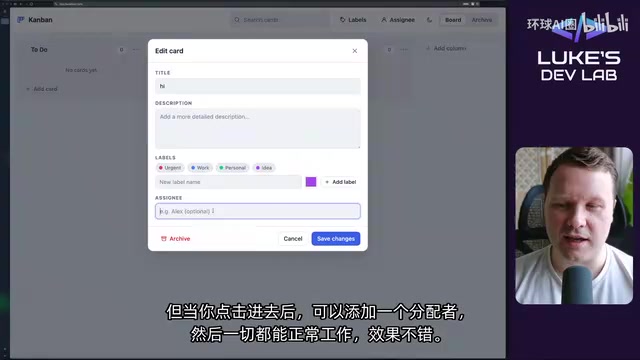
Qwen3 27B benchmark finds Q4 is the sweet spot, and Q2 surprisingly handles simple tasks.
This article covers a systematic benchmark by Bilibili developer Luke, testing Unsloth's Qwen3 27B model across Q1–Q8 quantization levels on three real-world tasks: Kanban frontend development, Blender 3D modeling, and Godot game development. Key findings: Q4 (Q4KXL) is the best quality-efficiency tradeoff; Q2 surprisingly completed the Kanban app in one pass; and as task complexity rises, lower quantization models fail sharply — Q3 crashed Godot repeatedly, Q1 looped infinitely in every test.
How Much Capability Does Quantization Actually Cost?
For developers running large models locally, quantization is unavoidable. It lets massive models fit on consumer-grade GPUs — but at the cost of precision loss. The real question is: how significant is that loss? Can low-quantization versions still get the job done?
Bilibili developer Luke (Luke's Dev Lab) ran a systematic benchmark of Unsloth's Qwen3 27B model across multiple quantization levels. He focused on the largest KXL variants at each level (e.g., Q2KXL, Q3KXL, Q4KXL) and consistently used Q8's high-precision inference mode, giving every version the fairest possible shot.
This article walks through the full test process and findings. The most striking takeaway might just upend your assumptions about low-quantization models — Q2 actually completed the Kanban app in a single pass.
Test Methodology: Three Real-World Challenges
Luke designed three progressively harder tasks spanning frontend development, 3D modeling, and game engines:
Kanban App
A classic frontend coding task: generate a fully functional Kanban board with card drag-and-drop, column management, and other interactive features.
Blender Modeling Challenge
Using MCP (Model Context Protocol), the model directly controls Blender to create a lantern scene with lighting, glass, and varied texture materials.
Godot Game Engine Challenge
The hardest task — build a 3D platformer with moving platforms, collectible orbs, obstacles, and a goal to reach. Luke specifically noted that the Blender and Godot prompts were unpublished and untrained-on, to prevent data contamination from skewing results.
Kanban Test: Surprising Resilience from Low-Quantization Versions
The Kanban results were unexpectedly solid across the board:
- Q8: Performed as expected, though not flawlessly — an unclosable card-editing popup appeared on first delivery, requiring one follow-up prompt to fix.
- Q6: Delivered with broken card and column dragging, also fixed in one follow-up. UI fidelity was high.
- Q5: Used 84% of context, ran error-free on the first try, came with demo cards pre-populated. Only flaw: a mysterious blue filter banner.
- Q4: Completed in one pass with a clean UI and full functionality. Minor overlap between the search icon and placeholder text.
- Q3: Completed in one pass, fully functional — card creation and task assignment all worked.
The real surprise was Q2. Luke expected looping and frequent errors, but Q2 completed the entire Kanban app in a single pass. With compressed context, it used only about 2% of the context window. All features tested as functional. Zero errors.

Only Q1 failed outright — it started planning, listed out files, then fell into an infinite loop, repeating the same plan with no way out. Luke's verdict: Q1 is over-quantized beyond usability.
Blender Test: Quantization Gaps More Visible in Creative Work
3D modeling demands stronger spatial reasoning and tool-calling ability, and quantization losses showed more clearly here.
- Q8: Used 54.9% context with no compression needed. The delivered lantern had fine textures, convincing glass, and natural light transmission — best in class.
- Q6: Same 54.9% context usage. Not quite as polished as Q8, but still quite good.
- Q5: The glass panel angles looked a bit off (90-degree orientation), possibly an intentional design choice.
- Q4: Returned results immediately with no back-and-forth, but lacked the layered inner glow effect.
- Q3: Consumed a large number of tokens, and the top hook was modeled incorrectly — yet Luke felt the overall look was arguably better than Q4.

Even Q2 delivered a lantern model — the glowing interior elements weren't visible and quality clearly dropped, but it was fast, used minimal context, and Luke was genuinely surprised it finished at all. Q1 got stuck again: it connected to Blender and attempted to call the BPY API, but entered a loop after errors and produced virtually nothing.
Godot Test: Complex Tasks Expose Low-Quantization Weaknesses
As the hardest task, Godot game development clearly revealed the relationship between quantization level and task complexity.
- Q8: Used 49.8% context after compression; Luke manually stopped it when he felt it had reached a reviewable state. The final product had solid mechanics, scene detail, and shadows — only minor Z-fighting (surface flickering where two objects overlap).
- Q6: Token consumption was striking — 92% of context. Initial movement was inverted (up/down flipped), fixed after prompting, but a panel blocked the view.
- Q5: Movement direction kept reversing, and the model seemed unable to correctly interpret its own test results — it believed it couldn't jump when it actually could. Luke noted that human verification is better than relying on the model to self-test in these cases.

- Q4: Orbs were collectible and movement worked, but moving platforms teleported at the end of their animation loop — incorrect animation cycling.
- Q3: Complete failure — repeatedly crashed the Godot editor, multiple prompts couldn't fix it, task not completed.
- Q2: Got stuck in a loop, failed.
- Q1: Entered a loop immediately after connecting tools, no progress whatsoever.
As task complexity increased, Q3 and below clearly struggled, and Q4 emerged as a meaningful threshold.
Core Conclusions: Q4 Is the Sweet Spot, but Low-Quant Has Its Uses
Based on all three tests, Luke offered several practically valuable takeaways:
Don't Underestimate Q2 and Q3
The biggest surprise from this benchmark: for simpler, web-based tasks, Q2 and even Q3 are viable. Luke mentioned that other models he'd previously tested — including 35B and 3B variants — performed worse on the Kanban task than Q2 did here, which left a strong impression. If you're running a 16GB consumer GPU, low-quantization versions fit entirely in VRAM and deliver excellent inference speed.
Creative and Complex Tasks Still Need Higher Quantization
For creative work like Blender, go with Q5, Q6, or Q8 if you want polished results on the first try. For complex tasks like Godot — with heavy tool calling and state management — low-quantization versions will produce frequent errors and crashes.
Q4 Is the Best All-Around Choice
Luke considers Q4 (Q4KXL) the optimal trade-off between quality and efficiency. While it doesn't match Q8's polish, it remained fully usable across all three tests, with friendlier resource usage and inference speed. This explains why Q4 has long been the community's go-to default for many use cases.
Quantization Loss Amplifies Non-Linearly with Task Complexity
For simple tasks, the gap between Q2 and Q8 is small. But as complexity increases, low-quantization models drop off sharply. This means quantization level should be chosen based on the specific use case — not blindly chasing maximum precision or minimum file size.
Final Thoughts
The value of this benchmark lies in using real, unpolluted tasks to quantitatively map the capability boundaries of different compression levels. For developers deploying locally, the conclusion is actionable: match your quantization level to task complexity. For simple web development, push Q2/Q3 to squeeze every bit of performance from your hardware. For complex creative and engineering tasks, step back up to Q5 or higher. And for the vast majority of use cases, Q4 is the safe, reliable default you can reach for without overthinking it.
Related articles

GitHub Daily · November 04: Agent Ecosystem Explodes, Skill Packs and Memory Layers Become the New Battleground
GitHub Daily Nov 04: AI agent infrastructure dominates Trending as competition shifts from model capability to engineering reliability, with skill packs and memory layers emerging as the new battleground.

My precious RAM: RAM Stick Bitten Off Motherboard Sparks Discussion
Reddit's "My precious RAM" post documents a RAM stick bitten off a motherboard. We reconstruct the incident, analyze why it went viral, and share hardware installation tips.
Diving into PostgreSQL Internals: A Free, Open-Source Guide to Database Principles
*The Internals of PostgreSQL* is a free online book covering process architecture, storage layout, query processing, MVCC concurrency control, and WAL logging—ideal for DBAs and backend engineers who want to understand database internals.