Qwen3 + RAGFlow: A Zero-Cost Guide to Building a Local Knowledge Base from Scratch

Complete hands-on guide to building a private RAG knowledge base using Ollama, Qwen3, and RAGFlow locally.
This article walks through building a private local AI assistant using Ollama, Qwen3, and RAGFlow. It compares fine-tuning vs. RAG, explaining why RAG is better suited for vertical-domain knowledge bases due to its low cost, real-time updates, and citation support. The guide covers Docker and WSL setup, RAGFlow deployment, local and online model integration, embedding principles, and a key pitfall: using `host.docker.internal` instead of the host IP inside Docker containers.
In an era where general-purpose LLMs are everywhere, why would you still want to build your own local knowledge base? The answer is simple: online models can't directly access private enterprise or personal data. Even when you upload files as attachments, true local persistence is hard to achieve. More critically, when a model encounters something it doesn't know, it tends to fabricate answers — a phenomenon known as hallucination. This tutorial, based on a hands-on walkthrough, covers the complete process of building a stable, controllable, and citation-backed local AI assistant using Ollama, Qwen3, and RAGFlow.
Why RAG Instead of Fine-Tuning
There are two mainstream approaches to solving the hallucination problem: fine-tuning and RAG (Retrieval-Augmented Generation).
Fine-tuning involves retraining a model on domain-specific data. For an e-commerce customer service use case, you'd need to download an open-source model like Qwen, DeepSeekAd, or Llama, then prepare a large set of annotated Q&A pairs for training. The problem with this approach is that it's expensive — data collection, cleaning, and training all require significant resources.
RAG takes a fundamentally different approach. Think of it as giving the model a reference book it can consult on demand, so it answers based on the book rather than its own "memory." The advantages are clear: answers stay close to the source material, the knowledge base can be updated in real time without retraining, and every answer can cite which section of the original document it came from. When you factor in deployment cost, learning curve, and hardware requirements, RAG is a straightforward and efficient solution for vertical-domain knowledge bases and AI assistant applications.
The entire RAG workflow can be broken down into three core steps: knowledge base construction, vectorization, and retrieval & generation.
At the technical level, RAG operates in two phases: offline indexing and online retrieval. During the offline phase, raw documents are chunked, vectorized, and stored in a vector database. During the online phase, when a user asks a question, the query is also vectorized and compared against the document vectors in the database using similarity search. The most relevant chunks are retrieved, combined with the original question into a prompt, and fed to the LLM to generate the final response. Because answers are grounded in real document chunks rather than the model's parametric "memory," RAG dramatically reduces hallucinations and provides built-in citation traceability.
Environment Setup: Docker and WSL Pitfalls
The first step is installing Docker. Head to docker.com and download the version that matches your OS — Mac users need to choose between Apple Silicon and Intel chips, while Windows users have AMD and ARM architecture options.
The most common issue Windows users encounter when installing Docker is installation failure, which is almost always caused by the system's virtualization features not being enabled. The fix: press the Windows search key, search for "Turn Windows features on or off," and check both Windows Subsystem for Linux and Virtual Machine Platform. Windows will automatically install the required components.
If you still get errors after that, go to Settings → Windows Update → Advanced Options → Recovery and use the "Fix Windows Update" tool to resolve stuck update processes and component issues. These two steps resolve the vast majority of installation problems.
Once Docker is installed, confirm that WSL is configured. Open CMD and run wsl --version to check; if it's not installed, run wsl --install.
Getting the RAGFlow Source Code and Starting the Service
With the environment ready, head to GitHub to get the RAGFlow source code. If you're comfortable with the command line, use git to clone it; otherwise, just click Download to grab the zip file. Extract it to your local drive, navigate into the folder, and focus on the docker folder.
Inside you'll find a key configuration file called .env. Pay attention to the port setting — the default is port 80, meaning the access URL is localhost. If this conflicts with another service on your machine (like Dify), change it to something like 8888 and save.
Once configured, right-click inside the docker folder and select "Open in Terminal," then run the startup command. RAGFlow isn't a single service — it also depends on redis, es, minio, and other components, all of which will be pulled together. The first startup typically takes 10 to 20 minutes depending on your hardware.
After startup, you can see the RAGFlow, minio, redis, and es containers running under the "Containers" tab (not "Images") in the Docker Desktop client. You can also use a command to list all running containers and their port numbers to confirm everything is up.
Integrating Models: Local Ollama and Online APIs
Open your browser and go to localhost to reach the login page. After signing in, you'll see modules for knowledge bases, chat, search, agents, and file management. The first thing to do is integrate a model provider.
Deploying a Local Model with Ollama
For local integration, first download Ollama from ollama.com and run through the standard installation. The Ollama website offers a range of models including DeepSeek, Qwen, and Llama. To get Qwen3, run ollama run with the appropriate model tag from the command line. If your GPU is modest, you can start with the 0.6B or 1.7B variant for a demo; if you have a capable GPU, go with 8B or 14B.
Downloading an embedding model (like BGE) works the same way.
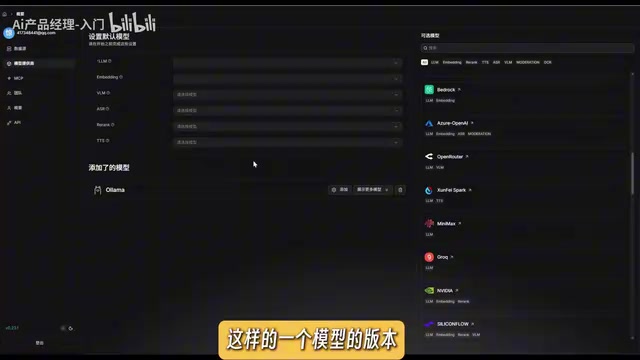
Back in RAGFlow, add Ollama as a provider. Models are categorized as embedding, chat, re-rank, image-to-text, etc. When integrating a chat model, run ollama list to copy the model name and paste it in.
This is where most people get tripped up: the URL configuration. Since RAGFlow runs inside a Docker container, it can't directly reach the host machine. Many tutorials tell you to use the IPv4 address from ipconfig — that won't work. The correct approach is to use host.docker.internal as the hostname, followed by port 11434. Set the max token count to 8888 or 8080 and click confirm.
Ollama is an open-source tool designed specifically for running large language models locally. It wraps model downloading, runtime management, and API serving into a simple command-line interface. After installation, Ollama starts a REST API service on the local machine that listens on port 11434 by default. External applications like RAGFlow can call local models via HTTP requests using an interface compatible with the OpenAI API — so most tools that support OpenAI can integrate with Ollama seamlessly. Ollama also automatically detects NVIDIA/AMD GPUs and enables hardware acceleration; if no discrete GPU is available, it falls back to CPU-only mode, which is slower. Model files are stored by default in the .ollama folder in your user directory and can be quite large, so make sure you have sufficient disk space.
Integrating an Online API
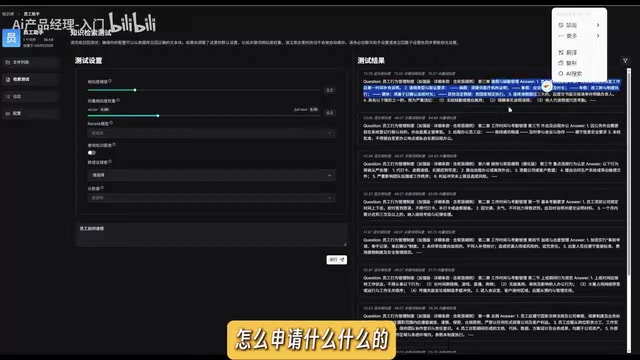
If your local GPU isn't powerful enough and you want access to more capable models, you can integrate an online API such as SiliconFlow. Register on their website (it's completely free with a daily usage quota), copy your API key from the "API Keys" page, paste it into RAGFlow, and save. You'll then have access to cloud-hosted models.
SiliconFlow is a Chinese cloud inference platform that provides API access to mainstream open-source models including DeepSeek, Qwen, and GLM, with an OpenAI-compatible interface. New users get a free daily quota, making it a convenient option for personal projects. One important caveat: using an online API means your query text and knowledge base chunks are processed through the platform's servers. For use cases involving trade secrets or personal privacy, you should carefully assess compliance risks. If you're only using the online API for the embedding model, the data transferred is relatively small. But if your chat model also runs online, every conversation's context and retrieved document chunks are sent to a third party — a factor worth serious consideration when choosing your architecture.
Understanding Embeddings: How Text Becomes Vectors
When creating a knowledge base, you need to select an embedding model (either local BGE or online SiliconFlow) and choose a chunking method — RAGFlow has built-in presets for papers, tables, books, Q&A, and more.
So what exactly does embedding do? At its core, it converts text into a numerical representation. Natural language carries complex, multi-dimensional information. Take the word "apple" — it has dimensions like water content, sugar content, and so on. Using a simple 2D coordinate system as an analogy, the X-axis might represent water content and the Y-axis sweetness. The line from the origin to a given point forms a vector.
Real embedding models operate in far more dimensions — 512 or 768 are common. A key property of vectors is that semantically similar words end up with similar coordinates. For example, the vectors for "cat" and "dog" will be close together, since they share similar dimensions like being pets and being friendly to humans. "House," being non-living, will have coordinates far from animals. The power of embeddings lies in capturing the semantic meaning of language.
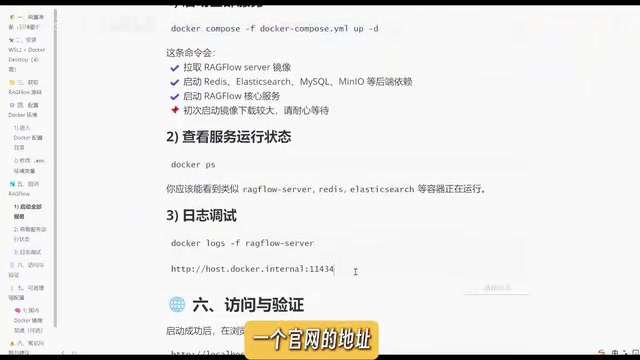
After uploading documents, click "Start" to parse them — this triggers chunking, embedding, and indexing. Once parsing completes, a green indicator appears. You can then run a retrieval test to verify results. For example, if you query "how do employees apply for leave" and the returned chunks are related to leave and absence management, your document has been properly embedded and is ready for retrieval.
A vector database is the infrastructure in a RAG architecture that stores and retrieves vectors. Unlike traditional relational databases that rely on exact matching, vector databases use Approximate Nearest Neighbor (ANN) search algorithms to quickly find the closest vectors to a query in a large, high-dimensional space — which in the RAG context means "the most semantically relevant document chunks." Common similarity metrics include cosine similarity and Euclidean distance. RAGFlow uses Elasticsearch as its default vector storage backend, which is why the es container is also started when you launch RAGFlow. Understanding this helps you diagnose issues when retrieval results are poor — you can trace the problem to chunking strategy, embedding model choice, or similarity threshold configuration.
Creating a Chat Application: Grounded, Citable Responses
Back on the home page, create a new chat application — for example, "Employee Management AI Assistant." In the configuration, you can set a system prompt (e.g., "You are an employee assistant. Summarize content from the knowledge base"), select the knowledge base you just indexed, and choose a conversation model — either the local Qwen3 1.7B or the online DeepSeek R1. Remember to click Save after configuring.
When you ask "How do employees apply for leave?" the model first retrieves relevant chunks from the knowledge base. Each matched chunk has an associated ID, and the model then generates a response based on those chunks. The final answer strictly references the uploaded employee handbook and automatically cites the source passages — making it grounded, reliable, and hallucination-free.
Once your AI assistant is set up, you can create a token from the top-right corner and embed the assistant into your own website.
Local Model vs. Online API: How to Choose
Both options have their trade-offs:
- Online API (e.g., SiliconFlow): Pros — access to more powerful and capable models with low local hardware requirements. Cons — data passes through third-party servers; usually paid (with limited free daily quotas).
- Local deployment: Pros — complete data privacy, nothing leaves your network. Cons — requires a reasonably capable GPU.
Companies or use cases with strict data security and privacy requirements typically choose local deployment. For personal projects and prototyping, online APIs are faster and more convenient.
Workflow Summary
Here's a complete recap of the entire setup: deploy local models with Ollama (remember to use host.docker.internal for the URL), deploy RAGFlow with Docker (default port 80, accessible at localhost); then follow three steps — create a knowledge base, upload and parse documents to generate vector embeddings, and integrate a chat LLM to build your AI assistant.
The full RAG pipeline can be summarized as: document chunking → embedding model vectorizes chunks into vector database → user query is vectorized and similarity search is performed → relevant document chunks are returned → LLM synthesizes and generates the final response.
Once you understand the difference between RAG and fine-tuning, the principles behind embedding and vectorization, and how to deploy services inside Docker containers, you have everything you need to build your own private intelligent knowledge base.
Related articles

Felix Rieseberg Personal Homepage
Felix Rieseberg's personal homepage sparks attention on Hacker News. This article covers the Slack engineer's technical background, the rise and fall of nativefier, and the value of a developer homepage as a tech calling card.

@ai-sdk/vue 3.0.306 Patch Release Syncs with [email protected] Update
@ai-sdk/vue 3.0.306 released, synced with [email protected]. A routine patch release for the Vercel AI SDK ecosystem with no public API changes; the Vue adapter layer stays version-aligned with the core package.

Gemini 4 Argon API Launches: The Era of Million-Token Output Begins
Google launches Gemini 4 Argon with sparse MoE architecture, up to 1M output tokens, and a 68.90% Vals Index score, available across API, AI Studio, and the Gemini app.