Ravioli Review: A Minimalist Design Tool for One-Click Postage Stamp Shapes

Ravioli is a minimalist tool for generating custom postage-stamp shapes with parametric controls.
Ravioli is a lightweight design tool by Hesam Mousavi that focuses entirely on generating custom postage-stamp shapes. Through three simple parametric controls — stamp size, perforation density, and corner roundness — users can create professional stamp outlines in seconds, bypassing the tedious manual process in tools like Illustrator or Figma. Supporting both PNG and SVG export, it serves graphic designers, sticker makers, social media managers, and DIY enthusiasts seeking a zero-learning-curve solution.
A Small Design Tool That Does One Thing Well
In an era of increasingly bloated design tools, Ravioli takes the opposite approach, embracing a path of minimalism. Built by Hesam Mousavi, this lightweight tool does just one thing — help you create custom postage-stamp shapes. After launching on Product Hunt, it earned 88 upvotes and an 8th-place ranking. While not a viral hit, its clear positioning won the attention of a dedicated niche audience.
Product Hunt, founded in 2013 by Ryan Hoover, has become one of the world's most influential product launch platforms. It showcases dozens of new products daily, with community members voting and commenting to determine rankings. For indie developers and small teams, Product Hunt is essentially a low-cost product exposure channel — no ad budget required, as long as your product has a standout feature, it can attract a precisely targeted audience. In a daily competition among hundreds of products, Ravioli's 8th-place finish with 88 votes is an above-average result, suggesting its niche positioning genuinely resonated with its target users.
A postage-stamp shape refers to the classic stamp outline with perforated edges and rounded corners. This visual element is quite common in brand design, sticker production, social media graphics, and retro-style posters, but manually drawing those perforations in a general-purpose design tool is no easy task. Ravioli targets this specific and subtle pain point.
In general-purpose vector design tools like Illustrator or Figma, manually creating stamp perforations is a task that seems simple but is actually tedious. Designers typically need to draw a rectangle as the base outline, then evenly arrange numerous identically sized circles along all four edges, and finally use the "Subtract" boolean operation to cut the perforations from the rectangle. The key difficulty lies in spacing calculations — ensuring a reasonable number of perforations on each edge with even spacing, and natural transitions at the four corners without half-circles or asymmetry. If rounded corners are also needed, complexity increases further because the curve length at rounded corners differs from straight edges, requiring the perforation placement logic to be recalculated. Even for experienced designers, the entire process takes 5–15 minutes, while Ravioli compresses it into a few seconds of slider adjustments.
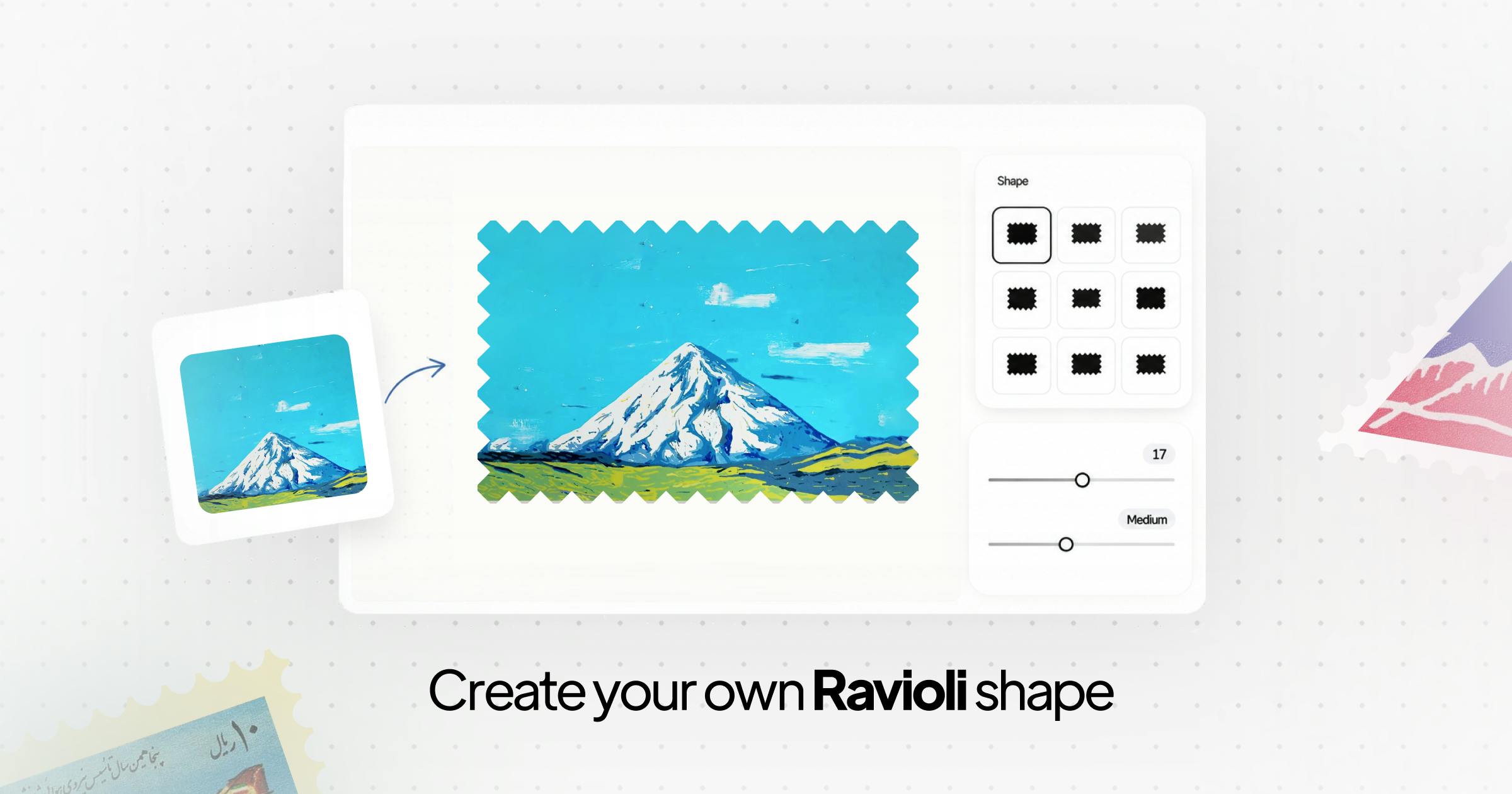
Ravioli Core Feature: Parametric Stamp Generation
Three Key Adjustment Dimensions
Ravioli's operational logic is refreshingly straightforward. Users first select a base shape, then fine-tune it through three core parameters:
- Stamp size: Controls the overall size of the outline;
- Holes: Adjusts the density and style of the signature perforated holes around the stamp's edge;
- Roundness: Controls the corner radius, freely switching from sharp right angles to soft rounded edges.
The beauty of this parametric design approach is that users don't need vector drawing skills to quickly produce clean, professional stamp outlines. Parametric Design is a methodology that generates design solutions by defining parameters and rules. It was first widely adopted in architecture and industrial design. In digital design tools, parametric means users don't need to manually draw graphics pixel by pixel or node by node — instead, they adjust preset variables and let algorithms automatically calculate and generate the final shape. The core advantage of this approach is predictability and consistency — every parameter adjustment produces a clean, mathematically precise result, eliminating errors from manual drawing. Auto Layout in Figma, node-based programming in Grasshopper, and variable systems in CSS are all different manifestations of parametric thinking.
Compared to manually building perforation paths in Illustrator or Figma, Ravioli compresses what was once a tedious process into a few slider drags.
Dual Format Export: PNG and SVG
Once adjustments are complete, Ravioli supports two export formats: transparent-background PNG and infinitely scalable SVG. This choice is quite practical — PNG is ideal for bitmap compositing and quick previews, while SVG meets the needs of professional users who require resolution-independent scaling and post-export editing.
From a technical standpoint, PNG (Portable Network Graphics) is a lossless compressed bitmap format recommended by the W3C in 1996, originally designed to replace the patent-encumbered GIF format. Its key feature is support for Alpha channel transparency, making transparent-background PNGs the standard asset format for design compositing. However, the bitmap nature of PNG means images become pixelated when enlarged. SVG (Scalable Vector Graphics) is an XML-based vector graphics format, also maintained by the W3C, which uses mathematical formulas to describe shapes (such as Bézier curves, arcs, and line segments), enabling infinite scaling without loss of clarity. SVG files are essentially text files that can be modified directly in a code editor and manipulated by CSS and JavaScript, providing tremendous flexibility in web development and post-editing.
For geometrically regular shapes like stamp outlines, SVG is especially well-suited because the circular perforations and straight border lines can all be precisely expressed with concise mathematical descriptions. For scenarios where stamp shapes need to be integrated into more complex designs, SVG's vector properties are particularly important.
The Product Philosophy of a Minimalist Tool
The Design Trade-offs Behind a "Tiny Tool"
Ravioli repeatedly describes itself as a "tiny design tool" in its introduction. This positioning is itself a deliberate product strategy. In a design software market dominated by feature bloat, micro-tools focused on a single task are carving out a unique ecological niche. They don't aspire to be all-in-one platforms — instead, they make a specific need exceptionally easy to fulfill.
The rise of micro-tools (also called tiny tools) is a notable trend in the SaaS and indie development space in recent years. This trend is driven by multiple factors: modern web technologies (like React and WebAssembly) have significantly lowered the barrier to building browser-based tools; payment infrastructure like Stripe and Gumroad enables individual developers to easily monetize products; and the design and developer community's growing awareness of "Tool Fatigue" is also fueling the movement — as all-in-one software like Photoshop and Figma pack in more and more features, users actually become less efficient when trying to complete specific small tasks. Representative micro-tools include Remove.bg (one-click background removal), TinyPNG (image compression), and Coolors (color scheme generation), all following the Unix philosophy of "do one thing well."
The value of such tools lies in reducing cognitive load. When a user just wants to quickly generate a stamp outline, opening a massive design suite, hunting for the relevant feature, and configuring complex parameters is clearly overkill. Ravioli solves this problem with a purpose-built interface that has virtually zero learning curve.
Target Users and Use Cases
Based on its product positioning, Ravioli primarily serves the following user groups:
- Graphic designers and content creators: Those who need to incorporate retro or collectible-style stamp elements into their work;
- Sticker and merchandise makers: Using SVG output to interface directly with cutting devices or print workflows;
- Social media managers: Quickly creating image assets with stamp-style borders;
- DIY enthusiasts: Generating clean stamp graphics without needing professional design software.
The Market Logic of Micro Design Tools
Surviving Through Single-Point Breakthroughs
Ravioli's emergence reflects a typical approach among today's indie developers: rather than building a big, do-everything product, focus deeply on a sufficiently specific scenario. These "single-point breakthrough" products often have low development costs, simple maintenance, and are more likely to gain precise exposure on platforms like Product Hunt.
Its 88 upvotes indicate it addressed a real need, but with only 2 comments, it also reveals the ceiling for this type of tool — a relatively niche audience with limited discussion buzz. This is a common dilemma for micro-tools: the more precisely targeted the positioning, the more vertical the market, and the more limited the room for scaled growth. These tools often adopt a freemium model — basic features for free, premium features for a fee — or charge based on API call volume, seeking sustainable business models within a limited user base.
Potential Future Improvements
As an early-stage tool, Ravioli still has plenty of room for expansion. For example, it could add more preset stamp shape templates, support overlaying patterns inside the stamp, provide batch generation capabilities, or include a "perforation style library." These features could maintain the tool's lightweight nature while further enhancing its practical value.
Summary: A Small but Beautiful Stamp Shape Generator
Ravioli is a quintessential "small but beautiful" design tool. It harbors no grand ambitions — it simply makes the stamp shape generation process simple and smooth. For designers and creators with relevant needs, it's an efficiency tool worth bookmarking. And for the broader design tool ecosystem, it once again confirms an important truth: beyond general-purpose software, micro-tools that focus on solving specific problems still hold a solid place in the market.
Related articles

Amphibious Transforming Drone: Beyond 100x Power Savings, What Are the Real Needs?
Is the amphibious transforming drone just a gimmick? Starting from the 100x power difference of the M4 Morphobot, explore real application scenarios and thesis topic ideas, analyzing boundary conditions where pure drones and pure ground robots both fail.

Warhound Raises $200 Million: Genetically Engineered "War Dogs" Paired with Anduril Gear
Warhound raises $200M, backed by Ben Lamm and Palmer Luckey, to genetically engineer dogs for military and law enforcement use and equip them with Anduril gear. This article analyzes its technology direction, funding logic, and ethical controversy.

Claude API Comes to Google Cloud: IAM Integration and SDK Access Guide
Anthropic hosts the full Claude API on Google Cloud with IAM-controlled permissions and unified billing. This guide covers the Vertex AI and Anthropic-hosted entry points, IAM role configuration, and SDK access.