Refactoring Your Claude Code Workflow: Plan Mode and a Lean CLAUDE.md in Practice

Treat Claude as a manager, not a coding tool: planning, sparse config, skill reuse, and parallel sessions.
The article traces a clear shift in Claude Code's usage paradigm: from a rule-stacking "rulebook" to a judgment-criteria "manager" approach. It covers voice input and five-element prompts, starting projects in plan mode, slimming CLAUDE.md into a directory of skill pointers, amplifying output with MCP connectors and parallel sessions, reviewing with diff views and built-in code review, managing context with /compact and /clear, and cleaning up with /doctor. The advanced Gauntlet Loop is best used to polish a solid first version. The focus shifts from coding to management, reducing trial-and-error to one question: is the description clear?
Claude Code's usage is undergoing a clear shift. Tutorials from two months ago still taught you to stack rules and write exhaustive CLAUDE.md files, but Anthropic's own engineers are now publicly discussing a different approach: treat AI as a manager, not a coding tool. Based on a complete workflow walkthrough video on Bilibili, this article lays out what actually works today—from plan mode and voice input to lean configuration files, parallel sessions, and self-tested previews.
The Core Shift: From Rulebook to Judgment Criteria
The classic move of the old paradigm was "rule stacking": do this, don't do that, always output in a certain format. The video explicitly notes that Anthropic engineers have publicly stated that for the latest models, this approach backfires—stacking rules no longer makes Claude sharper; it boxes it in.
The new approach is to give judgment criteria rather than rule lists: describe the level you want and let the model figure out how to get there. The same goes for examples—giving three samples used to help, but now the model tends to copy them directly and stop exploring.
This idea runs through everything that follows: prompts should be clear but not over-constrained, config files should be thin, and processes should be handed off to reusable skill files.
The Five Elements of a Good Prompt
The basic framework from the video: before starting, nail down five things—what you're building, what it's for, what features it needs, what it should look like, and what it absolutely must not do. Spell out these five points clearly, and Claude doesn't have to guess.
On top of that, add voice input. When typing, people compress and self-censor, cutting out the context that actually matters; when speaking, they let it all out. In practice: switch to plan mode, tap the microphone, and explain the requirements like you're having a conversation.
Plan Mode: Think It Through Before You Start
Every project should start in plan mode. After switching the mode selector to plan, Claude reads files, thinks through the problem, and asks you questions back—without touching a single file until you approve.
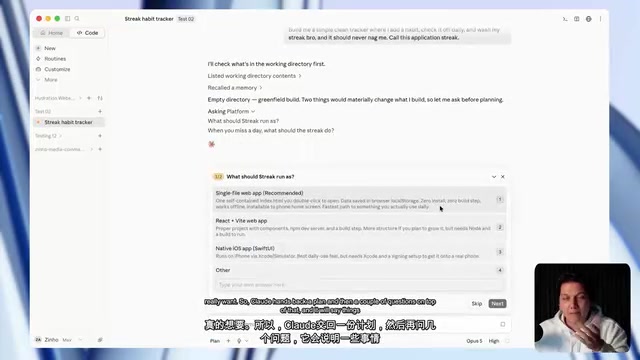
The example app in the video is a habit tracker. After the user describes the requirements verbally, Claude returns a plan plus several follow-up questions, such as "should the streak reset at midnight?" Only after the user approves does it start building. This habit is the key move that keeps Claude from confidently heading in the wrong direction.
Once the build is done, Claude starts the dev server itself, opens the app, clicks buttons, fills out forms, and fixes what's broken before reporting completion—a self-test QA pass. In the preview window on the right, you can watch it operate the app on its own.
Review Output from a Manager's Perspective
The first version is never perfect. The video suggests not reading the code, but describing problems like a designer would: "the cards are too cramped," "the numbers are too small," "the check animation stutters a bit." Send it, the preview updates, and continue. The loop is: build, preview, describe, improve.
When Claude says it's done, don't just test it—open the diff view and go through the changes line by line, like reviewing a pull request at a real company. You don't need to understand code; you just need to confirm the changes appear where expected and nothing moved where it shouldn't. You can also annotate a specific line like commenting on a document—for example, "make the streak flame orange instead of gray."
There's also a built-in code review command that has Claude audit its own work, focusing on real bugs, broken logic, and security holes rather than style nitpicks. In the video, it caught a problem where the streak wouldn't reset—fixed before the user ever hit it.
A Lean CLAUDE.md: The Config File Is a Directory, Not a Warehouse
The video cites Anthropic's July notes on context handling: for the latest models, they cut more than 80% of the content in Claude Code's own system prompt, with no drop in coding performance.
The lesson for your personal config file: CLAUDE.md shouldn't be a warehouse; it should be a directory. The model is strong enough to find context in the codebase on its own, and a giant file loads every session, burning budget before you've written a single line of code.
Keep only what Claude genuinely can't learn from the codebase: brand voice, error message style, the one non-obvious architectural decision, and pointers to detailed content in skill files.
To set it up, type /init and let Claude generate it automatically, then open it and trim: delete anything a senior developer could figure out just by looking at the folder. The entire file for the example app in the video is three lines—keep it dark with one warm accent, friendly copy that doesn't induce guilt, design rules in the design skill.
The result: when you later ask for a weekly view, the output comes out dark, warm, and friendly right away, with no need to repeat any requirements. Three lines beat fifty.
Skills, Connectors, and Parallel Sessions
CLAUDE.md can stay thin because the details live somewhere better—skills. A skill is a saved process: write it once, reuse it forever, trigger it with a slash command, and Claude will also invoke it automatically when relevant. Anything you do the same way every time—how components are written, what the brand looks like, the weekly research process—can become a skill.

MCP (Model Context Protocol) connects Claude to the tools you already use: GitHub, Slack, Notion, Google Sheets. Add them with a few clicks in the connectors menu, then just talk in natural language. In the example, each completed habit is logged to Google Sheets, so the data lives somewhere real instead of only inside the app.
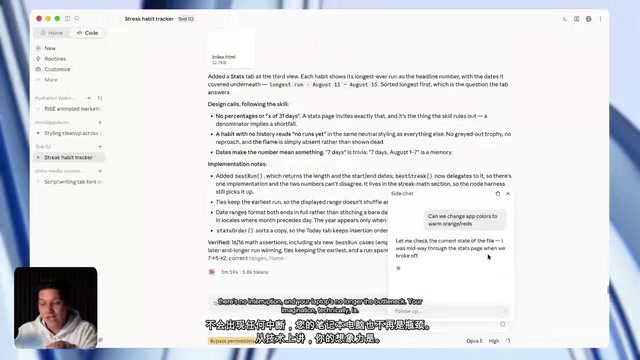
Running multiple sessions in parallel is another underrated capability. You can open several isolated sessions on the same project at once—one building a stats page, another cleaning up styles—without conflicts. And sessions keep running after you close the app—send off a big task, come back an hour later, and the work is done. If you have a question midway, open a side chat and the main build doesn't stop.
MCP (Model Context Protocol, 模型上下文协议) is a standard Anthropic open-sourced in late 2024 to let AI models connect to external tools and data sources in a unified way. In Claude Code, it plays the role of a "tool adapter layer": each MCP server wraps the APIs of platforms like GitHub, Slack, and Notion into a set of operations Claude can understand, and Claude calls them on demand—no need for users to hand-write scripts or copy-paste data. Compared with earlier custom plugins, MCP's value is standardization—the same server can be reused across desktop apps, the CLI, and the API, which is why the community ecosystem has quickly accumulated a large number of ready-made connectors. The "add them with a few clicks in the connectors menu" mentioned in the article is exactly the interoperability dividend this protocol delivers.
Context Management and Final Checks
The usage meter at the top shows the session's working memory; once it fills up, Claude starts forgetting earlier decisions. Two commands solve this: /compact compresses the conversation into a summary and continues, good for carrying on in the same session; /clear wipes everything, good for switching to a completely different task.
If you don't have time to fully describe the problem, just paste in a screenshot and say "fix this." In the video, the mobile counter overlapped the date, and one screenshot solved it. For the hardest problems, turn effort up to max—slower and more expensive, but a different tier of results.
Before ending a session, run /doctor. It scans your configuration, finds dead-weight connectors and redundancy in CLAUDE.md, and tells you what to delete. In the example, it flagged a connector that had been added but never used, cleared with one click.
The context window (上下文窗口) is the upper limit on the total tokens a model can "see" at once in a single session, covering the system prompt, conversation history, files read in, and tool results. It's like a limited workbench: new content keeps piling on, and the earliest information either gets pushed out or compressed. This is the root reason the usage meter "fills up" and Claude starts forgetting earlier decisions. Once you understand this, the trade-off between /compact and /clear becomes clear—the former replaces the raw history with a model-generated summary, preserving semantics but losing detail; the latter swaps in a completely clean workbench, suited to task switches. Managing the context window well is essentially about balancing "information completeness" against "attention sharpness."
Advanced Techniques and Their Limits
The video mentions a recently circulating trick called the Gauntlet Loop, whose core is just a three-line prompt structure: what the task is; how to build it—have the main agent dispatch to sub-agents, each taking a piece with its own critic to check it; and the standard—tell it not to stop until every critic is genuinely impressed. In the desktop app's workflows panel, you can watch it run stage by stage.

But this loop consumes a lot of time and tokens, and it optimizes toward the standard you set: point it at a weak idea and it will polish the wrong thing beautifully. It's best to build a solid first version the normal way, then unleash the loop to refine it.
Deployment takes one sentence: tell Claude to deploy to Vercel, and it configures the project, pushes, and returns a shareable live URL. Going further, Routines can run tasks on a schedule in Anthropic's cloud—things like nightly pull request reviews or Monday-morning bug triage.
The Gauntlet Loop is a form of multi-agent orchestration: the main agent breaks down the task and dispatches it to sub-agents, each paired with an independent critic for quality review, forming a "generate—judge—iterate" closed loop. This pattern clearly improves final quality because the critic and the generator have separate perspectives, effectively escaping the "self-consistency bias" that plagues single-model self-evaluation. The cost is multiplied token consumption, and all iterations converge toward the standard you set—when the standard itself is vague or low, the loop only polishes mediocrity into something more refined. Think of it as an amplifier rather than a teleprompter: build a solid base first, then use it.
Four Principles to Take Away
- Speak, don't type: tap the microphone and talk—voice preserves far more context than typing.
- Keep CLAUDE.md thin: it's a directory, not a warehouse; anything learnable from the code doesn't belong in it.
- Compact the context before switching tasks: a clean context yields better output—take a few seconds to keep everything sharp afterward.
- Send off big tasks and walk away: your laptop is no longer the limit.
The center of gravity of this workflow is management, not coding: plan mode prevents heading the wrong way, voice input preserves full intent, lean config files and skill files reduce the fixed overhead of every session, and the diff view and built-in review let you sign off like a manager. It doesn't guarantee a perfect first version, but it reduces the cost of trial and error to a single thing: whether you described it clearly.
One-line Summary
Treat Claude as a manager, not a coding tool: a new workflow of planning, sparse config, skill reuse, and parallel sessions.
Paragraph Summary
The article lays out a clear shift in Claude Code's usage paradigm: from a "rulebook" mode of stacking rules to a "manager" mode centered on judgment criteria. Key changes include preserving full intent with voice input and five-element prompts, starting every project in plan mode and acting only after approval, slimming CLAUDE.md into a directory pointing to skill files rather than a warehouse, and amplifying output with MCP connectors, parallel sessions, and background sessions. For acceptance, it emphasizes reviewing output like a manager with the diff view and built-in code review, managing the context window with /compact and /clear, and cleaning up config redundancy with /doctor. The advanced Gauntlet Loop is best for polishing after a solid first version. The overall center of gravity shifts from coding to management, reducing the cost of trial and error to a single question: is the description clear?
Related articles

Prompt Engineering for Beginners: From Writing Prompts to Engineering Thinking
Starting from the essence and four functions of prompts, this article systematically explains the six-step process, four success criteria, learning value, and practical limitations of prompt engineering to help you build a complete understanding.

Anthropic Launches Nasdaq IPO: AI Giant's Listing and Risk Disclosures
Anthropic officially launches its Nasdaq IPO under ticker ANT, with market valuation expected to potentially exceed SpaceX's record. The prospectus devotes nearly 100 pages to AI risks, while first-half revenue grew over 14x but net losses widened sharply, reigniting the AI bubble debate.

Rust cURL Clone Uses 4,832 unsafe Blocks—Is the Memory Safety Myth Broken?
A Rust cURL clone uses 4,832 unsafe keywords, challenging Rust's memory safety narrative. We analyze what unsafe really means, compare Fil-C, and examine rewrite motives.