RESTk + MCP in Practice: Let AI Agents Operate Your API Client Directly

RESTk lets AI assistants operate the API client directly via a local MCP Server, trading redaction and approval for safety.
RESTk runs a private MCP Server locally on Mac, letting MCP-compatible AI assistants like Claude Code, Cursor, and Windsurf connect directly and packaging 40+ API client capabilities into Agent-callable tools—achieving "AI moves into the API client" rather than merely generating code. Its core arguments are threefold: decoupled architecture (tool layer vs. reasoning layer), zero sharing by default with credential redaction (synthetic data replaces real secrets), and human-in-the-loop approval (pop-up confirmation, auto-approve still gates deletes and raw HTTP calls, everything reversible and Git-tracked). In testing, AI audited 43 requests across 10 folders and found a real bug where a method name didn't match the HTTP method. The overall security model's core assumption being "AI is useful but can't be fully trusted."
When an API Client Starts "Growing" an AI Teammate
API debugging tools have long been stuck in the "human operates the interface" stage—manually building collections, firing off requests one by one, eyeballing response diffs. RESTk attempts to change this interaction model: it runs a private MCP Server on your Mac, letting MCP-compatible AI assistants like Claude Code, Cursor, and Windsurf connect directly, turning 40+ capabilities of the API client into tools an Agent can call.
The logic behind this approach isn't complicated: rather than having AI generate code that a human then executes inside the API client, why not let AI "move into" the API client directly? The official demo presents a complete audit scenario—AI automatically checks whether the method names of 43 requests across 10 folders match their actual HTTP methods, finding and fixing a real bug.
How the MCP Server Connects to Your AI Assistant
One-Click Setup, Universal Across Clients
The setup entry point is in the AI Integration panel under Settings. Once the MCP Server status shows Ready, pick your assistant—Claude Code, Claude Desktop, or Cursor—and the system generates the corresponding config file, along with copy-paste commands usable in the terminal. Windsurf, ZED, VS Code with Continue, and any other MCP-compatible assistant should, in theory, be able to connect to the same Server.
The value of this design lies in decoupling: RESTk provides the tool layer, the AI assistant provides the reasoning layer, and users aren't locked into any single vendor's AI product.

MCP (Model Context Protocol) is a protocol open-sourced by Anthropic in late 2024 to standardize how AI assistants connect to external tools and data sources. Think of MCP as the "USB-C port" of the AI world: in the past, every time a new tool was added, the AI client had to write bespoke adapter code for it; with MCP, the tool side only needs to implement a single MCP Server exposing some "tools" (each tool contains a name, description, and JSON Schema parameter definition), and any MCP-compatible client—Claude Code, Cursor, Windsurf, ZED, VS Code + Continue, etc.—can call these tools through unified JSON-RPC. The protocol also supports resources (readable data) and prompts (preset prompt templates), with optional support for sampling (the Server reverse-requesting AI to generate content). This is exactly the underlying reason RESTk can "implement once, work everywhere," and it explains why it doesn't need to develop a separate plugin for each AI assistant.
Zero Sharing by Default, Permissions Start from Scratch
The first thing after a successful connection might confuse you: ask Claude "how many collections do I have" and the answer is zero. This isn't a bug—it's a design choice. Until you actively enable "Share with AI," no collection is exposed to AI. RESTk even tells the assistant which toggle needs to be turned on.
Sharing is done collection by collection. Once enabled, AI can browse and send requests, but real secrets remain invisible—they're replaced with synthetic data. Even if AI repeatedly asks, all it sees is "what's on disk," not "what the password is."
The "synthetic data replacing real secrets" mentioned in the article is called credential redaction or data masking in security engineering. The key point is: in the request body that AI sees, fields like Authorization, api_key, and password are replaced with structurally identical but functionally worthless fake values (such as sk-xxxx, Bearer <redacted>), so that AI can understand request structure and complete audits and documentation generation without real secrets entering the model's context. This step is critical, because once a secret enters AI's context window, it could be written to logs, leaked by subsequent prompts, or flow out through the model provider's data policies. Compared with "deleting after the fact," "replacing by default" is a forward architectural constraint—it doesn't rely on AI's cooperation, nor on users remembering to clean up.
A Real API Audit Case
AI Finds Mismatch Between Method Name and Actual Request
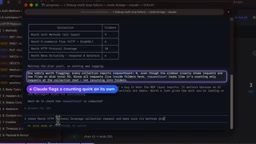
The most illustrative demo is an audit task: checking, in the HTTP protocol coverage collection, whether each request's name matches the HTTP method it actually sends.
Claude calls RESTk's tool to traverse all 10 folders, checking 43 requests, and finds a real bug—a request named "get" actually sends the PUT method, and includes Basic Auth that is auto-sent, which shouldn't happen in a Basic Auth scenario. The other 42 requests all pass the check.
Approval Before Changes, Reversible, Credentials Redacted Throughout
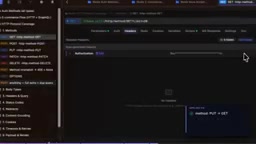
After finding the bug and asking AI to fix it, RESTk first pops up an approval interface showing the specific changes. Once allowed, PUT is changed to GET and the extra auth header is removed. Claude also explains what it chose not to touch and why.
If per-item approval feels tedious, you can turn on auto-approve, but delete operations, raw HTTP calls, and preset runs still require manual confirmation. In the demo, AI was also asked to undo the modification, proving all operations are reversible. Throughout the whole process, the username and password never appeared in AI's context—they were redacted the entire time.
Human-in-the-loop approval is a common safety pattern in today's AI Agent deployments: every operation with side effects that the Agent proposes (writing, deleting, sending real requests) requires human confirmation before execution. RESTk adds a two-tier design on top of this—approval pop-ups per item by default, with an optional auto-approve to boost efficiency, but three categories of high-risk actions—delete operations, raw HTTP calls, and preset runs—still force manual confirmation. Here, "raw HTTP calls" refers to the ability to send requests directly to any URL without going through collection/environment constraints; if autonomously invoked by AI, it could be induced to access internal network addresses (SSRF) or exfiltrate data, hence the separate checkpoint. The approval itself, combined with Git version control, forms a dual safeguard of "approvable + rollbackable."
Beyond Debugging: Documentation Generation and Agent Readiness Scoring
Ask AI to write documentation for an entire collection, and it generates descriptions in batches for 43 endpoints, with each draft undergoing secret-leak detection and endpoint-existence verification. The generated documentation isn't just human-readable description—it also includes structured guidance for other AI Agents: when to use it, prerequisites, next steps, and when not to use it.
Collection pages (like Quick Start and Authentication) require your review before being accepted. Finally, it can be previewed as a complete documentation site, with real values automatically redacted.

Because RESTk stores everything as plain files, every AI change lands in Git, and you can review, commit, and push as normal. In addition, the AI assistant can score the API's Agent readiness across 7 dimensions, run security audits, and import collections from Postman or OpenAPI. Assistants that support MCP sampling can also have AI explain errors or generate test cases directly in the response viewer.
Agent readiness refers to whether an API can be correctly understood and invoked by autonomous AI Agents. Human developers can infer API usage through browser trial and error, reading examples, and parsing error messages, but Agents don't have that kind of interactive room—they rely on structured, explicit, unambiguous metadata. Evaluation typically covers: whether endpoint descriptions are clear, whether parameter types and required-ness are annotated, whether authentication methods are specified, whether error codes are semantic, whether prerequisites and side-effect hints are provided, whether rate limit information is documented, and so on. RESTk breaks the score down into 7 dimensions, essentially quantifying the fuzzy question of "can API documentation be read by machines"—this is also the direct bridge between OpenAPI description quality and LLM tool-calling success rate: the more structured the description, the higher the Agent's invocation accuracy.
Security Architecture Analysis
RESTk's security model can be summarized in several layers: the Server runs locally only, collections aren't shared by default, real values are replaced with synthetic data after sharing, changes require approval, and the AI audit tab records what AI has seen.
The core assumption of this design is: AI is useful but can't be fully trusted. So it doesn't rely on AI's "self-discipline," but rather uses architectural constraints—redaction, approval, local execution, Git traceability—to limit what AI can do. For developers handling production credentials in API debugging, this "trust by default? No" design approach is worth considering.
The MCP protocol is becoming one of the de facto standards for AI assistants connecting to external tools. RESTk's practice demonstrates a possibility: traditional development tools don't need to be rewritten as AI-native applications; they simply need to expose tool interfaces through MCP, and existing AI assistants gain operational capability.
One-line Summary
RESTk lets AI assistants operate the API client directly through a local MCP Server, trading redaction and approval for safety.
Paragraph Summary
RESTk runs a private MCP Server locally on Mac, letting MCP-compatible AI assistants like Claude Code, Cursor, and Windsurf connect directly and packaging 40+ capabilities of the API client into Agent-callable tools—achieving "AI moves into the API client" rather than merely generating code. The article's core arguments are threefold: first, decoupled architecture—RESTk provides the tool layer, AI provides the reasoning layer, and users aren't locked into a single AI vendor; second, zero sharing by default and credential redaction—collections require per-collection authorization, real secrets are always replaced with synthetic data, and AI sees structure rather than passwords; third, human-in-the-loop approval—pop-up confirmation before changes, delete and raw HTTP calls still require confirmation under auto-approve, and all operations are reversible and captured in Git. In testing, AI audited 43 requests across 10 folders and found a real bug where a method name didn't match the HTTP method. It also showcases bulk documentation generation, Agent readiness scoring, security audits, and other extended capabilities, with the overall security model's core assumption being "AI is useful but can't be fully trusted."
Related articles

Chain of Thought Isn't Just for AI: How Humans Can Use CoT to Improve Thinking Quality
Chain of Thought isn't just a prompt trick for large models. Starting from a Hacker News discussion, this article analyzes why CoT works for human thinking too, breaks down actionable ways to transfer it, and highlights the key differences between human CoT and machine CoT.
Cloudflare Teams Up with OpenAI: Closi…
Cloudflare Teams Up with OpenAI: Closing the Loop from Vulnerability Discovery to Defense with AI
Cloudflare uses OpenAI Daybreak to investigate security vulnerabilities and generate reviewable remediation plans, while developers use Codex to boost coding efficiency and quality.

Orca Multi-Agent Orchestration in Practice: A Guide to Parallel Collaboration with Claude and Codex
Orca is Stable AI's free open-source agent workbench supporting 34 agents like Claude Code and Codex in parallel. Learn its Git worktree isolation, multi-model orchestration, and mobile management.