Rill Browser: An AI-Native Browser That Brings Claude Code and Codex to Your Side

Rill Browser lets you press ⌘E to send any webpage directly to Claude Code or Codex as an Agent task.
Rill Browser is an AI-native browser designed for AI coding workflows, topping Product Hunt's Developer Tools and AI categories. Its core feature is the ⌘E shortcut: press it on any page and Rill automatically identifies the right project, passes the current page's context to Claude Code or Codex, and lets the Agent work in the background while you keep browsing. Beyond this entry point, Rill also offers automatic tab grouping by topic, day-based browsing history search, and a centralized Agent project view — positioning itself as a unified command center for developer AI workflows. The product is free and runs on users' existing Claude Code and Codex subscriptions, with no additional cost.
As AI coding tools become standard equipment for developers, a new question has emerged: how do you seamlessly funnel what you see in the browser into a running AI Agent? Rill Browser offers its own answer — an AI-native browser built around Claude Code and Codex that topped Product Hunt's Developer Tools and Artificial Intelligence categories, earning 205 upvotes and 32 comments.
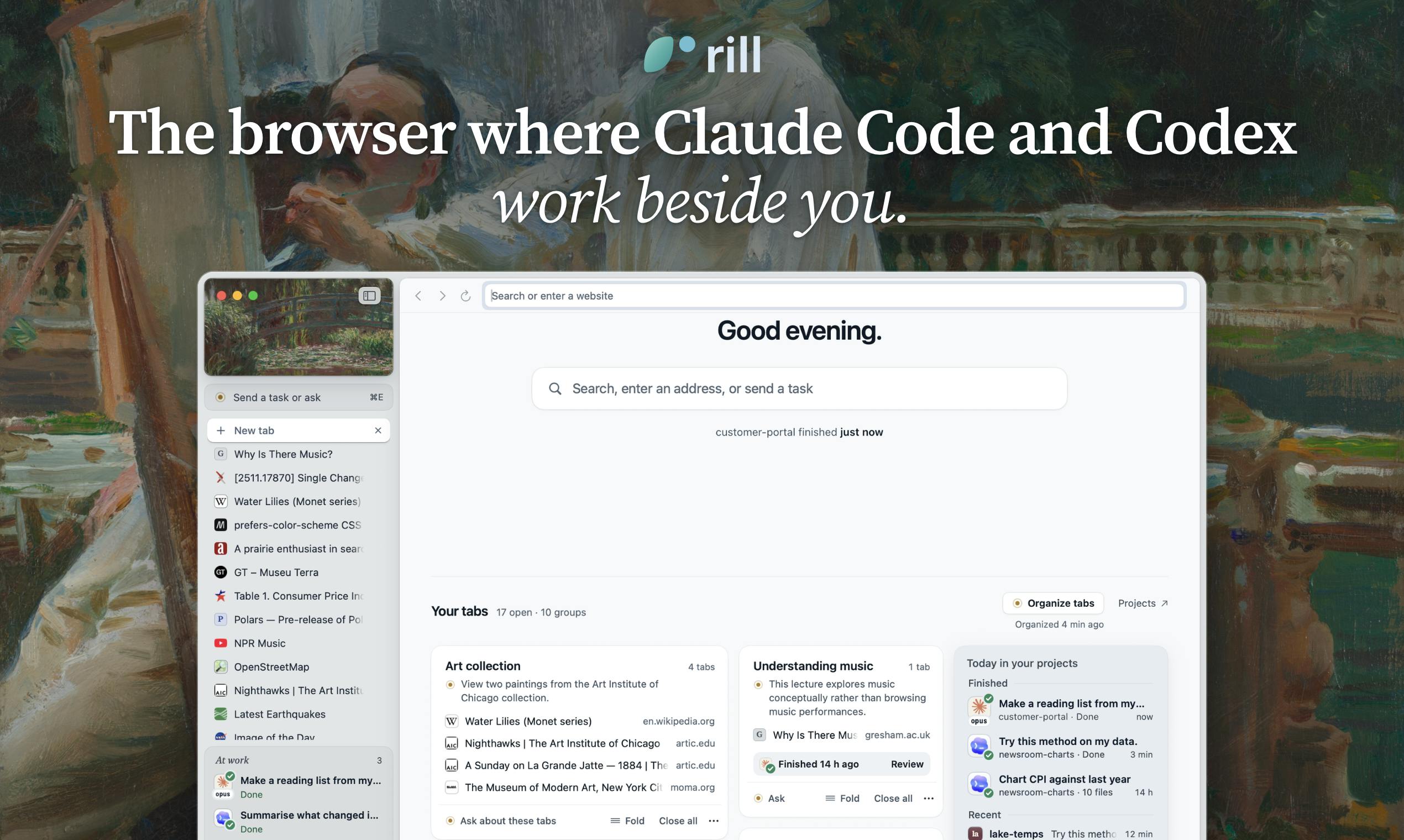
The ⌘E Key That Turns Web Pages into Agent Tasks
Rill's core concept is straightforward: you browse the web as usual, and whenever you encounter content that needs AI processing, press ⌘E on any page to convert what you're looking at into a task for an Agent.
This design addresses a real pain point in developers' daily workflows. Previously, handing documentation, error messages, API references, or design mockups from the browser to Claude Code or Codex meant repeated copying, pasting, and context-setting. With Rill, triggering ⌘E automatically identifies the right project, passes the current page's context to it, and the Agent starts working in the background — while you continue browsing without breaking your train of thought.
This "browse and delegate" pattern essentially upgrades the browser from a passive information consumption tool into a middle layer connecting human intent with AI execution. For developers already accustomed to Claude Code and Codex, the smoothness of this handoff directly determines the tool's practical value.
Claude Code is Anthropic's command-line AI coding tool that lets developers collaborate directly with Claude models in a terminal environment to write, debug, and refactor code. Codex is OpenAI's code generation model and associated toolchain, capable of understanding natural language instructions and generating corresponding code. Both represent a new paradigm of "agentic programming": AI doesn't just passively answer questions — it actively executes multi-step tasks, reads and writes files, runs commands, and sustains continuous workflows. This agent-driven approach is precisely what makes "how the browser and the Agent exchange information" a real engineering friction point. Developers frequently shuttle context between the browser and command-line tools, and Rill aims to eliminate that manual handoff entirely.
More Than a Shortcut: Rethinking Tabs, History, and Projects
Rill's ambitions go beyond a single keyboard shortcut. It has also reworked the browser's foundational features to better suit AI-driven workflows.
On the tab management side, Rill automatically groups messy open tabs by topic — a meaningful cognitive load reduction for developers juggling dozens of tabs across multiple tasks simultaneously. Browsing history is reorganized into "searchable days," letting you rewind to what you were doing and reading on any given day, rather than sifting through a disordered list of URLs.
More importantly, there's the project view: Rill consolidates all the projects your Agents are currently handling into a single place. When you have multiple Agents working on different tasks at once, this centralized project panel eliminates the chaos of checking across multiple terminals or windows. In essence, Rill aims to become a unified command center for a developer's AI workflow.
Reuse Your Existing Subscriptions — Zero Extra Cost
Rill's pricing strategy is worth highlighting: it's free, and it runs on top of subscriptions you already have.
This means Rill doesn't charge you anything extra — it simply connects to the Claude Code and Codex subscriptions you're already using. This "no double billing" model lowers the barrier to entry. Developers don't need to purchase additional Agent capabilities just to use Rill; they just plug in their existing tools.
From a business perspective, this also reflects Rill's current positioning: it wants to connect and enhance, not replace, the underlying AI coding tools. At a time when AI tool subscription costs keep stacking up, the "reuse what you already have" approach is genuinely user-friendly.
A Trend Worth Watching
Rill Browser's rise to the top of Product Hunt reflects a direction that's taking shape: the browser is becoming the new battleground for AI Agents.
Traditional browsers were designed around human clicks and reading habits. But as AI Agents become heavy participants, browsers need new interaction primitives — like Rill's ⌘E, which converts "what I'm currently looking at" into "what the Agent needs to do." This aligns with the broader wave of AI browser experiments, all attempting to redefine the relationship between the browser and AI.
Of course, Rill is still in its early stages. Its real-world performance, the reliability of its Agent integrations, and its compatibility with users outside the Claude Code/Codex ecosystem all remain to be proven over time. But the product hypothesis it puts forward — that developers need a browser where AI Agents can "work alongside them" — does identify a genuine gap in today's AI coding workflows.
For developers who are already deeply reliant on Claude Code and Codex, Rill is worth trying. And for those tracking the evolution of AI tooling, it's a vivid case study in how browsers might adapt to the age of Agents.
"Interaction primitive" refers to the most fundamental unit of operation in a human-computer interface — just as mouse clicks and touch gestures once redefined interaction in the desktop and mobile eras. In the Agent era, existing browser interaction primitives (URL input, page scrolling, hyperlink navigation) were designed around human cognitive habits, without accounting for AI as a collaborative participant. Rill's ⌘E is essentially an exploration of a new primitive: treating the "current browsing context" as a transferable task payload. Similar explorations include Arc Browser's AI summary feature and Microsoft Edge's Copilot sidebar — but Rill's differentiator is that it's directly oriented toward dispatching tasks to Agents, rather than stopping at information retrieval or summarization. That positioning difference defines a considerably more vertical target audience.
Related articles

Chain of Thought Isn't Just for AI: How Humans Can Use CoT to Improve Thinking Quality
Chain of Thought isn't just a prompt trick for large models. Starting from a Hacker News discussion, this article analyzes why CoT works for human thinking too, breaks down actionable ways to transfer it, and highlights the key differences between human CoT and machine CoT.
Cloudflare Teams Up with OpenAI: Closi…
Cloudflare Teams Up with OpenAI: Closing the Loop from Vulnerability Discovery to Defense with AI
Cloudflare uses OpenAI Daybreak to investigate security vulnerabilities and generate reviewable remediation plans, while developers use Codex to boost coding efficiency and quality.

Orca Multi-Agent Orchestration in Practice: A Guide to Parallel Collaboration with Claude and Codex
Orca is Stable AI's free open-source agent workbench supporting 34 agents like Claude Code and Codex in parallel. Learn its Git worktree isolation, multi-model orchestration, and mobile management.