Robin: The AI Email Client That Organizes Itself

Robin is an AI email client that automatically organizes your inbox in the background — smart by default.
Robin, built by developer Martín Granados García, is an AI-powered email product whose core premise is an inbox that organizes itself. It takes over your email to auto-surface verification codes, categorize shopping and subscription records, parse event invites into your calendar, and consolidate newsletters into a magazine-style feed. Unlike Gmail's keyword-based filters, Robin emphasizes semantic understanding with automatic action execution — extracting action items from emails rather than just sorting them into folders. This reflects a broader AI shift from "user-invoked" to "background automation." The product is early-stage, with accuracy, data privacy, and migration friction remaining its core unresolved challenges.
An Inbox That Organizes Itself
The core email experience has barely changed in decades: inboxes stuffed with login verification codes, shopping confirmations, subscription notifications, event invites, and endless newsletters. Users are forced to act as their own mail sorters — manually categorizing, archiving, and searching. Robin, which recently launched on Product Hunt, aims to end all that. Its pitch is refreshingly direct: an inbox that organises itself.
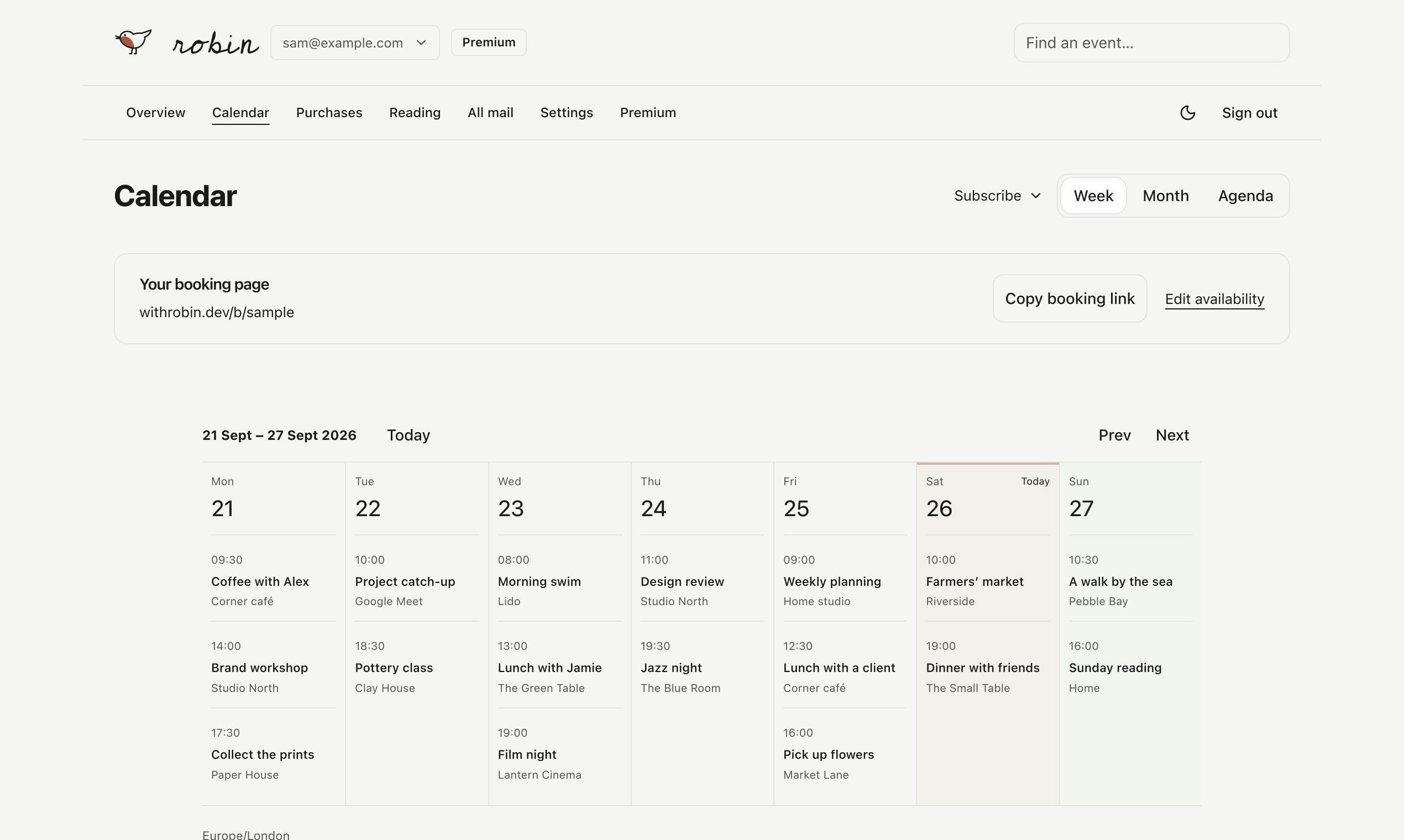
Built by developer Martín Granados García, Robin sits at the intersection of Email, Productivity, and Artificial Intelligence. Its initial launch numbers — 9 upvotes, 1 comment, ranked #19 — aren't particularly impressive. But the product philosophy it represents points toward a clear direction in the evolution of smart email tools.
What Robin Actually Does
According to its official description, Robin works in two ways: you can use it as your primary email address when signing up for services, or forward your existing emails into it. Once it takes over, it handles several things automatically:
- OTP codes surfaced instantly: One-time login and verification codes are prioritized and pushed to the front — no more digging through a pile of notifications;
- Shopping and subscriptions auto-categorized: Purchase records and subscription billing are identified and sorted, making it easy to track spending and renewal dates;
- Invites automatically added to your calendar: Event and meeting invitations are parsed and dropped directly onto your calendar;
- Newsletters aggregated into a magazine: All your newsletters are consolidated into a single, magazine-style reading experience.
The goal of this entire system, in the developer's own words, is about "liberating from email a bit."
The Product Philosophy Behind It: Let Agents Handle It in the Background
What's most interesting about Robin isn't any individual feature — it's the single line that captures its philosophy: "Agents should work in the background with the inbox for us. Inbox should be smarter by default."
This statement captures a key trend in AI applications right now: the shift from "users actively invoking AI" to "AI automatically completing tasks in the background." Traditional email filters and rules require users to manually configure conditions. Robin instead tries to use an AI Agent to understand the semantic meaning of email content, automatically determining whether a message is a verification code, a bill, or an invitation — then acting accordingly. This is a "smart by default" approach: no setup required, works right out of the box.
How It Differs from Traditional Email Tools
Mainstream email clients already offer category labels (like Gmail's Promotions and Social tabs) and smart filtering, but these are largely based on keyword and sender-based rule matching. Robin aims to go further with semantic understanding + automatic execution: not just filing emails into folders, but extracting action items from them (turning invitations into calendar events) and proactively surfacing critical information (verification codes) in the most visible position.
The fundamental difference between an AI Agent and a traditional rules script is this: rules scripts can only execute pre-written if-then logic, while an Agent can perceive context, make reasoned judgments, and execute multi-step tasks in sequence. In the email context, this means the system doesn't just recognize "this email contains a 6-digit number" — it understands "this is a one-time verification code triggered while the user is logging into a service, and it needs to be visible immediately." The two approaches have vastly different dependencies on natural language semantics. The technical path powering these email Agents typically combines a large language model (LLM) with structured output, transforming email body text into structured data with type labels, then triggering corresponding downstream actions (writing to a calendar API, pinning to the top, etc.). This architecture genuinely connects "understanding" and "execution" for the first time — but it also introduces the uncertainty of LLM reasoning errors.
Worth Watching, But Worth Scrutinizing Too
Conceptually, Robin addresses a real and widespread pain point. But based on what's publicly available, the product is still in its early stages, and several questions remain unanswered:
- Accuracy: When AI auto-categorization and action extraction go wrong — misclassifying an important email, missing a verification code — the cost is higher than doing it manually;
- Privacy and trust: Handing a third-party service control of your inbox and access to all your email content involves sensitive data; user concerns about privacy and data security can't be dismissed;
- Migration friction: Using Robin as your new email address means changing your address. Forwarding existing email adds another layer of routing. Real-world reliability and experience need long-term testing to validate.
These are challenges shared by every product in the "AI takes over your inbox" category.
The privacy risks deserve a separate note. When users route all their email through a third-party service, they are effectively handing a typically small startup team custody of highly sensitive data — login credentials, purchase records, travel plans, private correspondence, and more. Unlike large email providers, early-stage products often haven't yet established robust data encryption standards, access controls, audit logging, or compliance certifications (such as SOC 2 or GDPR data processing agreements). The question of who owns the email data used for training or optimizing models is also a critical clause users should carefully review in the privacy policy before granting access. Privacy-conscious users may want to test these products with a secondary, non-primary email address before connecting their main account.
Takeaway
Robin is a snapshot of how email tools are evolving toward a "background Agent + smart by default" model. Its feature set — surfaced OTP codes, categorized bills, invitations added to calendar, newsletters aggregated — all points toward the same goal: freeing users from the drudgery of email management. The product is still early, with limited upvotes and discussion, but the direction it proposes is worth watching. Perhaps the inbox of the future really should be "smarter by default" — with AI quietly handling the clutter somewhere we can't see.
Related articles

Amphibious Transforming Drone: Beyond 100x Power Savings, What Are the Real Needs?
Is the amphibious transforming drone just a gimmick? Starting from the 100x power difference of the M4 Morphobot, explore real application scenarios and thesis topic ideas, analyzing boundary conditions where pure drones and pure ground robots both fail.

Warhound Raises $200 Million: Genetically Engineered "War Dogs" Paired with Anduril Gear
Warhound raises $200M, backed by Ben Lamm and Palmer Luckey, to genetically engineer dogs for military and law enforcement use and equip them with Anduril gear. This article analyzes its technology direction, funding logic, and ethical controversy.

Claude API Comes to Google Cloud: IAM Integration and SDK Access Guide
Anthropic hosts the full Claude API on Google Cloud with IAM-controlled permissions and unified billing. This guide covers the Vertex AI and Anthropic-hosted entry points, IAM role configuration, and SDK access.