RTX Pro 6000 vs M5 Ultra: How to Choose a $10K+ Personal AI Workstation

RTX Pro 6000 vs M5 Ultra: this debate is really about capacity versus throughput, not raw GB counts.
This article compares the RTX Pro 6000 (96GB GDDR7 VRAM) against the Mac Studio M5 Ultra (up to 512GB unified memory) as personal AI workstations. The core finding: they're not competing in the same space. The Mac's 512GB solves model capacity but hits bandwidth-limited compute bottlenecks — real-world tests show memory at 30% while the GPU is maxed out. The RTX Pro 6000, with Blackwell architecture and the full CUDA ecosystem, is a true production workstation for video generation, image creation, and LoRA training, with its sweet spot at 70B–100B models. The advice: identify whether your workload is bottlenecked by capacity or compute before choosing.
With a budget in the tens of thousands of dollars and only one personal AI workstation to buy, which would you choose? On one side is the NVIDIA RTX Pro 6000, with 96GB VRAM and the full CUDA ecosystem; on the other is the Mac Studio M5 Ultra, with up to 512GB of unified memory. On the surface this looks like a VRAM showdown, but dig deeper and you'll find these two machines are playing entirely different games.
The Allure — and the Trap — of 512GB
The Mac's biggest selling point is that it can hold 512GB of unified memory. What does that actually mean? You can load a 100B model. You can load a 200B model. You can even load something like DeepSeekAd V4 Flash — the kind of behemoth that personal computers couldn't even dream of running before. The first barrier to running large models on a personal machine has always been that the model simply doesn't fit. A 512GB Mac says: go ahead, load it up, no problem.
But real-world usage tells a different story. One user ran DeepSeek V4 Flash on a 512GB M3 Ultra — the model loaded fine, and a 27B model could run alongside it. But looking at the monitoring stats: memory usage was only at 30%, while the GPU was already maxed out. In their own words: the memory headroom is genuinely impressive, but it was the first time they'd ever seen memory become the idle resource.
Two concepts need to be separated here: capacity determines whether a model can fit in memory, while compute throughput determines how fast you can actually get work done once it's loaded. It's like a truck that can carry 50 tons — but fully loaded, it can only do 20 km/h. On the highway, a delivery scooter will blow past you. Yes, it fits; no, it isn't fast. Apple really did give you the 512GB warehouse. They just didn't include enough forklifts.
Unified Memory is fundamentally different from the discrete VRAM found in traditional PC architectures. In Apple's M-series chips, the CPU, GPU, and Neural Engine all share a single physical memory pool, eliminating the need to copy data back and forth between system RAM and VRAM — theoretically removing the PCIe bandwidth bottleneck of traditional designs. The trade-off: that memory's bandwidth is shared and competed for by all compute units. The M3 Ultra's memory bandwidth is around 800 GB/s; the M5 Ultra improves this to roughly 1 TB/s — impressive numbers, until you consider that a single NVIDIA H100 can deliver 3.35 TB/s. Large model inference is a classic memory-bandwidth-bound task — every token generated requires sweeping all model weights from memory into the compute units, and bandwidth directly determines generation speed (tokens/s). This is exactly why a 512GB Mac can hold the model yet still produce frustratingly slow output.
The M5 Ultra Generation Is Closing the Compute Gap
To be fair to the M5 Ultra: most real-world benchmarks to date are based on the M3 Ultra, and the 512GB M5 Ultra launched relatively recently with deliveries still pending for many buyers. This generation's upgrades are specifically targeted at closing the compute gap.
The GPU now includes Neural Accelerators, and Apple's own benchmarks in LM Studio claim large model prompt processing speeds up to 4× faster than the M3 Ultra. Official numbers always deserve a discount, but the direction is clear: Apple knows the problem was never insufficient memory — it was insufficient compute. This generation is essentially Apple fitting proper forklifts into that 512GB warehouse.
The RTX Pro 6000's Sweet Spot — and Its Awkward Zone
The RTX Pro 6000 takes the opposite approach: 96GB GDDR7 ECC VRAM, Blackwell architecture, the full CUDA ecosystem, and a 600W TDP. Its problem isn't compute power — it's whether 96GB is actually enough.
Compared to a 32GB RTX 5090, the biggest value of the Pro 6000 isn't speed — it's which models you can load. But 96GB is an oddly awkward number: for a 27B model, a 32GB card is perfectly comfortable, making 96GB overkill; for a 200B model, 96GB still isn't enough. Too expensive for small models, too small for the largest ones — it's the hardware equivalent of being stuck in the middle on the dating market: solid credentials, but hard to place.

Where it really shines is the middle ground: 70B to 100B models, large context windows, large KV Cache, and multi-concurrent workloads.
GDDR7 ECC — the ECC (Error-Correcting Code) part is what separates professional cards from gaming cards. ECC automatically detects and corrects single-bit memory errors, preventing silent data corruption caused by cosmic rays or electrical noise during long computation runs. In scientific computing and model training, a single flipped bit can turn an entire training run's output into garbage. Gaming cards like the RTX 5090 typically lack ECC, while RTX Pro 6000, NVIDIA A-series, and H-series professional/data center cards all include it as standard. For a personal AI workstation, ECC means higher reliability — and it also explains why Pro-series cards are priced so much higher than their gaming-card counterparts. Blackwell architecture is NVIDIA's latest GPU microarchitecture (2024–2025), delivering significant improvements over the previous Ada Lovelace generation in FP4/FP8 low-precision inference — particularly relevant for quantized LLM inference.
Video Generation Is the RTX Pro 6000's Killer Feature
The RTX Pro 6000's real killer use case isn't running LLMs. Real-world tests with MiniMax H3 video generation at 960×544 upscaled to 1080p showed VRAM usage of 67–69GB:
- 90 frames: 10.4 minutes
- 124 frames: 17.9 minutes
- 158 frames: 27 minutes
The question here isn't whether the model loads — it's how many videos you can produce in a day. That's the starkest possible illustration of the gap between a production machine and a demo machine.
Some have asked whether 96GB can let an LLM and ComfyUI "coexist." They can coexist — a 27B Q4 plus ComfyUI plus H3 fits comfortably within 96GB. But fitting together doesn't mean running at full speed simultaneously. The VRAM can hold two demanding tenants, but the GPU is still one landlord. When they compete, neither gets peace.
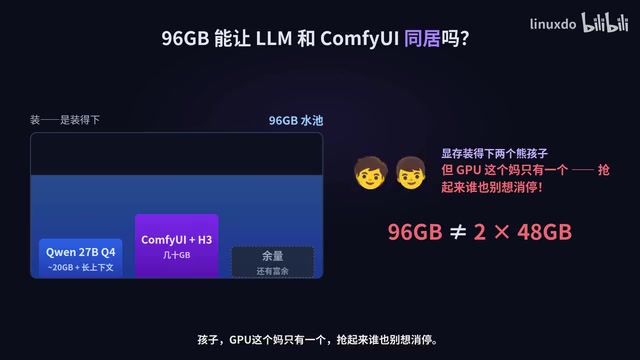
Remember: 96GB VRAM is not the same as two 48GB cards.
ComfyUI is the most popular open-source AI image and video generation workflow framework today. Built on node-based visual programming, it lets users freely combine Stable Diffusion, video models, ControlNet, LoRA, and other components into complex generation pipelines. It runs almost entirely on the CUDA ecosystem and is far better optimized for NVIDIA GPUs than any other platform — which is the fundamental reason the "NVIDIA card dedicated to ComfyUI" split has become so widely adopted in the community. KV Cache (Key-Value Cache) is an important optimization mechanism in Transformer inference: when processing long contexts, the model caches computed attention key-value pairs in VRAM to avoid recalculating all historical context every time a new token is generated. The longer the context and the more concurrent requests, the more VRAM KV Cache consumes — which is precisely why 96GB VRAM delivers unique value in "large context, high concurrency" scenarios.
Mac Wins on Simplicity — and on Your Time
Does that mean the Mac loses? Not at all. The Mac is quiet, power-efficient, and low-maintenance. Users who've switched from 3090s and 5090s to Mac often cite the biggest win as all the time they no longer spend wrestling with drivers, thermals, and CUDA compatibility issues.
The RTX Pro 6000 draws 600W at full load — you can practically watch the electricity meter spin; the Mac is so quiet you can hear your own bank account thinning out. We're always calculating tokens per second and bandwidth, but nobody calculates how many hours a month get burned troubleshooting hardware. Time is money too.
So a mature community-developed setup has already emerged: Mac runs the LLM server, MacBook runs the Agent, and the NVIDIA card handles ComfyUI. LLMs need capacity; video needs CUDA compute. Forcing one machine to do everything means compromising everything. That's a more mature approach than debating who the one true god is.
If You Can Only Buy One, How Do You Choose?
If you can only buy one — that's the real question.
If 80% of your work is local LLMs, very large models, and Coding Agents, and you care about noise levels, power consumption, and maintenance overhead, the M5 Ultra is highly compelling — especially at 256GB or above. It solves the problem the RTX Pro 6000 can never solve: model capacity. 96GB is 96GB, full stop.
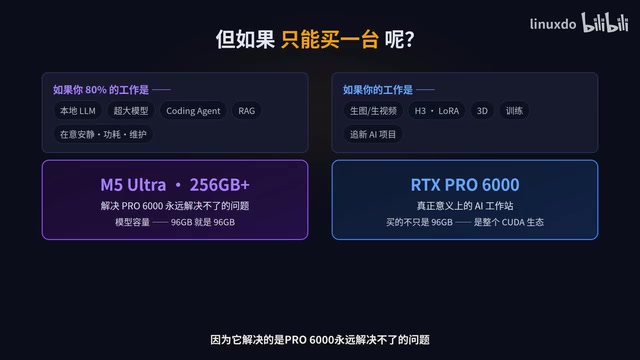
If your work is image generation, video generation, H3, LoRA fine-tuning, 3D, or training, and you want to run the latest AI projects the moment they ship, then the RTX Pro 6000 is a true AI workstation. You're not just buying 96GB of VRAM — you're buying the entire CUDA ecosystem.
Conclusion: Capacity vs. Throughput
A clear positioning emerges for both machines:
- The M5 Ultra is a personal server for very large models: models that used to be impossible to run on a personal computer can now sit on your desk.
- The RTX Pro 6000 is a general-purpose AI production workstation: it may not fit the absolute largest models, but it handles every AI task that's actually in production today — from LLMs to images, video, and training.
This competition was never 96GB vs. 512GB. It's about whether you need capacity or throughput.
The takeaway for each type of user is direct: 512GB Mac users should remember that 70% memory remaining doesn't mean 70% performance remaining. RTX Pro 6000 users should remember that fitting two models in VRAM doesn't mean running two tasks at full speed simultaneously.
When choosing a workstation, stop fixating on GB counts. Look at where your actual workload gets stuck: if models don't fit, buy more memory; if they fit but run slowly, buy more compute. The M5 Ultra lets you run what you couldn't run before. The RTX Pro 6000 turns what you can run into real production output.
Related articles

Meta vs. Publishers: The AI Data Battle Over Terms of Service Changes and the Future of the Internet
Meta changed its business account terms to allow AI training on linked website data, sparking backlash from publishers and creators. Industry groups demanded negotiations, forcing Meta to remove 'training' wording and delay the effective date. The dispute reveals the deeper battle over data authorization and the future of the internet in the AI era.

When Outside Xbox Meets Blood on the Clocktower: A Legion Match in Minecraft
Outside Xbox guests Ellen and Mike play Minecraft Blood on the Clocktower in a Legion game. How can three good players fight an evil majority amid information noise? This article breaks down Legion mechanics, information-role mind games, and the endgame reversal.

Kimi K3.1 Hands-On Test: Open-Source Model Nears Opus, Video Generation Steals the Show
Kimi K3.1 completed motion graphics, 3D rendering, mini-games, and video generation in a live test. Analysis of its 2.8T MoE architecture, gap vs Opus/GPT, and hidden video generation.