Rune: A Minimalist Text Scratch Pad That Syncs Across Your Macs in Real Time

Rune syncs one shared scratch file across all your Macs via iCloud Drive — minimal, instant, and merge-safe.
Rune is a lightweight Mac text editor by indie developer Bill Anastas, built around a single scratch file stored in iCloud Drive that syncs seamlessly across all your Macs. It drops multi-document complexity in favor of an always-ready, single-file experience. On the technical side, Rune merges concurrent edits rather than overwriting them. The editor adopts Sublime Text's color scheme and shortcuts, supports plain-text paste, and includes a Find in History feature to compensate for the single-file model. It's squarely aimed at developers and power users living in the Apple ecosystem — but currently doesn't support iOS or cross-platform sync.
An idea pops into your head, you jot it down on your office Mac, then spend time hunting for it again on a different device at home — this fragmented note-taking frustration is something nearly every multi-Mac user has experienced. A small text editor called Rune, spotted on Product Hunt, is trying to solve it in the most minimal way possible.
What Is Rune
Rune is a lightweight text editor for Mac, and its core value proposition is captured neatly in its tagline: "Type it on one Mac. Find it on another." Its design philosophy is deliberately restrained — no complex note management, no multi-document system. Instead, everything revolves around a single scratch file.
That file lives in iCloud Drive, shared across all your Macs. Whatever you type on any device is saved instantly and automatically synced to your other machines. For developers and power users who habitually capture ideas, code snippets, and temporary lists as scattered text, this "one file for everything" approach actually reduces cognitive overhead.
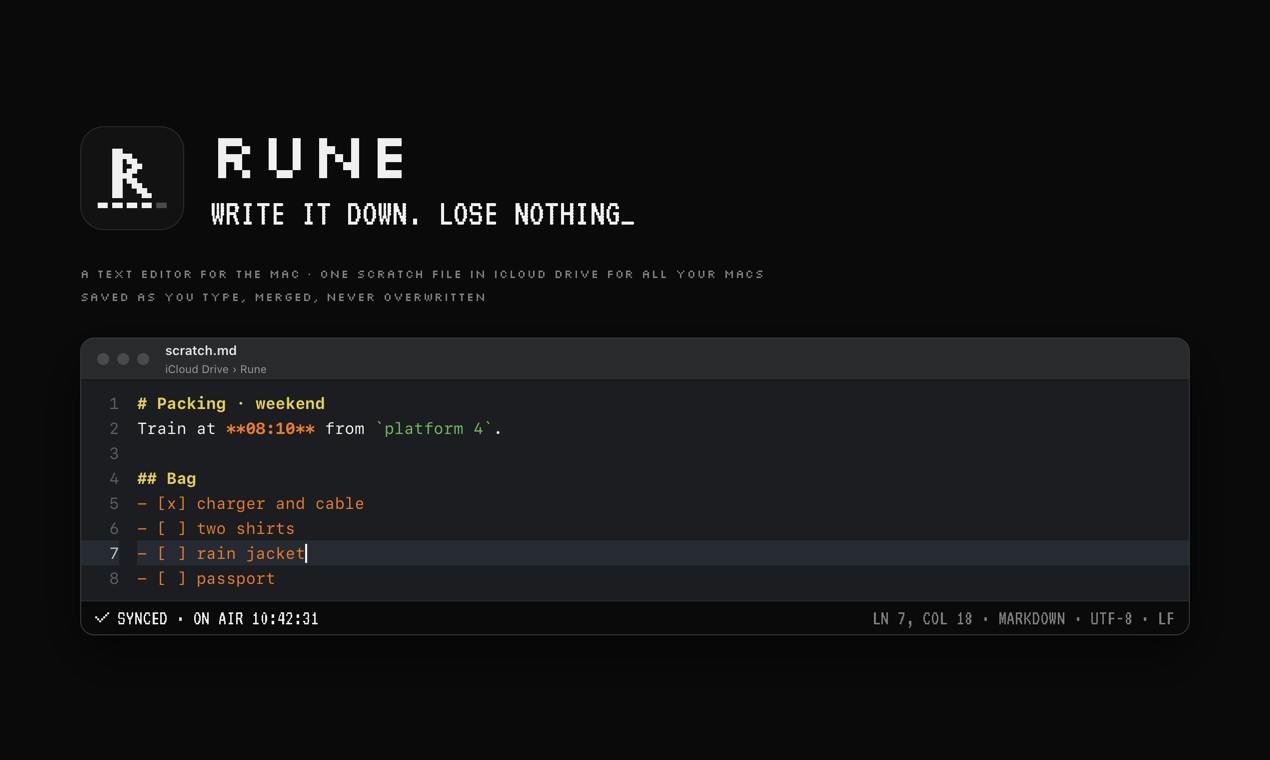
Rune was built by indie developer Bill Anastas. On Product Hunt, it earned 72 upvotes and ranked #20, listed under the Mac, Productivity, and Developer Tools categories.
Core Features Breakdown
Smart Merging That Never Overwrites
The most technically noteworthy aspect of Rune is its sync logic. The biggest risk with multiple devices sharing a single file is conflict and overwrite — when you edit on two Macs simultaneously, the classic "last write wins" strategy often leads to data loss.
Rune's approach is to merge rather than overwrite. The official description explicitly states that edits from two Macs are merged, not overwritten. This means that even if you're recording content on different devices in parallel, everything gets preserved. For users treating it as a persistent scratchpad, this is a critical safeguard against data loss.
Background: "Last Write Wins" (LWW) is the simplest conflict resolution strategy in distributed systems — whichever device writes last wins, and concurrent changes from other devices are discarded. iCloud Drive itself can run into similar issues at the file level: when two devices modify the same file offline and then upload after reconnecting, the system sometimes preserves two conflicting copies for the user to resolve manually. By implementing merge logic at the application layer, Rune performs a diff on text changes from different devices before syncing, combining all newly added content rather than simply overwriting the entire file with the latest timestamp. In the collaborative editing space, this typically relies on algorithms like OT (Operational Transformation) or CRDT (Conflict-free Replicated Data Types). Rune hasn't publicly disclosed which mechanism it uses, but its "merge, not overwrite" promise is more than sufficient for single-user, multi-device scenarios.
An Editing Experience Optimized for Developers
Rune's editing experience draws clear inspiration from Sublime Text — it adopts Sublime Text's color scheme and keyboard shortcut conventions. For developers familiar with that classic editor, the transition requires almost zero relearning.
It also supports plain-text paste, which may seem like a small detail but is genuinely useful for anyone frequently copying content from web pages or documents. It automatically strips the original formatting, keeping your text clean.
Background: Sublime Text was released in 2008 by indie developer Jon Skinner. Known for its blazing-fast startup, "Goto Anything" quick navigation, and multi-cursor editing, it was the dominant tool for frontend and full-stack developers before VS Code rose to prominence. Its default color scheme, "Monokai," is widely celebrated for its strong contrast and reduced eye strain during long sessions — so much so that VS Code, JetBrains, and many others ship it as a built-in theme. By adopting this color scheme and shortcut style, Rune is essentially paying homage to the muscle memory of an entire generation of developers. Things like
Ctrl+P-style command palettes and multi-selection feel immediately natural to anyone who's used Sublime Text before.
Find in History: Retrieve What You Once Wrote
Rune also offers a Find in History feature, letting you search through past content you've written. Since the app fundamentally revolves around a single scratch file, this history search capability compensates for the lack of multi-file management — you don't need to remember which file you saved something to; you just search for the fact that it once existed.
Who Is It For
Rune's positioning is crystal clear: it's not a knowledge management system like Notion or Obsidian, nor is it a full-featured code editor. It targets a very specific scenario — people who need to seamlessly carry scattered text snippets between multiple Macs.
Developers can use it to store temporary code snippets, CLI commands, or debugging notes. Writers can treat it as an always-ready inspiration pad. Power users can use it as a cross-device "temporary clipboard." Its value isn't in feature breadth — it's in the fluidity of "open and go, available everywhere."
The Product Philosophy Behind Minimalist Tools
Rune reflects a trend in indie developer tools in recent years: rather than building a sprawling platform, go deep on solving one specific pain point. It foregoes multiple documents, tabs, tags, and categories to focus on exactly three things: a single file, reliable sync, and a developer-friendly editing experience.
This restraint is both a strength and a limitation. The strength is a near-zero setup, instant-on experience. The limitation is its dependency on the iCloud Drive ecosystem — it's Mac-only and can't cover iOS or cross-platform use cases. For users fully committed to the Apple ecosystem, that's a non-issue. For anyone who needs to sync on an iPhone or Windows machine, Rune currently can't help.
As a small, focused tool, Rune's success largely hinges on whether its sync reliability holds up under long-term real-world use. At least from a design standpoint, it has identified a genuine need — capturing scattered text across multiple Macs — and delivered an admirably elegant answer.
Related articles

WorkBuddy Full Tutorial: Build an AI Office Automation Agent from Scratch
A complete WorkBuddy tutorial: installation, three working modes, multimodal picture book video practice, expert team agent building, and workflow configuration for low-cost AI office automation.

WorkBuddy Agent Complete Guide: From Beginner to Automation in 7 Days
Based on Bilibili's 256-episode WorkBuddy masterclass, this systematically breaks down Tencent's AI office workbench core capabilities: Agent principles, Skill encapsulation, cross-platform connectors, scheduled automation, knowledge bases, and zero-code development, with learning path recommendations.

8 AI Accounts, 7 Failed: An Honest Review of Using AI to Get Work Done
Only 1 of 8 AI-run Bilibili accounts succeeded. We break down the real difference between "performing AI" and "using AI to get work done."