Running a 125B Model Locally on 8GB VRAM: Qwen3.8-Flash-Next Deployment Review

A consumer GPU + large RAM can run a 125B model locally via quantization and memory offloading.
The video demonstrates a surprising setup: using a consumer GPU with 8GB+ VRAM plus 64GB of RAM, combined with an open-source llama.cpp-based engine and quantization, you can run the 125B-parameter Qwen3.8-Flash-Next model fully locally. Tests showed the model generating a working 3D skiing game and FPS shooter from scratch, accurately counting 25 chopsticks in a photo, and completing multi-step engineering tasks via an Agent client compatible with OpenAI/Anthropic APIs. The solution is free and open-source with no API costs, though complex tasks can take hours and the high RAM requirement makes it better suited for research and exploration than heavy production use.
Running a 100B+ Parameter Model on Consumer Hardware Is Now Real
For a long time, running hundred-billion-parameter language models was almost exclusively the domain of data centers and multi-GPU workstations. But a recent video by Lingdu Jieshuo (零度解说) demonstrates a counterintuitive solution: with just a consumer GPU with 8GB or more of VRAM — paired with a large amount of system RAM — you can run a 125-billion-parameter model entirely on a local desktop machine.
The core of this approach is an open-source project by an overseas developer that brings the Qwen3.8-Flash-Next model to ordinary desktop PCs. No servers, no multi-GPU rigs, no expensive workstations required — 30-series, 40-series, or 50-series NVIDIA cards work, and so do AMD cards. More importantly, the entire inference process runs completely locally, with no API dependencies and zero token costs.
The key technical insight is "RAM as a buffer": whatever VRAM can't hold is handled by system memory and virtual memory. The test machine used 8GB of VRAM alongside 64GB of RAM — it's that large RAM capacity carrying the bulk of the model that makes it possible to run such a massive model on a small GPU.
Memory Offloading is the core mechanism behind this approach. When GPU VRAM isn't large enough to hold the entire model, the inference framework offloads some model layers to system RAM or even disk-based virtual memory. During inference, the required layers are loaded into VRAM on demand for computation, then swapped back out. The tradeoff is a significant speed penalty — data transfer bandwidth between VRAM, RAM, and disk is far lower than the GPU's internal bandwidth, so the more layers that are offloaded, the lower the tokens-per-second generation rate. This is precisely why 64GB of RAM matters: the bandwidth between RAM and VRAM (DDR5 at ~80GB/s) is far higher than between RAM and an NVMe SSD (~7GB/s). Keeping the model in RAM rather than constantly reading from disk is the key to maintaining usable inference speeds. This also explains why the approach has a hard requirement on RAM capacity, rather than just relying on virtual memory as a workaround.
From Model Selection to Quantization: Breaking Down the Deployment Process
The project is built on top of llama.cpp as its inference engine, and the installation process is relatively straightforward. After downloading and extracting, you run the startup script (the started here batch file) in the directory. The program automatically detects your current hardware configuration and walks you through the setup step by step.
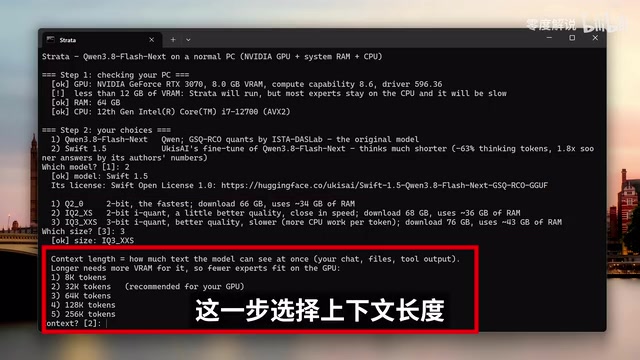
The configuration process involves several key choices:
Model version: The native model offers the highest quality but is slower; the optimized version reduces thinking time by approximately 63%, producing output faster with almost no quality difference.
Quantization level: This is the core step for balancing quality against memory usage. The Q1 quantized version requires approximately 34GB of RAM, IQ1-XS requires ~36GB, and IQ3 requires ~43GB. Virtual memory can supplement if RAM is insufficient, and users can choose flexibly based on their setup.
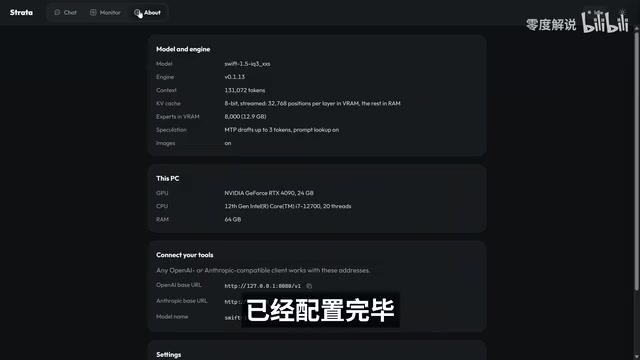
Context length: The program recommends different values based on your VRAM. 8GB VRAM gets a recommended 32K context; 24GB VRAM can support 128K.
KV cache precision: The author recommends 8-bit; 4-bit is faster but slightly reduces quality.
You can also optionally load an image recognition module (~1.4GB) to enable multimodal capabilities. Note that downloading the model requires a stable international internet connection.
Quantization refers to the technique of compressing model weights from high-precision floating-point numbers (e.g., FP16/BF16, where each parameter takes 16 bits) to lower-precision integers (e.g., INT8, INT4, or even INT1). For a 125B parameter model, FP16 precision alone would require roughly 250GB of VRAM — Q1 quantization compresses each parameter to approximately 1 bit, shrinking the total model size to a range manageable by consumer-grade memory. The lower the quantization level number, the higher the compression ratio and the lower the memory footprint, but inference quality (especially for logical reasoning and fine-grained generation) also decreases accordingly. The IQ series (e.g., IQ1-XS, IQ3) is a variant called "importance-aware quantization," which assigns different levels of precision to each weight based on its importance to the model's output. At the same compression ratio, it retains more useful information than uniform quantization, making it the mainstream approach for extreme compression scenarios.
KV Cache (Key-Value Cache) is the mechanism in Transformer architectures for storing intermediate attention results during inference. The longer the context and the higher the precision, the more VRAM the KV cache consumes. Reducing it from FP16 to 8-bit or 4-bit can significantly free up VRAM in exchange for longer usable context, though precision that is too low can affect coherence in long texts.
Code Generation Benchmark: A 3D Game with Zero Hand-Written Code
After deployment, the program serves a local control panel at 127.0.0.1:8080, which includes a chat interface and a real-time monitoring dashboard (showing token output speed, GPU utilization, memory usage, and other metrics).
The first test was asking the model to write a 3D skiing game. On a 24GB VRAM setup, the output speed was approximately 63 tokens per second. The model spent over ten minutes generating the complete code, which ran successfully on the first try — the game supports directional controls for turning, speed adjustments, a snowy mountain scene, and background sound effects, all running smoothly. The author didn't write a single line of code.
One noteworthy detail is stability on long tasks. The standard llama.cpp frequently throws "context length exceeded" errors during extended generation tasks, but this solution ran through the entire multi-minute generation without hitting that issue — a meaningful practical advantage.
The author then raised the difficulty by asking the model to write an FPS shooter game. Output speed dropped to roughly 45 tokens per second, and the task took about half an hour. The resulting game is a single HTML file — no installation package or game engine required, just open it directly in a browser. The game includes a radar minimap, a reload mechanic, headshot damage numbers, ammo and health pack pickups, and even gunfire and background audio synthesized entirely within the code, with no external audio files referenced.
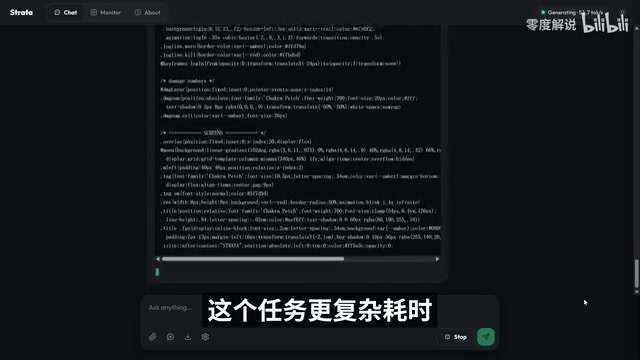
Token output speed varies across different tasks — higher complexity means lower speed — which is normal behavior for local inference under constrained compute.
Multimodal and Agent Use Cases
Because the image recognition module was loaded, the model has multimodal capabilities. The author uploaded a photo of chopsticks and asked the model to count them. The model accurately identified 25 chopsticks and categorized them by cross-section: 19 with silver metallic tips and 6 with colored tips (further broken down into blue, yellow, off-white, and green), which was verified to be completely correct.

A more advanced use case involves connecting the model to an Agent. The project is compatible with both OpenAI and Anthropic API interface formats, so the local address 127.0.0.1:8080 can be connected directly to clients like Hermes. Since it's a local model, the API key can be left empty.
The author demonstrated having an Agent develop a "desktop virtual companion" application — a large project spanning 10 sub-tasks that took several hours to complete. The final output was a full project with a user manual, implementing a desktop cartoon character called "Xiao Ruan (小软)" with real-time 3D interaction, two-way voice conversation, and intent-driven animation controls. It can respond to conversation, react to pokes, and more. The 3D modeling quality is modest, but the functionality is complete and usable.
The term Agent here refers to a working mode where a large language model acts as a "decision core," autonomously calling external tools (such as file read/write, code execution, browser control, etc.) to complete multi-step tasks — as opposed to single-turn question answering. The project's compatibility with both OpenAI and Anthropic API interface formats means that Agent clients originally designed for GPT-4 or Claude (such as Hermes, Cursor, etc.) require no code changes. You simply replace the API endpoint from a remote URL to the local
127.0.0.1:8080, and the client seamlessly switches to the local model. This compatibility design dramatically lowers the migration cost and allows the local model to reuse existing prompts, tool chains, and workflow configurations from the broader Agent ecosystem. Leaving the API key empty eliminates the authentication step, since requests never leave the local machine and no identity verification is needed.
Reflections on the Local Deployment Trend
The significance of this demonstration isn't the polish of the games generated — it's the proof of concept: through quantization and memory offloading, the barrier to running hundred-billion-parameter models locally is being dramatically lowered. For users who care about data privacy, want to eliminate API costs, or need to work in offline environments, this "big-RAM brute-force" approach offers a genuinely viable option.
That said, the limitations deserve honest acknowledgment: complex tasks can take hours, there's a hard requirement for large RAM capacity, and quantization introduces quality degradation. All of this means the approach is currently better suited for exploration and experimentation than for heavy production workloads. But the direction of progress is clear — running frontier large models on consumer hardware is moving from "impossible" to "everyday."
Related articles

uGAP: An AI Platform Unifying 100+ African Geospatial Datasets
uGAP is an African geospatial AI platform by a University of Cape Town team, unifying 120+ African datasets with a Python SDK for discovery, processing, and model training, already used in cyclone flood mapping.

Cursor Can Now Control Your Computer: AI Agents Can Drive Desktop Apps for Testing
Cursor adds desktop control: AI agents can drive desktop apps like the iOS Simulator to test their own features. We analyze the impact on dev workflows, possible technical approaches, and reliability concerns.

Vibecoding a Custom Inference Engine: High Hopes, Harsh Reality
A Reddit developer shares the real experience of vibecoding a custom inference engine: running GGUF Q4 models in the browser with WebGL2 and GLSL, only to fall into tokenizer debugging hell. This article analyzes the engineering challenges of browser-side LLM inference and why cloning llama.cpp is the more rational choice.