Running a Local LLM on a Laptop CPU: Ollama + Qwen3 Gives a Desktop Pet a Brain

Bilibili creator runs Qwen3 8B on pure CPU with an ordinary laptop and uses DSH to build a local AI desktop pet that chats and remembers.
The article documents creator Wei Ming upgrading his original desktop pet "Xiao Jin Niang" to version 3.0: choosing Ollama + Qwen3 8B for local deployment, pure CPU inference at about 9 tokens per second, 0 yuan cost, and chat content never leaving the machine. Engineering was handed to AI agent DSH, which completed plugin writing, testing, and fixes in about 50 minutes. Along the way, a CORS issue arose where the DSH window origin was rejected by Ollama, solved via plugin backend forwarding; details like degradation dialogue when the model is off and memory clearing on close were also implemented. The desktop pet now chats, remembers, and changes expressions with the conversation, and the plugin is open-sourced.
Cloud APIs charge by the word and require an internet connection, while local deployment is often discouraged by "no GPU" — but Bilibili creator Wei Ming offers another path with an ordinary laptop: Ollama plus the open-source Qwen3 8B, a model about 5 GB in size, running purely on CPU, with chat content never leaving the machine and a cost of 0 yuan. He took his original desktop pet "Xiao Jin Niang" from a shell that could only show seven expressions and change outfits to version 3.0 that can chat, remember, and read the room. The whole process is documented in the first episode of Little Whale Girl Evolution Diary.
Two technical paths, and why local
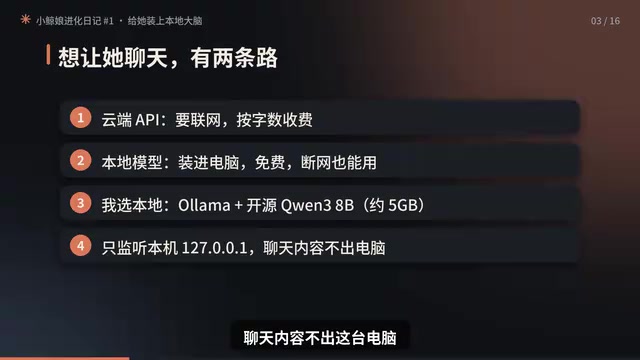
To make a desktop pet talk, there are two paths. Connect to a cloud API: requires internet, billed by the word. Install the model directly on the computer: free, works offline. Wei Ming chose the latter for a straightforward reason: conversations with a companion desktop pet are inherently private, and running locally means "chat content never leaves this computer" — plus you don't pay for every sentence.
The hidden barrier of this path is hardware. Many assume a local LLM requires a dedicated GPU, but his testing showed the opposite — running on GPU produced only 0.1 token per second and threw CUDA errors; switching to pure CPU instead yielded about 9 tokens per second. Combined with an output limit of "no more than 40 characters per sentence," a reply arrives in two or three seconds. For an ordinary laptop, that experience is good enough.
What's worth expanding on here is the trade-off logic: the value of a small local model isn't in benchmarks, but in making "usability" happen. Limiting reply length, accepting second-level latency, and giving up complex reasoning buys a "local brain" that costs nothing, never loses its connection, and never leaks.
Ollama is an open-source tool for running local large models — essentially a "one-click launcher" for LLMs. It packages model download, quantization, and inference serving into simple commands; users only need ollama run qwen3:8b to run a model locally. Ollama listens on 127.0.0.1:11434 by default and exposes an interface via HTTP API, so third-party programs (like the desktop pet plugin in this article) can call it. Its core value is lowering the barrier to local deployment: it automatically handles model formats, memory management, and hardware adaptation, letting developers without a deep learning background integrate quickly.
Qwen3 8B refers to the third-generation Tongyi Qianwen 8-billion-parameter version. Parameter scale determines model capability and resource requirements: an 8B model quantized is about 5 GB, suitable for CPU inference; while 70B and above usually require multi-GPU setups. 8B performs well on Chinese dialogue and general knowledge Q&A, making it the sweet spot for local deployment.
DSH takes over, plugin goes from zero to working
With the model installed, the remaining engineering work was handed to DeepSeekHarness (DSH for short). Wei Ming wrote just one paragraph: double-click the desktop pet to pop up an input box, answers appear in the bubble above its head with streaming display, keep the persona short and cute, expressions follow the conversation, chat only connects locally, and if the model isn't running, reply "my brain hasn't woken up yet." The full prompt is pinned in the comments.
The next twenty-odd minutes were DSH's autonomous work: researching how to write the plugin, testing the local model interface, modifying code, writing tests, and finally dispatching a sub-agent to review line by line, finding 5 small issues and fixing them all.
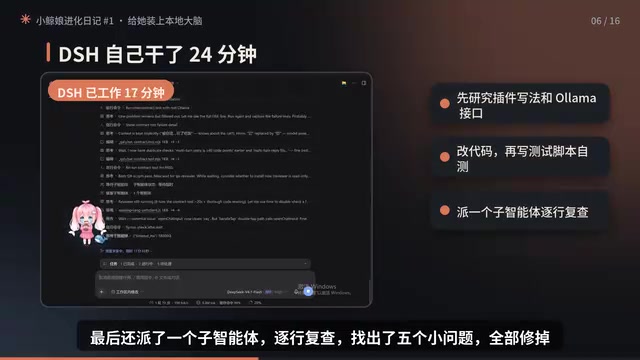
There's a detail worth recording in the plugin installation step: DSH popped up a dialog asking whether to allow installation, and Wei Ming first confirmed that what was being installed was indeed his own plugin folder in the workspace before clicking allow. This habit of "look carefully before approving" is a necessary line of defense when letting AI agents touch local files — the higher the degree of automation, the more indispensable human confirmation of key operations becomes.
AI Agent refers to an AI program that can autonomously plan, call tools, and execute multi-step tasks. Unlike ordinary chatbots, an agent breaks down goals (like "write a desktop pet plugin"), searches for information, modifies files, runs tests, and adjusts strategy based on results. In this article, DSH is a typical agent: it first researches how to write the plugin, then tests the interface, modifies code, writes tests, and finally dispatches a sub-agent for review. The "autonomy" of agents brings efficiency, but also requires humans to confirm at key points (like installing plugins, authorizing file access), forming a "human-in-the-loop" safety mechanism.
Second crash: model is running, but it says it hasn't woken up
Acceptance testing hit the most typical class of bug. Wei Ming asked "who are you," and the bubble immediately replied "my brain hasn't woken up yet" — but the local model was clearly running, and the earlier tests had all passed.
After reporting the phenomenon as-is to DSH, the logs gave the answer: the DSH window's origin was an address starting with DHAPP, which Ollama didn't recognize and rejected outright. The solution was to have the plugin backend forward requests on its behalf, connecting only locally.
Then two more small problems surfaced: after finishing a sentence the input box disappeared and double-clicking wouldn't reopen it; and during the early morning hours it stayed in a "sleepy" state, covering all the chat expressions.
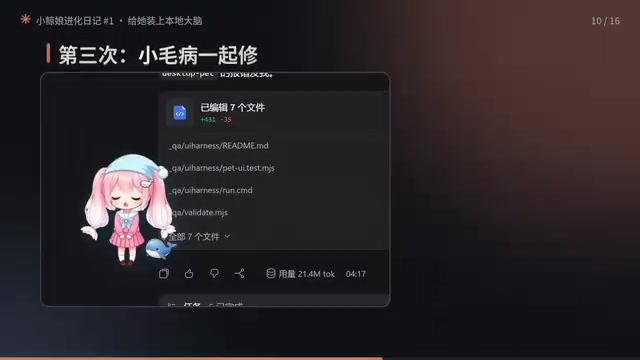
About 10 minutes after describing the phenomena clearly, version 3.0.2 fixed all these issues. The lesson from this debugging process: when integrating local models with third-party hosts, CORS and origin validation are common pitfalls — "tests passed" doesn't mean "the pipeline works"; only the real call path exposes problems.
CORS (Cross-Origin Resource Sharing) is a browser security mechanism that restricts resource requests between different origins (protocol + domain + port). By default, browsers only allow same-origin requests; if a frontend page (like the DSH window, origin DHAPP://...) makes a request to a local service on a different origin (like Ollama at 127.0.0.1:11434), the browser first sends a preflight request, and if the server doesn't return response headers allowing that origin, the request is rejected. In this article, Ollama didn't recognize the DHAPP origin and rejected it outright, causing the plugin call to fail. The solution is to have the plugin backend (same-origin or trusted environment) forward the request, restricted to local connections only, which both bypasses CORS and preserves local privacy.
Acceptance: expressions, memory, and graceful degradation when "asleep"
After the fixes, performance can be checked item by item. Asked whether to stay up late, it first squints and thinks, then advises going to bed early; told "the code keeps throwing errors, I'm so sad," it immediately tears up and says "don't worry, I'll help you find the bugs"; it remembers the most recent round of conversation — asked "what was the first thing I asked you," it answers "the first thing you asked me was who I am"; scolded with "you're so dumb," it gets aggrieved.

The memory strategy is also clearly defined: closing and reopening clears it, nothing is secretly saved. This aligns with the privacy-first local approach and prevents the desktop pet from becoming a black box that accumulates user data without consent.
The most commendable part is the degradation handling. Turn off the local model and speak, and it doesn't throw an error or freeze — it just says groggily "my brain hasn't woken up yet"; restart the model, and the first sentence takes a few extra seconds to load, then it says "I just woke up, the sun's already up." Translating technical failures into in-character expressions is far smarter than popping up an error dialog.
Graceful Degradation refers to a system continuing to operate in an acceptable manner when some functions fail, rather than crashing or throwing errors outright. In this article, when the model is off, the desktop pet doesn't pop up an error dialog but responds in-character with "my brain hasn't woken up yet"; after the model restarts, the first sentence has a loading delay, and it says "I just woke up, the sun's already up." This design translates technical failures into expressions users can understand and that fit the character setting, maintaining experience continuity while avoiding exposure of underlying error information. For companion products, degradation dialogue is an important part of maintaining emotional connection.
Cost accounting and what's next
All told: local model costs 0 yuan, no internet needed, runs on CPU; DSH spent about 50 minutes modifying the plugin across three rounds of revisions, consuming over 20 million tokens, fortunately with a 99% cache hit rate. The plugin is already open-sourced on GitHub; copy the pinned comment paragraph to DSH and it can be installed.
From a product perspective, the significance of this combination is that it lowers the barrier of "AI desktop pet" to an ordinary laptop: local inference saves money and preserves privacy, agent tools handle the engineering transformation, and the persona and expression system handles emotional expression. In the next episode, Wei Ming wants Xiao Jin Niang to speak, and the first line will be decided by the highest-liked comment.
For readers who want to replicate this, the path can be summarized in three steps: first get Qwen3 8B running with Ollama and confirm the output speed on CPU, then use DSH to connect the plugin interface to the local service, and finally add fallback dialogue for when the model isn't started and a memory-clearing strategy.
Related articles

GPT-Image 2.6 Dual Release: A Double Upgrade in Speed and Precision
OpenAI releases GPT-Image 2.6 with Flare for faster generation and Sunburst for complex prompts and dense infographics. API adds markup editing, SVG, and GIF support.

Robert Caro: How to Get Insiders to Talk and Uncover the Hidden Logic of Johnson's Money Politics
Pulitzer winner Robert Caro shares how he interviewed John Connally, revealing how pressing on Johnson's funding annotations got insiders to explain political money logic.

Showing This Video to Someone in 2014: The Stunning Evolution of AI Video
From the viral Reddit post "Show this AI video to someone from 2014," we look back at a decade of AI video generation's leap from academic research to indistinguishable reality, analyzing the cognitive impact and trust challenges amid the flood of synthetic content.