Running AI Locally on Mac: Model Recommendations from 8GB to Mac Studio
Tested Mac local AI by memory tier: from 8GB to Ultra, which model fits, runs, and is useful.
Based on a tech blogger's testing, this article maps which local AI models suit Macs of different memory capacities. The premise is Apple Silicon's unified memory: the GPU gets two-thirds of memory on 36GB and below, three-quarters above, so an 8GB Mac has ~5.3GB usable and 16GB ~10.7GB. The author gives model picks and measured token speeds per tier from 8GB to Ultra, distinguishing MoE and dense models, concluding that local AI's value is precise selection by memory.
Why Mac Is Great for Running AI Locally
A tech blogger crunched the numbers in a video: if you pay monthly for an AI chatbot, the Mac you already own can actually take over part of that work for free — usable on flights, with files never uploaded anywhere, and the cost of trying is just a download. The hard part is figuring out which model your Mac can actually fit. Pick one too large, and it will lag or fail to load entirely.
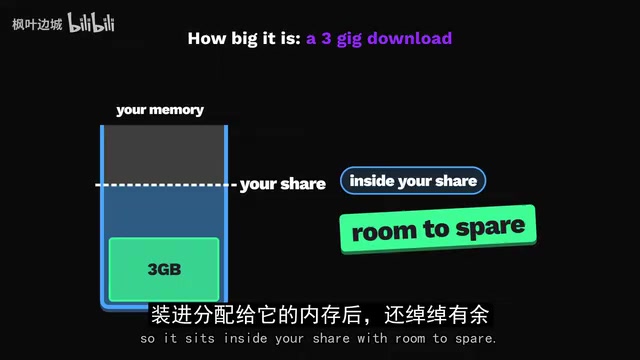
The fundamental reason Mac is suited to local AI is unified memory: the CPU and GPU cores share the same memory pool. But macOS won't hand the entire pool to the GPU. On Macs with 36GB or less, the GPU gets two-thirds by default; above 36GB it gets three-quarters. In practice, an 8GB Mac has roughly 5.3GB of usable AI memory, and a 16GB Mac about 10.7GB. This share is the real ceiling, and it's why every model screenshot in the video stays strictly within this range.
The blogger notes you can raise this limit with a terminal command (wired limit), but whatever you give to AI, the rest of the Mac loses, so he advises against touching it on low-memory machines. At the application level, his first choice is LM Studio, built specifically for Apple Silicon, where a single window lets you download models and chat directly; the other commonly mentioned option is Ollama.
Unified Memory is an architectural feature of Apple Silicon chips: the CPU, GPU, and Neural Engine share the same physical memory pool, rather than the traditional PC setup where the CPU and discrete GPU each have their own dedicated VRAM. This means the GPU can directly access model weights in system memory without copying data between VRAM and RAM. For local AI inference, this eliminates the traditional "VRAM capacity" bottleneck — you don't need a 24GB graphics card, just enough unified memory. The trade-off is that the memory share available to the GPU is constrained by macOS's wired limit, which reserves and locks a portion for the GPU to prevent it from being swapped to disk. This also explains why a Mac's "usable AI memory" is always less than its nominal memory.
8GB M1: What the Smallest Mac Can Do
The good news is it can indeed run a real chatbot. The blogger's choice is Google's Gemma 4 E2B, a 3GB download that leaves headroom within the available share. One user running it on the same M1 via Ollama hit 15-20 tokens per second. A token is roughly a short word or part of a word, and most people read at 5-10 tokens per second, so the answer appears faster than you can read it. It's good for rewriting emails, summarizing pasted web pages, or answering quick questions on a flight with no Wi-Fi.
One step up and you hit the limit: Gemma 4 E4B is a 5GB download that nearly fills the entire share. LM Studio's own guide also recommends 8GB Macs stick to small models. These models only occupy your other apps' memory while loading; quit the app when done and the memory returns to the system.
16GB: Local AI Starts to Get Practical
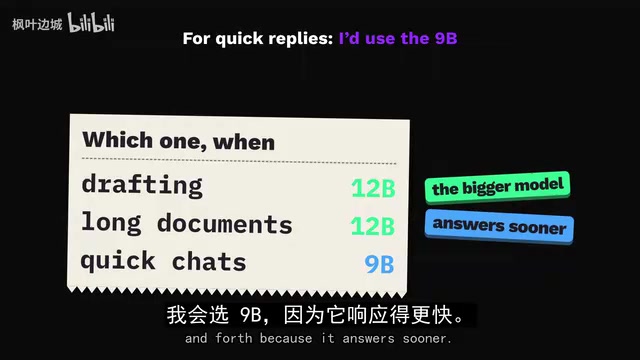
16GB is a common configuration for recent MacBook Airs, with a usable share of 10.7GB — twice that of an 8GB machine. The blogger's daily driver is Gemma 4 12B, a 7GB download that still leaves room for long conversations. On a 16GB M4 Mac mini, one user measured 13.1 tokens per second, slightly faster than reading speed. For a more responsive experience, try QWEN 3.5 9B, which hits 17.7 tokens per second on the same M4. His approach: the 12B handles drafting and summarizing long documents, while the 9B handles quick back-and-forth Q&A.
What about older machines? Public benchmarks run the same model on different chips: M1 at 14 tokens per second, M4 at 24 — meaning the M1 retains nearly 60% of the speed. So on an older M1, the blogger leans toward smaller models — one user ran Gemma 4 E4B on an M1 at 8.2 tokens per second, still readable.
A viewer asked what the M5 chip Air can run. The blogger's answer: the M5 has the fastest memory of any Air chip generation, so the same pairing will only be faster — Gemma 4 12B as the daily model, QWEN 3.5 9B as the fast one. One user pushed the 9B to 25 tokens per second on this Air, though using a custom MLX engine; it'll be slightly lower in standard apps. He doesn't recommend chasing large models on this Air: anything over 10GB basically requires raising the limit, and then the browser will compete with the AI for memory.
24GB: Mixture-of-Experts Models Enter the Scene
24GB is an option on M2 through M5 Airs, and also appears on the M4 Pro Mac mini. With a usable share of 16GB, it's enough to run another class of model — Mixture of Experts (MoE). These models are large overall, but only a small subset of parameters activates per word, so they know more than their speed suggests.
The blogger's choice is Gemma 4 26B, where only 4 billion parameters participate per word. A 24GB M4 Pro user ran it in Ollama at 36-38 tokens per second — several times reading speed, but a tight fit: only 9% memory was free and the swap file was nearly full, so close memory-hungry apps before long tasks. He delegates coding questions, long PDFs, and drafts bigger than an email to it.
What he explicitly skips at this tier is QWEN 3.8 27B: popular and powerful, but it's a dense model that activates all parameters per word, so it's slow on base chips. On that same M4 Pro, one user only got 11.4 tokens per second — Gemma is about 3x faster. Its 16.5GB download exceeds the 16GB share and won't fit — unless you raise the limit, leaving almost nothing for other apps. It fits on 32GB, but the speed gain is limited.

Mixture of Experts (MoE) is a sparse activation architecture: the model contains a large number of parameters overall, but each token is routed to only a few "expert" sub-networks for computation. For example, Gemma 4 26B has 260 billion total parameters but activates only 4 billion per word. This has two consequences: first, inference speed is close to that of a small model because actual computation is small; second, the model file size is still based on total parameters, so memory capacity requirements are high. In contrast is the Dense Model, like QWEN 3.8 27B, which activates all parameters for every token — computationally heavy and slow, but generally more capable at the same parameter count. On memory-constrained Macs, MoE is the key to "leveraging large knowledge with small compute" — you can fit the big file and get small-model speed.
32GB and 48GB: Plugging Local Models into Your Editor
32GB has a usable share of about 21GB, just enough for a special model: QWEN 3.6 35B, also a Mixture of Experts, with only 3 billion parameters working at any moment. The MLX version is slightly over 20GB, leaving little room after fitting. One user ran it on a standard M6 in LM Studio at 63.8 tokens per second — 6x reading speed on a base chip. This is the first time the blogger recommends plugging a local model into a code editor: with answers this fast, you don't have to wait and can keep working. The trade-off is tight space, so control conversation length and fall back to Gemma 4 26B for long conversations.
If you have an older M1 Max or M2 Max at this capacity, the situation is different: these chips have far higher memory bandwidth than standard chips. One user ran QWEN 27B on such an M1 Max at 15.8 tokens per second, so on a Max he'd actually keep the dense model.
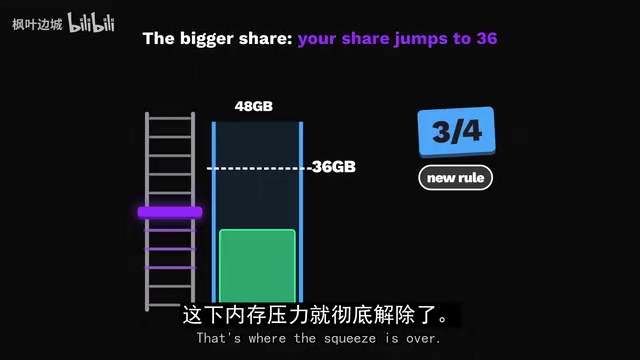
36GB and 48GB correspond to Pro and Max chips respectively. 36GB still follows the two-thirds rule, with a 24GB share — the same 35B fits with a bit more breathing room than 32GB. At 48GB the rule switches to three-quarters, and the share jumps to 36GB — the squeeze disappears, and the 35B can sustain truly long conversations. One user ran it on an M5 Max with native llama.cpp at 124 tokens per second — by the blogger's math, about 4 seconds to output a full page of text. With more room, larger dense models also fit: Gemma 4 31B hits 25.2 tokens per second on the same machine — slower, but it activates all parameters per word, so he switches to it when the answer really matters. On a 48GB M4 Pro it's discounted, because that chip's memory speed is far below the M5 Max, so the 35B remains the top pick.
LM Studio and Ollama are the two most commonly used local model runners on Mac. LM Studio offers a graphical interface with built-in model search and download, supports both GGUF and MLX formats, and lets you set context length, GPU offload layers, and other parameters per model — great for beginners. Ollama centers on the command line and API; a single ollama run starts a model, making it easy to script and integrate into development tools. Both rely on llama.cpp (a C++ inference engine) or MLX (Apple's array framework optimized for Apple Silicon). The "custom MLX engine" mentioned in the article refers to bypassing LM Studio/Ollama's default backend and running models directly with MLX, which typically achieves higher throughput but lacks a ready-made chat interface.
64GB to Ultra: Dual Models and Giant Models
64GB is where Max chips in the Mac Studio start to shine, with a 48GB usable share that allows something new: loading two models at once. The fast one is QWEN 3 35B, which one user pushed to 83.8 tokens per second on an M2 Max in LM Studio — fast enough to keep running behind your code editor all day; the careful one is QWEN 27B, at 23.9 tokens per second on an M4 Max — slower, but suited to hard problems. The fast model handles most things; the careful one takes over when the answer matters.
Does the old M1 Max still hold up? Yes, and it's the best news on the whole ladder: one M1 Max user reported the 35B hitting 62 tokens per second on the accelerated version — an old Mac still far exceeds your reading speed.
Further up is the most memory-hungry tier. The model everyone wants is QWEN 3.8 Flash Next: 125 billion parameters, but only 6 billion working per word — a giant that runs. The full download is too large, but there's a slimmed version that fits exactly into the share. On a corresponding-memory M4 Max, the 3-bit version runs in llama.cpp at 27.3 tokens per second — still far above reading speed — making it one of the largest models a laptop can hold. The smaller capacity tier can't fit it at all, since the smallest file on the download page exceeds the usable share; there the blogger switches to GPT OSS 120B, OpenAI's open model, whose 63GB download leaves room to spare. At this tier he covers everything small models can do, plus long reports and tricky code — the places where small models first stumble.
At the top of the ladder is the Ultra-chip Mac Studio, where Flash can run up to 512GB. On the largest M3 Ultra, one user ran QWEN 3.5 397B at 29.2 tokens per second — a model three times the size of Flash Next. On an M5 Ultra with half the memory, GLM 5.3 Flash hit 61.7 tokens per second — a 320-billion-parameter model that's still faster than your eyes. There are, of course, even larger open models, so the Ultra has a ceiling too, but no other Mac comes close.
A Cheat Sheet and Final Advice
The blogger compresses each tier into one sentence: 8GB runs Gemma 4 E2B for quick tasks — don't push it; 16GB uses Gemma 4 12B as daily and QWEN 3.5 9B for speed; 24GB runs Gemma 4 26B and skips QWEN 27B; 32GB runs QWEN 3.6 35B and keeps conversations short; 48GB runs the same model with room to spare and leaves hard problems to Gemma 31B; 64GB runs one fast and one careful model simultaneously; 96GB runs GPT OSS when Flash Next won't fit; 128GB is Flash Next's domain.
As for whether to cancel a paid chatbot, his attitude is pragmatic: on an 8GB Mac he wouldn't cancel, but at 32GB and above, he'd try pausing for a month to see what he actually misses. If it were his 16GB Air, he'd install LM Studio tonight and start with Gemma 4 12B.
The value of this testing isn't in advocating local AI replacing the cloud, but in providing a precisely targeted route by memory tier: first calculate how much memory the GPU can actually get, then filter models by three layers — "fits, runs, useful." For most users, the real question was never whether models are powerful enough, but whether they fit or run at all.
One-line Summary
Tested Mac local AI by memory tier: from 8GB to Ultra, which model fits, runs, and is actually useful.
Paragraph Summary
Based on a tech blogger's hands-on testing, this article systematically maps out which local AI models suit Macs with different memory capacities. The core premise is Apple Silicon's unified memory architecture: the GPU can only use part of the memory — two-thirds on 36GB and below, three-quarters above — so an 8GB Mac has about 5.3GB usable, and 16GB about 10.7GB. On this basis, the author gives recommended models and measured token speeds for 8GB, 16GB, 24GB, 32GB, 48GB, 64GB, and Ultra chips, distinguishing between Mixture-of-Experts and dense models. The conclusion: the value of local AI isn't replacing the cloud but selecting precisely by memory; at 32GB and above, consider pausing paid services for a month.
Related articles
Yung Pueblo on Self-Awareness: A 365-Day Guide to Inner Transformation
Yung Pueblo shares his new book Journey's 365-day self-awareness structure on Talks at Google, discussing meditation, intuition, co-leadership in relationships, and gratitude practices.

FBI and USDA Hit by Cyberattacks: Critical Infrastructure Security Alarms Sound Again
FBI and USDA reportedly hit by cyberattacks; the FBI was breached for the second time in recent months, this time targeting the National Crime Information Center (NCIC). This article analyzes the incident details, NCIC's strategic value, and common security challenges facing government agencies.

How Do UK Grid Battery Storage Systems Make Money?
How UK grid battery storage makes money: stacking frequency response, capacity market, and wholesale arbitrage revenue, plus operational trade-offs and market risks.