Running Local LLMs on an Intel MacBook: A 400-Line Python Management Panel Put to the Test

A 400-line Python panel plus llama.cpp lets forgotten Intel Macs run local small models on pure CPU.
The article introduces LLM Panel, a ~400-line, zero-dependency Python tool from a Bilibili creator that compiles llama.cpp v0.9.0 from local source to bring local LLMs to Intel MacBooks from 2016–2020. On pure CPU, a 1.7B quantized model reaches 22 tokens/s, long-document prefill hits 140 tokens/s, memory use is just 1.1GB, and software cost is zero. The solution offers multiple instances, queued concurrency, embedding model support, and a watchdog, and relies on llama-server's native OpenAI API compatibility. Tests show larger batch sizes and KV cache prefix reuse deliver clear gains, while Flash Attention makes little difference on CPU; downsides include long waits for long context, heat-related slowdowns, and unsuitability for models above 7B parameters. The author gives tiered advice by memory, with AVX2 support as the prerequisite.
In 2026, what can an old Intel MacBook still do? One Bilibili creator's answer: run local large language models. To that end, he wrote a small ~400-line Python tool called LLM Panel, paired it with the llama.cpp engine, and got a 1.7B quantized model running on pure CPU at a generation speed of 22 tokens per second. That number isn't earth-shattering, but it's more than enough for everyday conversation.
A group forgotten by the ecosystem
According to the creator, Intel-based MacBooks were produced for a full five years, from 2016 to 2020, with a huge installed base worldwide, memory ranging from 8 to 64GB, and CPUs from dual-core i5 to 8-core i9. But in 2026, the local LLM tooling ecosystem has basically forgotten them: the default download buttons are all Apple Silicon, and the Intel versions are either tucked in a corner or have stalled updates.
Command-line tools have a high barrier to entry, and graphical tools don't get updates, so this group is stuck in the middle. LLM Panel fills exactly that gap: turning downloading, quantization, loading, unloading, chatting, and API access into one-click operations.
Four key numbers
The creator sums up the solution's positioning with four sets of data:
- A 1.7B model generates 22 tokens per second on pure CPU, which is completely sufficient for everyday conversation—this speed already exceeds most people's typing speed;
- Long-document processing speed of 140 tokens per second, so a ten-thousand-word document can be gone through in just over a minute;
- 1.1GB of memory usage, which is all it takes to run a 1.7B quantized model;
- Zero software cost: open-source engine, open-source model, self-written panel.
It should be noted that the 22 tokens per second here is a perceived difference measured against tens of tokens per second on a GPU. The creator's view is straightforward: if it feels slow, you're using it in the wrong scenario—comparing a small CPU model against a large GPU model will naturally give you a distorted conclusion.
A token is the basic unit of text a model processes, roughly equivalent to 0.5 to 0.75 English words, while a single Chinese character typically takes 1 to 2 tokens. "22 tokens per second" refers to how many tokens the model can emit per second during autoregressive generation—since it generates only one token at a time, appends it back to the input, and computes the next one, this speed directly determines the "typing" rhythm the user sees. Normal human reading speed is about 5 to 8 tokens per second, and typing speed is even lower, so 22 tokens/s already makes conversation feel close to smooth. The 140 tokens/s during long-document processing is the speed of the prefill stage, which processes the entire prompt in parallel at once and doesn't incur the per-token loop overhead, so it's far faster than the generation stage—though with large volumes you still have to wait.
Where the engine comes from
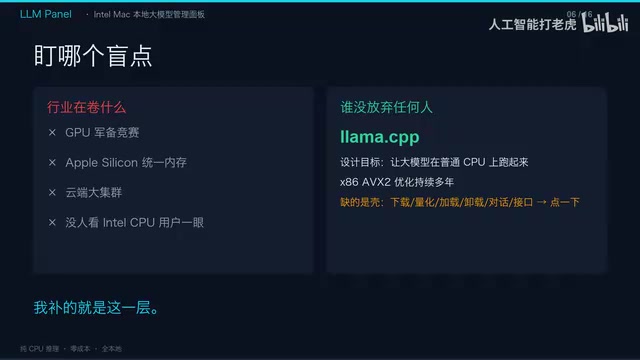
LLM Panel itself doesn't handle inference; inference is delegated to llama.cpp. The panel pulls the latest stable release of llama.cpp, v0.9.0, from GitHub and compiles it from source on the local machine—not downloading someone else's precompiled binary, but letting the compiler natively optimize for the local CPU, with AVX2 instruction sets, FMA fusion, and everything else generated according to the machine's capabilities.
The build produces two binaries: the llama-cli command line and the llama-server server. llama-server is natively compatible with the OpenAI API, which means hooking up any client later is just a matter of changing a URL.
Several core capabilities of the panel
- Multiple instances: one model, one process, one port—different models can be online simultaneously without interfering with each other;
- Concurrency control: concurrency set to 1, with excess requests automatically queued, so long tasks don't step on each other;
- Embedding model support: non-generative models work just as well through a dedicated embedding endpoint;
- Watchdog and health checks: engine logs and memory levels are all displayed in the interface.
The chat interface on the right directly reuses llama-server's built-in web UI: select a model on the left, chat directly on the right, and the status bar at the bottom shows model online status, port usage, and memory consumption in real time. Click to load, and the model is ready in two seconds; click to unload, and it exits cleanly.
llama.cpp is an open-source large language model inference engine written in C/C++, started by Georgi Gerganov in 2023. Its core design goal is to free LLM inference from dependence on high-end GPUs: by hand-writing SIMD kernels (corresponding to AVX2/AVX-512 on x86 and NEON on ARM), it maps operations like matrix multiplication directly onto CPU vector instructions, thereby achieving usable inference speed in a pure CPU environment. It also supports gguf-format quantized weights (Q4, Q5, Q8, etc.), compressing model size to a quarter of the original fp16 or even less—which is why a 1.7B model needs only 1.1GB of memory. llama.cpp's built-in llama-server exposes an OpenAI-style HTTP API, so the panel itself doesn't need to implement inference logic—it only needs to manage processes and ports.
Performance comparison experiments

The creator ran several comparison experiments, with some counterintuitive conclusions:
- Flash Attention on/off: on and off correspond to 13,800 and 14,000 tokens per second respectively (the creator's original wording), essentially no difference. On CPU it's not the bottleneck, so don't put blind faith in the toggle.
- Batch size: raising it from 512 to 4096 and enabling batch threads, saturating 12 logical cores, gives about an 11% speedup—free performance.
- KV cache prefix reuse: this is the most effective one. In continuous conversation, identical prefixes are reused directly, and only the newly added part is recomputed. The bulk of the time savings comes from caching, not compute.
KV cache prefix reuse (prompt caching) works like this: when generating each token, a Transformer must compute attention over all historical tokens. To avoid redundant computation, the inference engine caches the Key and Value tensors of each layer's attention—the KV cache. In multi-turn conversation, the historical prefix stays completely unchanged, so you only need to compute the KV for the few newly input tokens and then reuse the old cache, saving exactly the most time-consuming prefill portion. This also explains why "the bulk of the time savings comes from caching, not compute." llama.cpp implements this capability via --prompt-cache or the slot mechanism in server mode, and the gains are especially significant for scenarios like follow-up questions and repeated Q&A over long documents. The cost is that the KV cache itself occupies memory—the longer the context and the more layers, the more it takes—so it must be weighed together with memory levels.
Three moats and three buckets of cold water
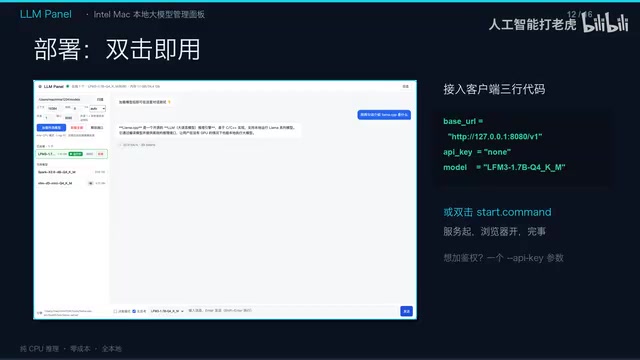
The differentiation of this solution lies in three points: zero dependencies—the entire panel uses only the Python standard library and installs no third-party packages; fully local—the service listens only on the local loopback address, so model weights, conversation content, and logs don't leave the network by a single byte; standard API—OpenAI compatibility means any client or automation script only needs to change a URL.
Cold water is also in order:
- Long context really hurts. CPU prompt processing runs at 140 tokens per second, so tens of thousands of words of material take several minutes, with no output during that time—it looks frozen, but it's actually computing.
- Speed fluctuates. Under high system load, or when the machine heats up and throttles, speed can drop to a quarter.
- Don't touch models with more than 7 billion parameters. Brute-forcing large models on pure CPU is undignified; this solution is positioned for small models, fast responses, and full locality.
Match your configuration to your memory
The creator's configuration advice is quite specific:
- An old Air with 8GB of memory: can run 1.7B, smoothly;
- 16GB: pick anything under 4B freely—this is the most comfortable tier;
- 32GB: like the creator's i7 six-core twelve-thread machine, you can run multiple instances freely and still leave half the memory for other things;
- Even older machines from around 2013–2014: they can run, but stick to under 2B.
There's only one prerequisite: the CPU must support the AVX2 instruction set. According to the creator, Intel chips from 2013 onward basically all support it. There are also five practical guidelines—choose Q4-quantized versions of models with 1 to 4 billion parameters; set context length as needed, with 16,000 being enough for daily use; enable no-thinking mode for simple tasks to skip the chain of thought; set concurrency to 1 to let requests queue; and keep an eye on memory levels—a 32GB machine can run three small models simultaneously without issue, but beyond that you'll need to unload selectively.
AVX2 (Advanced Vector Extensions 2) is a 256-bit SIMD instruction set extension introduced by Intel starting with the Haswell architecture (2013). It can operate on 8 32-bit floats or 32 8-bit integers in parallel at once, and is a key acceleration method for running quantized models on CPU; FMA (fused multiply-add) combines multiplication and addition into a single instruction, further reducing computation rounds. When compiling, llama.cpp detects the instruction sets supported by the local machine and generates the corresponding kernels. If the CPU doesn't support AVX2, it can only fall back to narrower instruction paths like SSE, and speed drops noticeably—some quantized formats may even fail to run. So "whether the CPU supports AVX2" is essentially the threshold for whether this solution can work at all, which also explains why the author insists on compiling from source locally rather than distributing binaries directly.
A signal worth watching
The significance of this project isn't in the performance numbers, but in the overlooked fact it reveals: the tech world chases GPUs, unified memory, and cloud clusters, but projects like llama.cpp have never given up on any CPU—AVX2 optimization for x86 has been worked on for years. What's been missing is just a shell that lowers the barrier.
For users who still have an Intel Mac, this is a zero-cost, fully local small-model path; for developers, it demonstrates how a few hundred lines of standard-library code can breathe life into a hardware group forgotten by the ecosystem. Old hardware isn't incapable of standing—it's just that no one has given it a usable interface.
One-line Summary
A 400-line Python panel plus llama.cpp lets forgotten Intel Macs run local small models on pure CPU.
Paragraph Summary
The article introduces LLM Panel, developed by a Bilibili creator: a ~400-line, zero-dependency Python tool that compiles llama.cpp v0.9.0 from local source to give Intel MacBooks from 2016–2020—forgotten by the ecosystem—a way to run local LLMs. On pure CPU, a 1.7B quantized model reaches 22 tokens per second, long-document prefill hits 140 tokens per second, memory usage is only 1.1GB, and software cost is zero. The solution offers multiple instances, queued concurrency, embedding model support, and a watchdog, and leverages llama-server's native OpenAI API compatibility. Tests show that larger batch sizes and KV cache prefix reuse deliver clear gains, while Flash Attention makes essentially no difference on CPU; the downsides are long waits for long context, speed loss from heat throttling, and the unsuitability of models above 7 billion parameters. The author gives tiered selection advice based on memory, with the prerequisite that the CPU supports AVX2.
Related articles

Gemini 4 Hydrogen Hands-On: Google's Fastest and Cheapest AI Model
Hands-on with Gemini 4 Hydrogen: the fastest, cheapest model in the Gemini 4 family. We break down the Carbon/Argon/Hydrogen split, API pricing traps, free-tier limits, and the cost trade-offs of four thinking levels—with a real bug-debugging demo.
Gemini 4 Hydrogen vs Sonnet Comparison Test: Uses Only 1% of Weekly Quota, Performance on Par
Hands-on test: Gemini 4 Hydrogen vs Sonnet on the same CRUD task—Hydrogen used only 1% weekly quota with comparable performance and better UI details, while Anthropic's model used 7%. Developer says daily tasks don't require expensive models.

Gemini 4 Neon Released: Beats Opus 5.5 on Multiple Benchmarks, Google Returns to the Top Tier
Google DeepMind releases Gemini 4 Neon: 61 on the Artificial Analysis intelligence index (3rd) and 1st on the coding index, beating Opus 5.5 on multiple benchmarks. $3/$15 per million tokens; available in the Gemini API and AI Studio.