Running MiniMax H3 Locally on 8GB VRAM: ComfyUI All-in-One Package Tested

Run MiniMax H3 video generation locally on 8GB VRAM for free using the Qiuye ComfyUI all-in-one package.
This article covers a consumer-friendly local deployment guide for MiniMax H3 (Hailuo's open-source video model) using the Qiuye ComfyUI all-in-one package and 4-step Lora acceleration. An 8GB VRAM GPU can generate audio-synced AI videos for free with no queues. The four-step setup involves preparing assets, downloading four model types (main model ~19GB), placing files in ComfyUI directories, and loading a community-validated workflow. Key parameters (15s duration, 0.4→0.8 two-pass sampling, Multiple=32, English prompts) are what make low-VRAM execution possible. Current output is pre-generated video; the real frontier is evolving toward real-time interactive 3D digital characters.
The open-source video generation model MiniMax H3 (Hailuo's open-source release) has been generating buzz in the local deployment community. A Bilibili creator published a complete local deployment guide for 8GB VRAM setups, using the Qiuye ComfyUI all-in-one package and a 4-step Lora to get this hardware-hungry video generation model running on consumer-grade GPUs. This article breaks down the deployment process, key parameters, and real-world results — and explores the technical trajectory behind this kind of "AI desktop companion" use case.
Why MiniMax H3 Local Deployment Is Worth Paying Attention To
MiniMax H3 is a video generation model open-sourced by Hailuo. Its appeal comes down to three things: completely free local execution, no credits or queues required, and built-in audio-video sync output. Compared to online services limited by quotas and moderation, local deployment gives creators significantly more freedom — character appearance, background scenes, costumes, actions, dialogue content, and vocal tone can all be customized through prompts.
Historically, the biggest barrier to ComfyUI hasn't been the models themselves, but the environment setup. CUDA, dependency libraries, and error rollbacks have turned away countless non-technical users. This solution takes the Qiuye all-in-one package approach, compressing installation into a "unzip and run" experience with a fully Chinese interface — which is the core reason it's spread so quickly.
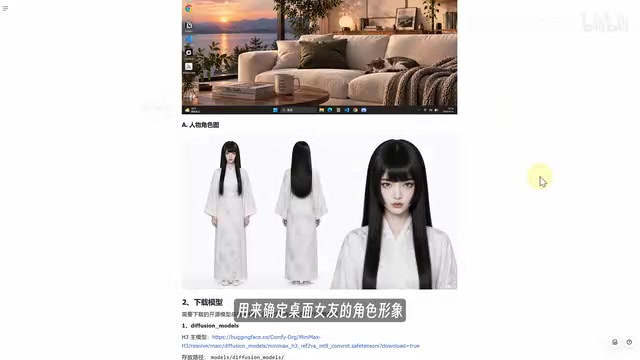
Deployment Walkthrough: Four Model Types + All-in-One Package
The entire process breaks down into four steps. The logic isn't complicated — what matters is getting the files in the right place.
Step 1: Prepare Your Assets
You need two images: a sofa scene image as the video background, and a character reference image to define the character's appearance. The character image constraints are loose — a three-view reference or a single character image both work, and swapping characters later is straightforward.
Step 2: Download Four Types of Model Files
- Diffusion Models: The main model, largest file size at around 19GB;
- Text Encoder: Download as indicated on the model page;
- Lora Model: The creator specifically emphasizes downloading the "4-step Lora" — this is the key to faster generation. With it, generation speed improves noticeably; image quality takes a slight hit but the tradeoff is well worth it;
- VAE Models: Two files in total — download both.
Each of these four model types plays a distinct role in the video generation pipeline. The Diffusion Model is the core, responsible for generating video frame content through iterative denoising in latent space — it's the largest file because it encodes all the knowledge about motion, appearance, and temporal structure. The Text Encoder (typically from the CLIP or T5 family) converts prompts into vector representations the model can understand, guiding the direction of the diffusion process. The VAE (Variational Autoencoder) handles conversion between pixel space and latent space — encoding input images into compact latent representations to save VRAM, then decoding generated latent vectors back into visible video pixels. Lora (Low-Rank Adaptation) is a lightweight fine-tuning module that modifies model behavior by adding low-rank matrices on top of the original weights; the "4-step Lora" here specifically reduces inference steps from the default dozens down to 4, dramatically cutting generation time at the cost of minor quality loss.
Step 3: Install the ComfyUI All-in-One Package
After downloading the package, don't launch it right away. First, place the four model types into their corresponding ComfyUI directories — Diffusion Models go into the diffusion_models folder, Loras go into the loras folder, and so on. Only after all models are in place should you start ComfyUI.
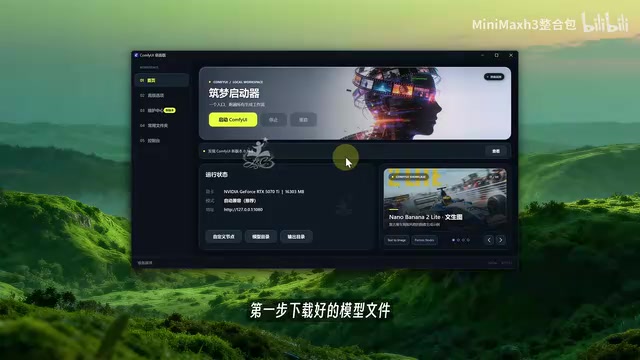
Step 4: Load the Workflow
Drag the included workflow file into the ComfyUI interface to load it. The two upload slots on the left accept the scene image and character image respectively. Paste in the prompts from the documentation. This workflow has been validated by multiple community members — it's a mature, ready-to-use setup.
ComfyUI is a node-based graphical interface originally built for Stable Diffusion image generation, now extended to support video generation models. Its core design breaks the model inference process into a visual node graph: each node represents a processing step (such as loading a model, encoding text, denoising sampling, or decoding output), and the lines between nodes represent data flow. Users can freely combine inference pipelines by dragging and connecting nodes without touching any code. Workflow files (typically .json format) are saved and shareable versions of these node graphs — dragging someone else's validated workflow into the interface instantly reproduces their full inference configuration, which is how technical solutions spread through the community. The Qiuye all-in-one package goes further by pre-installing the Python runtime, CUDA dependencies, and common plugins, eliminating the need for manual environment setup.
Key Parameters: Finding the Sweet Spot for 8GB VRAM
This section is the technical core of the entire process — and the deciding factor in whether it runs at all.
- Prompt language: English prompts consistently outperform Chinese in testing; use English for stable output;
- Video duration: 15 seconds is the safest default. 8GB VRAM running 15 seconds is tight but acceptable; personally, don't exceed 30 seconds;
- Aspect ratio: Choose 16:9 for landscape video;
- Megapixels parameter: Set to 0.4. The workflow internally runs two-pass sampling — first at 0.4 megapixels, then at 0.8 megapixels — balancing speed and quality;
- Multiple parameter: Keep at the default 32. H3 was trained on resolutions aligned to multiples of 32, so leave it unchanged.
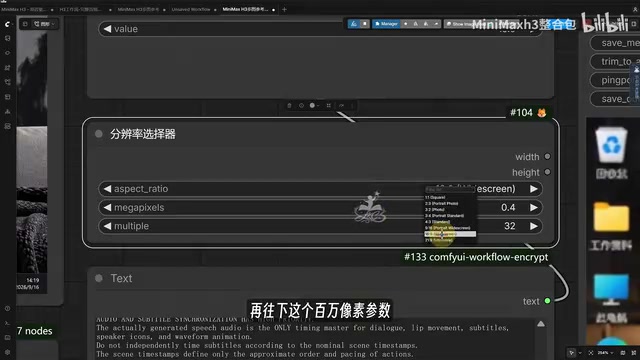
The creator repeatedly emphasizes: the biggest mistake in local deployment is immediately maxing out resolution and duration. Insufficient VRAM causes either painfully slow generation or an outright OOM crash. The safe approach is to first get a successful run with the above parameters, then gradually increase settings based on your GPU's headroom. This parameter discipline is the prerequisite for 8GB VRAM being "actually usable."
The "megapixels" parameter and two-pass sampling design reflect a common resolution-vs-VRAM tradeoff strategy in video generation. Running the first diffusion pass at 0.4 megapixels (roughly 640×625) lets the entire denoising process complete within constrained VRAM, since latent space dimensions scale directly with target resolution. The second pass at 0.8 megapixels (similar to super-resolution or high-res fix) then uses the low-resolution result as guidance to add detail in fewer steps, with far lower peak VRAM pressure than sampling at 0.8 megapixels from scratch. Keeping the Multiple parameter at 32 aligns with the model's training configuration — H3 was trained with resolutions normalized to integer multiples of 32, so maintaining this during inference avoids artifacts or performance degradation from size mismatches.
Results and Limitations: It's Still Pre-Generated Video
From the demos, the output can achieve coherent sequences like a character walking in from off-screen, sitting on the sofa, changing outfits, and speaking — with solid audio-video sync. The workflow offers high creative freedom: character, scene, costume, actions, dialogue, and vocal tone are all customizable.
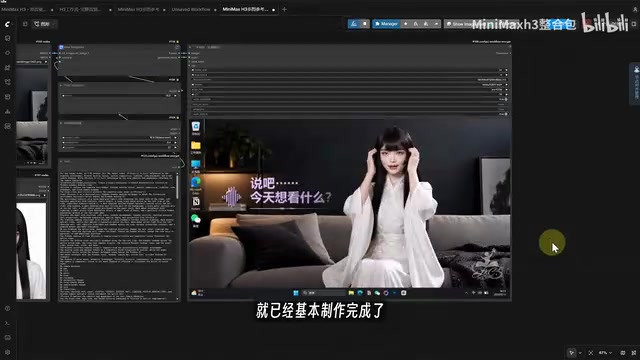
But it's worth being clear-eyed about this: what you're building right now is fundamentally a pre-generated AI video. Every action and line of dialogue is designed in advance through prompts — there's no real-time interaction happening.
From Pre-Generated Video to Real-Time Digital Characters
The creator closes by raising a more compelling direction: if this were built as a real-time 3D AI character, the nature of the product changes entirely. It would no longer be a pre-rendered video, but something that can listen to speech in real time, understand it through a large language model, and respond instantly — even reading computer state to react accordingly: reminding you to rest after long work sessions, appearing when you open certain apps, triggering different facial expressions based on conversation.
The technical complexity of this path increases sharply. It requires chaining together local speech recognition, an AI LLM, text-to-speech synthesis, 3D rendering, character animation, and real-time interaction into one complete pipeline — with CPU, GPU, and VRAM demands far exceeding the current video generation approach. Moving from "a video clip" to "a living digital character" is an order-of-magnitude leap, and the next frontier worth watching in local AI applications.
Real-time digital character systems are typically referred to architecturally as "embodied conversational agents" or "virtual digital humans." The full pipeline includes: local speech recognition (ASR) converting user speech to text, a large language model (LLM) understanding semantics and generating a response, text-to-speech (TTS) synthesizing emotionally expressive audio, driving a 3D character with lip sync and facial animation, and finally outputting frames through a real-time rendering engine (such as Unity or Unreal). Each component has latency requirements, and end-to-end latency must stay within a few hundred milliseconds for fluid interaction. Unlike the "offline batch processing" of video generation, this pipeline requires all components to run in parallel with sustained resource consumption, placing significantly higher combined demands on CPU scheduling, GPU concurrency, and memory bandwidth. Approaches including Live2D-based driving, real-time reconstruction via Gaussian Splatting, and commercial digital human middleware are all exploring this direction.
Summary
The value of this solution isn't that the model itself is particularly cutting-edge — it's that it brings MiniMax H3 deployment within reach of consumer hardware: 8GB VRAM, free, Chinese interface, one-click package. The 4-step Lora speedup and two-pass sampling parameter design are what make it viable at low VRAM. For users looking to get started with local video generation, this is an accessible entry point. The real imagination space lies in evolving from pre-generated video toward real-time interactive digital characters.
Related articles

WorkBuddy Full Tutorial: Build an AI Office Automation Agent from Scratch
A complete WorkBuddy tutorial: installation, three working modes, multimodal picture book video practice, expert team agent building, and workflow configuration for low-cost AI office automation.

WorkBuddy Agent Complete Guide: From Beginner to Automation in 7 Days
Based on Bilibili's 256-episode WorkBuddy masterclass, this systematically breaks down Tencent's AI office workbench core capabilities: Agent principles, Skill encapsulation, cross-platform connectors, scheduled automation, knowledge bases, and zero-code development, with learning path recommendations.

8 AI Accounts, 7 Failed: An Honest Review of Using AI to Get Work Done
Only 1 of 8 AI-run Bilibili accounts succeeded. We break down the real difference between "performing AI" and "using AI to get work done."