Samsung Fold 8 as a Desktop PC: Testing a Full Workstation Setup from a Single USB Port

Samsung Fold 8 becomes a desktop PC via one USB-C port, a powered hub, and DeX mode.
The Samsung Galaxy Fold 8 can build a complete desktop work environment through a single USB-C port connected to a powered hub — supporting a monitor, wired Ethernet, SD card readers, and an external SSD. Samsung DeX automatically detects HDMI and Ethernet with no manual setup required. Under the combined load of all these connected devices, the phone only reached warm temperatures without overheating or throttling. The setup validates "foldable as desktop" at the hardware level, though multi-app performance and productivity app compatibility still need deeper testing.
One USB Port, an Entire Desk Setup
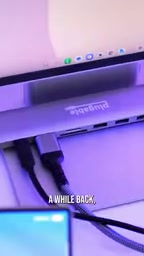
The Samsung Galaxy Fold 8 comes with just one USB-C port — which sounds pretty limiting for expansion. But paired with a powered USB hub (the reviewer used one from Plugable), this foldable instantly gains desktop-class connectivity. The logic is simple: the phone handles compute and the OS, the hub distributes ports, and Samsung DeX ties everything together into a near-PC experience.
What makes this setup meaningful is how it reframes the phone — not as a "mobile device," but as a "pocketable desktop." With a monitor and a keyboard-and-mouse combo, a full working environment can be up and running in seconds.
DeX's Auto-Detection Is the Real Differentiator
What actually makes this setup work well is Samsung DeX's plug-and-play behavior. In testing, DeX automatically detects HDMI output and immediately mirrors the display to the external monitor — no manual switching or fiddly configuration required.
Even more impressive is how networking is handled: the Ethernet port on the hub is also automatically detected and configured. The reviewer admits that full gigabit speeds are arguably overkill for a phone, but the stability of a wired connection still has real value for anyone looking to use their phone as a long-term desktop replacement.

Samsung DeX (Desktop Experience) is a desktop mode system Samsung introduced in 2017. Its core concept is a window management layer optimized for large screens, running on top of Android. Once activated, apps run in resizable floating windows, and familiar desktop elements like a taskbar and quick launcher appear — shifting the interaction model from touch to keyboard and mouse. Unlike Apple's Stage Manager, DeX doesn't simply adapt the native OS interface; it triggers a separate UI rendering path, which is why it integrates more seamlessly with external displays. Early DeX required a dedicated dock, but starting with the Galaxy S8, it transitioned to USB-C-only activation. Foldable series support for DeX has continued to deepen with each new generation.
Storage Expansion: External Drives and Card Readers Are Both Covered
Beyond display and networking, this combination also unlocks flexible storage options. With the hub connected, both SD and microSD card slots work normally, and an additional 10Gbps USB-C port allows direct connection to an external SSD.
This means the Fold 8 can handle not just everyday documents, but also high-speed read/write scenarios — like offloading video footage or managing large files. For creators who want to shoot, edit, and store on a single device, this level of expandability brings the "phone as workstation" idea closer to reality.

The 10Gbps USB-C port mentioned here corresponds to the USB 3.2 Gen 2 standard — theoretically twice the bandwidth of mainstream USB 3.0 (5Gbps). For direct-connected external SSDs, this means sequential read speeds approaching 1,000MB/s, largely eliminating wait times when offloading 4K video footage through a phone. That said, real-world speeds still depend on the storage device's own performance and cable quality. It's also worth noting that Android's file permission system differs from desktop OSes, and some professional video editing apps still need to adapt how they access external storage — one of the remaining software-side gaps in the "phone as workstation" vision.
Thermal Performance Under Load Is Surprisingly Solid
Driving an external display, wired network, and storage devices simultaneously is no small thermal challenge for a smartphone. But the reviewer observed that throughout the entire process, the Fold 8 got warm but never uncomfortably hot or anywhere near overheating.
This matters a lot. The biggest concern with using a phone as a desktop replacement is usually heat buildup and performance throttling under sustained load. If the Fold 8 can maintain stable temperatures during extended desktop use, it becomes a much more practical candidate for the role of "desktop in your pocket."

How Far Is the Phone from Replacing the PC?
This real-world test shows that Samsung DeX, paired with a quality powered hub, can turn the Fold 8 into a remarkably capable desktop environment — display output, wired networking, multi-path storage, and better-than-expected thermals all covered.
Of course, a single video demo can't capture every nuance: real-world performance under multi-app workloads, compatibility with productivity software, and the experience of a full day's work at a desk all need longer-form testing to validate. But at the port-and-basic-experience level, the foldable flagship is already blurring the line between phone and computer — moving "one device for everything" from concept to something tangible.
Related articles

macOS Is No Longer UNIX: Apple Didn't Renew Certification, But the Technology Is Unchanged
Apple did not renew macOS's UNIX certification, and the Open Group has removed Apple's entry. This article analyzes the technical reality behind the expiration, Apple's possible intentions, and the practical impact on developers.

Building Stateful Multi-Agent Systems with Azure Cosmos DB
Based on the official Azure Cosmos DB tutorial, this article explains how to use the Agent Memory Toolkit to add shared persistent memory to a multi-agent travel planner, covering short-term, long-term, episodic, and semantic memory plus cross-session state continuity.

Production AI Agent Operations: A Three-Step Framework for Observing, Evaluating, and Optimizing
Azure Cosmos DB team proposes a three-step framework for production AI Agent operations: observe trace tracking, evaluate with LLM as a judge and regression testing, optimize cost across RU, retrieval, memory, and LLM layers.