ScaleKit in Practice: Building a DevOps AI Agent with Per-User OAuth
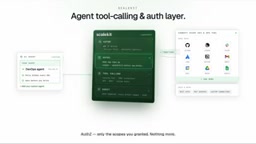
Build a DevOps Agent with Per-User OAuth so it acts across systems as real users.
Based on Scalekit's demo video, this article breaks down building a DevOps Agent with Per-User OAuth using ScaleKit. Shared admin credentials are convenient but bring loss of identity, uncontrolled scopes, and key-leak risk — a security trap. ScaleKit serves as the agent's tool-calling and authentication layer, creating per-user connections for GitHub, Linear, and Slack with tokens stored in a vault and auto-refreshed. The agent's logic is lightweight: poll GitHub for open PRs, skip tracked items to avoid duplicates, create Linear tickets, remind reviewers, and publish a daily summary, confirming before write operations. The demo triaged 8 PRs in 47 seconds, with tokens never entering code or model context. The key bottleneck for production AI Agents is authentication and permissions, not reasoning.
When engineers spend time every day chasing stale PRs, dealing with failed checks, replying to review reminders, syncing Linear tickets, and writing daily summaries, a DevOps AI Agent looks like the perfect remedy. But once you actually get started, the trouble is just beginning: a simple request like "turn stale PRs into Linear tickets" involves three apps — GitHub, Linear, and Slack. That means three sets of OAuth apps, different scopes, secrets, and tokens that always seem to expire at 2 a.m.
Many developers take the shortcut: a single shared admin credential. The price is loss of identity, uncontrolled scopes, and a security incident the moment the secret leaks. According to a demo from the YouTube tech channel Scalekit, the right solution is to introduce a dedicated agent authentication and tool-calling layer, so each user authorizes under their own identity and the agent acts on their behalf.
Drawing on that demo video, this article breaks down how to build a DevOps Agent with Per-User OAuth using ScaleKit, and analyzes what this architecture means for putting AI Agents into production.
Why shared credentials are a trap for DevOps Agents
The core work of a DevOps Agent is reading and writing across systems: pulling PR status from GitHub, creating tickets in Linear, pushing reminders to Slack. Each system has its own permission model. With a shared service account, the agent holds "super privileges," and no call can be traced back to a specific person.
As the demo puts it, this shortcut has "no identity, no scopes — one leaked key is a disaster." Per-User OAuth, by contrast, lets each engineer authorize with their own account; the token the agent receives represents only that user, and what it can touch is strictly limited to that user's scopes. This is not just a security best practice but also the foundation for auditing and compliance.
ScaleKit's positioning is precisely "the tool-calling and authentication layer for agents": Who is asking? A real user. What can they touch? Only their scopes. A single call reaches any tool, and every action is recorded.
OAuth 2.0 and the mechanics of Per-User OAuth
OAuth 2.0 is an authorization framework that lets third-party apps obtain limited access to a user's resources without the user directly handing over their password. The core flow: the app redirects the user to the authorization server, the user logs in on a hosted page and consents to authorization, and the authorization server then issues an access token and a refresh token. Access tokens usually have a short lifetime (e.g., a few hours); once expired, the refresh token can be exchanged for a new token without requiring the user to log in again.
"Per-User OAuth" means each end user completes this authorization flow separately, and the resulting token represents only that user, not a shared service account. The counterpart is the "shared credential" model: all requests use the same admin-level token or service account key. In the DevOps Agent scenario, the benefit of Per-User OAuth is a clear permission boundary — when the agent calls GitHub, Linear, or Slack, it is actually acting as the engineer who initiated the request and can only touch resources within their individual authorization scope. This also leaves a complete audit trail: any read or write can be traced to a specific person. The cost is that you need to manage an independent token lifecycle for each user, which is exactly the problem an auth layer like ScaleKit is meant to solve.
Connecting GitHub, Linear, and Slack in three steps
ScaleKit reduces connecting external apps to a few clicks. The demo walks through the full flow:
- Create a connection: Choose GitHub, set the auth mode to "per user," enter the OAuth app's credentials, configure the minimum required scopes, and save. The GitHub tools are then ready.
- Repeat for Linear and Slack: The same flow, a few clicks, three connections, three names.
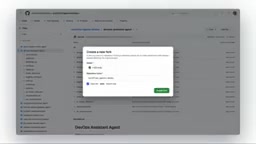
- Configure the agent template: Copy the environment URL, client ID, and newly generated secret from the ScaleKit dashboard into the forked DevOps Agent repository, and set the three connection names, the repositories to monitor, and where to send the daily summary.
Users complete authorization once on the hosted login page, and tokens go straight into ScaleKit's token vault. When a token nears expiration, ScaleKit refreshes it automatically, so developers never have to handle a 2 a.m. expiry exception.
OAuth scopes and the principle of least privilege
A scope is a string in an OAuth authorization request that declares "which specific permissions the app needs" — for example, read-only repository information and creating tickets are different scopes. After the user consents, the authorization server binds the scopes to the token, and the resource server then limits the operations that can be performed accordingly.
The principle of least privilege requires requesting only the scopes the business truly needs, rather than checking all permissions for convenience. For a DevOps Agent, if it only needs to read PR status and create tickets, it should not request high-risk scopes like deleting repositories or managing organization members. The narrower the scopes, the smaller the blast radius if a token is leaked or abused. Configuring minimum scopes separately for each connection in the demo is exactly this principle put into engineering practice: the GitHub connection gets only the permissions needed to read PRs and write comments, the Linear connection only what's needed to create tickets, and the Slack connection only what's needed to send messages.
Agent logic: one function, two jobs
Once the auth layer is in place, the agent's own logic becomes lightweight. The agent in the demo performs two core tasks: polling GitHub for open PRs, and when it finds a stale PR, creating a Linear ticket, reminding the reviewer, and publishing a daily team summary.
The details reflect production-grade considerations: PRs already tracked in Linear are skipped to avoid duplicate tickets; before any write operation, the agent asks for confirmation. Developers only need to focus on business logic like "ask it for a Linear ticket whenever a bug shows up," and the agent drafts a plan first, then executes.
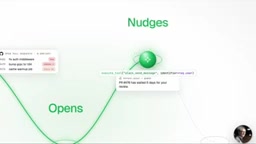
Based on the demo data, the agent triaged 8 PRs in 47 seconds, with every action running on a real user's token — Priya's, Marcus's, Dev's — rather than a shared bot. These tokens never enter the code, nor the model's context.

Token vault and automatic refresh
A token vault is a security component dedicated to storing OAuth access tokens and refresh tokens, typically encrypting them at rest and restricting who can read them with strict access controls. It isolates tokens from business code, logs, and model context, preventing secrets from appearing in repositories, plaintext environment variables, or prompts.
Automatic refresh is responsible for silently exchanging the refresh token for a new token when the access token nears expiration and updating the record in the vault, all without the user or developer noticing. For the agent, this means it doesn't have to check whether a token is expired before calling an external tool, and tasks won't be interrupted by a token dying at 2 a.m. Together, the two form the infrastructure that lets Per-User OAuth run at scale: each user's token is securely hosted and refreshed on demand, and the agent obtains a usable token only at the moment of the call, discarding it afterward.
Implications for putting AI Agents into production
This case reveals a key bottleneck in moving AI Agents from demo to production: authentication and permissions. Most agent frameworks excel at reasoning and tool calling but leave the dirty work of OAuth to developers. ScaleKit claims support for 500+ external apps, any framework, and any LLM — essentially filling this infrastructure gap.
For teams planning to build an internal DevOps Agent, there are several transferable lessons:
- Prefer Per-User OAuth: Even if initial setup is more troublesome, avoid the identity black hole of shared credentials.
- Externalize token management: Automatic refresh and vault storage save a great deal of operational burden.
- Confirm before write operations: Agent autonomy needs boundaries, especially for operations with external impact like creating tickets and sending messages.
- Use idempotent logic to prevent duplicates: Skip PRs already tracked so the agent doesn't create noise.
It should be noted that the above analysis is based on a single demo video, and ScaleKit's actual ease of use and the depth of its 500+ app support still need independent verification. But the model it advocates — "the agent acts under the user's delegated identity" — is worth considering for any team building multi-system agents.
One-line Summary
Build a DevOps Agent with Per-User OAuth so the agent acts across systems under real users' identities.
Paragraph Summary
Based on Scalekit's demo video, this article breaks down how to build a DevOps Agent with Per-User OAuth using ScaleKit. A shared admin credential is convenient but brings loss of identity, uncontrolled scopes, and the risk of key leakage — a security trap for DevOps Agents. ScaleKit, as the agent's tool-calling and authentication layer, lets you create per-user connections for GitHub, Linear, and Slack in a few clicks, with tokens stored in a vault and refreshed automatically. The agent's own logic is lightweight: poll GitHub for open PRs, skip tracked items to avoid duplicate tickets, create Linear tickets, remind reviewers, and publish a daily summary, asking for confirmation before write operations. In the demo, the agent triaged 8 PRs in 47 seconds, with tokens never entering the code or model context. The article argues that the key bottleneck for AI Agent production is authentication and permissions, not reasoning capability.
Related articles
Claude Code in Practice: Building a Zero-Code Clip Factory That Turns Long Videos into Vertical Shorts Automatically
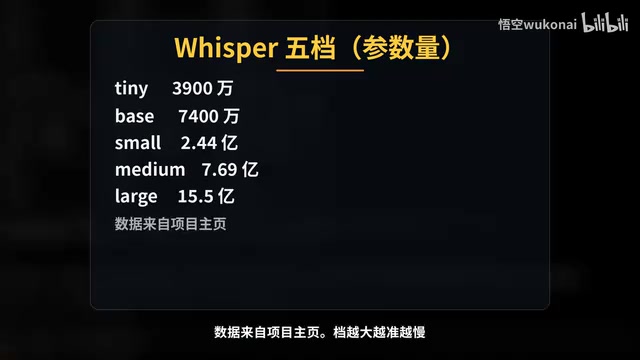
Bilibili creator Wukong uses Claude Code to build a zero-code clip factory, automatically turning a 35-minute long video into 10 vertical shorts. Full workflow from Plan Mode, Whisper transcription, claude.md rules, hook QA to subagent review and plugin distribution, with real measured data.
WorkBuddy Complete Guide: How AI Agents Automate File Conversion for You
WorkBuddy hands-on guide: from Doubao giving only plans to AI agents that actually execute—batch-convert PDFs and archive them in three minutes. Includes installation, points system, Codex comparison, and getting-started tips.
Zero to One: Java + DeepSeek in Practice — A Programmer's Guide to Transitioning into AI Large Model Development
Based on a Bilibili livestream tutorial, this article explains how Java programmers can transition into AI large model development from zero, covering skill paths, building your first Java AI app, resume packaging, and job-hunting strategies to help you seize opportunities in the large model era.