Scam Link Check: A Free Tool That Instantly Assesses Scam Risk from Pasted Links
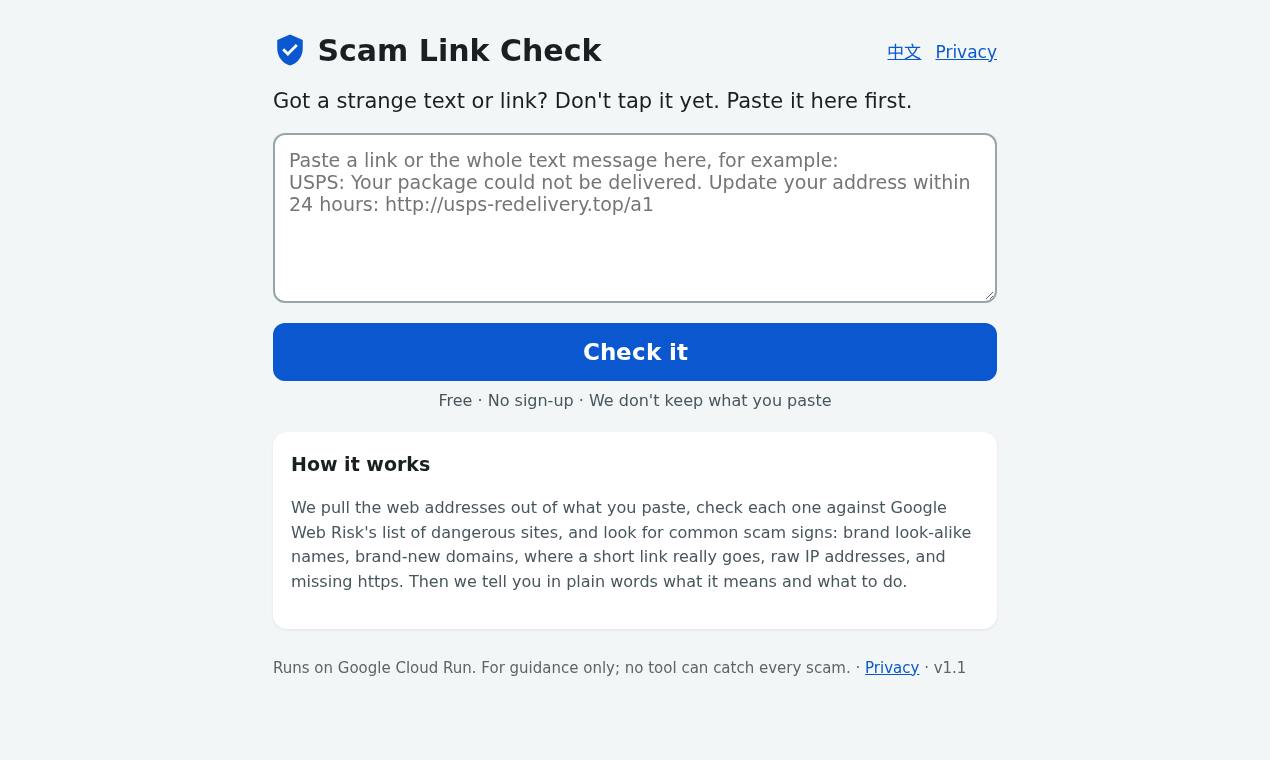
Scam Link Check is a minimalist security tool that quickly assesses risk from pasted links or texts, built for non-technical users.
Scam Link Check is a free Product Hunt tool: paste suspicious text or a link, and it extracts all URLs, checks them against Google Web Risk, follows short-link redirects, and combines signals like brand impersonation, newly registered domains, bare IPs, and missing HTTPS to give one of three plain-language verdicts. It targets non-technical users, requires no signup, stores nothing, runs on Google Cloud Run, and supports English and Chinese. Good for quick screening—but "no known risk" isn't absolute safety.
Title
Scam Link Check: A Free Tool That Instantly Assesses Scam Risk from Pasted Links
Meta Description
Scam Link Check is a free link safety tool: paste a suspicious text or URL and get a plain-language verdict of dangerous, suspicious, or no known risk. It combines Google Web Risk lookups, short-link redirect tracking, and detection of brand-impersonation domains, newly registered domains, bare IPs, and missing HTTPS. Supports English and Chinese, no signup, no content stored—great for helping elders quickly judge whether a link is safe.
Article Content
You get a text from an unknown number with a short link, and you're not sure whether to tap it; an elder forwards you a "bank notice" with a URL that looks a little off. Almost everyone runs into this kind of everyday dilemma, yet the cost of judging it is disproportionately high. A small tool that appeared on Product Hunt, Scam Link Check, tries to solve this with one minimal action: paste in the suspicious text or link and get a conclusion in plain language.
A Link Checkup in One Action
Scam Link Check's interaction design has almost no learning curve. Users can paste a complete text message or just a single URL, and the tool automatically extracts all web addresses from the text and feeds each one into Google Web Risk for a risk lookup. For short links, it also actively follows the redirect chain to see which domain it ultimately lands on—exactly where short-link phishing most commonly hides.
The final output has only three tiers of conclusions: Dangerous, Suspicious, and No known risk, paired with plain-language explanations of what to do next. The official site emphasizes support for English and Chinese, free use, no registration, and no content stored.
What It Actually Checks
The value of this tool isn't a single database query but the integration of several common phishing signals into one check.
Brand-impersonation domains are one of phishing's most classic tricks—for example, swapping letters for lookalike characters or adding an extra hyphen. Newly registered domains are equally worth watching, since scam sites often have extremely short lifespans, used and discarded. In addition, it flags cases where a bare IP address is used as the entry point—legitimate services rarely expose themselves this way—as well as links missing HTTPS.
None of these signals alone is enough to convict, but combined they form fairly persuasive grounds for judgment. What the tool does, in essence, is codify the checklist a security professional runs in their head into an automated process.
Google Web Risk is a security service provided by Google for detecting whether URLs, files, and the like contain malware, social engineering, or unwanted software. It draws on Google's vast crawling and threat-intelligence network and maintains a continuously updated list of unsafe resources. Developers can query via API whether a given URL matches these lists, thereby obtaining a risk determination. However, Web Risk mainly covers known malicious resources, so for newly emerged or unlisted phishing sites, it may miss them. Scam Link Check therefore uses it as a core data source but supplements it with other heuristic signals to improve detection rates.
Short-link redirect tracking means the tool simulates visiting a short link and follows the HTTP redirect chain until it reaches the final destination URL. Phishing attackers often use short-link services to hide the real domain, because the short link itself looks harmless and is hard to identify at a glance. By tracking redirects, the tool can reveal the final landing domain and then apply domain reputation checks. This process usually requires handling multiple redirects and taking care not to trigger the target site's defenses. Scam Link Check automates this step to help users see through the disguise of short links.
A bare IP address as an entry point means the link uses an IP address directly (e.g., http://192.0.2.1) rather than a domain to reach the site. Legitimate services almost always use domains, because IP addresses are hard to remember and lack brand association. Scammers using bare IPs can bypass domain-based reputation checks and hide their identity. In addition, missing HTTPS means the connection is unencrypted and vulnerable to man-in-the-middle attacks or eavesdropping. While many legitimate sites also support HTTPS, phishing sites often lack it due to cost or negligence. These signals aren't necessarily malicious on their own, but combined they significantly raise the suspicion level.
The Target Users Aren't Technical
Judging from its positioning, Scam Link Check clearly targets "non-technical elders" and anyone lacking experience in security judgment. This determines its design trade-offs: it doesn't show domain registration info, doesn't list threat-intelligence IDs, and doesn't give a risk score—only a plain-language conclusion and recommended action.
This direction hits a real pain point. The common problem with security tools is information overload: professionals understand them, while the people who actually need protection get scared off. Translating the conclusion into "don't tap this" or "this one's fine to view" is the form that's friendly to non-technical users.
Privacy Stance and Deployment
The product's categories list Privacy, Security, and Google Cloud Run, indicating it runs on Google cloud services. The official site explicitly promises free use, no registration, and no storage of pasted content—an important psychological threshold for users handling private text messages; after all, pasting chat logs into a third party is itself a concern.
It should be noted that the tool relies on Google Web Risk as its core risk data source, with redirect tracking and signal rules implemented on the product side, so the quality of its judgments depends heavily on the coverage of Google's threat intelligence.
Where It Should and Shouldn't Be Used
This kind of tool is suitable for quick initial screening: run an uncertain link through it first to get a directional judgment. But it isn't a substitute for full security judgment, nor should it be treated as an absolute guarantee—"No known risk" only means no known threat lists were hit at the moment; it doesn't mean the link is necessarily safe.
For ordinary users, treating it as a low-cost speed bump is reasonable: before tapping that link, spend ten extra seconds to confirm. For families who need to protect elders, saving this URL to their phone's bookmarks may be more effective than repeated verbal reminders.
Summary
Scam Link Check isn't a technically ambitious product, but it makes something high-frequency, low-cognitive-barrier, and serious in consequence simple enough. In the crowded security-tool lane, this restraint is actually rare.
One-line Summary
Scam Link Check is a minimalist security tool that quickly assesses risk from a pasted link or text message, designed for non-technical users.
Paragraph Summary
Scam Link Check is a free tool that appeared on Product Hunt. After users paste suspicious text or a link, it automatically extracts all URLs, checks risk via Google Web Risk, follows short-link redirects, and combines signals such as brand impersonation, newly registered domains, bare IPs, and missing HTTPS to output one of three plain-language conclusions: dangerous, suspicious, or no known risk. The product deliberately targets non-technical users, showing no technical details and only actionable advice; it requires no registration, stores no content, runs on Google Cloud Run, and supports English and Chinese. It's suitable for quick initial screening, but "no known risk" doesn't equal absolute safety.
Related articles
The Gemini 4 Trio and 3.8 Flash: A Full Comparison of Positioning, Pricing, and Benchmarks
A comparison of Gemini 4 Neon, Carbon, Argon, and Gemini 3.8 Flash: positioning, context, API pricing, Artificial Analysis and Arena benchmark scores, and available entry points.
AI Coding Model Leaderboard: Opus 5.5 Crowned, Gemini Neon Stages a Comeback
Tech blogger Matthew Berman releases an AI coding model tier list: Claude Opus 5.5 holds S-tier, Gemini Neon surprises with A-tier, OpenAI Astra lands B-tier. How do open-source models like DeepSeek fare? We break down the scoring logic and practical takeaways.

New Jersey Joe Sandwich: Meat and Coleslaw on Triple-Decker Rye
New Jersey Sloppy Joe isn't a ground beef burger—it's triple-decker rye bread with meat, Swiss cheese, and coleslaw, plus Russian dressing. Learn the authentic Essex County method and family recipe.