Scumble: Open-Source AI Inpainting Editor for More Controlled Image Editing

Scumble is a free, open-source desktop AI inpainting editor with local ComfyUI support and multi-model flexibility.
Scumble is an open-source desktop tool by developer Dennis Schöneberg focused on AI inpainting. Its core workflow has three steps: select an image region, describe the target content in natural language, and output the result as a color-matched independent layer. Non-destructive layer editing makes iteration safer, while built-in color matching reduces visible seams. It supports both local ComfyUI self-hosting and external API keys, with compatibility for FLUX 3, GPT Image, Nano Banana, and other leading models — no vendor lock-in required.
What Is Scumble
In a crowded landscape of AI image generation tools, an open-source desktop editor called Scumble made its debut on Product Hunt, landing at #13 for the day with 100 upvotes. Its purpose is clear: a free, open-source editor purpose-built for AI inpainting.
Unlike all-in-one image generation platforms, Scumble focuses on a specific, high-frequency use case — making precise edits to specific areas of an existing image. You simply draw a selection over the region you want to change, describe what should appear there in natural language, and Scumble generates the result as a separate, color-matched layer.
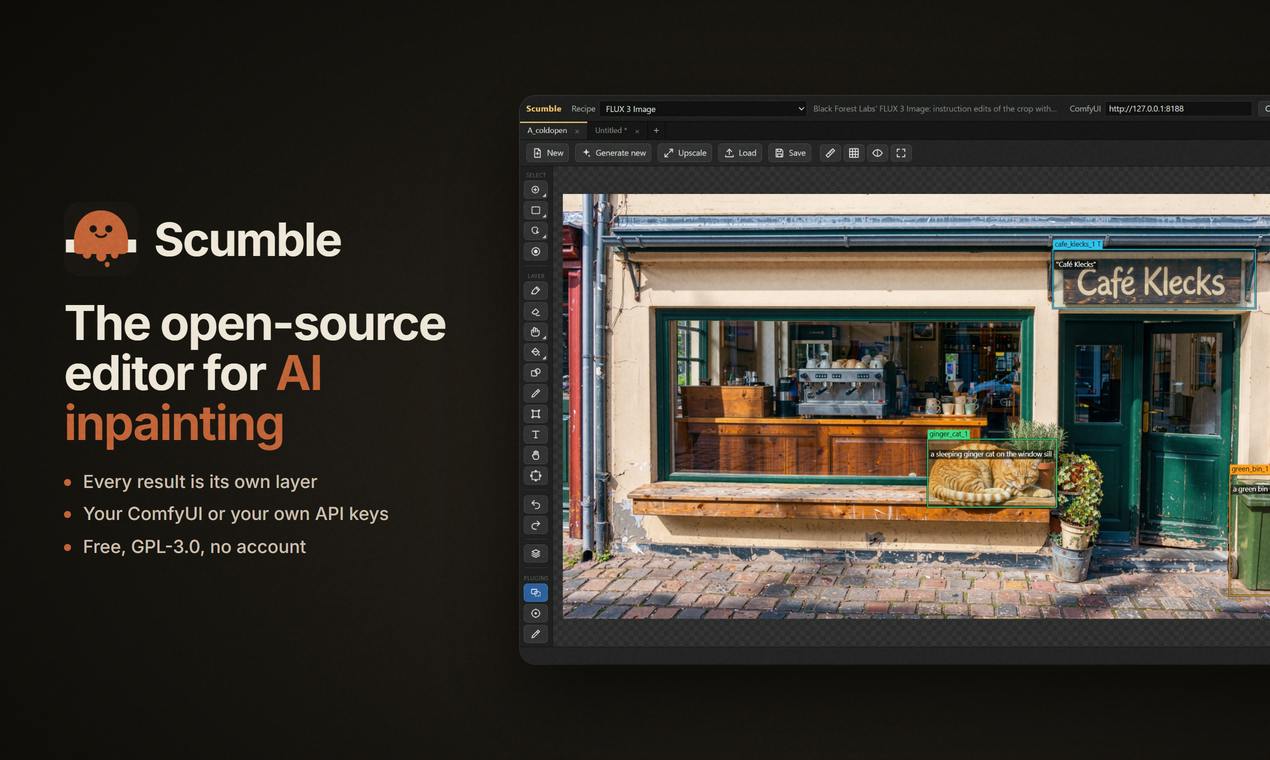
The tool was built by developer Dennis Schöneberg and is open-sourced on GitHub, sitting at the intersection of design tools, open-source software, and artificial intelligence.
Core Features: Select, Describe, Layer Output
Inpainting itself isn't a new concept, but Scumble's workflow design is worth noting. It breaks the editing process down into three intuitive steps: select a region of the image, describe what that region should look like, and have the result land as a standalone layer.
Color-Matched Independent Layers
One of Scumble's most practical features is that generated results are output as standalone layers with built-in color matching. This means newly generated content doesn't overwrite the original image — instead, it exists as an editable, compositable, and undoable layer. For designers familiar with layer-based editing in Photoshop and similar tools, this non-destructive workflow significantly lowers the cost of experimentation and makes iterative edits far more manageable.
One of the core challenges in AI inpainting is the "seam problem": newly generated content often differs noticeably from the surrounding image in brightness, tone, or saturation, making edits immediately obvious. Color matching technology analyzes the statistical color properties of the area surrounding the selection and automatically corrects the tone and brightness of the generated result, allowing new content to blend naturally into the original image. Scumble builds this step in and automates it, eliminating the need to manually apply curves, hue/saturation adjustments, or other correction layers in tools like Photoshop — significantly increasing the rate at which outputs are usable right away.
Natural Language-Driven Editing
"Say what should be there" is the core of Scumble's interaction model. Users don't need to fiddle with complex parameters — they simply describe their intent in plain text. This approach lowers the barrier to AI image editing, making it accessible to non-technical users while still maintaining precise control over the targeted region.
Self-Hosting and Model Freedom
What truly sets Scumble apart from most commercial AI editing tools is how it runs. It isn't tied to any single cloud service, and instead supports two operating modes:
- Local ComfyUI: You can connect Scumble to your own locally deployed ComfyUI workflow, running everything on-device with no data leaving your machine.
- Your own API keys: Alternatively, you can use your own API keys to connect to external model services.
In terms of model support, Scumble covers today's leading image generation models, including FLUX 3, GPT Image, Nano Banana, and more. This open architecture means users aren't locked into a single vendor and can switch flexibly based on quality requirements, budget, and privacy needs.
For privacy-conscious creators and businesses, the ability to self-host via ComfyUI is especially valuable — all assets and generation processes can remain local, avoiding the need to upload sensitive images to third-party servers.
ComfyUI is an open-source Stable Diffusion frontend built on a node graph architecture, allowing users to construct arbitrarily complex image generation workflows through visual node connections. It supports local deployment, with all computation running on the user's own GPU, making it popular among technically inclined users who value privacy and customization. However, ComfyUI's node-based interface has a steep learning curve for non-technical users. Scumble positions itself as a more approachable inpainting frontend on top of ComfyUI — preserving the core advantage of local, on-device processing while replacing the complex node-wiring workflow with a more intuitive select-and-describe interaction. FLUX is a high-quality image generation model series from Black Forest Labs, known for excellent text rendering and detail; GPT Image is OpenAI's image generation and editing API. Multi-model support means users can switch between local models and cloud APIs as needed, balancing quality, speed, and cost.
The Case for Open Source and Who It's For
Scumble's choice to go free, open-source, and desktop-native sends a clear message: it wants to be a tool that designers and AI enthusiasts can fully own and control, not another subscription-based black box.
The direct benefits of open source are transparency and extensibility. Developers can read the code, submit improvements, and customize features to their own needs; community involvement may also accelerate support for new models and capabilities. For technical users already working with ComfyUI, Scumble provides a more user-friendly inpainting frontend compared to the native node interface.
In terms of target audience, Scumble is a strong fit for three types of users: designers who frequently need to make localized edits to images, privacy-sensitive users who want to keep their entire workflow on-device, and tech enthusiasts who enjoy tinkering with open-source tools and self-hosting models.
Conclusion
Scumble isn't trying to reinvent image generation — it's going deep on a specific niche: inpainting. The combination of selection + natural language description + color-matched layers, paired with an open architecture supporting self-hosting and multiple models, carves out a clear space among AI image tools. For users who prioritize control, privacy, and flexibility, this open-source editor is worth trying out.
Related articles

Agent Skills Beginner's Guide: From Concepts to Multi-Agent Collaboration in Practice
A comprehensive guide to Agent Skills: core concepts, components, the importance of Description, standardization, beginner learning paths, and multi-agent collaboration.

One Neuron Detects Both Cats and Cars? We Reproduced It and Found a New Explanation
The cat-car neuron reinterpreted: researcher Cammarata argues it distinguishes pointy from round, not cats from cars. We reproduced the experiment and found the new explanation holds on most inputs—but cars are the exception. The interpretability debate continues on language models.

MCP Server + Python Assistant: A MicroStation Design Efficiency Revolution
Explore the early preview of the MCP Server and Python Assistant in MicroStation 2026: custom tools in five minutes, intelligent sheet index checks, and how AI is reshaping drawing workflows to unleash design creativity.