SeaArt vs PixAI: 2026 Anime AI Generator Hands-On Comparison

SeaArt vs PixAI full-workflow comparison: PixAI leads in prompt adherence and workflow; SeaArt offers a richer style library.
This article compares SeaArt and PixAI through four same-condition tests: OC construction, complex scene generation, character consistency, and post-editing. SeaArt offers rich model and LoRA libraries and VIP-free editing, but free accounts generate slowly, complex scenes often alter OC details, and dynamic poses occasionally show anatomical distortion. PixAI with Tsubaki.3 and various enhancement recipes generates faster, follows prompts more closely, and renders character anatomy more accurately, with a semi-realistic anime style; its Studio auto-detects and reuses LoRAs, significantly reducing the cost of continuous scene configuration. Conclusion: choose PixAI for control and continuous creation, SeaArt for style exploration and community remixing.
Choosing an anime AI image generator often comes down to the visual style you want, how much creative control you need, and how flexible the editing tools are. SeaArt and PixAI are two platforms drawing significant attention right now, but they differ noticeably in free quotas, generation speed, character consistency, and workflow design. This article runs the same set of creative tests on both platforms — from original character (OC) construction to complex scene generation, character consistency, and post-editing — to help creators find the tool that fits them best.
Basic Positioning of the Two Platforms
SeaArt AI is a comprehensive image generation platform supporting image, video, and art creation, with a wide range of models, LoRAs, and editing tools. PixAI focuses specifically on anime image generation, offering prompts, LoRA customization, image editing, and access to multiple models and Recipes.
The test uses fair conditions: both use free accounts (SeaArt 130 stamina, PixAI 10,000 credits), select anime-oriented models and LoRAs, and enable lighting enhancement recipes. The creative goal is a fairy-tale fantasy-style original elf character and its complex scenes.
LoRA (Low-Rank Adaptation) is a lightweight model fine-tuning technique, originally used for large language models and later adopted into the diffusion model ecosystem. Its principle is to inject a pair of low-rank matrices as bypasses alongside key layers of the base model, updating only these small numbers of parameters during training, thereby teaching the base model a new style, character, or concept at extremely low computational and storage cost. In anime image generation, LoRAs are typically only tens to hundreds of MB, far smaller than base models that often run into several GB, so the community can share character LoRAs, art style LoRAs, and clothing LoRAs in large quantities. When using them, you need to pair them with specific trigger words and adjust the weight to balance the base model and the LoRA's influence. Whether details like the "translucent wings" and "floral embroidery" mentioned in the article can be reproduced depends largely on whether the chosen LoRA covers those concepts.
ComfyUI is a node-graph-based Stable Diffusion workflow tool. Users drag model loading, prompt encoding, sampling, ControlNet, upscaling, and other stages into nodes and connect them into reusable, shareable pipelines. Compared to traditional one-click interfaces, ComfyUI lets creators precisely control each step and chain extensions like image-to-video and batch processing. This is also why the article mentions in the "Recommendations" section that SeaArt users can leverage ComfyUI to extend generated images into video.
Single-Character Generation: Image Quality and Style Differences
The test centers on an elf character, requiring features such as pointed ears, fantasy clothing, gem-like eyes, magical forest tones, and an elven longbow.
SeaArt uses the Nova Anime XL model. Generation speed is slower unless the speed accelerator is activated, but free accounts have limited accelerator uses. The result captured the elf concept, anime aesthetic, and lighting tones, but missed the longbow and the three-quarter side pose, and the front section of the blonde hair showed artifacts blending with pale green.
PixAI uses the Tsubaki.3 model with the Semi-glow enhancement recipe, and generation speed is noticeably faster. The three-quarter side pose, ornate elven longbow, hair color, and tones were all accurately rendered, and the gem-like emerald eyes and pointed ears were successfully generated. However, the result leans toward a semi-realistic anime style, different from the traditional anime look. This may be related to the "mature woman" description in the prompt.
Complex Scenes and Prompt Adherence
The second round of testing required generating a fairy-tale fantasy battle scene with multiple characters, specific actions, camera position, scene, and lighting.
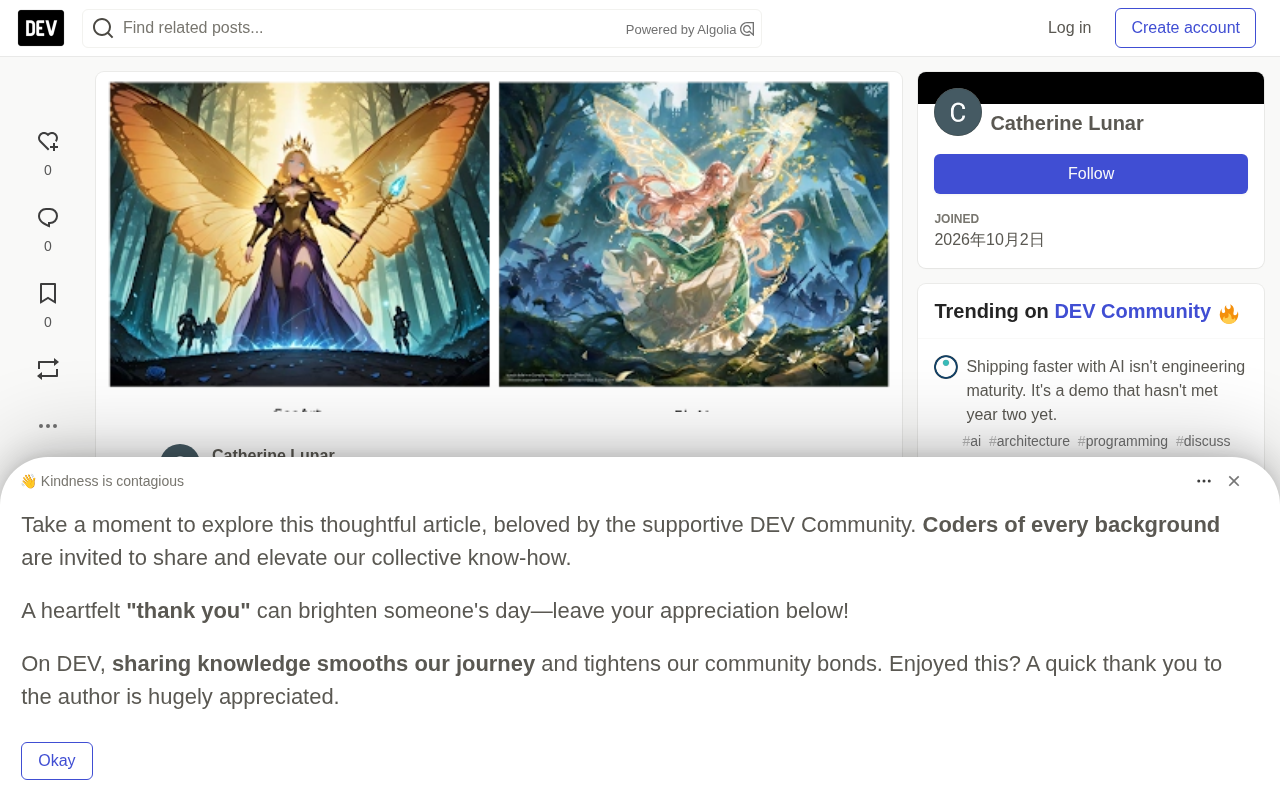
SeaArt uses Illustrious Anime Mix with the SOME STYLES | NoobAI-XL LoRA. It captured the butterfly wings and glowing staff, but OC details like rose-gold hair color and ivory-emerald armor were changed or ignored. SeaArt's smart image editing allows deepening shadows and strengthening background monsters, but image quality dropped slightly, and the background battle action was not fully rendered as prompted.
PixAI continues with Tsubaki.3 and adds the Mai Editorial Glow recipe. This version follows the prompt more accurately: the OC's main features, clothing, staff, and small elements like translucent wings, floral embroidery, and glowing magic spirals were all rendered. The background environment and sense of battle were also stronger. However, the requested camera angle and pointed ears were missing, and extra text appeared in the lower-left corner.
Continuing editing through Tsubaki.3, the text was successfully removed and the pointed ears were added, without changing key details like the face and hair.
One detail worth mentioning: PixAI Studio automatically detected and applied the previously used LoRA in subsequent edits, and this workflow design reduces the cost of repeated configuration.
Prompt adherence refers to how faithfully a model reproduces the objects, attributes, quantities, and spatial relationships listed in a prompt. Multi-character complex scenes are its stress test: models easily fall into "concept leakage" (assigning character A's hair color to B), "attribute binding errors" (putting armor material onto hair), or simply ignoring low-frequency details (like "pointed ears" or "camera angle"). Common technical countermeasures include using more structured prompt syntax, regional prompting, ControlNet constraints on composition, and choosing base models that are more sensitive to long prompts. In the article, PixAI retained floral embroidery and glowing magic spirals in the second round of testing, while SeaArt changed the rose-gold hair color and ivory-emerald armor — a direct reflection of the two models' differences in attribute binding and long-prompt parsing.
Character Consistency Test
Scenario 1: Elf Meets Forest Spirit
SeaArt uses the character reference feature to upload the original generated image, and prompt changes were rendered well — the expression, environment, glowing white deer, and camera angle almost exactly matched the intent. The only obvious difference was a slight change in hair details.
PixAI uses smart reference to upload the original elf image generated by Tsubaki.3. The result retained the OC's main visual features, including the intricate details of the clothing, and the camera angle brought a stronger sense of motion and action.
Scenario 2: Horseback Action Scene
SeaArt continues using character reference and automatically inherited the original image's LoRA. Lighting, camera angle, and forest details performed excellently, but the character's left arm holding the bow showed stretching distortion.
PixAI keeps the Tsubaki.3 model and settings unchanged, using smart reference. The semi-realistic anime style was preserved, and the clothing, horse, and environment were all successfully rendered, with even the smallest accessory details intact. The character's anatomy was correct, and the main visual features remained consistent.
Both platforms performed well on character consistency, but PixAI held a slight edge in anatomical accuracy and detail retention.
Post-Editing and Workflow Comparison
The final test focused on refining and extending an existing anime work. PixAI Studio brought the generated image into the workspace, automatically detected and applied the LoRA, and created a continuous scene of a queen guardian protecting the elf. The scene direction matched expectations, character positions and actions were rendered well, and subsequent images maintained consistency between characters.
SeaArt offers options including smart image editing, image-to-image, character reference, and prompt reverse engineering. In the test, image-to-image produced very little change, so smart image editing was used instead. The first result retained the OC's appearance and clothing and added a crown, but did not really change the scene, and the knight was missing. The second result likewise failed to create the described scene, and the image appeared distorted.
For creators who need continuous scene construction and deep editing, PixAI's connected workspace design is more advantageous. SeaArt is better suited to single-image creation and community remixing.
Free Quotas and Practical Limits
SeaArt free users consume about 4-6 stamina per generation and can generate multiple images. The main drawback is long generation times, and accelerators are limited for free users. The platform offers a rich set of models and LoRAs, as well as editing features that don't require VIP.
PixAI free users can access a library of community LoRAs, models, and recipes. Generation is faster, but each attempt consumes at least 4,000 credits. Faster speed and a connected workflow make it smoother to try different creative directions, edit, and iterate.
Stamina / credit billing is a common resource quota mechanism on image generation platforms, intended to pass expensive GPU inference costs on to heavy users while attracting new users with free quotas. SeaArt's "stamina" is deducted based on the number of images generated and whether accelerators are enabled, at about 4–6 points per generation, making the quota relatively generous. PixAI's "credits" consume at least 4,000 points per generation; the total sounds large, but the number of attempts is limited. When evaluating free quotas, don't just look at the total number — convert it into "how many images you can actually generate" and factor in hidden limits such as generation speed, whether editing is supported, and whether forced queuing applies. Because both platforms' models and pricing strategies keep changing, the figures given in this article reflect the state at the time of testing, and you should check the platform's latest quota documentation before actual use.
Recommendations
If you're after faster anime image generation, a rich set of recipes and LoRAs, and a connected workflow that preserves a character's main visual details during editing, PixAI with Tsubaki.3 deserves priority consideration.
If you want to explore multiple anime styles, mix and match community-shared tools and features, and are willing to use ComfyUI to extend generated images into video, SeaArt may suit you better.
Both platforms perform well in OC generation, complex scene handling, and detailed prompt adherence. The differences become more obvious in the post-editing stage: creators who value control and continuous workflows may lean toward PixAI, while those who prefer single-image creation and community remixing may prefer SeaArt.
Related articles

5 Practical Ways Real Estate Agents Can Use AI to Boost Efficiency (2026 Edition)
How can real estate agents use AI to boost efficiency? Based on a YouTube walkthrough, this breaks down five methods — ChatGPT for listing descriptions, Canva for marketing materials, forms for open house leads, Zapier for automated follow-up, and seller meeting prep — and flags risk boundaries like fair housing laws, photo authenticity, and price verification.

Grok Bot vs ChatGPT Agent: Which AI Agent Is More Powerful?
How does Grok Bot differ from ChatGPT Agent? This comparison examines how they work: Grok Bot has a cloud computer and runs persistently inside tools to execute multi-step tasks automatically; ChatGPT Agent operates web pages in a browser and is more mature at general tasks. Includes selection advice.

Walmart Agent Gateway: AI Shops for You Automatically—Why Is Amazon Going the Opposite Way?
Walmart's Agent Gateway lets ChatGPT, Gemini and other AI assistants access its product catalog to search, compare and add to cart, with spending limits and per-purchase approval. Amazon blocks external AI agents—two retail giants, opposite paths. Currently US-only, India may follow.