SharePoint Skills in Practice: Making SharePoint the Home Base for Copilot and AI Agents

SharePoint Skills turn reusable prompts into 30-minute automations that handle days' worth of compliance review.
Microsoft demonstrated how SharePoint serves as the core home base for Copilot and AI Agents. The key capability is "Skills" — essentially shareable, solidified prompts scoped to individuals or entire teams. Using a procurement scenario, the demo walked through three tiers: everyday Q&A (NDA lookups), team-scale workflows (vendor onboarding), and process transformation (automated compliance review). The transformation tier is the most compelling: starting from an existing Supplier Playbook, a complex skill that checks compliance rules, identifies approvers, and triggers Teams approvals can be built in just 30 minutes. The entire system inherits SharePoint's permission architecture, requiring no separate AI security infrastructure.
Why SharePoint Has Become the Ideal Home Base for Copilot and Agents
Microsoft SharePoint product managers R.K. Menon and Julia kicked off a demo with an interesting analogy — SharePoint is the "Home Airport" for Copilot and AI Agents. The reason is straightforward: enterprise documents live in SharePoint, and business processes fundamentally revolve around those documents. When AI enters the picture, it needs a trusted, permission-controlled, centralized knowledge repository as its foundation — and SharePoint fits that bill perfectly.
The demo team offered a core observation: applying AI within SharePoint yields a positive correlation between investment and ROI. The "investment" here refers not just to money, but more to the upfront setup effort — which might take a few hours or a few days. They broke AI use cases into three progressive tiers: Everyday Work, Team Scale, and Transform — with the real value return concentrated in that final transformation stage.
Core Concept: What Are SharePoint Skills
The keyword that kept surfacing throughout the demo was "Skills." R.K. offered a refreshingly plain definition: a Skill is essentially "a glorified prompt."
Many people have experienced this — spending significant time crafting the perfect prompt, then stashing it in a notepad or verbally passing it to a colleague with "just use this prompt." The process is tedious and nearly impossible to scale. Skills are designed to solve exactly that pain point: you create a Skill in SharePoint, fine-tune it, and the entire team can invoke it repeatedly — without anyone needing to know what the underlying prompt actually says.
Skills come in two scopes. For processes you use personally on a daily basis, you can create a Personal Skill stored in OneDrive and available wherever you go. For processes meant for the entire team — like "Look up an NDA" or "Onboard a vendor" — you create a Site Skill stored on the site, accessible to anyone with the appropriate permissions.
From a technical standpoint, Skills belong to the same conceptual family as "Plugins" or "Custom Actions" in Microsoft Copilot Studio, but with a much lower barrier to entry. Traditionally, deploying a custom AI capability in an enterprise required developer involvement — building flows in Power Automate or configuring connectors in Copilot Studio. SharePoint Skills bring that threshold down to something an ordinary business user can handle. The essence is solidifying the output of prompt engineering into a clickable button, allowing colleagues who know nothing about AI to reuse instructions that an expert carefully tuned. This aligns perfectly with the "Maker" culture Microsoft has been pushing across the entire Microsoft 365 ecosystem: empowering business users — not the IT department — to be the first creators of automation. Skills are stored in a document library called Agent Assets within the SharePoint site, meaning version management, backups, and permission inheritance can all leverage SharePoint's existing operational infrastructure. Enterprises don't need to build a separate management framework for AI capabilities.
Three-Tier Scenario Demo: From Q&A to Process Automation
The demo was set in a procurement context: R.K. belongs to the procurement team responsible for reviewing and approving vendors; Julia belongs to the business team responsible for selecting vendors and managing delivery.
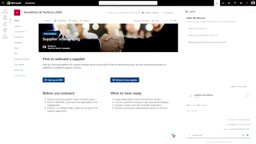
Tier One — Everyday Work: Before working with a vendor, Julia needs to confirm whether that vendor is covered by an NDA. She clicks the "Look up an NDA" button on the procurement site, which executes a preset custom skill in the Copilot chat panel — most likely created by the legal team. Julia simply types in the vendor name, and Copilot searches the site, returning the NDA's expiration date, coverage scope, and recommendations. She doesn't need to know the prompt contents, dig through contract documents, or consult the legal team. In the demo, Fabrikam Consulting was flagged as not covered due to an expired NDA, with the system clearly indicating when it expired and what it previously covered.
Tier Two — Team Scale: When Julia needs to run an onboarding process for a new vendor (Northman Traders), she again just clicks an "Onboard" button. Copilot walks her through step by step: providing the vendor name, creating a new entry in the vendor list, uploading documents to the designated folder. Throughout the process, Copilot doesn't make changes without permission — every step requires the user to click confirm.
The Real Transformation: Days of Review Work Done in Minutes
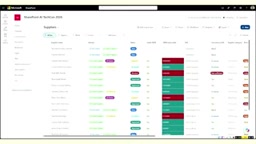
The transformation tier was the highlight of the entire demo. R.K. showcased the most time-consuming work for the procurement team — vendor compliance review. His company has seven or eight rules: vendors must have a signed NDA, a completed security questionnaire, the questionnaire must address data handling practices, insurance provisions must be in place, and so on. Manual review typically takes hours or even days, accompanied by rounds of back-and-forth communication.
R.K. had pre-created a skill to handle this work. After clicking "Start Review," the status automatically changed from "new" to "in review," and Copilot checked each document against each rule, producing a rule-by-rule comparison table: the first column lists the company rule, the second shows the evidence, and the third indicates pass/violation.
There was a particularly elegant detail in the demo: the final rule stipulated that contract amounts must be below $500,000, or VP approval is required. One vendor's contract value was $750,000 — above the threshold. Copilot flagged that it couldn't be approved directly, and based on a preset "Escalation Matrix," automatically identified Judith as the North America region lead, prompting "Would you like to send the approval request to Judith?"
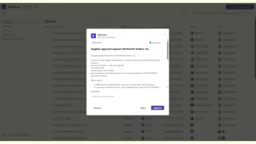
R.K. simply confirmed, and Copilot notified Judith through the Teams Approvals app, attaching vendor information, the reason for approval, and transaction details. Judith could then choose to approve, reject, or reassign directly. For fully compliant "golden vendors" (like Fourth Coffee), Copilot would simply recommend setting the status to approved, enabling one-click automatic approval.
The "Escalation Matrix" mentioned in the demo is a standard tool in enterprise compliance and approval workflows — typically a table documenting who a matter should be escalated to at different levels or for specific conditions. In traditional workflows, employees must manually consult this table and send requests themselves, a process prone to breakdowns from outdated information or personnel changes. The key value of embedding an escalation matrix into a Skill is that once Copilot determines an escalation condition has been triggered, it can directly query the matrix, pinpoint the specific approver, and complete the notification and audit trail through the Teams Approvals app — the entire process forms a closed loop with an automatic audit record. This is particularly important for enterprises needing to meet compliance requirements like SOC 2 or ISO 27001, since every approval trigger condition and final decision is automatically logged without requiring manual compilation of approval records.
How Simple Is It to Create a Skill: Half an Hour
What truly impressed the audience was R.K.'s revelation that creating this complex skill took only half an hour.
All his rules were written in a "Supplier Playbook" — a document originally used to train the team on how to review vendors, covering what materials are needed, how to handle each rule being met or unmet, and who approves what. In SharePoint, R.K. selected that file and simply told Copilot: "Create a skill using this document." Copilot asked a few clarifying questions, and once confirmed, the skill was generated in the background and immediately available for testing and refinement. If the test results were off, he could follow up with "Why did that go wrong — go fix it," and Copilot would update the skill accordingly.
R.K. made one key point: the hard part isn't building it in Copilot — it's getting clear on what you want Copilot to do. Once you have that clarity, execution is straightforward.
Permission Governance: The Natural Advantage of Building on SharePoint
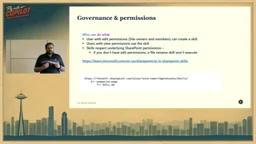
One of SharePoint's major advantages as an AI home base is its mature permission system. Skills fully respect SharePoint's permission hierarchy:
- Only users with edit permissions on a site can create skills; users with read permissions can use them;
- If a skill deletes content and you don't have file deletion permissions, that skill simply won't take effect for you;
- Lookup skills (like Julia's "Look up an NDA") will only return files the current user is authorized to access.
All skills are stored in a new document library called Agent Assets on the site, which site owners can view and manage at any time. This governance approach — built on the existing permission architecture — means enterprises don't need to construct a separate security layer when adopting AI capabilities.
SharePoint's permission system is built on Microsoft Entra ID (formerly Azure Active Directory) identity authentication, with fine-grained access controls layered on top at the site, document library, folder, and individual file levels. This system has been battle-tested in enterprise environments for years and is deeply integrated with compliance mechanisms including Conditional Access policies, Data Loss Prevention (DLP), and Information Barriers. Skills inheriting this permission system means that when an employee leaves or changes roles, their access to relevant Skills automatically lapses as SharePoint permissions are adjusted — no need for administrators to separately maintain an AI permissions list. For industries with strict data isolation requirements such as finance, healthcare, and legal, this "permissions as governance" design can significantly reduce the compliance review complexity involved in adopting AI capabilities.
Bonus: Two Paths to Generating Interactive Reports
The tail end of the demo showcased report generation, cleverly contrasting two types of users. R.K. crafted an extremely detailed, lengthy prompt covering every field — risk levels, NDA expiration dates, and more — instructing Copilot to generate a rich HTML report. He could then further request that high-risk items be highlighted in red with color coding applied throughout.
Julia, playing the role of an ordinary user unfamiliar with prompt engineering, simply entered "Create a useful report for me" — and still received a filterable, interactive, live report as a starting point to iteratively refine from there.
This contrast conveyed a core message: whether or not you're skilled at prompt engineering, you can still leverage the knowledge base your team has accumulated. As R.K. summarized — "That's the beauty of Copilot and SharePoint: you just have to ask."
Related articles

Chain of Thought Isn't Just for AI: How Humans Can Use CoT to Improve Thinking Quality
Chain of Thought isn't just a prompt trick for large models. Starting from a Hacker News discussion, this article analyzes why CoT works for human thinking too, breaks down actionable ways to transfer it, and highlights the key differences between human CoT and machine CoT.
Cloudflare Teams Up with OpenAI: Closi…
Cloudflare Teams Up with OpenAI: Closing the Loop from Vulnerability Discovery to Defense with AI
Cloudflare uses OpenAI Daybreak to investigate security vulnerabilities and generate reviewable remediation plans, while developers use Codex to boost coding efficiency and quality.

Orca Multi-Agent Orchestration in Practice: A Guide to Parallel Collaboration with Claude and Codex
Orca is Stable AI's free open-source agent workbench supporting 34 agents like Claude Code and Codex in parallel. Learn its Git worktree isolation, multi-model orchestration, and mobile management.