ShunCode 0.7.7 Update: MCP Extensions and Global Skill Support Now Available

ShunCode 0.7.7 adds global Skills and MCP support, turning a closed toolset into an open ecosystem.
ShunCode 0.7.7 delivers three core upgrades: global Skill support, MCP external extensions, and a UI redesign. The standout addition is MCP — users can now connect external tools like Exa to ShunCode, bypassing the previous 16-tool ceiling. Global Skills let users import once and reuse across all workspaces. The companion model detection tool now runs as a local sync process, scanning ~28 models in three minutes. Minor display bugs and occasional MCP instability remain, and the model gacha feature carries account risk.
ShunCode 0.7.7 Brings Three Major Upgrades
ShunCode, a domestically developed AI coding Agent tool, has released version 0.7.7. According to a demonstration by a Bilibili content creator, this update focuses on three areas: introducing global Skill support, opening up MCP external extension capabilities, and a full UI redesign.
For users familiar with Agent-based coding tools, the first two features represent the most meaningful expansions of the tool's boundaries. Previous versions only included 16 built-in tools — covering basics like file read/write, terminal access, and to-do list planning — with no way to extend beyond that fixed set. Version 0.7.7 addresses this limitation directly.
Global Skills: Import Once, Use Everywhere
A global Skill is essentially a folder. Unlike before, where Skills had to be configured separately within specific workspaces, a globally imported Skill becomes available across all workspaces immediately.
The standard for identifying a valid Skill folder is the presence of a skill.md file. Skills downloaded from the internet typically include this file and can be imported directly — the imported Skill's name matches the folder name. In addition to folder imports, the tool also supports ZIP archive imports, offering greater flexibility.
Once imported, Skills are copied to ShunCode's installation directory. The AI can query available Skills via list-type tools. In the demo, the presenter showed that Skills such as "computer use" and "make a PPT" were correctly recognized and invoked.
MCP Extensions: Breaking the 16-Tool Ceiling
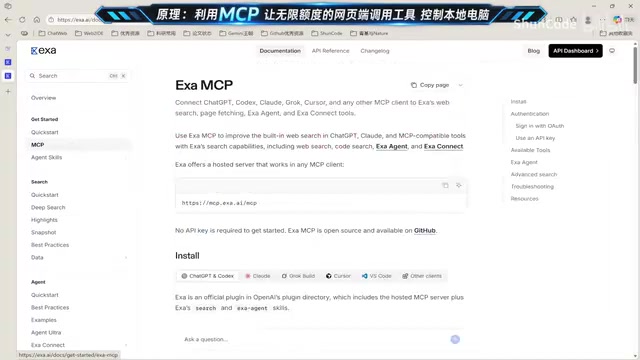
MCP (Model Context Protocol) support is the most anticipated feature in this update. By configuring MCP, users can connect external tools to ShunCode. Once integrated, these tools behave identically to built-in ones — it's a direct expansion of the tool's capabilities.
MCP Configuration Walkthrough
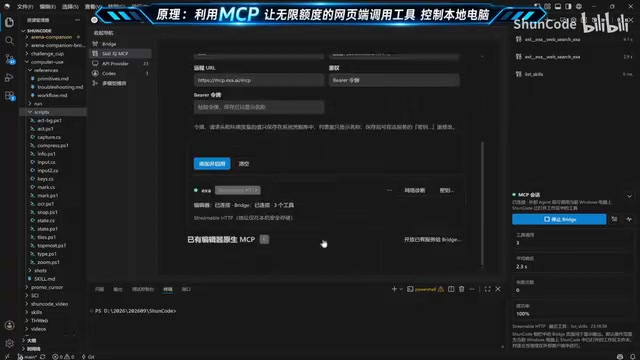
Using the Exa search tool as an example, the setup process goes roughly like this:
- Visit the target tool's official website and obtain your API Key from the credentials page
- Copy the MCP configuration URL from the official documentation
- In ShunCode, select the authentication method, then enter the token and API key
- Click "Add" to complete the configuration
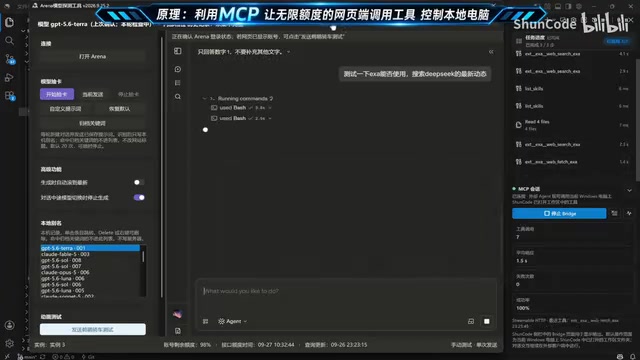
The presenter shared a practical tip: if the configuration documentation is confusing, just screenshot it and ask an AI to generate the configuration parameters — it significantly lowers the barrier to entry. Once Exa is configured, it exposes three internal tools: web search, web scraping, and Agent execution. In testing, explicitly telling the AI to "use Exa to search for the latest news" caused the model to invoke the tool twice and return results, confirming that the external integration pipeline works.
Notably, these MCP capabilities aren't limited to ShunCode itself. The presenter also demonstrated that connecting via a third-party MCP-compatible client exposes all available tools — including Skills that the AI discovered automatically without explicit prompting.
What is MCP? MCP (Model Context Protocol) is a standardized open protocol introduced by Anthropic in late 2024, designed to address the fragmented integration between AI models and external tools or data sources. The core idea is to define a unified server–client communication interface: tool providers package their capabilities as an MCP Server, while AI applications act as MCP Clients and call them according to the protocol — no proprietary adapter layers required on either side. It's analogous to how USB standardized hardware connectivity. Tool developers publish one MCP configuration, and any MCP-compatible AI application can plug right in. Major AI coding tools like Cursor, Claude Desktop, and Windsurf already support MCP, forming a growing ecosystem. ShunCode's adoption of MCP in version 0.7.7 means users can now tap into hundreds of existing MCP tools, rather than waiting for the ShunCode team to build each one natively.
Model Detection Tool: Dramatically Faster Scanning
The second half of the video covers updates to the companion model detection tool. The biggest change is a significant speed improvement — the tool no longer requires renaming or deleting accounts through a web interface. The presenter specifically warned that frequent renaming on the web side could trigger server-side detection and result in account bans, strongly recommending the updated local sync approach.
How the Detection Works and Real-World Results
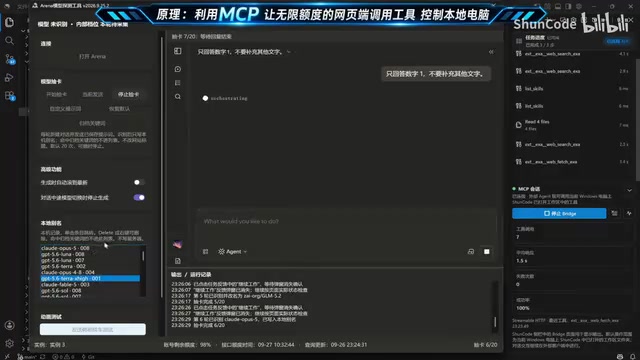
The new detection flow runs entirely as a local sync process: as soon as one model is detected, the tool moves on to the next, with no web interaction required. Users can set archiving keywords to automatically filter or skip logging of unwanted models (e.g., older DeepSeekAd, Doubao, or 5.5-series models).
According to the demo, roughly 28 models can be scanned in just three minutes. The supported model pool spans top-tier domestic and international models, including Opus 5, Opus 5.5, GPT-6 Astra, Sonnet 5, and more. The presenter noted an anecdotal observation: newly registered email accounts seem more likely to yield high-quality models, while older accounts tend to get routed to DeepSeek or Qwen-type models repeatedly. This is a single-source, unverified observation — readers should take it with appropriate skepticism.
What is "model gacha"? In this context, "gacha" (抽卡, literally "drawing cards") refers to the practice of using free trial or low-cost entry points on AI service platforms to batch-scan the model resources allocated to different accounts, in order to identify high-quality models. Some platforms distribute compute access or model access rights with an element of randomness — different accounts may be routed to different model versions or quality tiers. A "gacha tool" automates the process of quickly testing which models a given account can access, allowing users to efficiently identify accounts that can call top-tier models at low cost. This practice typically falls into a gray area of platform terms of service. Platforms may detect unusual access frequencies or abnormal account behavior patterns and ban the accounts involved — which is exactly why the author explicitly flagged the ban risk.
Known Issues in the Current Version
The presenter openly acknowledged several unresolved bugs in the current release:
- Some tool calls display "input is empty" even though content was actually retrieved — a display-layer bug
- Tasks occasionally complete but the UI requires a manual refresh to show the results
- MCP connections are intermittently unstable and may require a reconnect
These are UX-level issues rather than functional blockers. The author indicated they will be fixed in future versions.
Overall Assessment
ShunCode 0.7.7 takes a meaningful step forward in capability expansion. MCP integration and global Skills transform this domestic Agent tool from a "closed, fixed toolset" into an "open, freely composable ecosystem" — which aligns with the direction the broader AI coding Agent space is moving. Combined with fast model scanning and a pricing model reportedly around one yuan per day, it holds genuine appeal for budget-conscious developers who want access to top-tier AI models.
That said, the model gacha approach operates in a gray area and carries real account risk — users should assess the compliance implications themselves. The tool's overall stability also still has room for improvement.
Related articles

Amphibious Transforming Drone: Beyond 100x Power Savings, What Are the Real Needs?
Is the amphibious transforming drone just a gimmick? Starting from the 100x power difference of the M4 Morphobot, explore real application scenarios and thesis topic ideas, analyzing boundary conditions where pure drones and pure ground robots both fail.

Warhound Raises $200 Million: Genetically Engineered "War Dogs" Paired with Anduril Gear
Warhound raises $200M, backed by Ben Lamm and Palmer Luckey, to genetically engineer dogs for military and law enforcement use and equip them with Anduril gear. This article analyzes its technology direction, funding logic, and ethical controversy.

Claude API Comes to Google Cloud: IAM Integration and SDK Access Guide
Anthropic hosts the full Claude API on Google Cloud with IAM-controlled permissions and unified billing. This guide covers the Vertex AI and Anthropic-hosted entry points, IAM role configuration, and SDK access.